
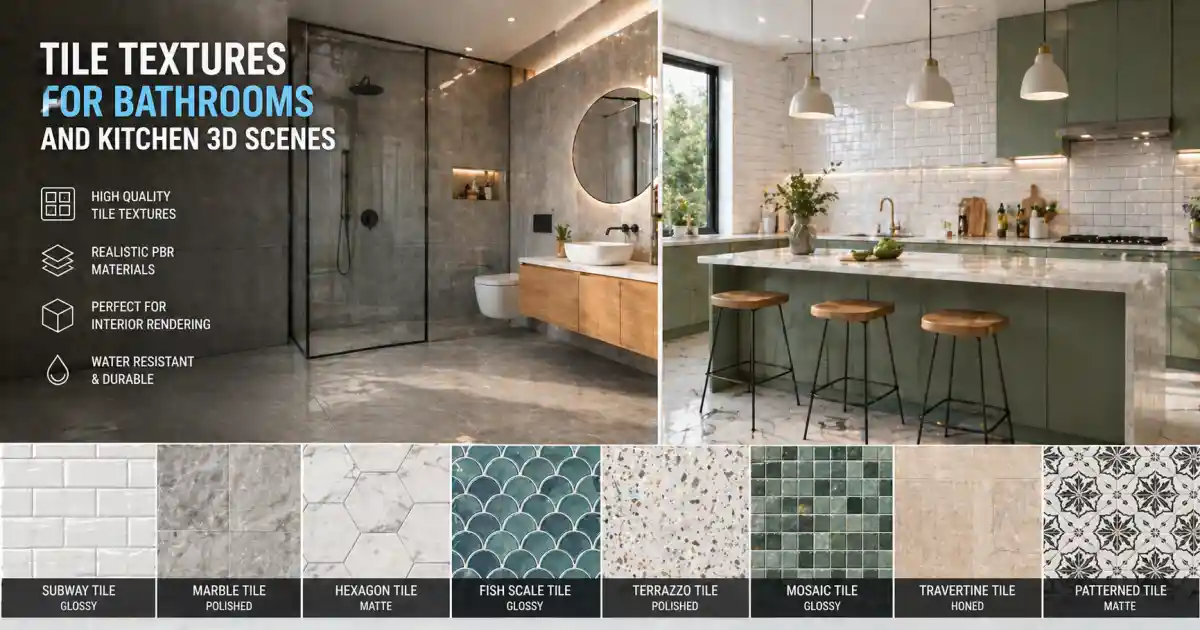
Tile textures are one of the most frequently reused assets in interior visualization. Whether it’s a bathroom backsplash, a kitchen floor, or a feature wall in a commercial lobby, the right tile texture can define the mood, realism, and scale of a scene. With the rise of physically based rendering (PBR) workflows, choosing the correct texture set has become as important as modeling and lighting.
This article covers practical guidelines for working with tile textures in bathroom, kitchen, and commercial interior projects. It also highlights where platforms such as Relebook can help you expand your resource library without jumping through infinite download hoops.
Why Tile Textures Matter in 3D Scenes
Tile textures are not just surface decoration. In an interior render, they provide visual anchors for scale, reflectivity, and wear patterns. A bathroom without realistic tile reads as a sterile box; a kitchen without proper grunge on the grout looks artificial. The same texture used at the wrong UV scale can make a shower wall look like dollhouse tile or monstrous subway tile.
The challenge is that tile textures also demand a specific set of material properties: glossiness, roughness, bump, and sometimes displacement. PBR tile textures generally come with albedo, roughness, normal, and ambient occlusion maps. Some also include a separate height or displacement map for deeper grout lines.
Key Factors for Choosing Tile Textures
Before diving into specific use cases, it’s useful to understand what makes a tile texture work in production.
Resolution
Higher resolution is not always better. For a close-up kitchen counter render, 4K may be necessary. For a floor seen from eye level in a wide shot, 2K is often sufficient. The real requirement is that the texture holds up at the screen percentage and distance your camera sees. If the scene includes extreme close-ups — for example, a bathroom sink reflection on glossy tile — then 4K or even 8K might be a safe choice, provided your system can handle the memory.
Seamless Tiling
Tile textures must tile seamlessly, especially for large surface areas like kitchen backsplashes or bathroom walls. Some tile textures are designed as single tiles with grout spacing already baked in. Others are multi-tile layouts that repeat across the UV. Make sure the texture you choose is clearly marked as “tileable” or “seamless.” If you see obvious repetition in a sample render, look for a version with random tile offsets or a larger atlas.
Material Maps
A standalone diffuse or albedo map is rarely enough for modern render engines. You need roughness to control how shiny each tile is, normal to give the tile surface micro-detail, and often a grout mask or separate grout texture. Many PBR tile sets also include a cavity or ambient occlusion map to darken corners and grout lines for depth.
Style and Color
Ceramic, porcelain, stone, glass, marble, terrazzo — each type brings a different look and different light behavior. Subway tile remains popular in bathrooms, while hexagonal or herringbone patterns are common in kitchens. The choice should match the architectural style of the scene. That said, neutral tones often work better for general product shots, while bold colors can be effective for concept visuals.
Bathroom Tile Textures: Key Considerations
Bathroom scenes often require higher gloss and more varied reflection. Chrome fixtures, glass shower doors, and wet surfaces all interact with tile reflections. A rough matte tile can feel warm, while a high-gloss polished tile adds a clean, clinical look popular in modern bathrooms.
Grout color also matters. White grout with white tile looks uniform but shows dirt in repeated renders. Dark grout creates contrast and emphasizes the tile geometry. In PBR terms, grout is usually a separate roughness area — often set to a higher roughness value compared to the smooth tile surface. This contrast is what makes tile patterns pop.
For bathroom floors, consider slip resistance visually. A wet floor reflection can be achieved by lowering the roughness of the tile and adding a subtle puddle decal. The texture itself should have a slightly mottled roughness map to simulate water spots and wear over time.
Kitchen Tile Textures: Balancing Realism and Style
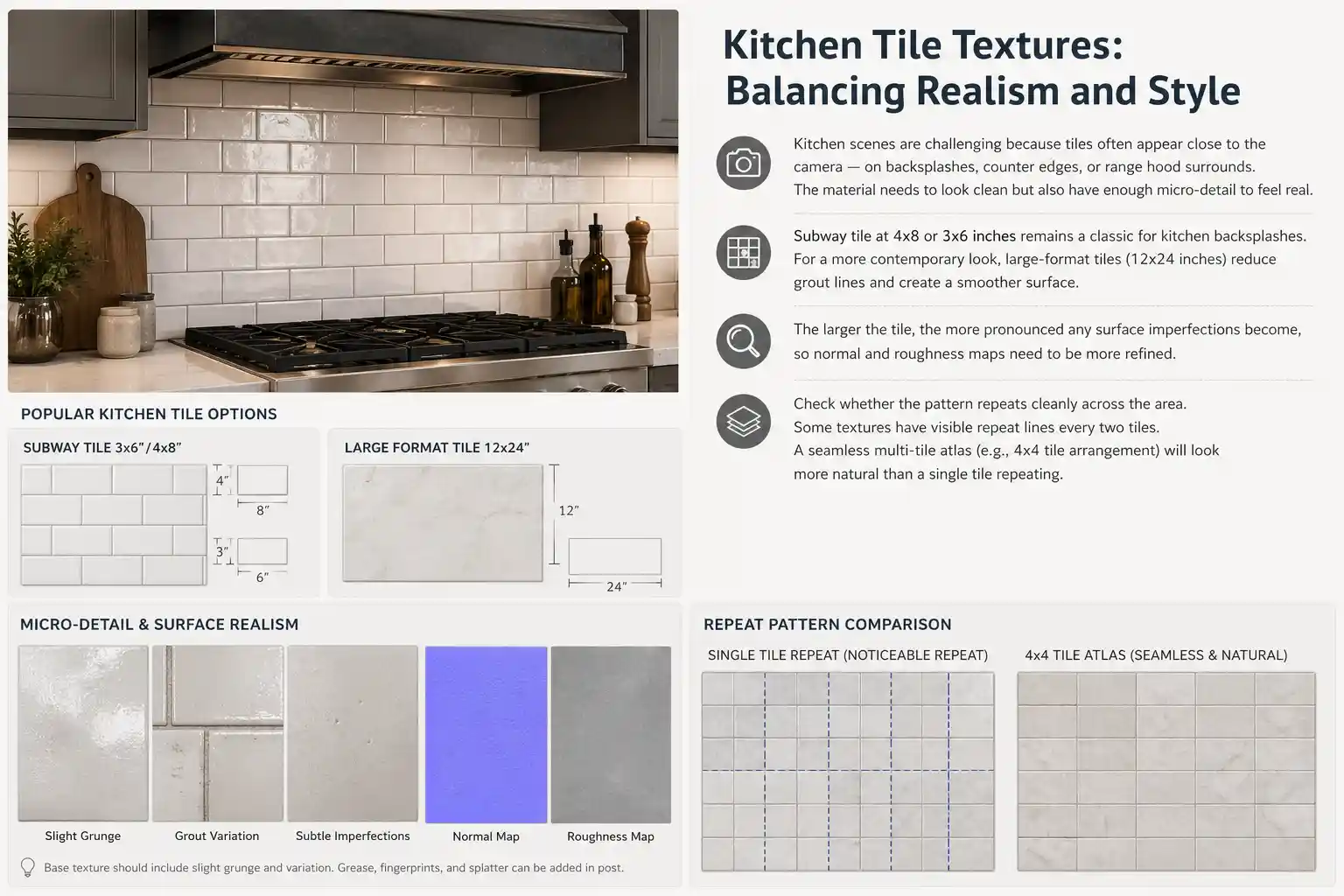
Kitchen scenes are challenging because tiles often appear close to the camera — on backsplashes, counter edges, or range hood surrounds. The material needs to look clean but also have enough micro-detail to feel real. Grease, fingerprints, and light splatter can be added in post-production, but the base texture should already have a slight grunge layer or grout variation.
Subway tile at 4x8 or 3x6 inches remains a classic for kitchen backsplashes. For a more contemporary look, large-format tiles (12x24 inches) reduce grout lines and create a smoother surface. The larger the tile, the more pronounced any surface imperfections become, so normal and roughness maps need to be more refined.
When choosing a kitchen tile texture, check whether the pattern repeats cleanly across the area. Some textures have visible repeat lines every two tiles. If you are rendering a long backsplash, a seamless multi-tile atlas (e.g., 4x4 tile arrangement) will look more natural than a single tile repeating.
Commercial Interiors: Scale and Durability
For commercial scenes — restaurants, retail, hotel lobbies — tile textures need to convey durability and cleanliness. Large-format porcelain tiles are common. The roughness is usually medium to low, with a matte finish for floors and a semi-gloss for walls.
Grout lines in commercial settings are often narrower, and the tile itself may have subtle grain or veining to resemble natural stone. PBR tiles with displacement maps work well here because the slight irregularity in tile height mimics real installation tolerances.
Workflow Tips: Applying Tile Textures in Blender and 3ds Max
The tools you use affect how you handle tile textures. Here are a few workflow notes for common platforms.
Blender
In Blender’s shader editor, you can create a node group that scales tile size, adjusts grout width, and mixes in a separate grout color. The Principled BSDF shader works well with PBR maps: connect albedo to Base Color, roughness to Roughness, normal to Normal (with a Normal Map node), and AO to a MixRGB factor if needed.
To avoid visible tiling, use a mapping node to rotate or randomly offset the texture for different tile instances. Alternatively, you can use the “Checker Texture” node as a mask to assign slightly different color and roughness values to alternate tiles — this breaks up uniformity without needing a custom atlas.
3ds Max with V-Ray or Corona
V-Ray and Corona both have dedicated tile nodes that generate a procedural pattern, but they still require good tile textures for the actual surface detail. The VRayUVWRandomizer is useful for scattering texture offsets across objects. For multi-tile setups, you can combine a tile procedural map with a bitmap layer so that each tile gets a slightly different variation of the same texture.
Substance 3D Designer / Painter
Many artists use Substance tools to create their own tile textures with full control over grout, wear, and color variation. If you prefer not to build from scratch, you can start with a high-quality tile texture from a library and then tweak roughness, add dirt, or adjust tile alignment in Painter.
Where to Find Tile Textures for Production
There are many sources for tile textures, both free and paid. The key is to check the license, resolution, and map types before downloading. Some platforms offer curated sets with consistent quality, while others rely on community uploads where quality can vary.
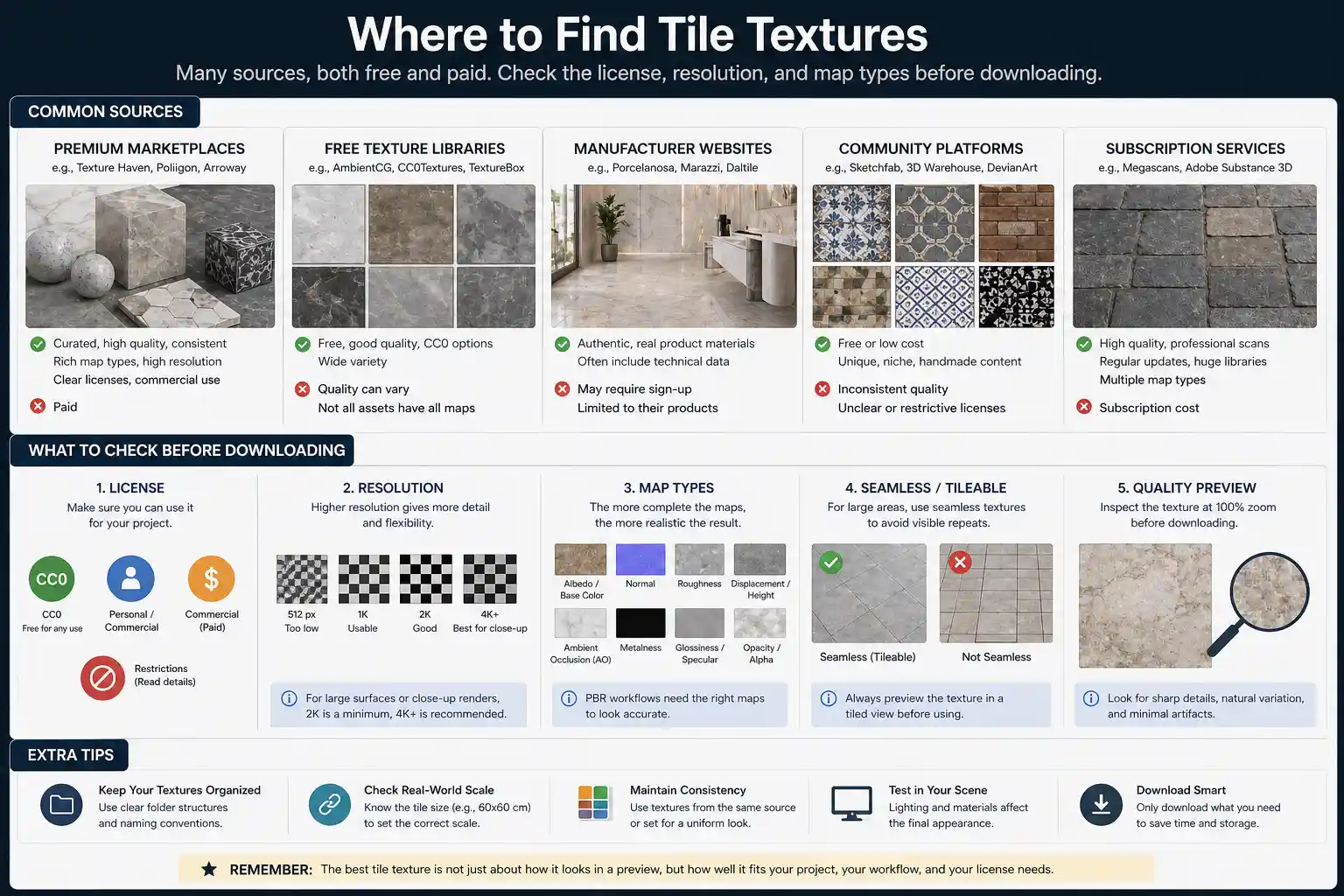
Relebook is one platform that aggregates 3D models, textures, HDRI, and other CG resources for visualization workflows. If you are looking for a practical way to browse tile textures alongside other scene elements like furniture or lighting setups, Relebook can serve as a single starting point. As with any resource, it’s a good habit to review each asset’s page for format, license details, and map availability before integrating it into a commercial project.
Final Thoughts
Tile textures are a small but critical part of any interior visualization. Getting them right — in resolution, material layering, and pattern — lifts the entire scene. Whether you are rendering a calm bathroom, a busy kitchen, or a commercial lobby, take time to select textures that match the scale, lighting, and style of your project. Use PBR maps consistently, and don’t be afraid to layer procedural tricks on top of bitmap textures to break up repetition.
Platforms such as Relebook offer one convenient place to explore textures, HDRI, and 3D models that can fit into your workflow. The goal is not to hoard resources, but to have a reliable set of tile textures ready when you need them — so you can focus on composition, lighting, and the final mood of your scene.
FAQ
What is the ideal resolution for tile textures in a bathroom scene?
It depends on how close the camera gets. For a medium shot at eye level, 2K is usually sufficient. For a close-up view of a backsplash or shower wall, 4K is safer. Always test your texture at the intended camera distance before finalizing resolution, as unnecessarily high resolutions slow down render times.
How can I make tile textures look less repetitive in a 3D render?
Use multi-tile atlases instead of single repeating tiles, apply UV randomization (e.g., VRayUVWRandomizer in 3ds Max or a mapping node with offset in Blender), and blend subtle variations in color or roughness per tile using a checker mask or textured grunge layer.
What maps should a good PBR tile texture set include?
A complete PBR tile set typically includes albedo (diffuse), roughness, normal, and ambient occlusion maps. For deep grout lines, a displacement or height map is useful. Some textures also include a grout mask or cavity map to separate tile surface from grout area for easier material editing.
Can I use tile textures from Relebook in commercial projects?
You should always review the license information on each asset’s page. Relebook offers both free and paid resources, and usage terms can vary. Check the specific license for any restrictions on commercial use, redistribution, or modification before incorporating the texture into a paid project.
What are the most common mistakes when applying tile textures in Blender?
Common mistakes include using the wrong scale (tiles looking too big or too small), ignoring the roughness map (all tiles have the same shine), and failing to break up tiling repetition. Always set correct UV scale based on real-world dimensions, connect the roughness map properly, and consider adding random tile variations.