
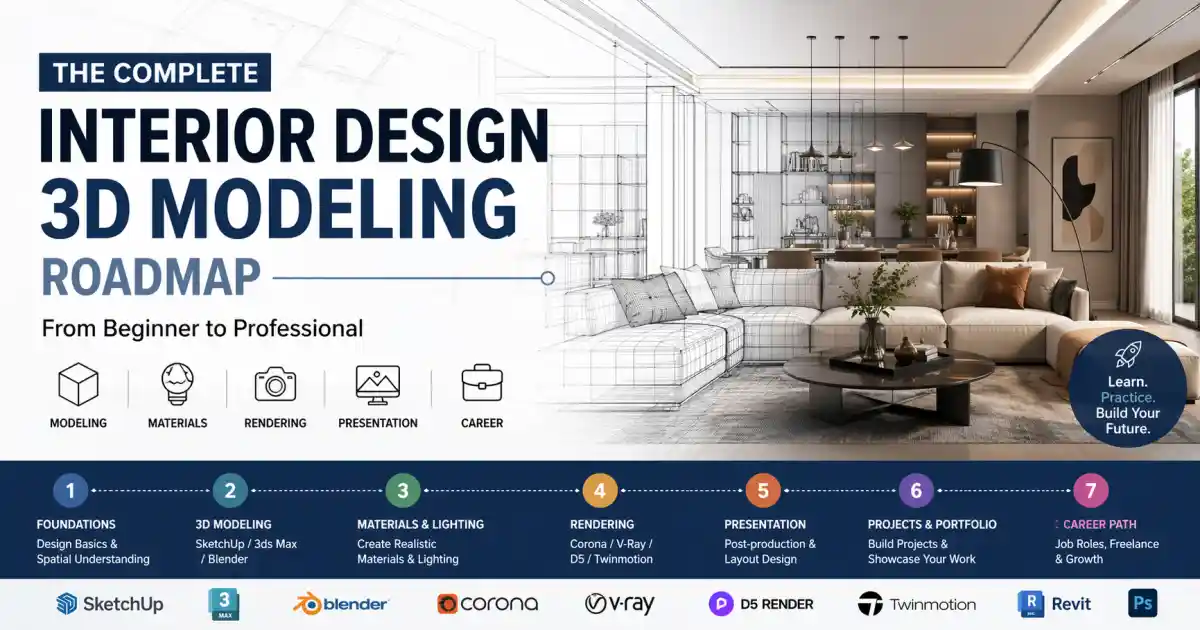
Learning Goals and Core Modules
The target learning outcome is not “knowing a lot of commands,” but being able to complete a full interior visualization workflow independently: understand the project brief, interpret a floor plan, build a scale-accurate white model, develop detailed geometry, assign coherent materials, set up natural and artificial lighting, render still images, optionally produce a real-time walkthrough, and maintain basic standards for naming, versioning, and collaboration. That orientation is consistent with foundational design texts and with official product training paths that emphasize modeling, documentation, rendering, review, and teamwork rather than isolated button-clicking.
| Audience | Starting Profile | Recommended Entry Route | Six-to-Twelve-Month Target |
|---|---|---|---|
| Beginners | No prior background in space, drafting, or 3D tools | Learn design foundations and drawing first, then SketchUp white-modeling, then 3ds Max + Corona/V-Ray | Complete two to three residential or small commercial projects and produce polished still images independently |
| Learners with design background | Comfortable with plans, styles, and scale, but weak in 3D execution | Move directly into SketchUp or 3ds Max while reinforcing fundamentals in parallel | Become capable of turning design intent into model + presentation output |
| Career switchers | Coming from graphic design, art, film, construction, or related fields | Choose one main software route first; avoid learning Blender, Max, and Rhino all at once | Build a focused portfolio of three to five projects for job applications |
| BIM- or technical-track learners | Intend to work in larger firms, coordination-heavy environments, or documentation | Add Revit earlier, ideally within the first six months | Develop combined strengths in visualization, documentation, and collaboration |
The following module table preserves the source report’s planning logic. The mastery levels and hours are editorial learning benchmarks carried over from the original Chinese report; they are intended for execution planning rather than as vendor-certified course durations.
| Core Module | Learning Focus | Recommended Mastery | Estimated Learning Time |
|---|---|---|---|
| Interior design fundamentals | Spatial function, ergonomics, circulation, style language, hard/soft furnishing relationships, case-study breakdowns | Proficient | 40–80 hours, about 4–8 weeks |
| Drafting and spatial composition | Plans, elevations, sections, axonometric drawing, perspective, proportion, dimensions, node/detail awareness | Proficient | 50–100 hours, about 5–10 weeks |
| White-modeling and detailed modeling | Groups/components, object naming, booleans, modifiers, editable poly workflow, basic surface logic | Expert | 80–160 hours, about 8–16 weeks |
| Materials and texturing | PBR principles, UVs, texture channels, procedural materials, consistency and restraint | Proficient to expert | 40–100 hours, about 4–10 weeks |
| Lighting and cameras | Daylight, artificial lighting, color temperature, exposure, composition, lens language, day/night logic | Expert | 40–80 hours, about 4–8 weeks |
| Rendering output | Sampling, denoising, test renders, batch output, stills and simple animation | Expert | 60–120 hours, about 6–12 weeks |
| Post-production | Photoshop, Camera Raw, unified grading, layout, subtle detail enhancement | Proficient | 30–60 hours, about 3–6 weeks |
| BIM and parametric design | Revit basics, documentation, schedules, Grasshopper logic, Rhino.Inside.Revit awareness | Beginner to proficient | 60–140 hours, about 6–14 weeks |
| Workflow and collaboration | IFC/FBX/Datasmith exchange, versioning, file cleanup, asset licensing, team coordination | Proficient | 30–80 hours, about 3–8 weeks |
A useful way to read the entire path is as a production chain rather than a stack of unrelated apps.

Software and Tool Priorities
The original report recommended learning software by production value, not by popularity alone. In practice, that means separating tools into three layers: primary production tools, collaboration and specialization tools, and presentation-enhancement tools. The preserved default order is: SketchUp → 3ds Max → Corona or V-Ray → Photoshop → D5 / Enscape / Twinmotion → Revit → Rhino + Grasshopper → Unreal Engine. For an open-source route, the preserved alternative is Blender → D5 or Twinmotion → Revit or Unreal as needed. The logic is simple: first learn to model space clearly, then render it convincingly, then communicate and coordinate it efficiently. Official product positioning supports this sequencing.
| Software or Combination | Priority | Use Cases | Main Advantages | Main Limitations | Learning Resources and Entry Points |
|---|---|---|---|---|---|
| SketchUp | Priority 1 | Fast concept modeling, white models, furniture/layout studies, quick client iterations | Very fast to learn; intuitive for interior work; strong asset and extension ecosystem | Less suitable for complex surface logic or high-end final detailing than Max or Rhino | Official: SketchUp Interior Design, SketchUp Fundamentals, Modeling Practice, 3D Warehouse, Extension Warehouse. Chinese: SketchUp official Bilibili. English: SketchUp Designers hub. |
| 3ds Max + Corona | Priority 2 | Photoreal interior stills, animations, commercial interior visualization | Mature modeling workflow; strong archviz pipeline; Corona emphasizes streamlined photoreal results and quick onboarding | Less useful as a BIM/documentation environment; narrower host ecosystem than V-Ray | Official: Autodesk 3ds Max Quick Start, 3ds Max Help, Chaos Corona product page, Corona Getting Started. Chinese: Autodesk China official Bilibili. English books in source: unspecified. |
| 3ds Max + V-Ray | Priority 2 | High-end interior stills, animation, multi-platform visualization teams | Strong control, mature ecosystem, broad integrations across major DCC/CAD/BIM tools | Deeper parameter complexity for beginners | Official: V-Ray product page, V-Ray Getting Started. Chinese: Chaos Chinese V-Ray pages where needed. English books in source: unspecified. |
| Blender | Priority 1 or 2 | Full-pipeline generalist work, cost-sensitive workflows, self-directed solo learning | Free and open source; covers the full 3D pipeline; strong documentation and training ecosystem | More self-curation required; beginner learning path can sprawl without discipline | Official: Blender Features, Blender Manual, Blender Studio, Blender Fundamentals. Chinese: latest Chinese manual, Blender official Bilibili. English books in source: unspecified. |
| Revit | Priority 3 | BIM-based interior and architectural modeling, documentation, schedules, coordination | Excellent for coordinated BIM work; supports documentation, views, sheets, and model-based collaboration | Not the first choice for final photoreal still-image production | Official: Learn Revit in 90 Minutes, Revit Overview, Revit for Architecture. English book recommendation in source: likely available, but specific title treated as unspecified here unless verified independently. |
| Rhino + Grasshopper | Priority 4 | Freeform furniture, complex ceilings and facades, computational studies, parametric control | Strong NURBS and freeform capability; Grasshopper adds visual algorithmic design; Rhino.Inside.Revit extends into BIM | Not the best first main tool for complete beginners targeting ordinary residential visualization | Official: Rhino Learn, Grasshopper algorithms guide, Rhino tutorial panel, Rhino.Inside.Revit Guides. Chinese: McNeel Chinese Forum. |
| D5 Render | Priority 3 | Real-time presentation, rapid iteration, animations, virtual tours, collaborative review | AI-assisted workflow, strong real-time rendering focus, workflow plugins, team collaboration, virtual tour features | A presentation layer, not a substitute for strong modeling fundamentals | Official: D5 workflow page, Quick Start, D5 for Teams. Chinese: D5 official site, tutorial center, help center. |
| Twinmotion | Priority 3 | Fast real-time visualization, videos, panoramas, walkthroughs from CAD/BIM data | Designed to make real-time 3D visualization easy; good demo scenes and onboarding; strong for fast presentations | Less customizable for advanced interaction than Unreal Engine | Official: Twinmotion product page and Quick Start Guide. Chinese-accessible documentation is available from Epic. |
| Enscape | Priority 3 | In-design visualization, live reviews, VR, fast review loops in CAD/BIM | Real-time speed, direct CAD/BIM integration, live feedback, low setup friction | Less flexible than offline renderers for fully art-directed hero shots | Official: Enscape product page, Enscape Getting Started, visualization feature pages. |
| Unreal Engine | Priority 5 | Advanced walkthroughs, immersive presentations, interactive archviz, customized real-time experiences | High ceiling for real-time quality and interactivity; Datasmith supports design-content pipelines | Highest learning barrier in the stack; should come after strong modeling/rendering habits | Official: Epic Learning, ArchViz tutorials, Datasmith Overview, Datasmith supported software, Unreal official Bilibili. |
Supplementary tools remain important even though they were not the headline rows in the source table. AutoCAD Architecture still matters for 2D drafting and technical communication; Photoshop / Camera Raw remain core post-production tools; and material-building tools such as Substance 3D become increasingly useful as you move from merely “using assets” to controlling texture fidelity and consistency.
Phased Roadmap
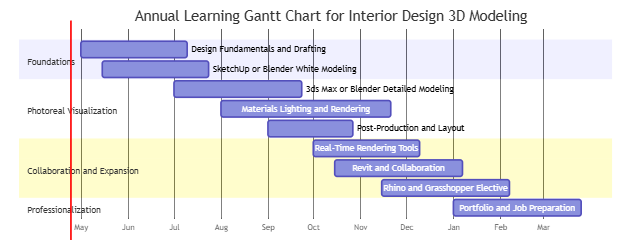
The original report’s phase logic is cumulative rather than serial. You do not “finish one program entirely” and then move on; instead, you establish a working mainline and gradually add depth where it improves deliverables. The course names preserved in this roadmap are all drawn from the source report’s recommended entry points, especially official learning portals from SketchUp, Autodesk, Chaos, Blender Studio, D5, Twinmotion, and Rhino.
| Phase | Courses and Training Focus | Project Tasks | Milestone Output | Evaluation Criteria |
|---|---|---|---|---|
| 0–3 months | Interior design basics, plans/elevations/sections/perspective, SketchUp Fundamentals / Modeling Practice or Blender Manual fundamentals; basic Photoshop color work in parallel | Build white models first, not polished renders; complete one small-space breakdown each week; start a reference library and naming convention | A single-bedroom or small living-room white model, two clay/gray renders, one simple layout page | Accurate scale, clean model hierarchy, stable camera angles, clear spatial relationships |
| 3–6 months | Move into 3ds Max Quick Start and Corona/V-Ray Getting Started, or Blender + D5/Twinmotion; systematic study of materials, lighting, and cameras | Complete one full residential set; produce at least one daytime and one nighttime version; start modeling single furniture pieces | A 60–90 square meter residential project with hero views, detail views, and a material board | Material consistency, believable light, manageable noise, visual hierarchy, restrained post-production |
| 6–12 months | Add Revit basics and documentation logic; add D5 / Enscape / Twinmotion for presentation; add Rhino / Grasshopper if needed | Complete one small commercial or office project; output stills plus a simple walkthrough; practice CAD/Revit/SketchUp-to-render pipeline | A café, clinic, showroom, or office project with stills and a short animation or walkthrough link | Independent workflow control, clean files, reliable revision handling, presentable client-facing output |
| 12+ months | Use Unreal, Rhino.Inside.Revit, Grasshopper, openBIM, or performance-analysis tools to specialize | Build three to five high-finish projects: one coordinated workflow project, one atmosphere-heavy rendering project, and one real-time or BIM project | A portfolio website or PDF portfolio including process pages, final pages, and project narratives | Clarity of project logic, visual consistency, stable execution quality, revision efficiency, and ability to explain process trade-offs |
The last step in every phase is revision, not just output. That is why the source report framed project work as a loop rather than a straight line.

Practical Projects and Resource Ecosystem
| Project | Goal | Key Technical Points | Reusable Asset Sources | Scoring Focus |
|---|---|---|---|---|
| Single-bedroom white model | Train scale awareness, furniture relationships, and camera setup | Groups/components, openings, basic layout | 3D Warehouse, Kujiale model library | Correct proportions, undistorted framing, readable space |
| Living-dining white model | Train open-plan organization and circulation | Partition changes, arrays, view guidance | 3D Warehouse, OM.cn | Rational circulation, layered composition, clean white model |
| Bathroom detailed model | Train precision in small spaces and detail control | Bevels, booleans, hardware, tile joints | Chaos Cosmos, 3D66, Poly Haven | Detail accuracy, realistic gaps, cleanliness |
| Chair or side-table single object | Train object accuracy and topology awareness | Editable poly, curves/NURBS, mapping coordinates | 3D Warehouse for reference, Fab, Substance ecosystem | Accurate silhouette, clean edges, believable materials |
| One-room complete apartment | Train a full residential pipeline | White model, detailed model, materials, daylight render, post | Poly Haven, ambientCG, Chaos Cosmos | Cohesion, comfort, material logic |
| Small café | Train atmosphere and commercial identity | Light hierarchy, focal views, prop organization | Fab, OM.cn, 3D66, ArchDaily references | Atmosphere accuracy, focal control, brand expression |
| Office meeting room | Train daylight realism and disciplined corporate language | Glass, metal, soft finishes, perspective control | Chaos Cosmos, Kujiale, Substance ecosystem | Realism, order, clear office character |
| Show apartment with day and night versions | Train dual-lighting scenarios and post-control | Exposure, color temperature, strips, consistent cameras | Poly Haven HDRIs, Chaos Cosmos | Clear day/night distinction with stylistic consistency |
| Duplex or villa stair space | Train complex vertical space and spatial storytelling | Curves, stairs, double-height space, lens control | Rhino/Max hybrid modeling, Poly Haven | Believable structure, mature composition, spatial impact |
| Showroom or brand-store real-time scene | Train walkthrough delivery and presentation | D5 / Twinmotion / Enscape, animation, material optimization | D5 assets, Fab, Chaos Cosmos | Smooth performance, clear presentation path, editability |
The resource ecosystem in the source report prioritized official libraries first, then Chinese-accessible professional sites, then community or user-upload platforms with explicit licensing caution. That priority remains sound for overseas readers as well.
| Resource Type | Recommended Sites | Use Notes |
|---|---|---|
| Model libraries | 3D Warehouse, Chaos Cosmos, Fab, Kujiale model library, OM.cn, 3D66 | Use official libraries first for production work; use Chinese user-upload platforms for practice or placeholders; verify commercial rights asset by asset |
| Materials and textures | Poly Haven, ambientCG, Adobe Substance 3D Assets, Chaos Cosmos / Scans | Start with CC0 resources for training; move to premium/scanned libraries when project fidelity demands it |
| HDRIs | Poly Haven, ambientCG, Chaos Cosmos | CC0 HDRIs are sufficient for early lighting study; premium options matter later for highly specific looks |
| Plugins and workflow add-ons | SketchUp Extension Warehouse, Datasmith, D5 workflow plugins, Rhino.Inside.Revit | Use plugins to accelerate workflow, not to replace understanding |
| Fonts | Source Han Sans, Noto Sans SC, source-licensed Chinese display fonts as needed | Prefer open-source or clearly licensable fonts in portfolios and presentation boards |
| Reference galleries | Huaban, Behance, ArchDaily Chinese and global editions | Use Chinese platforms for rapid reference collection and international platforms for portfolio benchmarking |
Portfolio, Careers, Trends, and Study Management
| Daily Template | Duration | What to Do |
|---|---|---|
| Reference analysis | 20 minutes | Break down one case or one image: layout, scale, palette, and lighting |
| Modeling practice | 45–60 minutes | Build or refine one part of the current project |
| Material / lighting test | 20 minutes | Test one material family or one lighting condition only |
| Reflection log | 10 minutes | Record what failed, what improved, and what to repeat tomorrow |
| Weekly Template | Frequency | What to Do |
|---|---|---|
| Focused project work | 4–6 sessions per week | Continue one main project instead of fragmenting attention across too many small exercises |
| Cleanup session | 1 session per week | Rename files, purge unused assets, clean layer structure, organize references |
| Review checkpoint | Every 2 weeks | Compare current work with a saved benchmark from two weeks earlier |
| Small project delivery | Every 4–6 weeks | Finish one self-contained project and archive it as a case study |
The original feedback loop is worth preserving exactly in spirit: seek critique early, compare your work against references and previous iterations, and review every project at three levels—design logic, visual quality, and workflow cleanliness. That habit is what eventually turns software familiarity into professional reliability.