
If you’ve ever scrolled through a 3D asset marketplace searching for the perfect model for your game, architectural visualization, or 3D print, you’ve probably noticed two options listed for almost every design: low poly and high poly. For new 3D artists and project managers alike, the choice between these two formats can feel overwhelming. Pick the wrong one, and you could end up with a laggy game that crashes on mobile, or a blurry architectural render that fails to impress a client. Understanding the core differences between low poly and high poly 3D models, and how to match each to your project needs, saves time, money, and frustration down the line. This guide breaks down everything you need to know to make the right choice every time.
What Are Low Poly and High Poly Models? Core Definitions
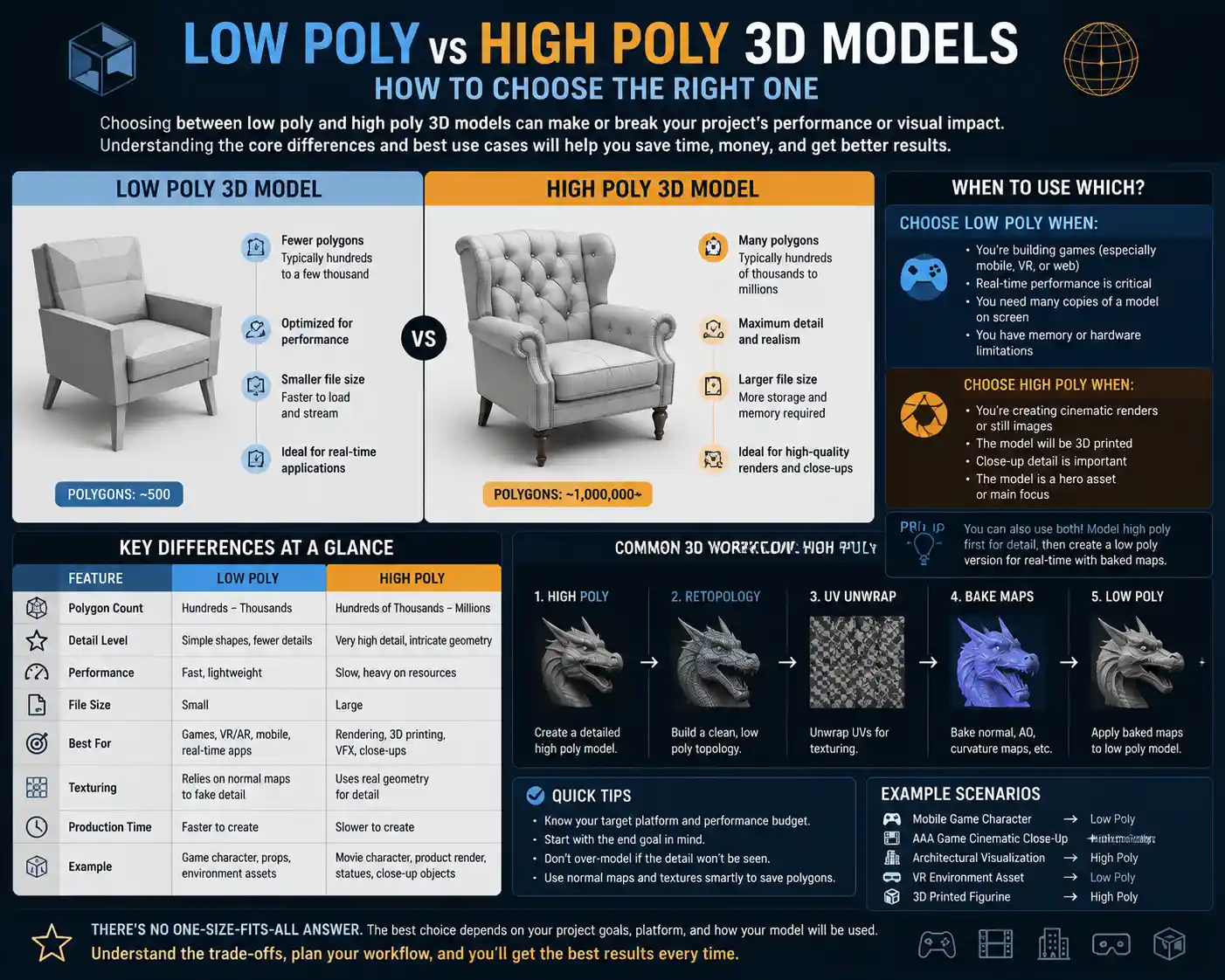
Before diving into when to use each format, it’s important to establish clear definitions. At their core, the difference between low poly and high poly comes down to polygon count — the number of individual triangles (or polygons) that make up the surface of a 3D model. More polygons mean more detail, but also more computational power required to process the model.
Low Poly 3D Models
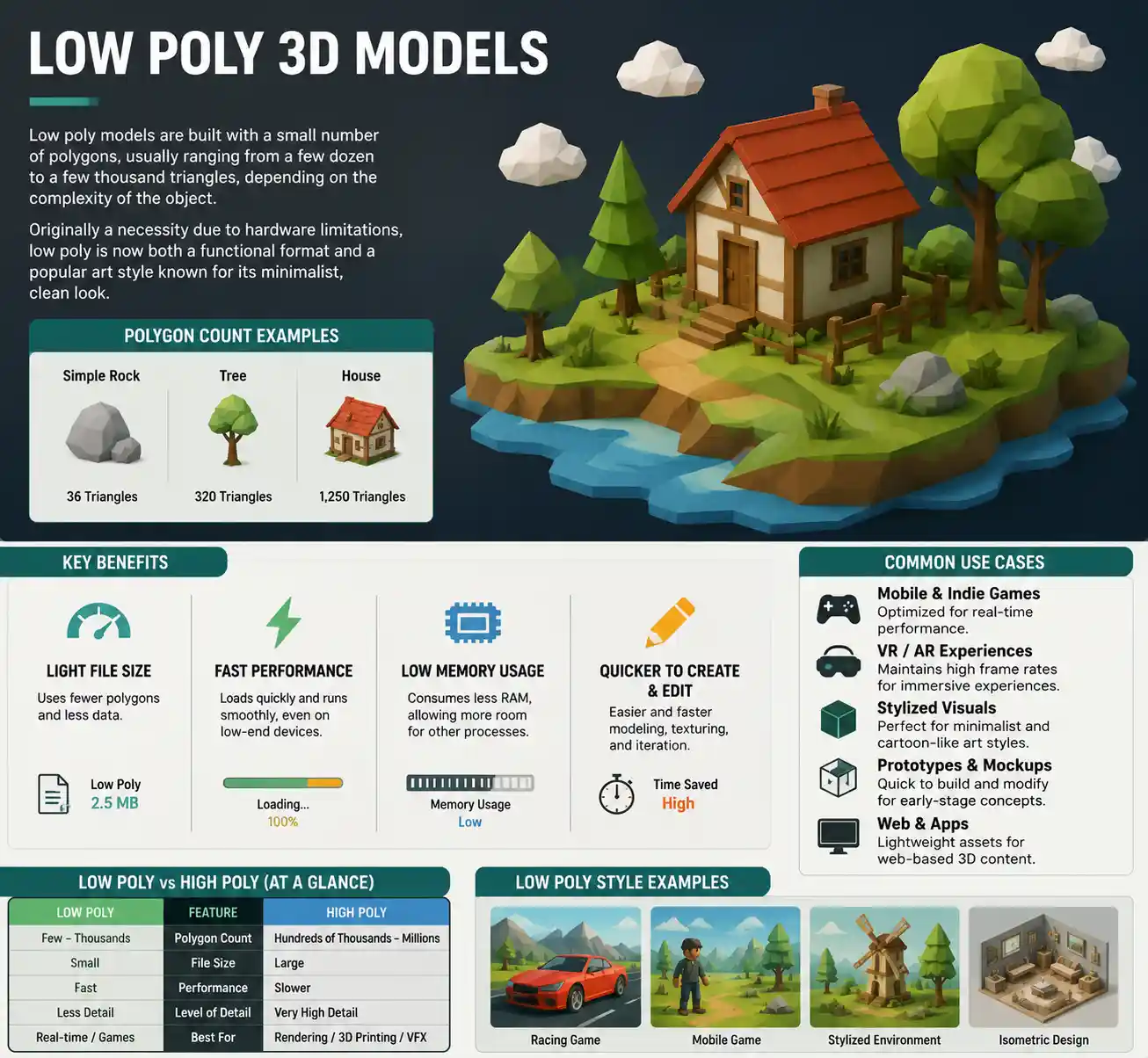
Low poly models are built with a small number of polygons, usually ranging from a few dozen to a few thousand triangles, depending on the complexity of the object. Historically, low poly was a necessity: early 3D games and graphics hardware couldn’t handle processing thousands of polygons at once, so artists had to prioritize efficiency over detail. Today, low poly has evolved into both a functional format and a distinct aesthetic style, popular for its minimalist, clean look in indie games and modern graphic design.
The key benefit of low poly models is their light file size and fast processing. They require less memory, load faster, and run smoothly even on low-end devices like mobile phones or budget laptops. Low poly models are also faster to create and easier to edit, making them a cost-effective choice for many projects.
High Poly 3D Models
High poly models use a much higher polygon count, often ranging from hundreds of thousands to millions of triangles. These models capture fine surface detail: the texture of carved wood, the subtle curve of a character’s cheekbone, the tiny imperfections in a metal wrench. High poly models are used when visual fidelity is the top priority, and processing power is less of a concern.
Unlike low poly, high poly models are rarely used as final assets in real-time applications. Instead, they are often used as source models to create normal maps or displacement maps — texture files that transfer high-detail surface information onto a lower poly base model, giving the illusion of high detail without the performance cost. This process, called baking, is a standard workflow in modern game development and product design.
“The goal of low poly isn’t to have as few polygons as possible — it’s to have just enough polygons to get the job done. The goal of high poly isn’t to have millions of polygons for the sake of it — it’s to capture every detail that matters for your final output.”
This quote from veteran 3D artist Ben Cleary, who has worked on AAA games for over 15 years, sums up the core philosophy behind both formats. Neither is inherently better than the other — the value of a model depends entirely on how it fits your project’s goals.
Key Factors to Consider When Choosing Between Low Poly and High Poly
The choice between low poly and high poly isn’t just about polygon count — it depends on five core factors that define your project. Evaluating each of these before you select or create a model will help you avoid common mistakes.
1. Project Type and Final Output
The first question to answer is: what will this model be used for? Different types of projects have wildly different requirements for polygon count:
- Real-time interactive projects (games, AR/VR, interactive websites): These require models that can be rendered dozens of times per second to keep movement smooth. Even high-end gaming consoles have a limit to how many polygons they can process in a single frame, so most assets here use low poly base models with baked high-poly detail.
- Pre-rendered projects (architectural visualizations, animated films, product marketing renders): These projects are rendered ahead of time, so you can afford to use high poly models for maximum detail. Each frame can take minutes or even hours to render, but the final output is far more detailed than real-time projects allow.
- 3D printing: 3D printers require solid, watertight models with enough detail to capture fine features, but unnecessarily high polygon counts can slow down slicing software and cause print errors. Most functional 3D prints use moderate poly counts, while artistic miniatures and detailed figurines benefit from high poly models.
- Prototyping and blocking: When you’re just laying out a scene or testing a concept, low poly models are almost always the right choice. They let you iterate quickly without wasting time on detail that will likely change later.
2. Target Hardware and Performance Requirements
Even within the same project type, the hardware your audience will use changes the equation. A game built exclusively for high-end gaming PCs can handle more polygons than a game built for iOS and Android mobile devices. A VR application has even stricter requirements: to avoid motion sickness, VR needs to render 90 frames per second or higher, so every asset needs to be as efficient as possible.
For example, a character model in a AAA PC game might have a base poly count of 10,000–30,000 triangles, while a character model in a mobile game might be capped at 1,000–5,000 triangles. For comparison, a high poly character model for a feature film can easily hit 1–5 million polygons, because each frame is rendered offline.
3. Visual Style and Aesthetic Goals
Polygon count isn’t just a technical choice — it’s an aesthetic one. Low poly has become a popular artistic style in its own right, with clean geometric shapes and a nostalgic feel that works perfectly for indie games, modern branding, and minimalist animation. Games like Firewatch and Minecraft use low poly aesthetics to create a distinct, memorable look that doesn’t need high detail to be engaging.
On the other hand, if you’re creating a hyper-realistic product render for a luxury watch brand, you need a high poly model to capture every bevel, scratch, and reflection that makes the product feel real. A low poly model would look cheap and inaccurate, undermining the brand’s premium image.
4. Budget and Timeline Constraints
Creating a high poly model takes significantly more time and skill than creating a low poly model. A simple low poly table might take an hour to model, while a detailed high poly version of the same table with carved legs and wood grain could take 5–10 hours or more. If you’re working with a tight deadline or a limited budget, low poly is almost always the more practical choice, unless detail is non-negotiable.
Even if you’re buying pre-made assets from a marketplace, high poly models are often more expensive than low poly equivalents, because they require more work to create. Factor that cost into your decision before you start browsing.
5. Workflow Compatibility
Your 3D workflow also matters. If you’re using photogrammetry to create models from real-world photos, you’ll often end up with very high poly raw models that need to be retopologized (reduced to a lower poly count) for real-time use. If you’re working with 3D scanning for product design, you’ll start with a high poly scan that you’ll refine for manufacturing or rendering. Make sure your choice of poly count fits the tools and processes you’re already using.
When to Use Low Poly Models: Practical Use Cases
Low poly models are the unsung workhorses of 3D design, and they are the right choice for far more projects than you might think. Here are the most common scenarios where low poly is the clear winner:
- Mobile and indie games
Mobile games run on phones with limited processing power and battery life, so heavy high poly models will drain battery, cause lag, and lead to poor user reviews. Even for indie games targeting PC, low poly lets small teams build large open worlds without getting bogged down in modeling endless detail. Many indie developers use the low poly aesthetic as a feature, not a limitation, building loyal fan bases around their unique visual style.
- Augmented Reality (AR) and Virtual Reality (VR)
AR and VR have strict performance requirements to avoid motion sickness and maintain immersion. AR applications run on mobile phones, so every polygon saved helps maintain a smooth frame rate. VR requires twice as many frames per second as regular games (one for each eye), so efficient low poly assets are critical for a comfortable experience. Even high-end VR headsets like the Meta Quest 3 prioritize low poly assets for most in-scene objects.
- Scene blocking and concept development
When you start a new 3D project, the first step is blocking out the scene: placing basic objects to set the scale, composition, and layout. Using high poly models at this stage is a waste of time. Low poly placeholder models let you iterate quickly, test different layouts, and get approval from clients or stakeholders before you invest time in adding detail. Many artists even keep low poly block models in their scene for large background objects that don’t need high detail, saving performance without hurting the final image.
- Background and environment assets
In any large scene, most objects are in the background, where players or viewers won’t get close enough to see fine detail. A tree on the horizon, a building a block away, or a pile of boxes in the back of a room doesn’t need millions of polygons. Using low poly models for these assets frees up processing power for foreground objects that do need high detail, keeping the entire project running smoothly.
- 3D web experiences and interactive advertisements
3D models embedded in websites need to load quickly over internet connections, even on slow mobile networks. Large high poly files can take tens of seconds to load, leading most users to leave the page before the experience even starts. Low poly models have small file sizes that load in seconds, making them ideal for web-based 3D experiences, interactive product previews, and online ads.
It’s also worth noting that modern texturing and mapping techniques have blurred the line between low poly and high poly in terms of visual quality. A well-made low poly model with a baked high-poly normal map can look almost identical to a full high poly model when rendered in real time, at a fraction of the performance cost. For example, a 2,000-polygon rock with a baked 4K normal map can look just as detailed as a 200,000-polygon high poly rock to the average viewer, especially when viewed from a distance.
When to Use High Poly Models: Practical Use Cases
High poly models are irreplaceable when detail and visual fidelity are your top priorities. They are the right choice for these common scenarios:
- Hyper-realistic pre-rendered projects: If you’re creating architectural visualizations for a luxury real estate development, product renders for a high-end car manufacturer, or characters for a Pixar-style animated feature film, high poly models give you the detail you need to create a believable, photorealistic image. Clients and audiences expect to see every fine detail, from the texture of wool fabric to the reflection on a polished car hood, and only a high poly model can capture that level of nuance.
- Source models for texture baking: Even if your final asset is a low poly model for a game, you’ll almost always start with a high poly source model to bake detail into normal, roughness, and displacement maps. This is the standard workflow in modern game development: create a high poly model with all the fine detail, bake that detail into textures, then apply those textures to a clean low poly base model for real-time use. Without the high poly source model, you can’t get that detailed, realistic look in your final low poly asset.
- High-detail 3D printing: 3D printing translates the 3D model’s geometry into a physical object, so any detail you want the printed object to have has to be present in the model. For example, a 3D printed miniature for tabletop gaming needs fine detail in the face, clothing, and weapons to look good when painted. That detail requires a high poly model — a low poly version would look blocky and undefined in physical form. Even for larger 3D prints, high poly models produce smoother curves and finer features than low poly alternatives.
- Product design and manufacturing: When designing a new product, engineers and designers use high poly models to test fit, finish, and function before creating a physical prototype. A high poly model of a new phone, for example, lets designers check every curve, button, and cutout for ergonomics and manufacturing feasibility. High poly models are also used for CNC machining and injection molding, where precise geometry is critical for a functional final product.
- Close-up renders and product marketing: If your model will be featured in a close-up shot for a product catalog, commercial, or billboard, any low-poly blockiness will be visible to viewers. High poly models stay smooth and detailed even when zoomed in, ensuring your product looks its best in marketing materials.
One common mistake new 3D artists make is using high poly models when they don’t need them. It’s easy to think “more detail is better,” but excessive polygon counts slow down your workflow, increase file sizes, and make it harder to edit your project. For example, a 10 million polygon tree for a background in an architectural render is overkill: viewers won’t see the detail, and it will increase your render time from hours to days for no tangible benefit.
Hybrid Workflows: Combining Low Poly and High Poly for Best Results
For most modern 3D projects, you don’t have to choose between low poly and high poly — you can use both in a hybrid workflow that leverages the strengths of each. The most common hybrid workflow is the high to low bake, which is standard in game development and real-time visualization:
- Model the object in high poly, adding all fine surface detail like scratches, carvings, and wrinkles.
- Create a clean, low poly version of the same object with the same overall shape, but fewer polygons.
- Bake the high poly detail into texture maps (normal map, ambient occlusion, displacement map) that capture the fine detail.
- Apply the baked texture maps to the low poly model. The result is a lightweight low poly model that looks like a high poly model when rendered in real time.
This workflow gives you the best of both worlds: the performance of low poly with the visual quality of high poly. For example, the 2023 action game Alan Wake 2 uses this workflow for all its assets: character models have low poly base meshes that run smoothly on consoles, with all the fine skin texture, hair detail, and clothing wrinkles baked from high poly source models. The result is a game that looks photorealistic while still running at 60 frames per second on mid-tier hardware.
Another common hybrid approach is level of detail (LOD) systems, used in almost all modern games and large 3D environments. With LOD, you create multiple versions of the same model: a high poly version for when the camera is close, a medium poly version for medium distances, and a low poly version for when the object is far in the background. The game automatically swaps between versions based on the camera distance, so you get maximum detail up close and maximum performance in the distance.
LOD systems are a game-changer for large open-world games. A single tree in The Legend of Zelda: Tears of the Kingdom might have three or four LOD versions: a high poly version when Link is standing next to it, and a low poly version when he’s flying a paraglider miles above the forest. This lets the game render thousands of trees at once without dropping the frame rate.
Conclusion
Choosing between low poly and high poly 3D models ultimately comes down to matching your model to your project’s goals, not picking a “better” format. Low poly models are the right choice when performance, speed, and file size are priorities, while high poly models are irreplaceable when fine detail and photorealism are non-negotiable. For most modern projects, a hybrid workflow that combines both formats gives you the best possible result: a visually stunning experience that runs smoothly on your target hardware.
Before you start any new 3D project, take the time to outline your core requirements: what is your final output, who is your audience, what hardware will they use, and what is your budget and timeline. Those answers will automatically point you toward the right choice. Remember the golden rule of 3D modeling: use as many polygons as you need, and no more than that. That principle will help you create efficient, beautiful projects that meet your goals every time.