
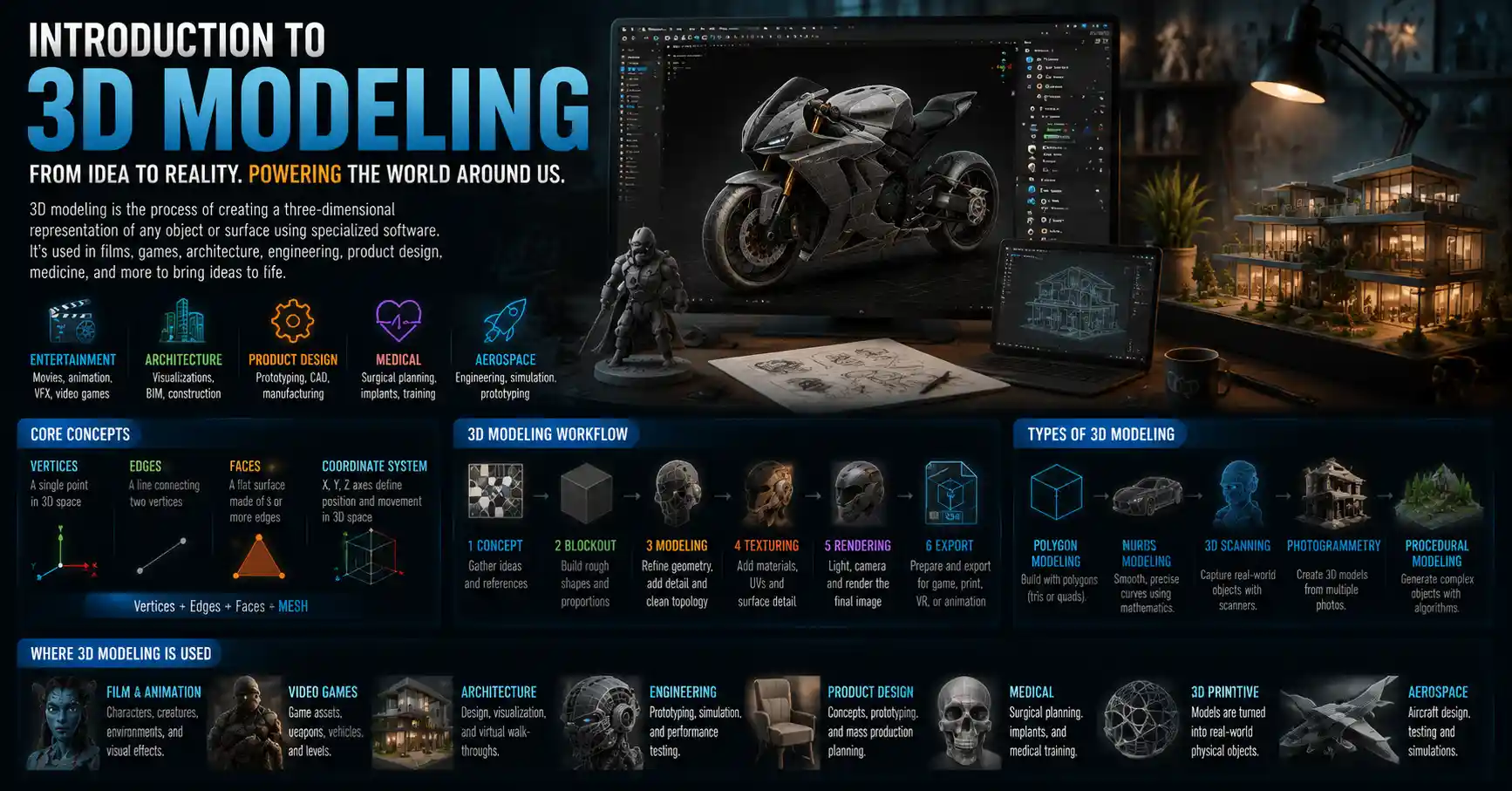
Walk down any modern movie theater aisle, flip through a video game catalog, or visit a new housing development, and you’re experiencing the work of 3D modelers. 3D modeling is the process of creating a three-dimensional representation of any object or surface using specialized software, and it has become one of the most in-demand creative and technical skills of the digital age. From animating blockbuster movie characters to designing medical implants that save lives, 3D modeling powers industries most people never associate with the craft. If you’ve ever wondered how digital objects go from a blank screen to a finished product, this introduction will break down everything you need to know to get started.
What Is 3D Modeling, and How Does It Work?
At its core, 3D modeling is the process of manipulating points, lines, and polygons in a digital three-dimensional space to create a digital object. Every 3D model is built from vertices: individual points in 3D space that are connected to form edges and faces, the flat surfaces that make up the shape of the object. Think of it like building with digital Lego bricks, but far more precise: you can stretch, curve, subdivide, and smooth shapes to create everything from a simple cube to a hyper-realistic human face.
Unlike 2D art, which only has width and height, 3D models exist on three axes: X (horizontal), Y (vertical), and Z (depth). This depth allows modelers to rotate the object, view it from any angle, and adjust it to fit a specific use case. Once a model is complete, it can be used for everything from 3D printing to virtual reality experiences, animated films, architectural visualizations, and even product design.
Core Types of 3D Modeling
Not all 3D modeling is the same. Different projects require different approaches, and most modelers specialize in one or two core types:
- Primitive modeling: The starting point for most beginners, primitive modeling builds shapes from basic geometric forms like cubes, spheres, cylinders, and planes. Modelers cut, stretch, and combine these primitives to create more complex objects. It’s a great way to learn the fundamentals of 3D space.
- Polygon modeling: The most common type of modeling for games and animation, polygon modeling uses connected flat polygons (usually triangles or quads) to build a surface. The more polygons you use, the more detailed the model can be, though high-poly models require more computing power to run.
- NURBS (Non-Uniform Rational B-Splines) modeling: Popular in industrial and automotive design, NURBS creates smooth, mathematically precise curves and surfaces. Unlike polygon modeling, which approximates curves with many small flat faces, NURBS defines curves with exact mathematical equations, making it ideal for products that need to be manufactured to precise specifications.
- Scanned 3D modeling: Instead of building a model from scratch, modelers use 3D scanners to capture the shape of existing physical objects and turn them into digital models. This is commonly used for reverse engineering, historical preservation, and creating realistic models of real-world objects for film or games.
- Procedural modeling: Procedural modeling uses algorithms and rules to generate 3D objects automatically, rather than modeling every detail by hand. This is especially useful for creating complex natural environments like forests, mountains, or cities, where repeating patterns can be generated quickly.
Every type of 3D modeling follows the same basic workflow: start with a basic shape, refine the form, add details, apply textures and materials to give the object color and surface properties, and then prepare it for its final use, whether that’s rendering, 3D printing, or animation.
Common Industries That Rely on 3D Modeling
It’s hard to overstate how widespread 3D modeling has become in the 21st century. What started as a niche tool for engineers and animators is now a foundational part of dozens of industries. Here are some of the most common use cases that rely on skilled 3D modelers every day.
Entertainment and Media
The entertainment industry was one of the first to adopt 3D modeling at scale, and it remains one of the largest employers of 3D artists. Every modern animated film from Pixar, Disney, and DreamWorks uses 3D modeling to create characters, environments, and props. Even live-action blockbusters rely on 3D modeling to create CGI characters, set extensions, and visual effects that would be impossible to film practically. For example, the dragon Drogon in Game of Thrones or the superhero suits in the Marvel Cinematic Universe were all created as 3D models before being added to live-action footage.
Video games are another huge market for 3D modelers. Every character, weapon, building, and landscape in a modern console or PC game is a 3D model. With the rise of virtual reality (VR) and augmented reality (AR), demand for high-quality optimized 3D models has only grown, as VR experiences require smooth, detailed models that can run in real time.
Architecture, Engineering, and Construction (AEC)
Gone are the days when architects only relied on hand-drawn blueprints to communicate their designs. Today, most architectural firms use 3D modeling to create realistic visualizations of buildings before construction even begins. These models allow clients to walk through a virtual version of a home, office, or public space, helping them understand the layout and make changes before any concrete is poured. 3D modeling also powers BIM (Building Information Modeling), a system that embeds data like material costs, structural specifications, and maintenance schedules into a 3D model, making it easier for architects, engineers, and construction teams to collaborate on large projects.
Manufacturing and Product Design
From consumer electronics to cars to furniture, almost every mass-produced product you buy started as a 3D model. Product designers use 3D modeling to prototype new designs, test how different parts fit together, and identify potential flaws before going into mass production. 3D modeling also makes 3D printing possible: anyone with a 3D printer can turn a digital 3D model into a physical object, opening up new possibilities for custom manufacturing and small-batch production.
Healthcare and Life Sciences
3D modeling has revolutionized modern medicine. Surgeons use 3D models created from patient CT and MRI scans to plan complex procedures, like separating conjoined twins or replacing a damaged hip. Custom 3D printed implants, from dental crowns to knee replacements, are built from 3D models tailored to a patient’s unique anatomy. Pharmaceutical companies also use 3D modeling of protein structures to develop new drugs, allowing researchers to visualize how a potential drug will interact with a target protein in the human body.
Other industries that rely heavily on 3D modeling include archaeology (where modelers recreate lost historical sites and artifacts), advertising (for product visualizations and commercials), and forensics (for recreating crime scenes to help juries understand evidence).
Getting Started: Essential Tools for Beginner 3D Modelers
If you’re interested in learning 3D modeling, the first step is choosing the right software. The good news is that there are options for every budget and skill level, from free open-source tools to professional-grade programs used by major studios. Before you invest in expensive software, it’s best to start with a tool that matches your goals and experience level.
Free Beginner-Friendly Software
You don’t need to spend hundreds of dollars to start learning 3D modeling. These free tools are perfect for beginners:
- Blender: Blender is the undisputed king of free 3D software. It’s open-source, completely free to use for any purpose (including commercial work), and has every feature most modelers will ever need: modeling, sculpting, animation, rendering, and even video editing. It has a massive global community that creates free tutorials, assets, and add-ons to extend its functionality. The only downside is that it has a steep learning curve for complete beginners, but there are more than enough free resources to help you learn.
- SketchUp Free: SketchUp is designed for beginners, especially those interested in architectural modeling or product design. It has an intuitive, easy-to-learn interface that makes it simple to create basic 3D models quickly. The free web version is perfect for hobbyists and people just starting out, while the paid Pro version is used by many professional architects.
- Tinkercad: Tinkercad is a browser-based 3D modeling tool from Autodesk designed specifically for beginners and kids. It uses a simple block-based building system that makes it easy to learn the basics of 3D design without overwhelming new users. It’s particularly popular for people learning to design models for 3D printing.
Professional Industry-Standard Software
Once you’ve mastered the basics and want to work professionally, these are the tools most industries use:
- Autodesk Maya: Maya is the industry standard for 3D animation and modeling in film and games. It has powerful modeling, rigging, and animation tools that make it the first choice for many major studios.
- Autodesk 3ds Max: 3ds Max is popular for architectural modeling, product visualization, and game development, especially for creating static environments and assets.
- ZBrush: ZBrush is the go-to tool for digital sculpting, which involves adding fine details to 3D models like skin texture, wrinkles, or surface details on a character. Most high-end character models for film and games are sculpted in ZBrush before being optimized for animation.
- SolidWorks: SolidWorks is the standard for industrial and mechanical design, used by engineers to create precise, manufacturable 3D models of parts and products.
Beyond software, you don’t need a supercomputer to start 3D modeling, but a decent computer with a good graphics card will make your work much smoother. Most modern laptops can handle basic modeling in Blender or Tinkercad, though high-poly sculpting or rendering will require more powerful hardware. Many beginners also invest in a graphics tablet, which makes sculpting and drawing details much easier than using a mouse, though it’s not strictly required to start.
Top Tips for Beginner 3D Modelers to Learn Quickly
Learning 3D modeling can feel overwhelming at first. The interface is unfamiliar, the terminology is new, and it can take months to build the muscle memory to create the shapes you envision. But with the right approach, anyone can learn the skills they need to create great 3D models. These practical tips will help you avoid common beginner mistakes and progress faster.
“The beautiful thing about learning 3D modeling is that the more you practice, the more you see how every small choice you make as an artist or designer changes the final result. Don’t wait until you’re ‘good enough’ to start working on projects you care about.”
Start Small and Master the Fundamentals First
One of the most common mistakes beginners make is trying to create a hyper-realistic human character or a complex cityscape as their first project. This almost always leads to frustration and quitting. Instead, start with simple objects: a mug, a chair, a house, a simple sword. Mastering how to create basic shapes, clean up your geometry (the vertices and faces that make up your model), and add simple textures will give you a strong foundation to build on. Once you can consistently create clean, simple models, you can start moving on to more complex projects.
Learn the Terminology and Best Practices Early
3D modeling has its own vocabulary, and learning it early will make it much easier to follow tutorials and troubleshoot problems. Terms like topology (how the vertices and faces of a model are arranged), ngons (polygons with more than four sides, which can cause problems when animating or 3D printing), and UV unwrapping (the process of unfolding a 3D model so you can apply a 2D texture to it) are fundamental to the craft. Learning best practices like keeping your geometry clean, using the right number of polygons for your project, and organizing your model into named layers will save you hours of frustration later on.
Use Free Tutorials and Build a Portfolio of Projects
There are more free high-quality learning resources for 3D modeling than ever before. YouTube has thousands of free step-by-step tutorials for every skill level and software, and platforms like Coursera, Udemy, and Skillshare offer affordable structured courses. As you learn, work on projects that interest you: if you love video games, model your favorite weapon or character. If you love interior design, model your dream living room. Working on projects you care about will keep you motivated, and it will help you build a portfolio of work to show potential clients or employers later.
Study Real-World References
Even the most experienced 3D modelers don’t create models from memory. If you’re modeling a car, look at hundreds of photos of real cars from every angle. If you’re modeling a face, use reference photos to understand how bone structure, skin, and muscles shape the face. Reference helps you catch small details that you would otherwise miss, and it makes your models more realistic and accurate. Many modeling programs even let you import reference images directly into your workspace to use as a guide.
Join a Community
Learning 3D modeling doesn’t have to be a solo activity. Joining an online community of other 3D modelers will help you get feedback on your work, ask questions when you get stuck, and stay motivated. Popular communities include the Blender Artists forum, Reddit’s r/blender, and Discord servers for 3D artists. Sharing your work and getting constructive criticism is one of the fastest ways to improve, and many beginners find work and collaboration opportunities through these communities.
Career Opportunities and Future of 3D Modeling
As 3D modeling becomes more widespread across industries, demand for skilled modelers continues to grow. The U.S. Bureau of Labor Statistics projects that jobs for multimedia artists and animators, which include 3D modelers, will grow 16% between 2022 and 2032, much faster than the average for all occupations. There are several different career paths you can take as a 3D modeler, depending on your interests:
- Full-time employment: Many 3D modelers work full-time for film studios, game development companies, architectural firms, product design companies, or advertising agencies. Full-time positions usually offer steady income and benefits, and they let you specialize in a specific industry.
- Freelance work: Freelance 3D modelers take on projects from multiple clients, from small businesses that need product visualizations to studios that need extra help on large projects. Platforms like Fiverr, Upwork, and ArtStation make it easy to connect with clients, and many freelancers sell pre-made 3D assets on marketplaces like TurboSquid or CGTrader for passive income.
- Hobby and side income: You don’t have to become a professional 3D modeler to enjoy the craft. Many hobbyists create 3D models for 3D printing, make custom mods for video games, or create art just for fun, and many earn extra side income selling their models online.
The future of 3D modeling is being shaped by new technologies like artificial intelligence and real-time rendering. AI tools are already changing how modelers work, with tools that can generate basic 3D models from text prompts or 2D images, automating the early stages of the modeling process and letting modelers focus on refining details rather than building shapes from scratch. The rise of the metaverse, VR, and AR is also creating new demand for 3D assets, as brands and creators build virtual spaces and experiences that require thousands of 3D models. 3D modeling is also becoming more accessible, with improved software interfaces, cloud-based tools, and more learning resources that make it easier than ever for beginners to get started.
While AI is automating some parts of the 3D modeling process, it hasn’t replaced skilled modelers. AI-generated models still need refinement, cleaning up, and customization to fit specific use cases, and creative vision is still required to create models that meet the needs of a project. For the foreseeable future, skilled 3D modelers who can combine technical skill with creative vision will remain in high demand.
Conclusion
3D modeling is a versatile, creative, and in-demand skill that powers almost every part of the modern world. From the movies we watch to the buildings we live in to the medical devices that save lives, 3D modeling shapes how we design, build, and experience the world around us. Getting started can feel intimidating, but with free tools, endless learning resources, and a community of creators ready to help beginners, there’s never been a better time to learn.
Whether you want to build a new career as a professional 3D modeler, create custom models for 3D printing, or just learn a new creative skill, the core process is the same: start small, practice consistently, and work on projects that excite you. Over time, you’ll develop the skills to turn any idea you have into a three-dimensional digital object, and that’s a skill that will open up endless creative and professional opportunities.