
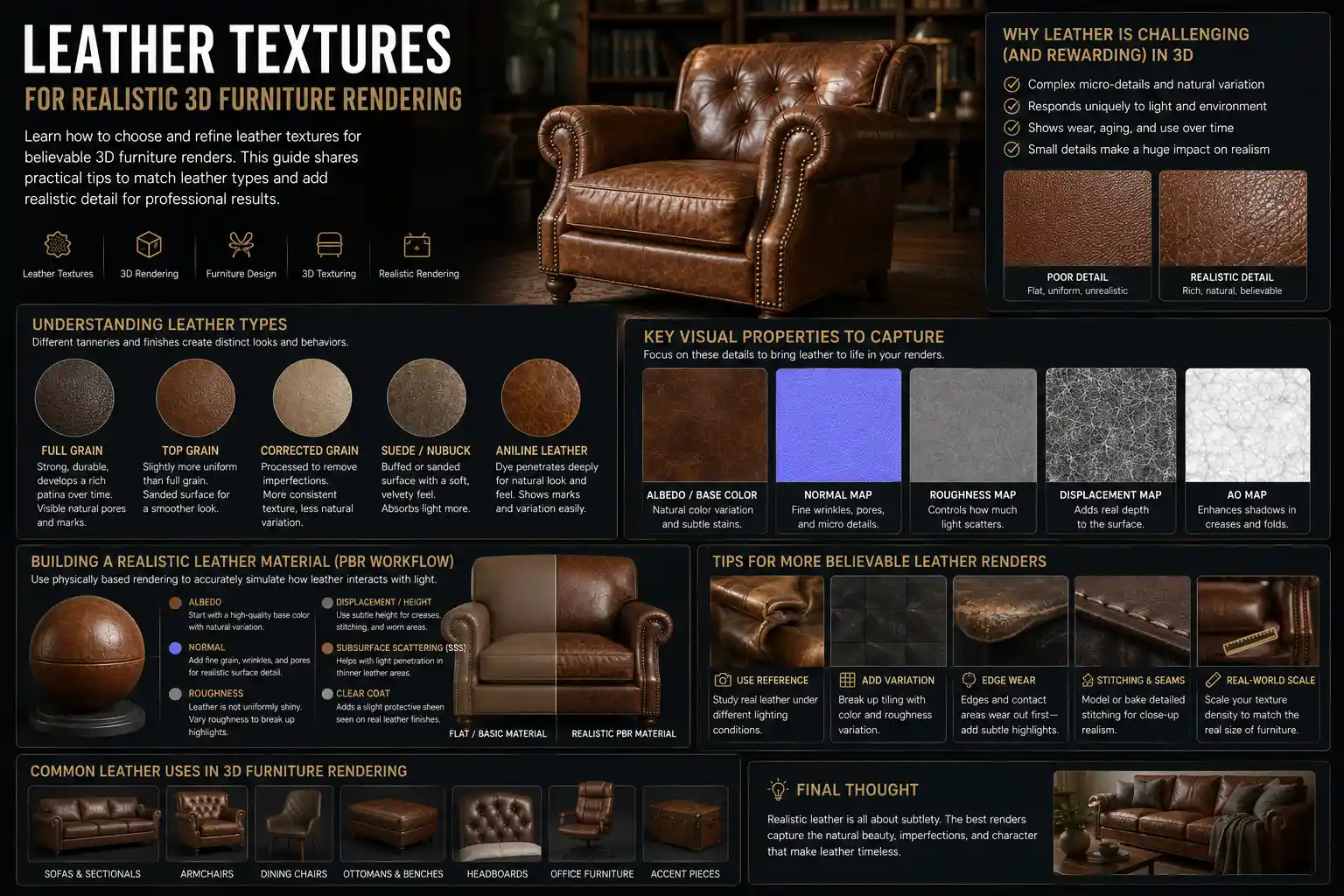
When you look at a photorealistic 3D render of a leather sofa, armchair, or vintage leather briefcase turned furniture accent, what makes it feel like you could reach out and run your hand across its surface? It’s not just the color or the stitching—it’s the texture. For 3D artists and furniture designers working on everything from e-commerce product listings to architectural visualizations, mastering leather textures is the difference between a render that looks like a generic stock asset and one that convinces viewers the piece is right in front of them. Leather is an organic material, with natural variations, wear patterns, and subtle imperfections that no two pieces share. Getting that realism right requires understanding how leather forms, how different tanning processes change its surface, and how to translate those physical properties into digital textures that work with modern rendering software.
The Biology and Origin of Natural Leather Texture
Before diving into digital texture creation, it’s critical to understand what gives natural leather its unique texture in the first place. Leather is made from animal hide, and every hide carries the biological imprint of the animal it came from. The outermost layer of the hide, called the grain layer, is what forms the visible texture of finished leather. This layer is made of tightly packed collagen fibers that run in irregular, overlapping patterns, creating tiny creases, pores, and ridges that are entirely unique to each animal.
How Animal Species Affect Base Texture
Not all leather starts with the same base texture. The animal species is the first factor that defines what the finished leather will feel and look like:
- Cowhide: The most common leather used for furniture, cowhide has a medium, relatively uniform grain with small, evenly distributed pores. Full-grain cowhide retains the natural outer layer, so you may see subtle scars from barbed wire, bug bites, or wrinkles from the animal’s movement that add character. Split cowhide, which is sanded down from the inner layer of the hide, has a much smoother, more uniform texture.
- Full-grain calfskin: Calfskin comes from younger cows, so the collagen fibers are finer and more tightly packed. This creates an extremely smooth, soft texture with barely visible pores, making it a popular choice for high-end designer sofas and accent chairs.
- Top-grain buffalo leather: Buffalo hide has a larger, more prominent grain with coarser pores than cowhide, creating a more rugged, textured surface that’s popular for rustic and industrial furniture designs. It also has more natural variation across the hide, with deeper wrinkles and thicker grain patterns in areas that were on the animal’s neck or shoulders.
- Sheepskin and lambskin: Known for an incredibly soft, supple texture, sheepskin has a fine, delicate grain that often has a subtle nap (short, fine fibers) on the surface. It’s most commonly used for padded accent pieces and upholstered headboards.
Even within the same species, no two hides are identical. An animal that lived in a rugged range will have more visible scars and texture variation than one raised on a controlled farm, and different parts of the same hide have different textures. The shoulder and belly areas have more stretch and looser fibers, creating deeper wrinkles, while the back has a tighter, more uniform grain. These variations are what make natural leather feel alive, and they are the details that must be captured in digital textures to achieve realism.
How Tanning and Finishing Alter Surface Texture
After the hide is cured, tanning and finishing processes dramatically change the original grain texture. For furniture, two main tanning methods are most common, each producing a distinct look:
Vegetable-tanned leather uses natural tannins from tree bark to cure the hide, resulting in a firm, matte texture that develops a rich patina over time. The surface retains most of the original grain, with subtle roughness and natural unevenness. Most aniline leather, a popular furniture finish that leaves the natural grain visible, is vegetable-tanned, resulting in a soft, matte texture that gets better with age. In contrast, chrome-tanned leather uses chromium salts to cure the hide much faster, resulting in a softer, more pliable leather that is more resistant to water. Chrome-tanned leather often has a more uniform texture, as the tanning process can smooth out some of the natural irregularities.
Finishing processes after tanning create even more texture variation:- Aniline finishing adds no opaque pigment to the hide, so all natural grain variation, pores, and minor imperfections remain visible. The result is a soft, matte texture that absorbs light evenly, with subtle shifts in color across the surface.- Semi-aniline finishing adds a thin layer of pigment to even out color while still leaving most of the natural grain visible. It has a very subtle sheen and slightly smoother texture than pure aniline.- Pigmented (protected) leather adds a thick layer of pigment and a protective topcoat, which covers most natural grain imperfections. The texture is much more uniform, often with an embossed grain pattern stamped into the surface to create consistency. Most mass-produced leather furniture uses pigmented leather, which has a slight to medium sheen and a smooth, predictable texture.- Nubuck and suede are created by sanding the grain layer (for nubuck) or splitting the hide to expose the inner fibrous layer (for suede). This creates a soft, napped texture with a matte finish that scatters light, creating subtle highlights when viewed from different angles.- Distressed and pull-up leather is intentionally treated to create a worn, vintage texture during manufacturing. Pull-up leather has added oils and waxes that move when the leather is stretched, creating lighter patches that mimic decades of use. Distressed leather may have intentional scuffs, scratches, and creases added to the surface to create a rustic, lived-in look.
Core Texture Maps for Realistic Leather Rendering
Modern 3D rendering relies on multiple texture maps to recreate the way light interacts with a physical leather surface. Unlike a simple 2D image that only shows color, each map carries specific information about surface properties that the renderer uses to generate a realistic result. For leather, there are five core maps that every artist needs to get right, and each serves a unique purpose.
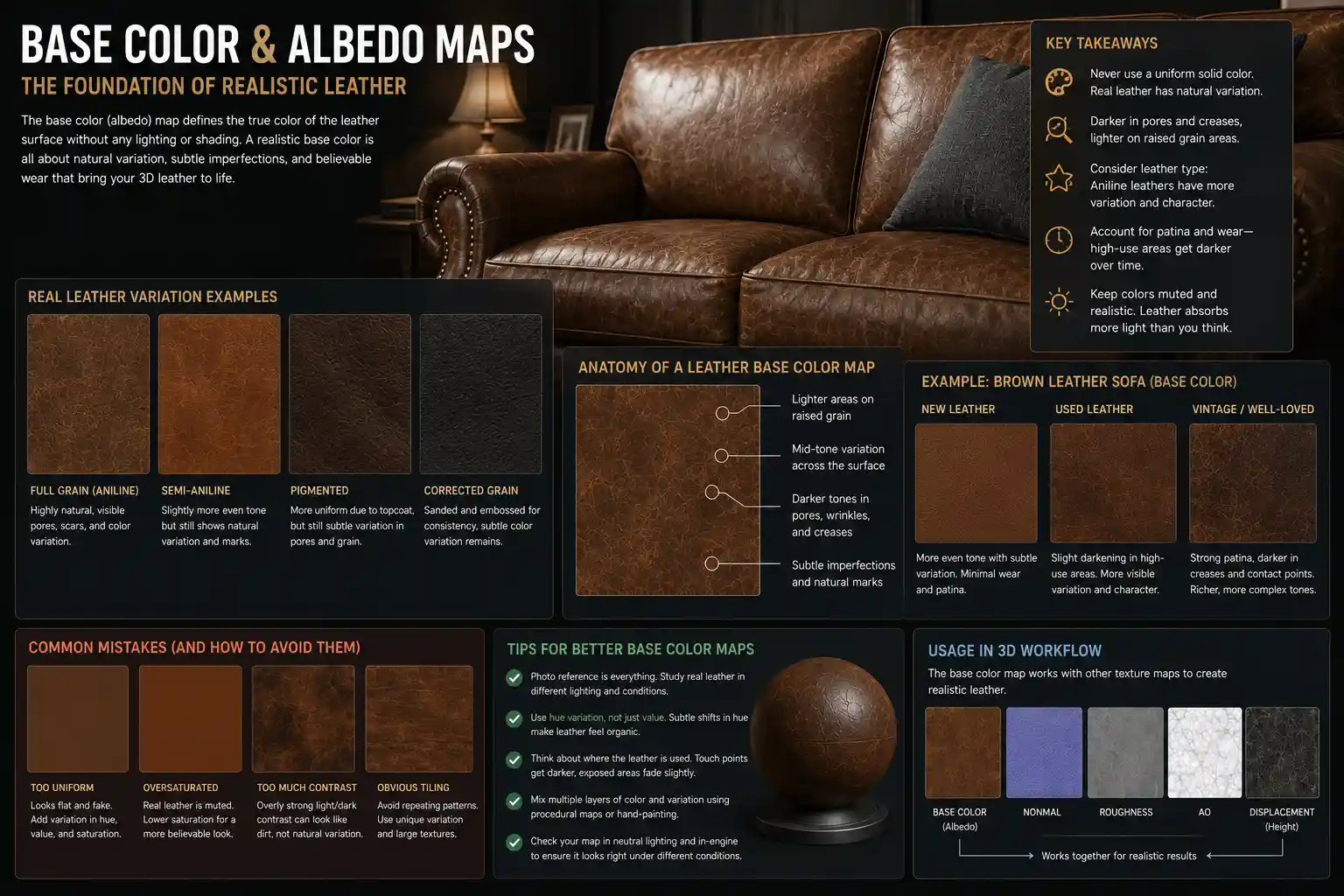
Base Color and Albedo Maps
The base color (or albedo) map is the foundation of any leather texture. For natural leather, this map should never be a uniform solid color. Even pigmented leather with a heavy topcoat has subtle color variation across the surface, ranging from slightly darker in pores and creases to lighter on raised grain areas. For aniline and semi-aniline leather, this variation is even more pronounced, with natural dark spots, subtle scarring, and color shifts that follow the natural grain pattern.
A common mistake new artists make is oversaturating the base color. Real leather absorbs most light, so its base color is usually more muted than you might expect. For example, a rich brown leather sofa won’t be a bright chocolate brown across the entire surface; it will have areas of lighter tan, deeper coffee, and even subtle grayish tones from natural variation. It’s also important to account for patina: vintage or well-used leather will have darker color in high-wear areas like armrests and seat cushions, where oil from skin and dirt have accumulated over time.
Normal and Bump Maps for Surface Displacement
While the base color tells the renderer what color the leather is, normal and bump maps tell it what the leather feels like. These maps add micro-detail to the surface: the tiny ridges of the grain, the indentations of pores, and the subtle creases that form where the leather wraps around a cushion or arm. Bump maps use grayscale values to indicate height (darker areas are lower, lighter areas are higher), while normal maps use RGB values to capture more detailed directional information for the surface slope.
For leather, the key to a realistic normal map is subtlety. Overly pronounced grain or pores will make the leather look like plastic or exaggerated fake leather. The grain should be visible when the camera is close up, but not distracting at a normal viewing distance for a room visualization. For full-grain aniline leather, add small, irregular imperfections like tiny scars and indentations to break up uniform grain patterns. For embossed pigmented leather, the grain pattern will be more regular, so you can repeat a consistent embossed pattern across the map.
For large-scale details like deep creases where a leather cushion folds, don’t rely on bump or normal maps—use actual displacement mapping or model the crease into the 3D geometry. Bump maps only fake surface detail; they don’t actually change the shape of the object, so deep creases will look flat if they’re only added to a bump map.
Roughness and Gloss Maps
Arguably the most important map for realistic leather rendering is the roughness (or gloss) map. Roughness controls how much light the surface scatters: a fully rough surface is matte, while a smooth, glossy surface reflects sharp highlights. Leather has almost never uniformly rough or uniformly glossy, even on finished pieces. Pores and crevices in the grain are darker and rougher, while the raised grain areas are slightly smoother and more glossy. That variation in roughness is what creates the subtle, soft highlights that make leather look rich and tactile.
For different leather types, roughness values change dramatically:- Full-grain aniline leather: High overall roughness (0.6 to 0.8 on a 0-1 scale, where 1 is fully rough) with subtle variation. Raised grain areas are slightly less rough, creating soft, diffused highlights.- Semi-aniline leather: Medium roughness (0.4 to 0.6), with a slightly more uniform gloss across the surface.- Pigmented protected leather: Low roughness (0.2 to 0.4), with a noticeable sheen and sharper highlights. The roughness is still higher than polished plastic, however—even the shiniest leather has enough micro-texture to soften highlights.- Suede and nubuck: Very high roughness (0.8 to 0.95), with almost no specular highlight. The napped texture scatters light evenly, so highlights are soft and diffused across the surface.- Worn vintage leather: High-wear areas like armrests become polished from years of contact, so those areas should have much lower roughness (higher gloss) than the rest of the surface. This creates a beautiful, natural patina that reads as authentic to viewers.
The biggest mistake I see new artists make with leather is uniform roughness. If your entire leather surface has the same gloss value, it looks like painted plastic, not organic hide. Real leather has micro-variation in every square millimeter, and that variation is what makes it feel real.
Practical Techniques for Creating or Sourcing Leather Textures
Whether you’re creating your own leather textures from scratch or sourcing pre-made assets for a project, there are practical steps you can take to ensure your textures look realistic for furniture rendering. The approach you take will depend on your project timeline, budget, and the level of detail you need.
Photoscanning: The Gold Standard for Realism
Photoscanning (or photogrammetry) involves taking dozens of high-resolution photos of a real leather surface from different angles, then using software to reconstruct all the texture maps automatically. This method captures every natural imperfection, pore, and color variation exactly as it exists on real leather, resulting in the most realistic possible textures.
If you’re new to photoscanning, follow these practical tips for great leather textures:
- Use a large, flat sample of the leather you want to scan. For furniture, this can be a leftover swatch from a manufacturer or an old leather cushion that matches the texture you need. Avoid stretching the leather when you mount it—any tension will stretch the grain and create an unnatural look.
- Use diffuse, even lighting. Avoid direct flash or directional light, which can create harsh highlights that confuse the photogrammetry software. A light box or overcast outdoor light works perfectly for flat texture scanning.
- Take enough photos at different focus distances. Leather has micro-texture that requires sharp focus across the entire surface, so use a small aperture and take multiple shots at different focus levels to capture all the detail.
- Export all required maps after processing. Most photogrammetry software can generate base color, normal, roughness, and displacement maps directly from the scan, so you don’t have to edit them from scratch.
The only downside of photoscanning is that it requires access to the real leather sample and a bit of technical skill. But for professional projects where realism is critical, it’s worth the extra effort. Many furniture manufacturers now provide scanned textures of their actual leather upholstery options to 3D artists, so the final render matches the physical product exactly.
Editing Pre-Made Texture Packs
For most freelance artists and small studios, pre-made leather texture packs are a cost-effective, time-saving starting point. There are dozens of high-quality texture packs available on marketplaces like Textures.com, CGTrader, and Poliigon, with options for every leather type from full-grain aniline to distressed vintage. The key to getting a realistic result is not to use the pre-made texture as-is—you need to edit it to add variation and match the specific properties of your project.
Follow these practical tips for editing pre-made leather textures:
- Add custom variation to break up tiling. Most pre-made textures are designed to tile seamlessly across large surfaces, which can create a repetitive, unnatural look for large furniture pieces like sofas. Use a soft brush to darken random areas, add subtle fake scars, or adjust the roughness in small patches to break up the repetition.
- Adjust the roughness map to match the leather finish. Many pre-made textures have overly high gloss, so you’ll usually need to increase the overall roughness to get a more natural look. Add darker spots (lower roughness) to raised grain areas to create natural variation.
- Match the texture scale to the size of your furniture. A common mistake is using a leather grain that’s too large or too small for the object. For a full-size sofa, the grain pattern should be sized correctly: if each pore is the size of a pea, the texture will look wrong. Compare your texture to reference photos of real leather furniture to get the scale right.
- Add wear and tear where it makes sense. If you’re rendering a vintage armchair, don’t just use a generic distressed texture. Add extra wear to the seat, armrests, and anywhere else a person would touch the chair regularly. Darken the color and lower the roughness in these areas to mimic the natural polishing of old leather.
Rendering Settings and Scene Context for Realism
Even the best leather texture in the world will look unrealistic if your rendering settings and scene are wrong. The way leather interacts with light depends on the context of the scene, and small adjustments to your renderer settings can make a huge difference in the final result.
Lighting Interaction Tips
Leather is a semi-soft organic material that responds to light differently than hard surfaces like wood or metal. For realistic results, follow these lighting guidelines:
First, use soft, diffuse lighting for most interior scenes. Hard, direct sunlight will create overly sharp highlights on leather that look unnatural, unless you’re intentionally rendering a piece in direct sunlight. Use area lights or HDRI environment maps that mimic natural indoor light, with soft gradients between highlights and shadows. For living room scenes, the soft light from a window will create gentle, diffused highlights on the curved surface of a leather sofa that read as very realistic to the viewer.
Second, account for subsurface scattering. Many artists forget that leather is slightly translucent—light penetrates the top layer of the material and scatters below the surface, creating a soft, warm glow, especially in thin areas like the edges of cushions or the folds of leather. Most modern renderers like V-Ray, Corona, and Blender Cycles support subsurface scattering, and adding a small amount of subsurface to your leather material will make it look much softer and more organic, rather than flat and plastic. For thicker furniture leather, you only need a low subsurface strength—too much will make it look like wax or rubber instead of leather.
Adding Contextual Detail for Immersion
Realistic leather furniture doesn’t exist in a vacuum. Adding small contextual details will make your texture feel more real and integrated into the scene. For example, add subtle creases and compression where the leather cushion is pressed by the frame or by weight over time. Leather is a flexible material, so it will form permanent creases along fold lines, and those creases will be darker and have more pronounced texture than the rest of the surface.
Another small detail that makes a big difference is contact shadows. Where a leather arm meets the sofa frame, or where a cushion rests on the base, add a soft, subtle contact shadow that darkens the leather slightly. This grounds the object in the scene and makes the texture feel like it’s part of a real 3D object, not just a flat sticker on a model.
If you’re rendering a well-used or vintage piece, add small imperfections that tell a story: a faint scratch on the armrest from a pet’s claws, a slightly discolored spot where a cup was set down dozens of times, or a subtle shine where someone’s arm has rested every day for years. These small details don’t have to be distracting, but they add authenticity that makes the render feel lived-in and real.
Conclusion
Mastering leather textures for realistic furniture rendering is a combination of understanding the material itself, working with the right texture maps, and paying attention to the small details that make organic materials feel alive. The most important thing to remember is that leather is not a uniform, manufactured material—it’s an organic product with natural variation, imperfections, and changes from use that give it character. By capturing that variation in your base color, roughness, and normal maps, and adjusting your rendering settings to mimic how real leather interacts with light, you can create renders that are indistinguishable from photographs of real furniture.
Whether you’re a beginner just learning to work with 3D textures or a professional working on high-end e-commerce or architectural visualization, taking the time to study real leather and adjust your textures to match that reality will always pay off. The best renders don’t just show what a leather furniture piece looks like—they make the viewer feel what it would be like to touch it, and that’s the mark of a truly realistic render.