

Speed often separates a good visualization from a great one — but speed without quality is just a blurred JPEG. For artists producing interior renders, the balance is found in reusable assets. Indoor scene CG models have become a cornerstone for architects, interior designers, product visualizers, and Blender or 3ds Max users who need to iterate quickly without starting from scratch on every wall, sofa, or lamp.
Whether you are staging a modern apartment for a real estate client or populating a showroom with furniture for a product launch, having a reliable library of interior CG models can cut your production time by hours. The key is knowing where to find them, how to choose them, and how to integrate them seamlessly into your existing pipeline.
Why Indoor Scene CG Models Matter
Staring at an empty grey box in a viewport is demoralizing. Filling a scene from scratch — modeling each chair, table, floorboard, and curtain — is rarely a good use of time, especially when deadlines are tight. Indoor scene CG models solve this by offering pre-built geometry that you can drop into a scene, adjust the materials, and render.
But they do more than save time. A well-modeled interior CG model carries baked-in proportions, edge flow, and detail that would take an experienced artist hours to replicate. For architects, this means more time to experiment with lighting and camera angles. For product visualizers, it means placing a new product inside a believable room without building the room itself.
The rise of real-time rendering engines like Unreal Engine and Twinmotion has further increased demand for these assets. Artists need scenes that are optimized for both offline renderers like V-Ray and real-time platforms. The best indoor scene CG models are versatile enough to work across multiple engines without heavy rework.
What Makes a Good Interior CG Model?
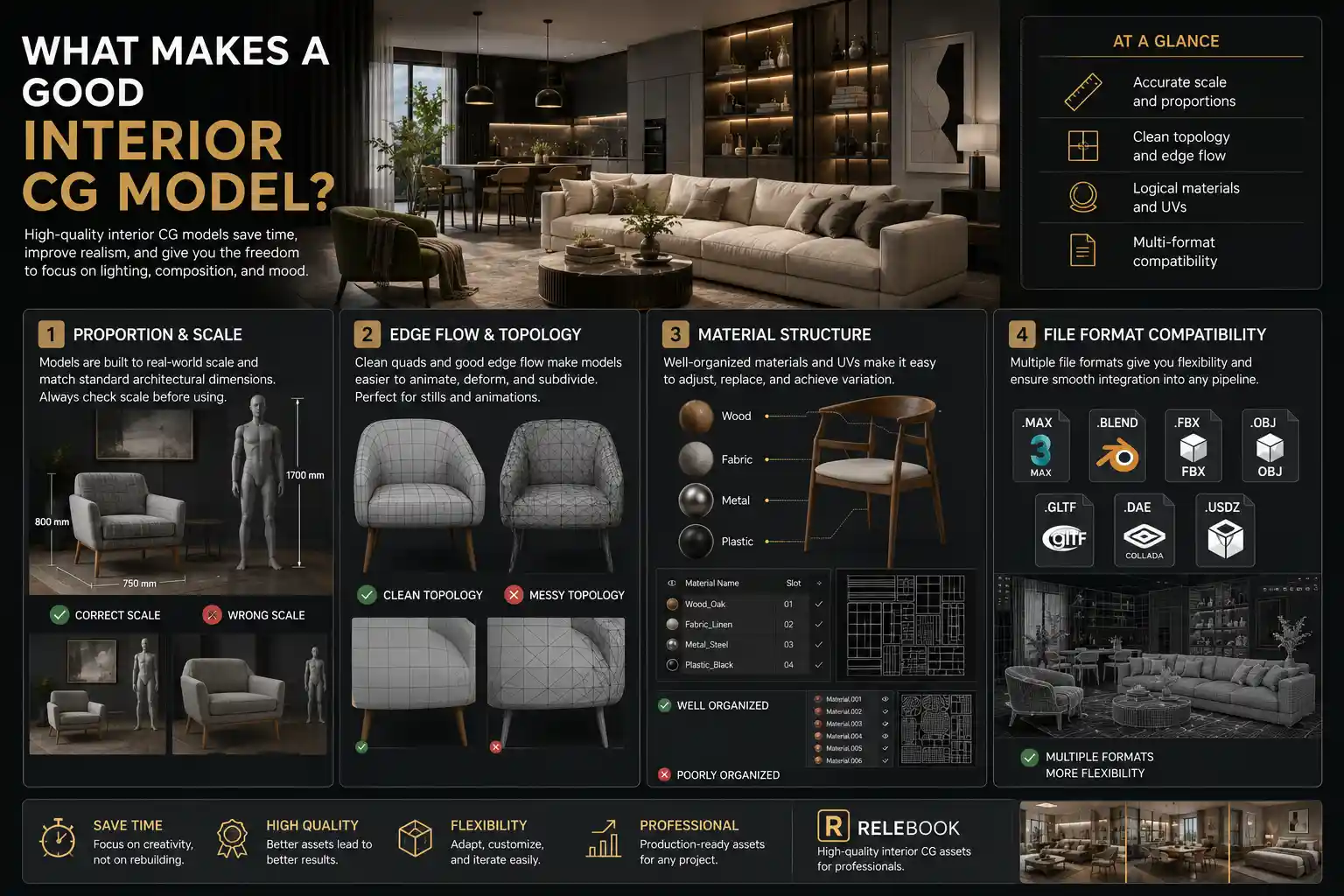
Not all 3D scene models are created equal. A model that looks stunning in a single dramatic render might break when you try to change the camera angle or lighting. When you are evaluating interior CG models, keep these criteria in mind:
Proportion and Scale
Nothing destroys realism faster than a chair that looks like a throne or a table that floats six inches above the floor. High-quality models are built to real-world scale and align with standard architectural dimensions. If you work in metric units, check that the model was originally modeled in millimeters or centimeters. A quick test: import the model into an empty scene with a human reference dummy.
Edge Flow and Topology
For still renders, messy topology might not matter. But if you plan to animate or deform the asset (for example, opening a cabinet door or moving a curtain), clean quads are essential. Subdivision-friendly topology also allows you to adjust detail level on the fly.
Material Structure
A good model uses well-named material slots and UV mapping that make sense for tiling textures. Nothing is worse than receiving a model with 50 unnamed materials that all look identical in the viewport. Look for models that separate wood, fabric, metal, and plastic into logical channels. This makes it far easier to swap textures or tweak glossiness.
File Format Compatibility
Your pipeline probably uses a mix of formats. FBX and OBJ are universal, but native formats like .MAX or .BLEND preserve modifiers and constraints. Ideally, a model should come in multiple formats so you can choose the one that fits your workflow without conversion headaches.
Practical Workflow: Using Indoor Scene Models in a Real Project
Let's walk through a typical scenario. You are an interior designer who needs to present three different furniture layouts for a 120-square-meter apartment. The client wants to see how natural light moves through the space with each layout.
Step 1: Start with a Shell
Either model the basic architectural shell yourself or use a generic room model from an indoor scene CG model pack. Many packs include empty rooms with floor, ceiling, wall, and windows already UV-mapped. This saves you the initial setup.
Step 2: Place Key Furniture
Pull sofa, bed, dining table, and shelving units from your library. Instead of adjusting every material from scratch, look for models that use standard PBR maps. You can often batch-replace textures across similar models.
Step 3: Add Secondary Elements
Rugs, cushions, tableware, plants, and books bring life. These smaller items are often the most time-consuming to model individually. A curated collection of accessories can fill a scene without breaking the polygon budget.
Step 4: Lighting and Environment
Good lighting can elevate a mediocre model, but bad lighting will ruin even the best geometry. HDRI maps are essential for believable interiors. Platforms like Relebook offer both indoor-specific HDRI and texture packs that match the color temperature of common interior light sources.
Step 5: Test and Iterate
Render a few quick passes. If a model looks off, check its scale and material assignments. Sometimes a simple UV fix or a better wood texture from a texture library is all you need.
Where to Find Reliable Indoor Scene CG Models
The market for 3D scene models is broad, but not every source is practical for professional visualization. Many online repositories offer thousands of models, but sorting through poorly optimized files can be exhausting. That is where curated platforms become useful.
Platforms such as Relebook provide a selection of indoor scene CG models, textures, and HDRI resources specifically geared toward visualization workflows. Instead of being buried in noise, you can browse categories like living rooms, bedrooms, kitchens, and commercial spaces, and then check each asset page for format, license, and usage details. This transparency helps you decide whether a model fits your current project before you download.
Relebook also offers resources priced per asset, with both free and paid options. Some assets may be available for free, while others are part of paid collections. Pricing and licensing terms can vary, so it is always wise to review the specifics on the product page before using an asset in commercial work. Availability and licensing can differ between models, and some platforms offer free downloads for selected assets under certain conditions.
Selection Tips for Interior CG Models
To get the most out of your indoor scene CG model library, consider these pointers:
Stick to recognizable brands or curated collections. A model that was used in a well-known architectural visualization has likely been tested in real projects.
Read the description carefully. Some models include realistic fabric folds or procedural wear; others are more basic. Know what you are getting.
Check the polygon count. Too high and your real-time engine will struggle; too low and close-up renders will look blocky. A range between 5,000 and 50,000 polygons per object is typical for most interior scenes.
Look for models that include multiple LOD (level of detail) versions. This is especially important if you plan to use the same model for both a wide shot and a close-up.
Examine the UV packing. Random UVs cause stretching when you apply a wood or fabric texture. Good UVs make material editing quick and consistent.
Integrating Indoor Scene CG Models with Your Renderer
Different renderers handle materials and geometry differently. If you use V-Ray in 3ds Max, you will appreciate models that come with V-Ray materials already assigned. If you work in Blender with Cycles, look for models with Principled BSDF shaders. Most modern models are built with PBR principles, meaning you can usually convert materials between renderers with minimal hassle.
When a model does not match your renderer, you can often rebuild the materials using the model's existing texture maps. Albedo, roughness, normal, metallic, and height maps are all you need to recreate the look. Relebook's texture packs sometimes include these maps separately, making conversion easier.
Avoiding Common Pitfalls
Even experienced artists make mistakes when using pre-made models. Here are a few to watch out for:
Forgetting to clean up after import. Many models come with hidden geometry, unused materials, or extra groups. Use a script or manual cleanup to remove unnecessary data. This reduces file size and improves render times.
Ignoring scale. Always measure your imported model against a known reference. A common issue is a sofa that is twice the intended size because the original artist modeled in inches while you work in centimeters.
Overlooking licensing. Some models are strictly for personal use or require attribution. Others allow commercial use but with restrictions on redistribution. Checking the license terms on the asset page is a habit that saves legal headaches later.
The Role of CG Scene Models in Collaborative Projects
In a team environment, consistency is crucial. If one artist uses a highly detailed indoor scene CG model while another uses a low-poly version, the final composite will look disjointed. Establish a shared library of approved models. This can be a central folder on a network drive or a cloud service. Some teams use platforms like Relebook as a reference point to source models that everyone can access, then adapt the textures to match the studio's own material library.
When all team members work from the same asset base, lighting setups and scene scales stay consistent. This reduces the number of iterations needed to align different scenes into a single presentation.
Staying Updated Without Overwhelm
The 3D asset landscape evolves constantly. New textures, HDRI packs, and models appear regularly. To stay productive, you do not need to chase every release. Instead, follow a few trusted sources that align with your style and subject matter. Relebook's focus on visualization assets means its catalog tends to emphasize usable, realistic interiors rather than fantasy or abstract shapes. This focus can save you time when searching for the right sofa or floor texture for a residential project.
Conclusion
Indoor scene CG models are not a shortcut — they are a strategic tool. By leveraging carefully chosen interior CG models, you free up creative energy for the aspects of a render that demand original thought: composition, lighting, mood, and storytelling. Whether you work solo or in a studio, building a reliable collection of 3D scene models that you trust will make your visualization process faster and more enjoyable.
Platforms that offer curated, well-described assets serve as helpful resources. Take the time to evaluate models before you download, check their format and license, and test them in your scene early. With the right library, your next interior render can go from empty box to finished presentation in a fraction of the time.
FAQ
What is an indoor scene CG model?
An indoor scene CG model is a pre-built 3D digital representation of an interior environment or object — such as a living room, kitchen, office, or individual furniture piece — made for use in visualization software. These models help artists quickly populate scenes without modeling every element from scratch.
Are indoor scene CG models compatible with Blender and 3ds Max?
Compatibility depends on the file format offered by the asset provider. Many models come in multiple formats like .BLEND, .MAX, .FBX, and .OBJ. Always check the product page for supported formats before downloading. Relebook, for example, lists format availability for each asset.
Can I use interior CG models for commercial work?
Usage rights vary by model and platform. Some downloads carry royalty-free commercial licenses, while others may be limited to personal projects or require attribution. Always review the license terms on the asset page. Relebook clearly indicates licensing details per asset so you can make an informed decision.
What should I look for when choosing a 3D scene model for interiors?
Key factors include real-world scale, clean topology, well-named material slots, proper UV mapping, and file format support for your software. It also helps if the model comes with PBR textures that match common renderers like V-Ray, Cycles, or Arnold.
Do I need to pay for indoor scene CG models on Relebook?
Relebook offers both free and paid resources. Some assets may be available at no cost, while others are part of paid collections. Pricing, licensing terms, and download conditions vary per item, so you should check each asset page for specific details before use.