
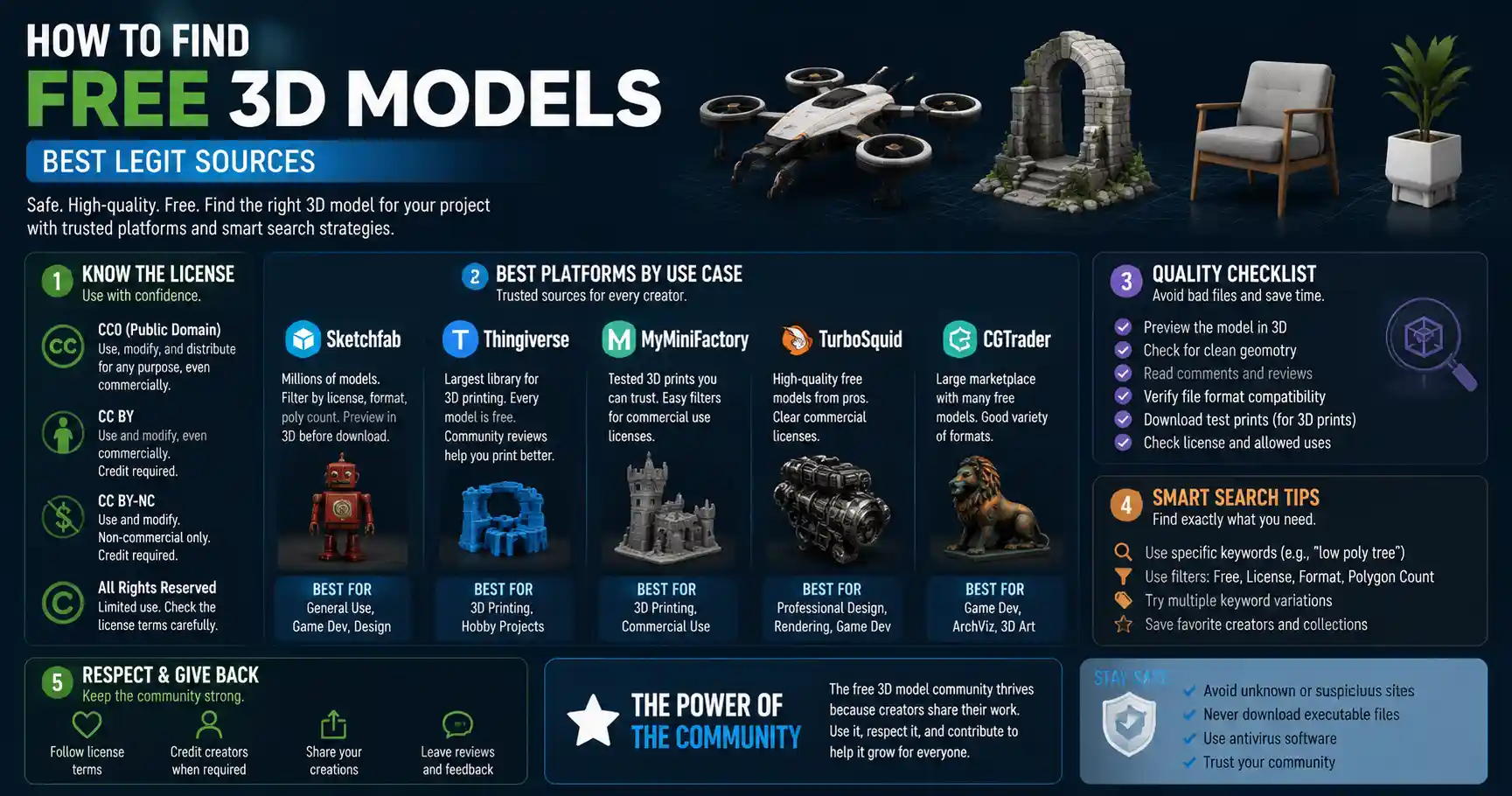
Whether you’re a hobbyist 3D printer testing a new design, a game developer prototyping a level, a student working on a 3D animation project, or an interior designer creating a mockup of a living space, 3D models are the backbone of your work. Commissioning a custom model can cost hundreds of dollars, and even buying pre-made assets from commercial marketplaces adds up quickly when you need multiple pieces for a project. The good news? There are thousands of high-quality free 3D models available online, if you know where to look and how to sort the good from the broken. This guide breaks down everything you need to know to find free 3D models that fit your project, avoid common pitfalls, and stay on the right side of licensing rules.
Understand Licensing Before You Download
Before you click that “download” button on your first free 3D model, the most important step is understanding what you can and can’t do with the file. All free 3D models come with a license, and ignoring that license can lead to copyright strikes, legal fees, or having your work taken down. Unlike paid models, which often come with clear commercial use terms, free models run the gamut from fully public domain to non-commercial only, so it pays to read the fine print.
Common Free 3D Model Licenses
Most free 3D model platforms use standard open licenses, which makes it easy to understand your rights at a glance:
- Public Domain (CC0): This is the most permissive license available. Models marked CC0 are free to use for any purpose, personal or commercial, with no attribution required. You can modify them, resell them, or include them in a commercial product without any restrictions. This is the best option for professional projects where you need full flexibility.
- Creative Commons Attribution (CC BY): This license also allows personal and commercial use, but you have to give credit to the original creator of the model. Most platforms make this easy: you just add a line to your credits page or product description linking back to the original creator’s profile. If you don’t mind crediting the artist, this is a great option.
- Creative Commons Non-Commercial (CC BY-NC): This license allows you to modify and use the model for free, but only for non-commercial projects. If you plan to sell your work, use the model in advertising, or include it in a paid product, you cannot use a CC BY-NC model without getting explicit permission from the creator.
- Royalty-Free: This term is more common on platforms that offer both free and paid models. For free royalty-free models, it usually means you can use the model for personal or commercial use after downloading, without paying royalties to the creator. Always check the fine print, though: some platforms restrict royalty-free use to non-commercial projects for their free assets.
- No License: If a model is uploaded without any clear license, assume that all rights are reserved by the creator. That means you cannot use it for any purpose without explicit permission. Even if it’s marked “free download,” an unlicensed model is technically copyrighted material, so using it is risky.
One common mistake new users make is assuming that “free download” automatically means “free to use for any purpose.” That’s not the case. A creator may upload their model for free to share with the hobbyist community, but still reserve commercial rights for themselves. Taking a minute to check the license upfront saves you hours of headaches later if you have to replace a model mid-project.
Top Repositories for Free 3D Models, By Use Case
There are hundreds of websites that host free 3D models, but not all are created equal. Some specialize in models for 3D printing, others for game development or architectural visualization, and many are just filled with low-quality, broken, or illegally uploaded files. Below are the most trusted platforms, sorted by what you plan to use the model for.
For 3D Printing
If you’re looking for models to print at home or in a makerspace, these are the go-to platforms with thousands of test, functional, and artistic models:
- Thingiverse: Owned by 3D printer manufacturer MakerBot, Thingiverse is the oldest and largest community for free 3D printable models. Every model on the platform is free to download, and most are licensed for personal use (many allow commercial use with attribution). You’ll find everything from simple phone stands to complex cosplay armor, and most models come with print settings tested by other users. The search and filter tools let you sort by license, publication date, and popularity, so it’s easy to find what you need.
- Printables: Created by another major 3D printer brand Prusa, Printables has quickly become a favorite of the 3D printing community for its clean interface and high-quality curated models. Like Thingiverse, all models are free to download, and creators can add print profiles, assembly instructions, and make notes about common issues. The platform also runs regular design contests, so there’s always new creative content being added.
- MyMiniFactory: MyMiniFactory offers a mix of free and paid 3D printable models, with a large library of free assets available for personal use. One unique benefit is that all free models are tested by the community to confirm they print correctly, so you’re less likely to download a broken file that wastes your filament.
For Game Development and Animation
If you need textured, rigged models for games, animations, or visual effects, these platforms have you covered:
- Sketchfab: Sketchfab is one of the largest 3D model communities on the internet, with millions of free models available for download. You can filter search results by license (including CC0 for commercial use) and by file type, poly count, and whether the model is rigged or animated. The platform’s built-in 3D viewer lets you inspect the model before you download it, so you can check for errors or missing textures. Many professional game artists share their work here for free, so you can find high-quality characters, environments, and props.
- BlenderKit: BlenderKit is a popular add-on for Blender (the free open-source 3D creation software) that gives you access to thousands of free 3D models, materials, and brushes directly inside the software. The free plan gives you access to all CC0 assets, which you can use for commercial projects. It’s incredibly convenient for Blender users, since you don’t have to download files separately and import them – you can just drag and drop a model straight into your scene.
- OpenGameArt.org: As the name suggests, OpenGameArt.org is dedicated to free and open-source assets for game development. All models on the site are licensed for free use, with clear tags for commercial use and attribution requirements. You’ll find everything from low-poly environment assets to 2D sprites and 3D characters, perfect for indie game developers working on a budget.
For Architecture and Product Design
If you’re creating architectural visualizations or product mockups, you need accurate, scaled models of furniture, appliances, and building elements:
- 3D Warehouse: Owned by Trimble, the makers of SketchUp, 3D Warehouse is the largest repository of free architectural and product models. Thousands of furniture brands, appliance manufacturers, and architects upload their models here for free, so you can find accurate, scaled models of everything from a specific sofa model to a full office building. Most models are free to use for personal projects, and many are available for commercial use with attribution.
- ArchDaily: ArchDaily has a curated library of free 3D models for architectural visualization, focused on building components, furniture, and landscape elements. All models are vetted for quality, so you don’t have to sort through hundreds of low-quality files to find what you need.
"The best free 3D models aren’t just free – they’re shared by creators who want to help other people learn and create. Taking a minute to respect their license requirements, leave a thank you comment, or credit their work helps keep the community growing for everyone."
How to Filter for Quality and Avoid Common Issues
Even on the best platforms, you’ll find a mix of high-quality ready-to-use models and broken, incomplete, or low-poly assets that aren’t suitable for your project. Learning how to filter for quality saves you hours of time wasted downloading and testing bad files. Here are the most practical tips to sort the good models from the bad:
Check the Model’s Poly Count for Your Use Case
The number of polygons (or poly count) in a 3D model determines how detailed it is, and what it’s suitable for. A high-poly model with millions of polygons will look great in a photorealistic architectural render, but it will crash your game engine or take hours to slice for 3D printing. Conversely, a low-poly model designed for mobile games will look blocky and low-resolution in a close-up render. Always check the poly count before you download, and match it to your project:
- For 3D printing: Most consumer 3D printers can handle models with 1-5 million polygons without issues, but very high-poly models will slow down slicing software. Focus on models that are designed for printing – they’ll already have the right polygon count and be manifold (a technical term meaning the mesh is solid and printable).
- For real-time games: Low-poly models (under 10,000 polygons for environment props, under 50,000 for main characters) are best, since they run smoothly on most devices.
- For photorealistic rendering or animation: You can use high-poly models (hundreds of thousands to millions of polygons) for maximum detail.
Preview the Model Before Downloading
Most modern platforms, including Sketchfab, Printables, and 3D Warehouse, have built-in 3D viewers that let you rotate, zoom, and inspect the model before you download it. Use this tool to check for common issues:
- Missing or stretched textures
- Holes or gaps in the mesh
- Incorrect scaling (a common issue with furniture models that end up being twice the size they should be)
- Non-manifold geometry for 3D printing (edges that are connected to more or less than two faces, which will cause slicing errors)
If the platform doesn’t have a 3D viewer, check the comments section. Other users will usually mention if the model is broken, doesn’t print correctly, or is missing files. That’s one of the biggest benefits of community-run platforms: users flag bad files so you don’t have to waste time on them.
Check for All Required Files
A 3D model isn’t just a single .obj or .stl file. Depending on your use case, you may need additional files to use the model properly:
- For 3D printing: Most models just need an STL or OBJ file, but some complex models will come with multiple separate parts that need to be assembled after printing. Make sure all parts are included in the download.
- For games and animation: You’ll need the 3D mesh file, plus texture files (diffuse, normal, roughness, and ambient occlusion maps), and if the model is rigged, the armature and animation data. Many free models will include multiple file types (FBX, GLB, OBJ) so you can use them in whatever software you prefer. If the creator only uploads a render image and no source files, that’s a red flag.
Advanced Tips for Finding Hard-to-Find Free Models
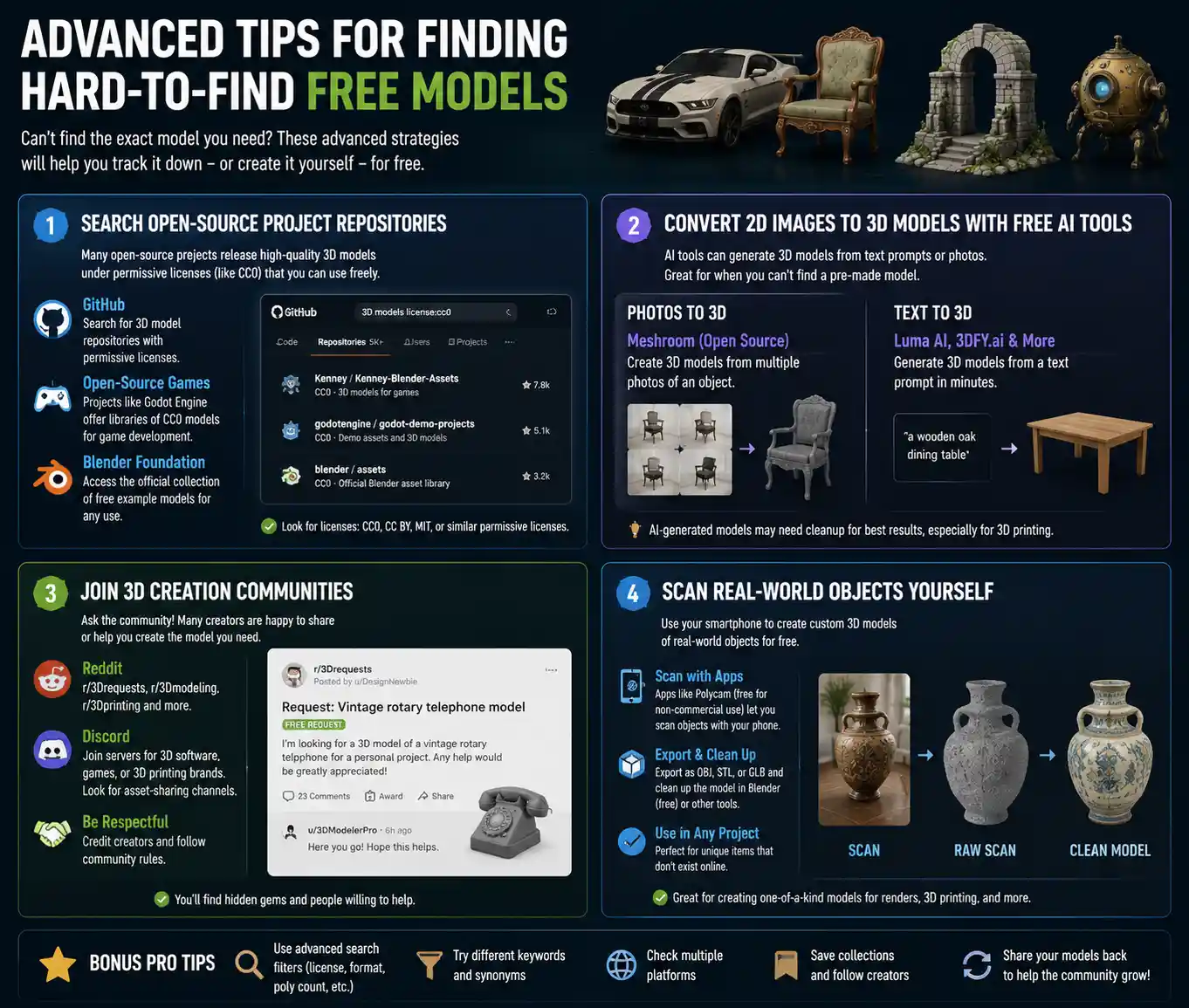
Sometimes you need a very specific model – a particular car model, a custom piece of furniture, or a rare historical artifact – and it doesn’t show up in the major repositories. When that happens, these advanced strategies will help you track down what you need for free.
Search Open-Source Project Repositories
Many large open-source projects, especially open-source games and 3D creation tools, release entire libraries of 3D models under permissive licenses. For example, the Godot Engine community maintains a library of free CC0 models for game development, and the Blender Foundation has a collection of free example models that are licensed for any use. GitHub is another great place to search: many creators upload their 3D model repositories to GitHub with permissive licenses, so you can download the files directly.
Convert 2D Images to 3D Models With Free AI Tools
If you can’t find the model you need, recent advances in AI have made it possible to generate a free 3D model from a text prompt or a 2D image. Many of these tools offer free tiers that let you generate and download models for non-commercial use, and some even allow commercial use for free. For example:
- Meshroom is a free open-source tool that can create a 3D model from multiple 2D photos of an object. This is perfect if you need a 3D model of a specific real-world object and can take photos of it yourself.
- Tools like Luma AI and 3DFY.ai offer free tiers for text-to-3D generation, so you can type “a wooden oak dining table” and get a full 3D model in minutes.
AI-generated models still need some cleanup to fix mesh errors or bad topology, especially for 3D printing, but they’re a great starting point if you can’t find a pre-made model anywhere.
Join 3D Creation Communities
When all else fails, ask the community. Reddit has several large communities like r/3Drequests, r/3Dmodeling, and r/3Dprinting where you can post a request for a specific free model. Many amateur and professional creators are happy to share a copy of a model they’ve already made for free, especially if you credit them. Discord servers for specific 3D software or 3D printing brands also have dedicated channels for sharing free assets, so joining a few relevant servers can give you access to models that aren’t posted on public repositories.
Scan Real-World Objects Yourself
If you have a smartphone, you already have a 3D scanner in your pocket. Free apps like Polycam (free for non-commercial use) let you scan any real-world object with your phone’s camera and export it as a 3D model. This is perfect for creating custom free models of unique objects that don’t exist online, like a hand-carved wooden bowl or a specific decorative item for a render. You can clean up the scanned model in free software like Blender, and use it for any project.
Common Mistakes to Avoid When Downloading Free 3D Models
Even experienced users make these common mistakes when downloading free 3D models, and they can cost you time, money, or legal trouble. Here’s what to watch out for:
First, downloading from untrusted sites. There are dozens of low-quality sites that scrape free models from legitimate repositories and re-upload them with ads, malware, or hidden download fees. Always stick to the well-known community platforms listed in this guide, rather than clicking random links from search engines that offer “10,000 free 3D models” for download. These sites often don’t check the license of the models they upload, so you could end up using a pirated model without even knowing it.
Second, ignoring attribution requirements. Even if a model is free for commercial use, if it’s licensed CC BY, you have to credit the creator. Failing to do so is a copyright violation, and many creators actively search for uncredited use of their work online. This can lead to a DMCA takedown notice, which can hurt your search rankings, get your game removed from an app store, or even lead to legal action. Adding attribution takes 30 seconds, so it’s not worth the risk.
Third, not checking for model errors before you start a project. If you’re 3D printing, a bad model can waste hours of print time and dozens of dollars worth of filament. If you’re working on a game or animation, a broken model can set your project back days. Always test a small section of the model, or check it in your software before you build your entire project around it. The 3D preview tool on most platforms is helpful, but it doesn’t catch every error, so a quick check after downloading is always worth it.
Fourth, not cleaning up the model before use. Even high-quality free models often have small issues that need fixing. For 3D printing, you may need to repair non-manifold geometry, add supports, or scale the model to the right size. For games and animation, you may need to optimize the poly count, reassign textures, or adjust the rigging. Don’t assume that a free model is ready to drop straight into your project without any adjustments – set aside 10-15 minutes to clean it up first.
Conclusion
Finding high-quality free 3D models doesn’t have to be a frustrating experience of sorting through dozens of broken files or risky unlicensed downloads. By starting with a clear understanding of license requirements, sticking to trusted community repositories tailored to your use case, and using simple quality checks to filter out bad files, you can find almost any model you need for free, whether you’re a hobbyist 3D printer, an indie game developer, or a professional designer working on a tight budget.
The free 3D model community is built on creators sharing their work to help other people learn and create. By respecting license terms, crediting creators where required, and even sharing your own modified models back with the community when you can, you help keep this valuable resource growing for everyone. With the tips in this guide, you’re ready to start searching for your next free 3D model and integrate it into your project with confidence.