
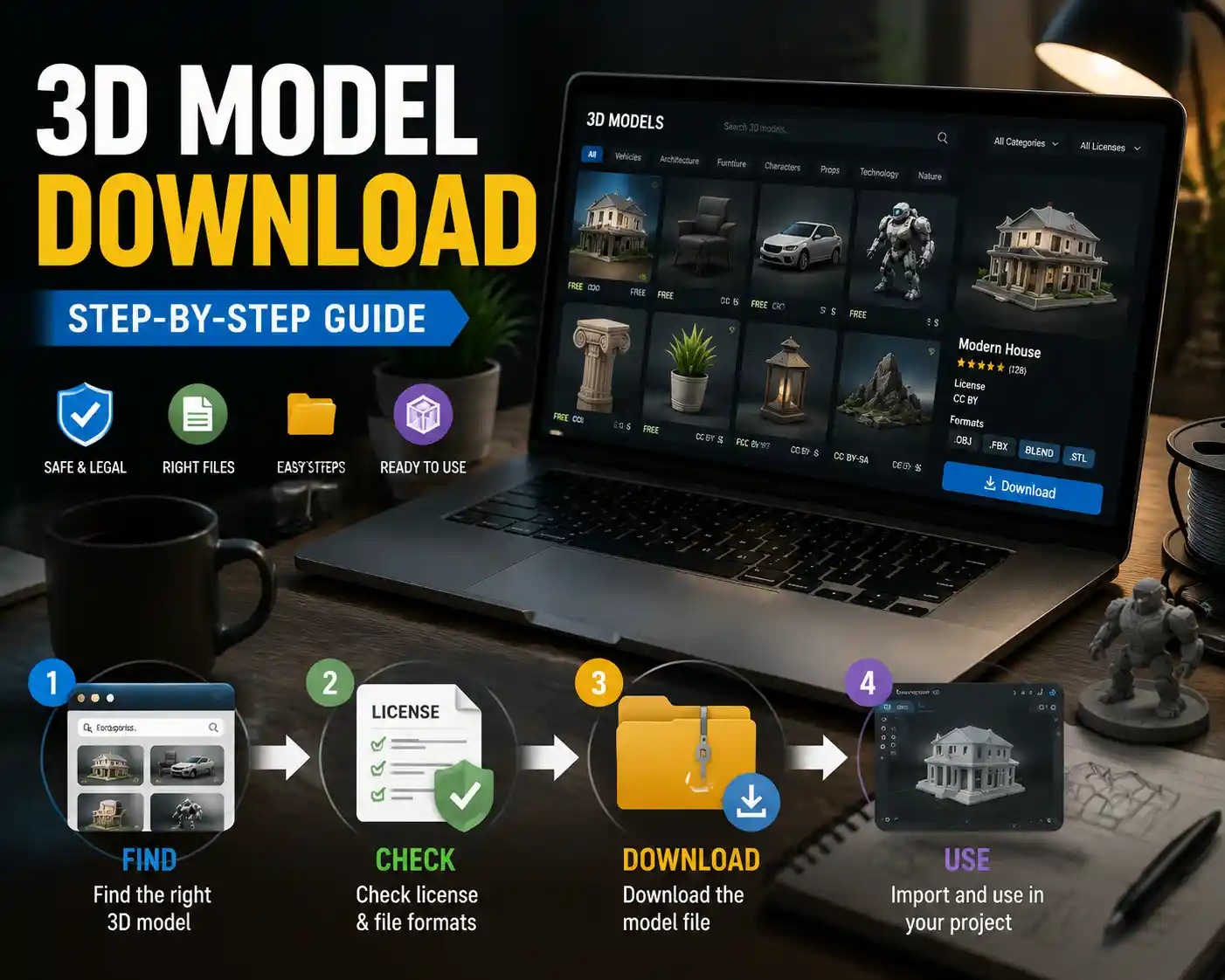
Whether you’re a 3D printing hobbyist, a game developer building out a level, a designer prototyping a product, or a student working on a 3D animation project, you’ve likely needed a pre-made 3D model at some point. Marketplaces and free model libraries host millions of ready-to-use files, but downloading the right model the right way can feel confusing if you’re new to the process. From choosing the correct file type to avoiding malware and respecting copyright rules, there’s more to it than just clicking a “download” button. This step-by-step guide breaks down everything you need to know to download 3D models safely, legally, and ready for your project.
Finding the Right 3D Model for Your Project
Before you can download a 3D model, you first need to find one that matches your needs. Thousands of websites host 3D models, ranging from free community-run libraries to premium commercial marketplaces, so narrowing down your options based on your use case will save you hours of wasted time. The first thing to decide is whether you need a free or paid model, as this will immediately shape which platforms you browse.
Popular Websites for Downloading 3D Models
Different sites cater to different needs, so it helps to know the strengths of the most popular platforms:
- Free non-commercial models: Sites like Sketchfab, Thingiverse, MyMiniFactory, and TurboSquid’s free section host millions of free models uploaded by creators. Thingiverse is specifically focused on 3D printable models, while Sketchfab has a huge library of models for animation, VR, and game development.
- Premium commercial models: TurboSquid, CGTrader, and FlippedNormals are go-to marketplaces for high-quality, game-ready or production-ready 3D models from professional creators. Models here often come with UV maps, texture sets, and multiple LOD (level of detail) versions ready for professional projects.
- Open-source and educational models: NASA 3D Resources, the Smithsonian X 3D collection, and Open3DModel offer free models of historical artifacts, spacecraft, and natural objects for educational and non-profit use.
When browsing, use specific search terms to narrow results. Instead of searching for “chair,” try “modern dining chair 3D printable” or “low-poly oak chair game ready” to get results that match your exact requirements. Most sites let you filter results by license, file type, polygon count, and price, so use those filters to eliminate irrelevant options early.
Verify Compatibility With Your Project
Even if a model looks perfect in the website’s preview, it won’t work for you if it’s not compatible with your software or use case. Before you click download, check two key details: the model’s intended use and its file format. If you’re 3D printing, you need a model that’s been tested for printing, with no non-manifold geometry or errors that will ruin your print. If you’re working in Blender, Unreal Engine, or Maya, you’ll want a file format that imports natively into your software without extra conversion.
“The biggest mistake new 3D artists make is downloading the first model that looks good, only to realize it’s the wrong file type or has a license that doesn’t allow their intended use. Taking two minutes to check details before downloading saves hours of troubleshooting later.”
Understanding 3D Model File Types and Licenses
Before you start the download process, it’s critical to understand two key elements that will determine if the model works for you: file types and usage licenses. Skipping this step can lead to importing errors, broken prints, or even legal trouble for commercial projects.
Common 3D Model File Types Explained
Different projects require different file formats, and most websites let you choose from multiple options when downloading. Knowing what each format is used for will help you pick the right one:
- .STL (Standard Tessellation Language): The most common format for 3D printing. STL files only store the surface geometry of a model, so they don’t include textures or color information. They’re universal across all 3D slicing software.
- .OBJ (Wavefront OBJ): A popular format for 3D modeling and animation. OBJs support geometry, texture coordinates, and basic material data, so they work well for exchanging models between different 3D software programs.
- .FBX (Filmbox): The standard format for game development and animated models. FBX supports rigging, animation data, textures, and materials, making it ideal for importing into game engines like Unity or Unreal Engine.
- .GLB/.GLTF: A modern open-source format optimized for web and VR/AR use. GLB files are compact and include all geometry, textures, and materials in a single file, making them perfect for online 3D viewers or interactive experiences.
- .BLEND/.MAX/.MA: Native file formats for specific software (Blender, 3ds Max, Maya, respectively). These are convenient if you use the same software, but can cause compatibility issues if you work with a different program.
If you’re unsure which format to pick, check your software’s documentation to see which formats it imports best. Most sites offer multiple formats, so you can usually download the one that matches your needs directly without having to convert it later.
3D Model Licenses: What You Can and Can’t Do
Just because you can download a 3D model for free doesn’t mean you can use it for any purpose. Creators retain copyright to their work, and most sites require uploaders to label models with a clear license that outlines allowed uses. Common licenses include:
Personal/Non-Commercial Use: This license lets you use the model for your own personal projects, like 3D printing a figurine for your desk or a student class project. You can’t use it in any product you sell, or in commercial content like a branded game or advertisement.
Commercial Use: Paid models almost always come with a commercial license that lets you use the model in products you sell, within certain limits. Some licenses require you to credit the original creator, while others let you use the model without attribution. Always check the terms: some commercial licenses limit how many physical copies you can 3D print, or prohibit reselling the model itself as-is.
Creative Commons (CC) Licenses: These standardized licenses are commonly used for free models, with clear labels for what’s allowed. For example, CC-BY lets you use the model for commercial purposes as long as you credit the creator, while CC-BY-NC only allows non-commercial use even with credit. Public Domain (CC0) means the model is free to use for any purpose, with no attribution required.
Ignoring license terms can lead to serious consequences, from takedown notices to copyright infringement lawsuits. Even if a model is free to download, always confirm the license matches your intended use before you add it to your project.
Step-by-Step Guide to Downloading a 3D Model
Once you’ve found the right model, confirmed it’s compatible, and checked the license, the actual download process is straightforward. Below is a step-by-step guide that works for most websites, with notes for common variations for free and paid models.
Step-by-Step Guide to Downloading a 3D Model
Once you’ve found the right model, confirmed it’s compatible, and checked the license, the actual download process is straightforward. Below is a step-by-step guide that works for most websites, with notes for common variations for free and paid models.
- Create an account (if required): Most 3D model websites require users to create a free account before downloading. This helps creators track downloads, and lets you save favorite models to your account for later. Some premium sites let you download without an account after purchase, but creating an account lets you access your download history if you need to re-download a file later.
- Add the model to your cart or check out: For free models, you’ll usually see a clear “Download” button directly on the model’s page. For paid models, you’ll need to add the model to your cart, enter your payment information, and complete checkout before you get access to the download link. Some marketplaces offer instant downloads after payment clears, while others may take a few minutes to process your order.
- Select your preferred file format and options: Many sites let you choose from multiple file formats, polygon counts, or texture resolutions before downloading. For example, a game-ready model might let you choose between a high-poly version for rendering and a low-poly version for in-game use. Select the options that best match your project, then confirm your choice to generate the download link.
- Start the download and save it to your device: Once the link is ready, click it to start the download. Most 3D model files are packaged as a .ZIP or .RAR archive to reduce file size and keep all related files (textures, material files, multiple versions) together. Save the archive to a location on your computer you can easily find, like your “3D Projects” folder or Downloads folder. Avoid saving it to a temporary folder if you want to keep the model for future use.
- Extract the files from the archive: After the download finishes, you’ll need to extract the contents of the compressed archive to access the actual 3D model files. On Windows, you can right-click the file and select “Extract All” to unzip it. On Mac, just double-click the .ZIP file to automatically extract it. For .RAR files, you may need a third-party tool like WinRAR or 7-Zip to extract the contents. Once extracted, you’ll see the 3D model file(s) and any accompanying texture or readme files.
Troubleshooting Common Download Issues
Sometimes downloads don’t go smoothly, even when you do everything right. The most common issue is a broken or incomplete download, which usually happens if your internet connection drops mid-download. If your file won’t extract or is smaller than the size listed on the website, simply delete the partial file and re-download it. Most sites let you re-download models as many times as you want after purchase or approval, so this is almost always a quick fix.
Another common issue is a download button that doesn’t work. This can happen if the site has pop-up blockers that interfere with the download, or if the model was removed by the creator for copyright or quality issues. If the button doesn’t respond, try disabling your ad blocker for the site (many ad blockers incorrectly block legitimate download buttons) or check if the model page has any notes about the file being taken down. If the model is removed, you’ll need to find an alternative model from another creator.
Some large 3D models (especially high-poly production-ready models with 4K textures) can be several gigabytes in size. If you have a slow internet connection, look for sites that offer split archives or download managers to help resume interrupted downloads. Avoid downloading large files on public Wi-Fi, which often cuts off large downloads to save bandwidth.
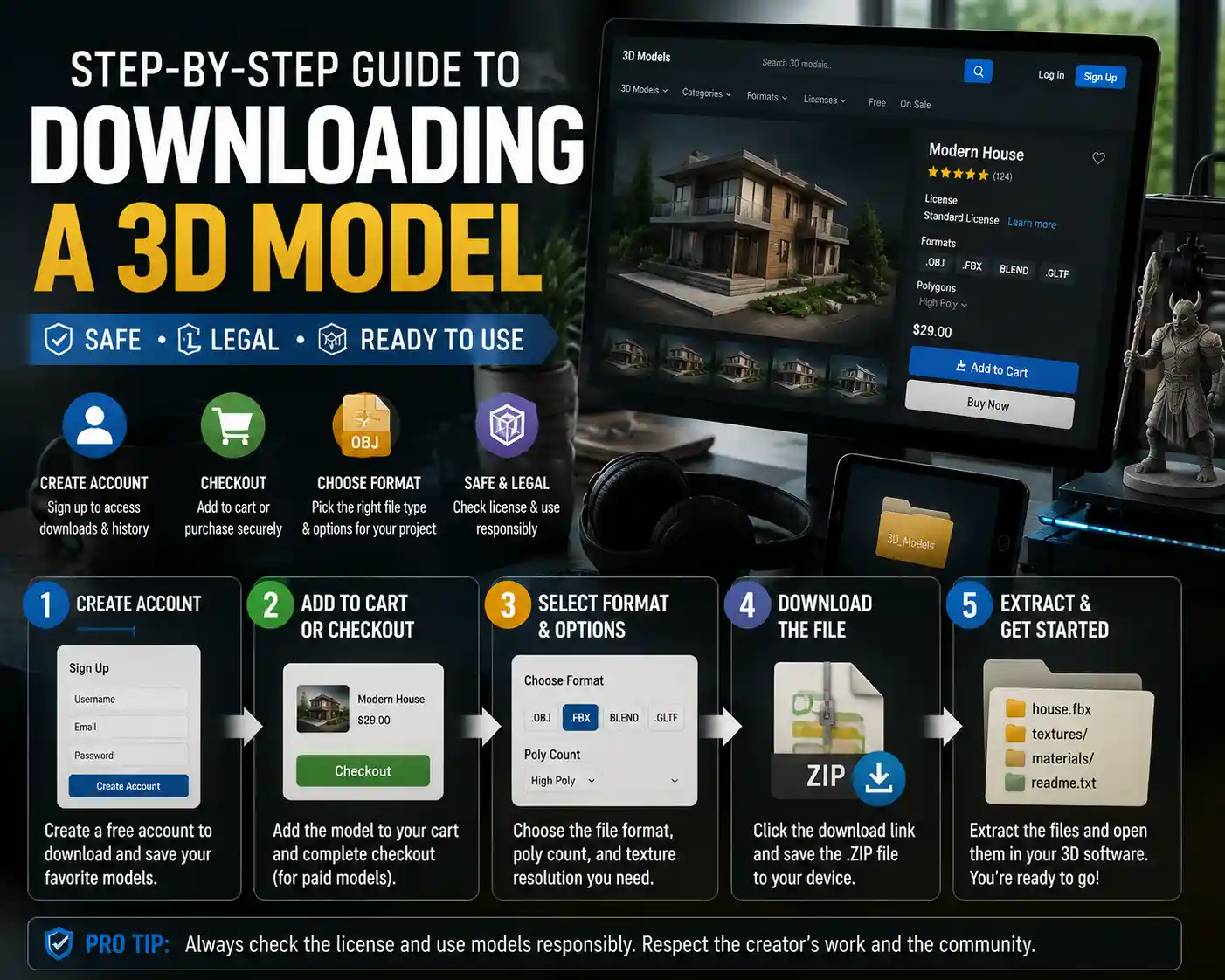
- Create an account (if required): Most 3D model websites require users to create a free account before downloading. This helps creators track downloads, and lets you save favorite models to your account for later. Some premium sites let you download without an account after purchase, but creating an account lets you access your download history if you need to re-download a file later.
- Add the model to your cart or check out: For free models, you’ll usually see a clear “Download” button directly on the model’s page. For paid models, you’ll need to add the model to your cart, enter your payment information, and complete checkout before you get access to the download link. Some marketplaces offer instant downloads after payment clears, while others may take a few minutes to process your order.
- Select your preferred file format and options: Many sites let you choose from multiple file formats, polygon counts, or texture resolutions before downloading. For example, a game-ready model might let you choose between a high-poly version for rendering and a low-poly version for in-game use. Select the options that best match your project, then confirm your choice to generate the download link.
- Start the download and save it to your device: Once the link is ready, click it to start the download. Most 3D model files are packaged as a .ZIP or .RAR archive to reduce file size and keep all related files (textures, material files, multiple versions) together. Save the archive to a location on your computer you can easily find, like your “3D Projects” folder or Downloads folder. Avoid saving it to a temporary folder if you want to keep the model for future use.
- Extract the files from the archive: After the download finishes, you’ll need to extract the contents of the compressed archive to access the actual 3D model files. On Windows, you can right-click the file and select “Extract All” to unzip it. On Mac, just double-click the .ZIP file to automatically extract it. For .RAR files, you may need a third-party tool like WinRAR or 7-Zip to extract the contents. Once extracted, you’ll see the 3D model file(s) and any accompanying texture or readme files.
Troubleshooting Common Download Issues
Sometimes downloads don’t go smoothly, even when you do everything right. The most common issue is a broken or incomplete download, which usually happens if your internet connection drops mid-download. If your file won’t extract or is smaller than the size listed on the website, simply delete the partial file and re-download it. Most sites let you re-download models as many times as you want after purchase or approval, so this is almost always a quick fix.
Another common issue is a download button that doesn’t work. This can happen if the site has pop-up blockers that interfere with the download, or if the model was removed by the creator for copyright or quality issues. If the button doesn’t respond, try disabling your ad blocker for the site (many ad blockers incorrectly block legitimate download buttons) or check if the model page has any notes about the file being taken down. If the model is removed, you’ll need to find an alternative model from another creator.
Some large 3D models (especially high-poly production-ready models with 4K textures) can be several gigabytes in size. If you have a slow internet connection, look for sites that offer split archives or download managers to help resume interrupted downloads. Avoid downloading large files on public Wi-Fi, which often cuts off large downloads to save bandwidth.
Staying Safe: Avoiding Malware and Copyright Issues
Downloading files from any website comes with security risks, and 3D model sites are no exception. Most reputable marketplaces scan files for malware before they’re available for download, but unregulated sites or model uploads from random users can carry hidden threats. Following a few basic safety rules will keep your device and your data safe.
Only Download From Reputable Websites
The easiest way to avoid malware is to stick to well-known, established 3D model platforms. The sites we mentioned earlier (Thingiverse, Sketchfab, TurboSquid, CGTrader) all have strict content guidelines and scan all uploaded files for viruses before they’re made public. Avoid downloading 3D models from random forum links, social media posts, or unvetted file-sharing sites, as these are the most common places to find infected files.
Even on reputable sites, be cautious of any download that asks you to install extra software, run an .EXE file, or enter your credit card information for a “free” model. Legitimate 3D model downloads come as .ZIP, .RAR, or the 3D file types we covered earlier. You should never have to run an executable file to get a 3D model, and any download that requires it is almost certainly malware.
Scan Downloaded Files Before Opening
If you’re downloading a model from a new or smaller site, it’s good practice to scan the downloaded file with your antivirus software before you open or extract it. Most modern antivirus programs automatically scan new downloads, but you can also manually right-click the file and select “Scan for viruses” to double-check. This only takes a few seconds and can stop malware before it infects your system.
It’s also important to avoid downloading pirated versions of premium 3D models. Pirated files are one of the most common sources of malware, and downloading them is also copyright infringement, which can lead to fines or legal action. Even if you find a premium model available for free on a file-sharing site, it’s not worth the security and legal risk. Many premium marketplaces offer free samples or low-cost versions of popular models for hobbyists on a budget.
Respect Copyright and Creator Rights
Beyond legal risk, respecting creator rights helps keep the 3D community healthy. Creators spend hours designing, testing, and uploading models for free or for sale, and following license terms supports their work. If a license requires attribution, make sure to credit the original creator in your project’s credits or description. If you want to modify a model and share it, check if the license allows derivative works before you post it publicly.
For 3D printing creators who sell physical products, always confirm that the model’s commercial license allows for 3D printing and selling physical copies. Many free non-commercial licenses prohibit this, even if you modified the model yourself. When in doubt, reach out to the original creator and ask for permission to use their work for your intended purpose. Most creators are happy to negotiate a license for small businesses or hobbyists, and it’s always better to ask than to risk violating their copyright.
Preparing Your Downloaded 3D Model for Use
Once you’ve successfully downloaded and extracted your 3D model, you’re almost ready to use it. But most models need a small amount of preparation before they work for your project, especially if you’re 3D printing or using it in a game engine.
Check the Model for Errors
For 3D printing, the most important step after downloading is checking the model for geometry errors that will cause print failures. Common issues include non-manifold geometry, overlapping faces, hollow spots, and missing walls. Most slicing software has basic error checking tools, but you can also use free tools like Meshmixer or Blender’s 3D Print Toolbox add-on to check and fix errors before you slice the model.
For animation or game development, check that the model has properly mapped textures, working rigging, and the correct polygon count for your needs. If the model is higher poly than you need, you can use decimation tools in Blender or other 3D software to reduce the polygon count without losing too much detail. Always import the model into your software first to test it before you start building it into your project, to catch any issues early.
Organize Your Downloaded Models
If you download a lot of 3D models, it’s easy to end up with a messy folder of unlabeled files that you can’t sort through later. Taking a minute to organize your models after downloading will save you time in the future. Create a clear folder structure, with separate folders for different project types, or different categories (e.g., 3D Printable, Game Ready, Characters, Props). Rename the model file to something descriptive, like “oak-dining-chair-low-poly.obj” instead of the default “model1234.obj” that some downloads use. Store frequently used models on your local hard drive for fast access, and archive older models to an external drive or cloud storage to save space.
Many 3D model libraries let you save models to your account on the site, so you can always re-download them later if you lose the local file. That said, it’s still good practice to keep a local backup of models you use often, in case the site goes down or the creator removes the model from the platform.
Conclusion
Downloading a 3D model from a website doesn’t have to be complicated, even if you’re completely new to 3D work. By taking the time to find the right model for your project, checking the license and file type before you download, following the step-by-step download process, and prioritizing safety and legal use, you can get a ready-to-use model for your project in just a few minutes.
The 3D community thrives on creators sharing their work, and respecting the rules of that community keeps it growing. Whether you’re downloading a free model for a weekend 3D printing project or a premium production-ready model for a professional game, following the best practices we’ve outlined here will help you avoid common mistakes and get straight to working on your project. With millions of high-quality models available online, there’s no need to build every model from scratch — and now you know how to download the right one safely and effectively.