
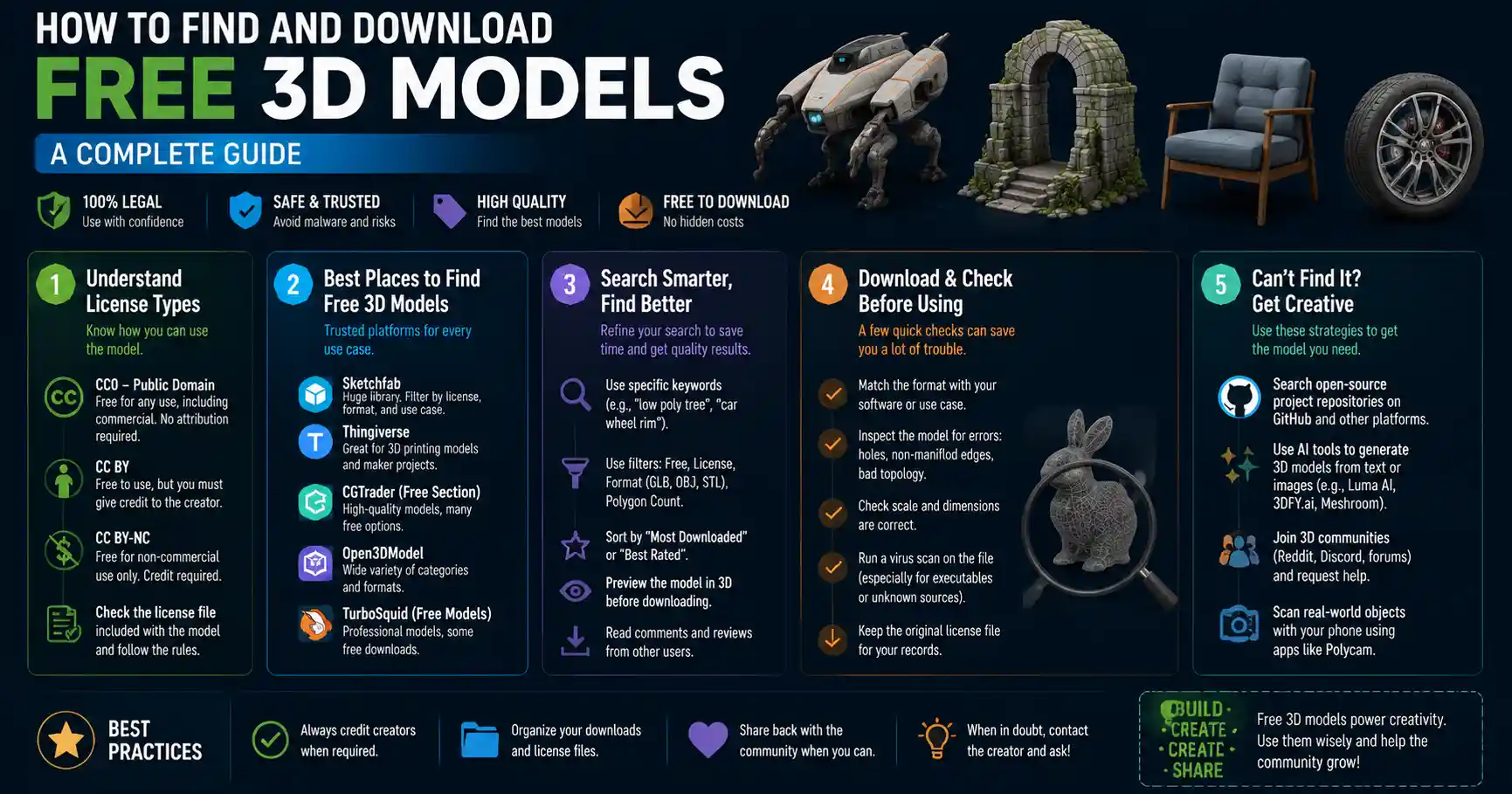
Whether you’re a game developer working on your first indie release, a 3D printing enthusiast testing a new design, a architecture student building a digital portfolio, or a digital artist experimenting with a new scene, high-quality 3D models are the backbone of any successful project. But commissioning custom models or purchasing premium assets from marketplaces can quickly blow a small budget, especially for hobbyists, students, or independent creators just starting out. The good news is that thousands of free, legally usable 3D models are available online if you know where to look and how to use them correctly. This guide breaks down everything you need to know to find, download, and use free 3D models without breaking the bank or violating copyright laws.
Understanding Legal Usage for Free 3D Models
Before you start downloading any free 3D model, it’s critical to understand the license terms that come with it. Unlike public domain content, most free 3D models come with specific restrictions that dictate how you can use them, whether commercially or non-commercially. Using a model outside of its license terms can lead to copyright strikes, legal fees, or having to pull your finished project from distribution.
Common License Types for Free 3D Assets
Most free 3D model platforms categorize assets by license, so you can filter results to match your intended use. The most common licenses you’ll encounter include:
- Public Domain (CC0): This is the most permissive license available. Models released as CC0 are free to use for any purpose, commercial or non-commercial, with no attribution required. You can modify them, redistribute them, or use them in paid products without any restrictions. This is the best option for commercial projects where you want to avoid legal hassle.
- Creative Commons Attribution (CC BY): This license allows free use for commercial and non-commercial projects, but you must give credit to the original creator. This is usually a simple line of text in your project credits or website footer crediting the model’s author, making it easy to comply with for most projects.
- Creative Commons Non-Commercial (CC BY-NC): This license allows you to modify and use the model for free, but you cannot use it in any project that generates revenue. This is a great option for personal projects, student work, or hobbyist renders, but it’s off-limits for commercial games, products, or client work.
- Royalty-Free: This term can sometimes be confusing, as it’s often used for both free and paid assets. For free royalty-free models, it usually means you can use the model without paying recurring royalties to the creator, even in commercial projects, but you cannot resell the model itself as a standalone asset. Always check the fine print for additional restrictions.
Red Flags to Avoid
Some sites scrape content from creators and repost free 3D models without permission, which means you could end up downloading a pirated asset even if you thought it was legally free. Avoid sites that require you to enter credit card information just to access free downloads, have excessive pop-up ads, or claim ownership of content uploaded by independent creators. Stick to well-established platforms with clear community guidelines that protect both creators and users.
"The biggest mistake new creators make is not checking the license before they use a free 3D model in a commercial project. I’ve seen indie game developers pulled from Steam because they used an unlicensed asset someone reposted on a random forum. It takes 30 seconds to check the terms, and it saves you years of work down the line."
Top Trusted Platforms for Free 3D Models
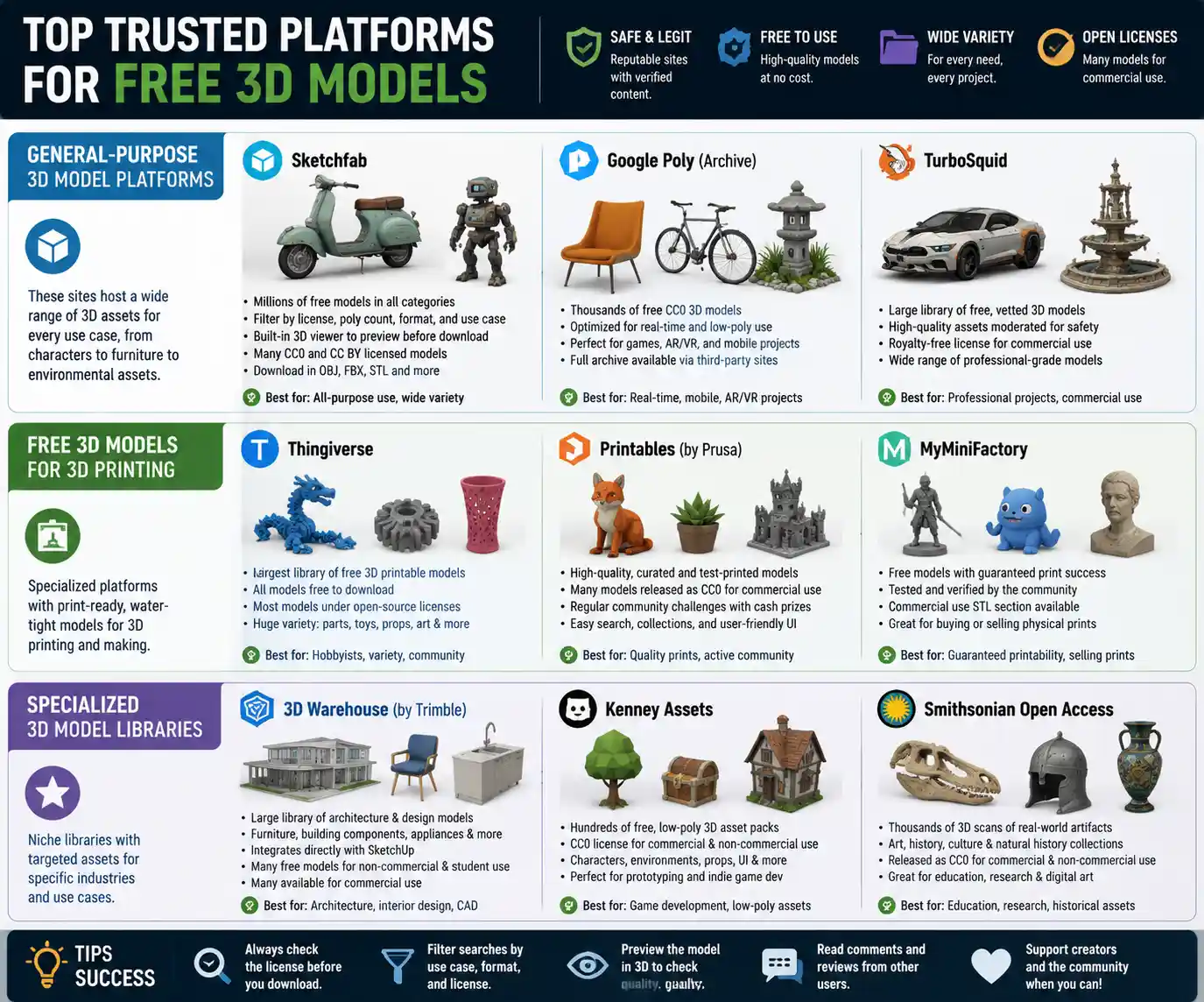
Not all free 3D model platforms are created equal. Some cater specifically to 3D printing, others to game development, and some to architectural visualization. Below are the most reputable platforms sorted by use case, so you can find exactly what you need for your project.
General-Purpose Free 3D Model Platforms
These sites host a wide range of 3D assets for every use case, from character models to furniture to environmental assets:
- Sketchfab: Sketchfab is one of the largest 3D platforms on the web, with millions of free models available for download. You can filter results by license, poly count, file format, and use case, and the built-in 3D viewer lets you inspect the model before you download it. Many creators release their work under CC0 or CC BY licenses, and there are huge collections of everything from everyday objects to full environmental sets. Sketchfab also supports direct downloads in most common file formats, including OBJ, FBX, and STL.
- Google Poly: While Google Poly was officially shut down for new uploads in 2021, the entire archive of thousands of free CC0 3D models is still available for public download through third-party archives. All models are optimized for real-time use, making them perfect for mobile games or AR/VR projects.
- TurboSquid: TurboSquid is best known for its premium 3D assets, but it also has a large library of free models available for download. All free models are vetted by the site’s moderation team, so you don’t have to worry about low-quality or pirated content. Most free models come with royalty-free licenses for commercial use, making it a great option for professional projects on a budget.
Free 3D Models for 3D Printing
If you’re looking for models to print at home or with a service, these platforms specialize in test-print, water-tight models ready for additive manufacturing:
- Thingiverse: Owned by 3D printer manufacturer MakerBot, Thingiverse is the oldest and largest community for free 3D printable models. All models on the site are free to download, and most are released under open-source licenses that allow modification and non-commercial use. You’ll find everything from toys and replacement parts for household items to cosplay props and art pieces.
- Printables: Printables, owned by Prusa Research, is a relative newcomer that has quickly become a favorite among 3D printing enthusiasts. The site curates high-quality models, all tested for printability, and many are released as CC0 for commercial use. The platform also offers community challenges with cash prizes for creators who release new free models.
- MyMiniFactory: MyMiniFactory has a large library of free 3D printable models, with a filter for free-only assets and a guarantee that all free models have been tested to print successfully. The site also has a section for STLs released under commercial use licenses, making it a good option for people looking to sell 3D prints of existing designs.
Specialized Free 3D Model Libraries
For specific use cases, these niche libraries offer targeted free assets you won’t find on general platforms:
If you work in architecture or interior design, 3D Warehouse from Trimble is the gold standard for free 3D models of furniture, building components, appliances, and entire architectural structures. It integrates directly with SketchUp, the most popular software for architectural drafting, so you can import models directly into your project without converting file types. Most models are free to use for non-commercial and student work, with many available for commercial use.
For game developers and real-time artists, Kenney Assets offers hundreds of free, low-poly 3D asset packs released under CC0 for commercial and non-commercial use. Kenney’s packs include everything from character bases and environmental tiles to props and UI elements, making it perfect for prototyping indie games or building a quick demo level. For animated characters, Mixamo (owned by Adobe) offers dozens of free rigged character models and thousands of free animations that you can download and use directly in Unity or Unreal Engine.
For academic and research projects, Smithsonian Open Access offers thousands of 3D scans of historical artifacts, art, and natural history specimens released as CC0 for non-commercial and commercial use. This is an incredible resource for educational projects, documentary work, or digital art installations that reference historical objects.
How to Search for and Filter Free 3D Models Effectively
Even with millions of models available, finding the exact high-quality model you need can feel like looking for a needle in a haystack if you don’t know how to refine your search. Follow these tips to cut through the noise and find what you need faster.
Use Specific Search Terms and Filters
General search terms like “free chair 3D model” will return thousands of results, most of which won’t match your needs. Instead, be specific about what you’re looking for, including the style and poly count you need. For example, searching “mid-century modern wooden chair low-poly 3D model CC0” will immediately eliminate high-poly sculpts, modern chairs, and models that can’t be used commercially.
Almost all major platforms let you filter results by multiple criteria. Always filter by license first to eliminate models that don’t match your intended use. If you’re working on a game, filter by poly count to avoid downloading a 10 million-polygon model that will crash your game engine. If you need a model ready to 3D print, filter for models specifically tagged as “printable” or “watertight” to avoid models that have errors that will ruin your print.
Check Model Details Before Downloading
Before you spend time downloading a large file, take a minute to inspect the model’s details to make sure it meets your needs. Most platforms let you see previews, wireframe views, or even interactive 3D previews that let you rotate the model and check for errors. Look for these key details:
- File formats available: Make sure the model is available in a format your software supports (OBJ, FBX, STL, and glTF are the most common).
- Poly count: A high-poly model is great for rendering and static visualization, but it will be too slow for real-time games or AR applications.
- Rigging and UVs: If you need an animated character, confirm the model is already rigged with a working armature and has properly unwrapped UVs for texturing.
- Creator notes: Many creators include notes about known issues, required software, or attribution requirements, so always read the description before downloading.
Use Collections and Curated Lists
Most platforms let creators and users curate collections of free models around specific themes. For example, you can find curated collections of “free CC0 medieval fantasy assets” or “free 3D printable household replacement parts” that have already been sorted by other users. This saves you time sorting through low-quality results, as most collections are maintained by community members who only include high-quality, properly licensed models.
You can also find curated lists on creative communities like Reddit, Reddit’s r/3Dmodeling and r/3Dprinting regularly update lists of the best free model sources, and creators often share their own free releases there. Pinterest and Behance also have curated collections of free 3D assets for specific industries, like architectural visualization or game development.
How to Fix and Customize Free 3D Models
It’s rare that a free 3D model will fit your project perfectly right out of the box. Most free models require small adjustments or fixes to match your needs, whether that’s repairing a mesh for 3D printing, reducing the poly count for a game, or retexturing to match your scene’s color palette. You don’t need advanced 3D modeling skills to make basic adjustments, and there are free tools that can handle most common issues.
Common Issues with Free 3D Models
Free models can have a range of common problems that are easy to fix once you know what to look for:
- Non-manifold geometry: This is a common issue with 3D models intended for printing, where the mesh has overlapping faces or open edges that make it impossible to slice. Most free 3D printing tools can automatically fix this issue in one click.
- Too high poly count: A 3D scan or high-resolution sculpt will often have millions of polygons, which is too much for real-time use. You can reduce the poly count using free decimation tools without losing much visible detail.
- Missing or low-resolution textures: Many free models don’t include textures, or only include low-resolution versions that don’t look good in high-definition renders. You can easily add your own textures using free PBR texture libraries like Poly Haven, which also offers all its textures for free under CC0.
- Incorrect scale: Many creators upload models without setting the correct unit scale, so your model might be 100 times bigger or smaller than you need when you import it into your project. This is an easy fix in any 3D software: just measure a reference object and scale your model to match.
Free Tools for Editing and Fixing Models
You don’t need to pay for expensive software like Blender (wait, actually Blender is completely free and open source!) to edit and fix your free 3D models. Blender is the most popular free 3D creation suite, and it can handle everything from mesh repair to retopology to retexturing and animation. There are thousands of free tutorials on YouTube that walk you through how to fix common issues with free models in Blender, so even beginners can learn the basics in an afternoon.
For 3D printing-specific fixes, tools like Meshmixer (free from Autodesk) and Ultimaker Cura (free slicing software) have built-in automatic repair tools that fix non-manifold geometry, hollow out models to save filament, and add supports for complex prints. For quick online repairs without downloading any software, MeshLab is a free open-source tool that you can run in your browser to clean up and simplify meshes.
When to Customize vs. Create From Scratch
Free 3D models are a huge time saver, but it’s important to know when it makes more sense to customize an existing model vs. build one from scratch. For environmental props, background objects, or common items that don’t need to be unique, a customized free model is almost always the best choice. It saves you hours of work and lets you focus your time on the core unique elements of your project. For main characters, branded products, or key design elements that need to be one-of-a-kind, you can still start with a free base model and customize it heavily to fit your needs, which is faster than building from scratch.
How to Get Free Custom 3D Models From Creators
If you can’t find the exact model you need in existing libraries, you can still get a custom 3D model for free without paying a creator. It takes a bit more networking and effort, but it’s a great option for non-commercial projects or open-source initiatives.
Collaborate With Student Creators
3D modeling students are always looking for real-world projects to add to their portfolios. Many art schools and university design programs have student job boards or community forums where you can post a request for a custom 3D model in exchange for full credit in your project and a portfolio piece for the student. This is a win-win: you get a free custom model tailored to your needs, and the student gets real-world experience and a sample of their work to show future clients.
You can also find student creators on creative platforms like ArtStation, Instagram, or Behance. Most students list their availability for collaborative projects on their profile, and many are happy to work on interesting non-commercial projects for free to build their portfolio.
Join 3D Modeling Communities and Open-Source Projects
Open-source game projects, 3D printing communities, and design collectives often work together to create free custom 3D models that are shared with the entire community. If you join one of these communities, you can request a custom model, and if your request fits the project’s goals, other community members may help you create it for free. For example, if you’re working on an open-source medieval fantasy game, you can request a specific weapon model on the project’s forum, and a community modeler may create it for free to add to the project’s asset library.
Communities like Reddit’s r/requestabot or Discord servers for 3D artists also have channels where you can request free models for non-commercial projects. Always be clear about your project’s scope and license requirements when posting a request, and be respectful of creators’ time — don’t request a complex 100-hour model for a personal project expecting it to be done for free.
Participate in Community Challenges and Requests
Many 3D modeling communities host monthly challenges where creators create models based on a theme, and the finished models are released for free to the entire community. For example, Printables’ weekly 3D printing challenges often result in dozens of new free models released under permissive licenses. You can also join a challenge as a requester: many challenges let community members suggest themes or specific models that creators will work on for the challenge, resulting in a free custom model that everyone can use.
Conclusion
Free 3D models are an incredible resource for creators of all skill levels and industries, from hobbyist 3D printing enthusiasts to independent game developers to architecture students. The key to using them successfully is starting with a clear understanding of license terms, sticking to reputable platforms, and taking the time to refine your search to find high-quality models that match your project’s needs. Even if a free model isn’t perfect right out of the box, free tools like Blender and Meshmixer make it easy to fix common issues and customize the model to fit your vision. And if you can’t find what you need, collaborating with student creators and open-source communities can help you get a custom model for free that meets your exact requirements.
By following the steps outlined in this guide, you can build a library of high-quality, legally usable 3D assets without spending a dime, leaving you more budget and time to focus on what matters most: bringing your creative project to life. Whether you’re printing a new replacement part for your kitchen, building your first indie game, or creating a digital render for a class project, free 3D models give you the flexibility to create more without breaking your budget.