
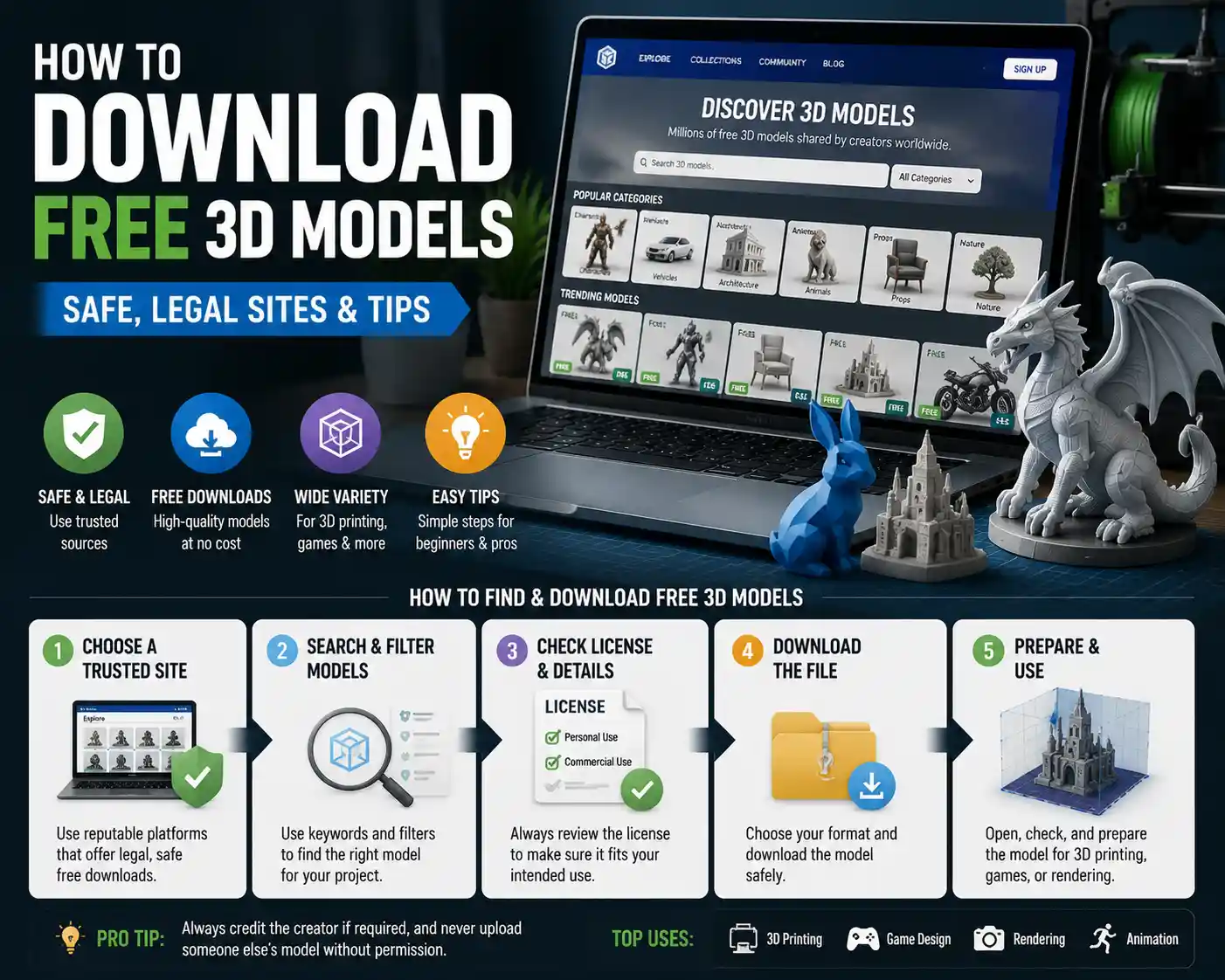
Whether you’re a hobbyist 3D printer, a game developer building a open world, a graphic designer adding depth to a marketing campaign, or a student working on a architecture project, free 3D models can cut down your work time from weeks to hours. Creating a detailed 3D model from scratch requires specialized skills, expensive software, and dozens of hours of tedious work – but today, there are thousands of high-quality free models available online, created by designers and hobbyists who share their work for the community. That said, finding reliable, legal, and print-ready or render-ready free models can feel overwhelming if you don’t know where to look. This guide breaks down everything you need to know to download free 3D models safely, legally, and for your specific use case.
Understand Licensing Before You Download
Before you click the “download” button on any free 3D model, the most important step is to understand its licensing terms. Many new creators make the mistake of assuming “free” means “free to use for any purpose,” but that’s not always the case. Using a model outside of its allowed license can lead to copyright claims, takedowns, or even legal action, especially if you’re using the model for commercial projects.
Common Free 3D Model Licenses
Most free 3D model repositories use one of a handful of standard licenses, and understanding the difference between them will save you a lot of trouble down the line:
- Creative Commons Zero (CC0): This is the most permissive license available. CC0 means the creator has waived all copyright to the model, and you can use it for any purpose – personal or commercial – with no attribution required. You can even modify the model and redistribute it as your own. This is the best license for most use cases, especially commercial work.
- Creative Commons Attribution (CC BY): This license allows you to use the model for personal and commercial purposes, modify it, and redistribute it, as long as you give credit to the original creator. This is a very common license for free models, and it’s generally easy to comply with – just add a line crediting the creator in your project’s credits or documentation.
- Creative Commons Attribution-NonCommercial (CC BY-NC): This license allows you to modify and use the model, but only for non-commercial purposes. You cannot use this model in any project that makes you money, whether that’s a sold 3D print, a commercial game, or a marketing campaign. This is one of the most common free licenses, but it’s off-limits for any commercial work.
- Personal Use Only: Some creators release their models for free only for personal use, with no explicit commercial permission. Even if attribution isn’t required, you cannot use these models for any commercial project. Always check the fine print if this is listed as the license.
- Royalty-Free: This term is often used for free models on commercial platforms, and it generally means you pay no upfront fee to use the model for commercial purposes, though sometimes you still need to credit the creator or restrictions apply to reselling the model itself. Always read the terms to confirm.
It’s worth noting that many repositories have system for filtering models by license type. Always use that filter if you’re working on a commercial project to avoid accidentally using a non-commercial model. A little due diligence upfront prevents major headaches later.
“The 3D community thrives on sharing, but respect for creators’ rights is what keeps that sharing going. Taking two minutes to check a license doesn’t just protect you – it protects the creators who give away their work for free.”
The Best Repositories for Free 3D Models
Not all free 3D model websites are created equal. Some are filled with low-quality, broken, or virus-infected files, while others are curated communities with thousands of high-quality free models from experienced creators. Below are the most trusted repositories, sorted by use case, to help you find what you need.
General-Purpose Free 3D Model Repositories
These sites host a wide range of 3D models for everything from 3D printing to rendering to game development:
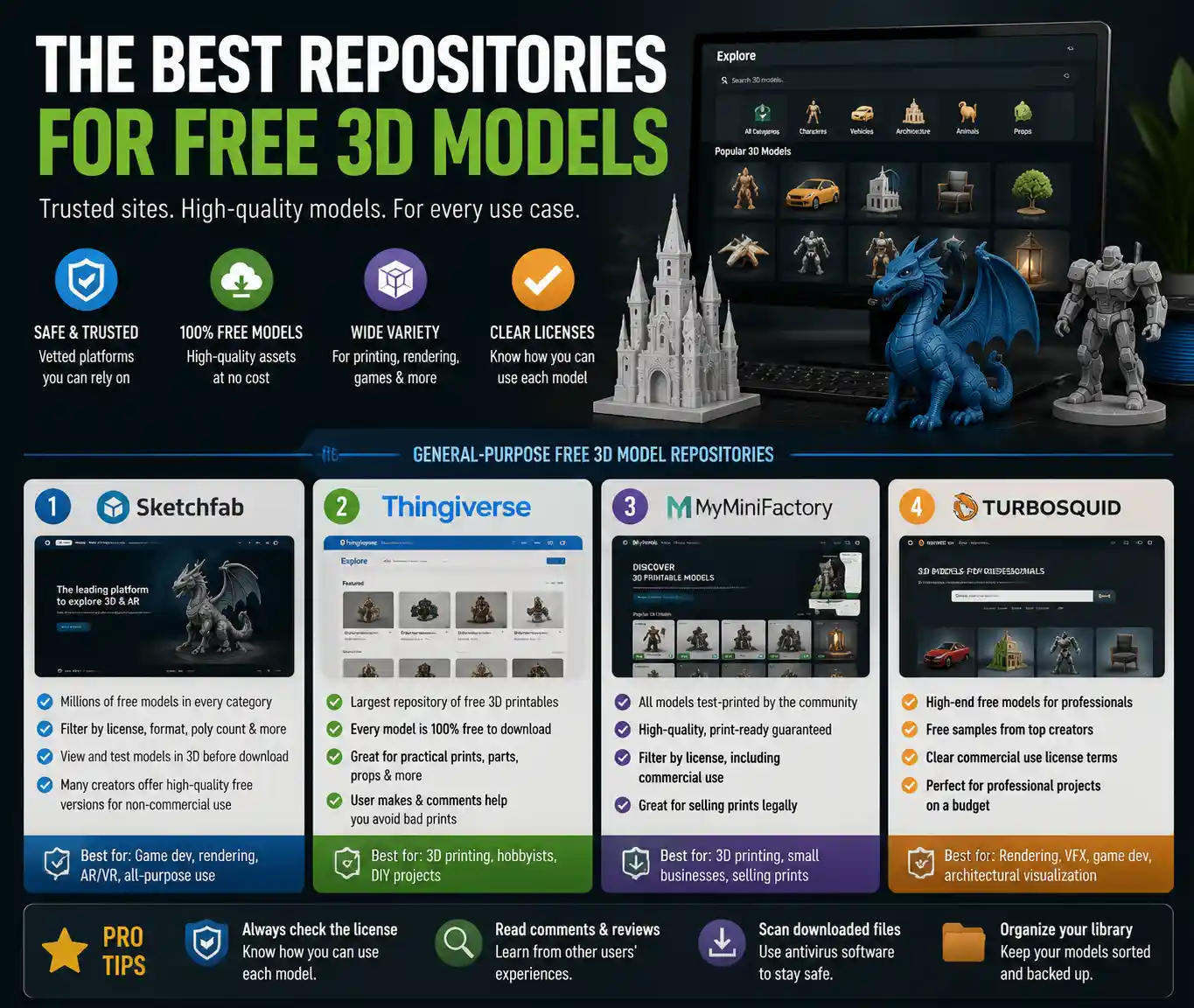
- Sketchfab: Sketchfab is one of the largest 3D model platforms in the world, with millions of free models available across every category. You can filter searches by license (including CC0 and CC BY), file format, and even poly count, which makes it perfect for game developers who need low-poly models. It also lets you view and test the model in 3D directly in your browser before you download it, so you don’t waste time downloading files that don’t meet your needs. Many creators post both free and paid versions of their models, so you can often get a high-quality free version for non-commercial use.
- Thingiverse: Owned by 3D printing company MakerBot, Thingiverse is the oldest and largest repository dedicated exclusively to free 3D printable models. Every model on Thingiverse is free to download, and most are licensed for personal use with flexible terms. It’s the best place to find practical prints, from phone cases to replacement parts for household items to cosplay props. Most models include test prints and user comments that flag issues, so you can avoid models that don’t print well.
- MyMiniFactory: MyMiniFactory has a large collection of free 3D printable models, and all models on the platform are test-printed by the community to guarantee they work. That means you’re far less likely to get a broken model with errors that ruin your print. It also filters for commercial use licenses, so you can find free models you can sell as 3D prints if you run a small 3D printing business.
- TurboSquid: TurboSquid is best known for high-end paid 3D models for professional rendering and game development, but it also has a huge library of free models. Many professional creators upload free sample versions of their paid models, so you can get high-quality professional assets for free. All free models on TurboSquid come with clear license terms for commercial use, making it a great option for professional designers on a budget.
Specialized Repositories for Specific Use Cases
If you’re looking for models for a specific project, these niche repositories have curated collections that beat general-purpose sites:
- Free3D: Free3D has a large collection of free models for game development, architecture visualization, and 3D printing. It offers filters for poly count and file format, making it easy to find models that fit your workflow. It also has a large community of independent creators who share their work for free.
- NASA 3D Resources: For anyone interested in space, science, or educational projects, NASA’s free 3D model repository has hundreds of accurate 3D models of spacecraft, planets, rovers, and more. All models are free to use for any purpose, as they’re created with public funding, so they’re perfect for educational content, games, or 3D prints. The models are highly accurate, so you don’t have to worry about incorrect proportions or details.
- BlenderKit: If you use Blender, the popular free 3D creation software, BlenderKit offers a huge library of free models, materials, and textures that integrate directly into the Blender interface. You can drag and drop models directly into your project without leaving the software, which speeds up your workflow dramatically. The free plan gives you access to thousands of CC0 and CC BY models, and the license terms are clear for commercial use.
- Open3DModel: Open3DModel has a library of over 15,000 free 3D models across categories from furniture to vehicles to characters. All models are free to download, and you can filter by license to find commercial-use options.
One of the best things about these repositories is that most have active comment sections where users can report broken files, ask questions, and share modifications they’ve made. That means you can often fix small issues with a model by reading through the comments before you download or print it.
How to Download and Prepare Free 3D Models for Your Project
Once you’ve found the model you want and confirmed its license, the next step is to download it and get it ready for your use. The process varies a little depending on whether you’re 3D printing, rendering, or using it in a game, but the core steps are the same.
Check the File Format
Different projects require different file formats, so always confirm that the model you’re downloading is available in a format your software supports. Common formats include:
- STL: The most common format for 3D printing, used by almost all slicer software.
- OBJ/FBX: Standard formats for 3D rendering, animation, and game development, supported by Blender, Unity, Unreal Engine, and most other professional software.
- GLB/GLTF: Compact, web-friendly formats for 3D models used in websites and AR/VR projects.
- Blend: Native Blender format, which is perfect if you use Blender and want to edit the model directly.
Most repositories let you filter searches by file format, so you can narrow down your results to only models that work with your software. If a model only comes in a format you don’t need, you can convert it using free tools like Blender or Online 3D Converter, but converting can sometimes introduce errors, so it’s better to get the right format upfront.
Scan for Malware
While most major repositories scan files for viruses, it’s always a good idea to scan any downloaded 3D file with an antivirus program before opening it. Small, unknown repositories may host files uploaded by third parties that contain malware, so a quick scan takes 10 seconds and protects your device. This is especially important for executable files or zipped archives that contain multiple files.
Inspect and Repair the Model
Even high-quality free models can have small errors that cause problems when 3D printing or rendering. Before you use the model, open it in your 3D software to check for common issues:
- Open the model and check for non-manifold geometry – edges that are connected to more or fewer than two faces, which can cause 3D printing errors. Most free tools like Meshmixer or Blender can automatically fix this.
- Check the scale of the model. Many creators upload models in arbitrary units, so a model that’s supposed to be a 10cm phone stand might import as 10 meters in your software. Double-check the dimensions before you print or render.
- Separate or combine parts as needed. If you’re 3D printing a large model like a cosplay sword, it may come as a single piece that you need to split into smaller parts to fit on your print bed, or multiple pieces that you need to join together.
For 3D printing specifically, free tools like MeshLab or Meshmixer can automatically repair most common errors, including holes in the mesh and overlapping faces. Taking five minutes to repair the model before slicing will save you from wasting filament on a failed print.
Optimize for Your Use Case
Depending on what you’re using the model for, you may need to optimize it to get the best results:
For 3D printing: If the model has a lot of detail that your printer can’t handle, you can simplify the mesh to reduce the file size and make printing smoother. Add supports if the model has overhangs that require them, even if the original model didn’t include them.
For game development: If you’re using the model in a real-time game, you’ll need to reduce the polygon count (retopologize) to keep the game running smoothly. Most free models on sites like Sketchfab have low-poly versions available, but you can also simplify the mesh in Blender if needed. You can also add or adjust textures to match your game’s art style.
For rendering: For professional visualizations or animations, you may need to add higher-resolution textures or adjust materials to get the look you want. Many free models come with basic textures, but you can upgrade them for free using sites like Poly Haven to get a higher-quality result.
Safety, Legal, and Quality Tips for Free 3D Models
Even when you’re downloading from a trusted repository, there are a few best practices to follow to stay safe, legal, and get the best possible result.
Avoid Copyright Infringement
Many free 3D models are of copyrighted characters, brand logos, or intellectual property – think Disney characters, superheroes, or popular brand products. Just because a model is free to download doesn’t mean it’s legal to use, even if it’s marked as personal use. If you’re making and selling 3D prints of copyrighted characters, for example, you can receive a copyright takedown or even a lawsuit. For personal use, most rights holders don’t go after individual hobbyists, but for commercial use, always stick to original models or models that are explicitly licensed for commercial use.
Credit Creators When Required
If your model is licensed under CC BY, it’s not just a legal requirement to credit the creator – it’s also good etiquette. The 3D community relies on creators sharing their work for free, and giving credit helps creators build their audience and encourage them to share more free work in the future. Most of the time, a simple link back to the creator’s profile on the repository is all that’s needed. For public projects like games or websites, add the creator’s name and a link in your credits page.
Judge Quality Before You Download
Not all free models are created equal, and there are a few quick ways to tell if a model is high quality before you download it:
- Check the number of downloads and user ratings. Models with thousands of downloads and positive ratings are almost always high quality. If a model has no ratings and only a handful of downloads, it’s more likely to have errors.
- Look at multiple preview images or the in-browser 3D preview. This lets you check for weird geometry, incorrect proportions, or missing details before you download.
- Read the user comments. Users will almost always flag errors, printability issues, or missing textures in the comments. If multiple people say the model doesn’t print well, pick a different one.
Stay Safe From Scams
Some disreputable websites pretend to offer free 3D models but actually exist to collect your personal information or infect your device with malware. Avoid any site that asks for your credit card information to download free models, or that makes you click through multiple pop-up ads to get the download link. Stick to the well-known repositories listed earlier, and never enter personal information like your email address or phone number unless you trust the site. Most reputable repositories let you download free models without creating an account, though creating an account gives you access to extra features like saving favorite models.
Another common scam is sites that reupload models from other repositories without the creator’s permission and charge a fee to download them. These sites often steal free CC0 models and sell them for a profit, which is allowed under CC0, but you can get the same model for free from the original repository. Always go to the original source if you can, to support the creator and avoid paying for something that’s available for free.
Give Back to the Community
If you modify a free model and fix errors, or you create your own free models, consider sharing your work back to the community. Many of the best free model repositories rely on creators sharing their work, and contributing helps keep the ecosystem alive. Even if you’re not a professional 3D artist, sharing a fixed version of a model you modified or a simple original model you created helps other hobbyists who are just starting out.
Conclusion
Downloading free 3D models is a game-changer for hobbyists, students, and professional creators on a budget. It lets you access thousands of high-quality assets without investing hundreds of hours in creating them from scratch, and it supports a global community of creators who love sharing their work. The key to success is simple: start by understanding the license to make sure you’re using the model legally, stick to trusted repositories to avoid low-quality or dangerous files, and take a few minutes to inspect and repair the model before you use it. Whether you’re printing a replacement part for your fridge, building a indie game, or creating a school project, there’s a free 3D model out there that fits your needs – and following the steps in this guide will help you find, download, and use it safely and successfully.