
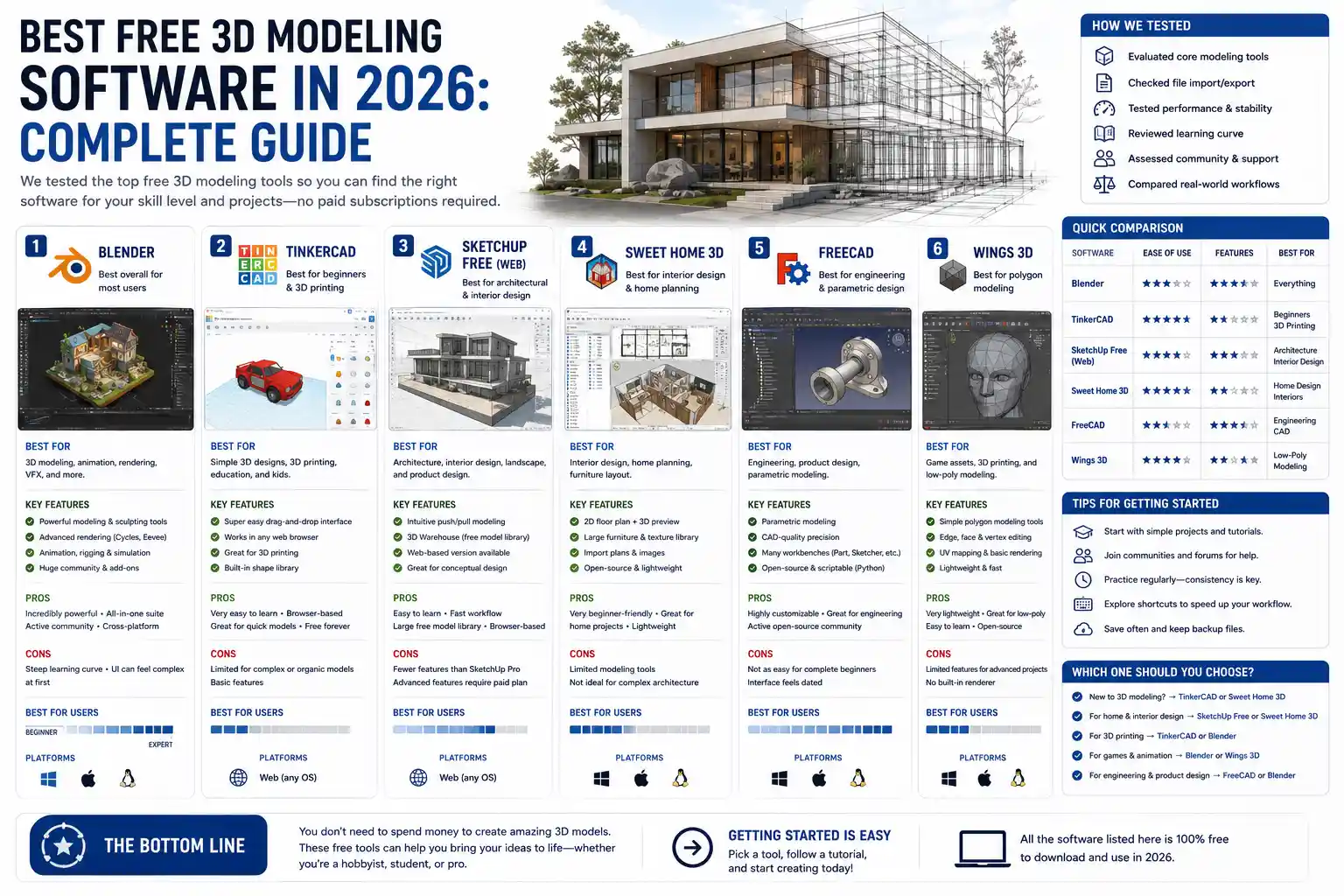
Whether you’re a hobbyist 3D printing a custom phone case, a student working on a game design project, or a small business owner prototyping a new product, the cost of professional 3D modeling software can feel like a major barrier. Premium tools like Autodesk Maya, Blender (wait, no—Blender is free now) or SolidWorks can run into hundreds of dollars per year in subscriptions, putting them out of reach for anyone not working at a large studio or with a generous institutional budget. But the good news is that the open-source and free-to-use creator community has exploded over the last decade, and today there are dozens of capable free 3D modeling tools available for every skill level and use case. The real question isn’t if free options exist—it’s which one fits your specific needs, and what tradeoffs should you expect when choosing a no-cost tool over a paid alternative.
What Counts as “Free” 3D Modeling Software?
Before we dive into specific tool recommendations, it’s important to clarify what “free” actually means in the context of 3D modeling, because not all free licenses are created equal. Many new creators run into hidden catches: a tool that advertises itself as free might actually be a limited trial, a free version with locked core features, or a free-for-personal-use license that prohibits commercial work. Understanding these distinctions will save you time and legal trouble down the line.
Free vs. freemium vs. free trial
First, let’s break down the most common licensing models: A completely free tool has no upfront cost, no subscription fees, no feature locks, and no expiration. Most of the tools in this category are open-source, meaning the community maintains the code and anyone can modify it to add new features. A freemium tool is free to download and use a base set of features, but charges for advanced tools, cloud storage, export options, or commercial licensing. A free trial is a time-limited version of a paid tool that locks all features after the trial period ends—this isn’t truly free, so we won’t focus on these here.
Personal vs. commercial use rights
The second big distinction is use rights. Many free 3D modeling tools allow commercial use of models you create, but some only permit personal, non-commercial projects. For example, some tools reserve commercial use for their paid tiers, while open-source tools almost always allow commercial use with few to no restrictions. Always check the license agreement before using a free tool for work you plan to sell—this is a common pitfall for new independent creators.
Top Free 3D Modeling Software for Every Use Case
Now that we’ve clarified what “free” actually means, let’s break down the most capable free tools available today, organized by their primary use case. There truly is a free option for every type of 3D project, from beginner art to industrial prototyping.
Blender: The All-In-One Open-Source Powerhouse
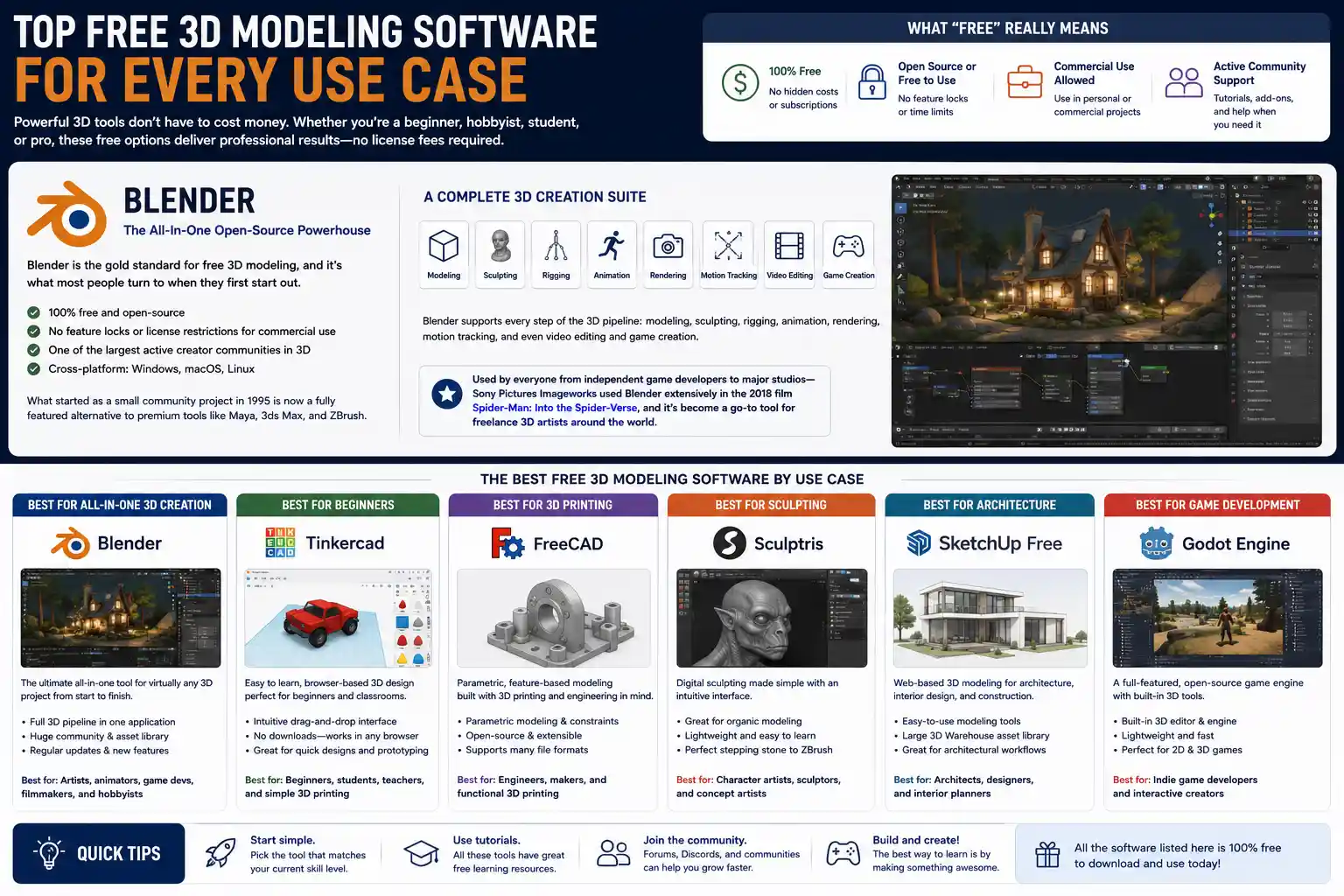
Blender is the gold standard for free 3D modeling, and it’s what most people turn to when they first start out. It’s 100% free and open-source, has no feature locks, no license restrictions for commercial use, and boasts one of the largest active creator communities in the 3D space. What started as a small community project in 1995 is now a fully featured alternative to premium tools like Maya, 3ds Max, and ZBrush.
Blender supports every step of the 3D pipeline: modeling, sculpting, rigging, animation, rendering, motion tracking, and even video editing and game creation. It’s used by everyone from independent game developers to major studios—Sony Pictures Imageworks used Blender extensively in the 2018 film Spider-Man: Into the Spider-Verse, and it’s become a go-to tool for freelance 3D artists around the world.
The main downside of Blender is its steep learning curve. Because it has so many features, it can feel overwhelming for complete beginners. But there are thousands of free tutorials available on YouTube and Blender’s official website, and the community is extremely welcoming to new users. For anyone looking for a free tool that can grow with them as they improve their skills, Blender is almost always the best first choice.
Free Tools for Beginners and Casual Hobbyists
If you’re new to 3D modeling and just want to dip your toes in without committing to learning Blender’s complex interface, there are several free browser-based and lightweight desktop tools built specifically for beginners. These are perfect for 3D printing beginners, kids learning 3D design, or anyone who wants to create simple models without a steep learning curve:
- Tinkercad: Tinkercad is a free browser-based 3D modeling tool from Autodesk, built specifically for beginners and education users. It uses a simple block-building approach that makes it easy to create basic shapes, combine them, and export models ready for 3D printing. It’s 100% free for personal use and education, and even allows commercial use for small projects. If you’ve never created a 3D model before, Tinkercad is the best place to start.
- SketchUp Free: SketchUp is a popular tool for architectural modeling and design, and the free web version is perfect for beginners who want to create simple architectural models, furniture, or household items. The free version includes all the core modeling tools you need for basic projects, and it has a much more intuitive interface than Blender for new users. The main catch is that the free version only allows 10GB of cloud storage, and commercial use requires a paid license, so it’s best for personal hobby projects.
- Vectary: Vectary is a browser-based 3D design tool that offers a free tier for personal use. It combines parametric modeling with mesh modeling, and it’s designed to be easy to use for beginners while still offering enough features for more advanced projects. The free tier allows up to 5 public projects, which makes it great for casual hobbyists who don’t need to work on multiple designs at once.
Free Tools for 3D Printing and Prototyping
If your main goal is to create models for 3D printing, you need a tool that supports parametric modeling (where you can easily adjust dimensions and features) and exports files in STL or OBJ format, the standard for 3D printing. Here are the best free options for this use case:
- FreeCAD: FreeCAD is an open-source parametric 3D modeling tool built specifically for engineering and product design. It’s 100% free, allows commercial use, and supports all the features you need to create precision models for 3D printing or CNC machining. It can import and export all standard CAD file formats, so it’s compatible with almost any 3D printing workflow. The interface is a bit dated and the learning curve is steep, but it’s the best free alternative to paid CAD tools like SolidWorks or AutoCAD for product prototyping.
- OpenSCAD: OpenSCAD is a free open-source 3D modeling tool that uses code to create models, instead of a graphical interface. It’s perfect for programmers or anyone who prefers to create parametric models by writing scripts, and it’s extremely lightweight and fast. It’s not for everyone—if you don’t like coding, you’ll probably find it frustrating—but it’s a favorite among 3D printing hobbyists who create reusable, adjustable designs.
- SelfCAD: SelfCAD offers a free tier for users making less than $1000 per year from their 3D work. It’s an all-in-one tool that includes modeling, slicing, and even 3D printing preparation, all in a browser-based interface. It’s designed to be easier to learn than traditional CAD tools, which makes it a good option for new 3D printing enthusiasts who need more features than Tinkercad offers.
Free Tools for Game Development and Animation
If you’re creating 3D assets for games or animation, you need tools that support retopology, UV mapping, rigging, and animation export. Beyond Blender, which does all of these things extremely well, there are a few other free options that specialize in this area:
- Wings 3D: Wings 3D is a free open-source subdivision modeler, perfect for creating low-poly and high-poly assets for games. It’s lightweight, has a simple interface, and supports all the core modeling tools you need for game asset creation. It doesn’t include animation or rendering tools, so you’ll need to combine it with other tools if you want to animate your models, but it’s a great free option for modelers who just need to create game assets.
- Dust3D: Dust3D is a free open-source tool built specifically for creating 3D game assets. It automates many of the tedious steps of game asset creation, like UV unwrapping, and it exports models ready to import into Unity or Unreal Engine. It’s still relatively new, but it’s extremely capable for independent game developers on a budget.
What Are the Tradeoffs of Free 3D Modeling Software?
While there are many amazing free 3D modeling tools available, it’s important to be realistic about the tradeoffs you’ll face compared to paid professional tools. Free tools aren’t inherently worse than paid ones—in fact, Blender beats many paid tools for most use cases—but there are some common limitations to keep in mind.
Customer support and documentation
Most free open-source tools are maintained by a community of volunteers, rather than a full-time company support team. That means if you run into a bug or have a question, you’ll usually have to rely on community forums, YouTube tutorials, or user-created documentation, rather than getting direct help from a support team. For most hobbyists and students, this isn’t a big problem—there’s almost always someone who has had the same issue and posted a solution online—but for professional teams working on tight deadlines, the lack of official support can be a problem.
That said, Blender is a bit of an exception here: the Blender Foundation has a full-time team of developers, and the official documentation is extremely comprehensive. But it still doesn’t offer the same level of dedicated enterprise support that paid tools like SolidWorks or Autodesk Maya do.
Advanced features and enterprise integration
Paid professional tools, especially CAD tools for industrial design and engineering, often include advanced features that free tools don’t have. For example, paid CAD tools include built-in finite element analysis (FEA) to test how a design will hold up under stress, built-in CAM tools for CNC machining, and integration with PLM (product lifecycle management) software that large companies use to manage their design processes. For small businesses and hobbyists, these features are usually unnecessary, but for large engineering teams, they’re essential.
For animation and game development, paid tools like Autodesk Maya offer advanced built-in character animation tools and seamless integration with other Autodesk products that many large studios already use. Again, Blender can do almost everything that Maya can do now, but it doesn’t have the same level of native integration with enterprise pipelines that paid tools offer.
File compatibility
Another common tradeoff is file compatibility. If you’re working on a team that uses paid professional tools, you may run into issues exporting your free-tool model to a format that works with their workflow. For example, FreeCAD can import and export STEP files (the standard for CAD), but complex STEP files can sometimes have errors when exported from FreeCAD that don’t appear when exported from SolidWorks. This is improving all the time as free tools get more development, but it’s still a common pain point for collaboration with paid-tool users.
Free 3D tools haven’t just lowered the barrier to entry for creators—they’ve rewritten the rules of what’s possible for people who don’t have the backing of a large studio or company. Ten years ago, you couldn’t make a feature film or a AAA-quality indie game with free software. Today, you can.
Tips for Getting Started With Free 3D Modeling
If you’re ready to start creating 3D models with a free tool, these practical tips will help you avoid common mistakes and get up to speed faster.
- Choose a tool that matches your project, not just the most popular one. It’s easy to default to Blender because everyone talks about it, but if you just want to create a simple model for 3D printing, Tinkercad or FreeCAD will be much easier to learn. If you’re an engineer doing product design, Blender’s organic modeling tools won’t be as useful as FreeCAD’s parametric tools. Pick the tool that fits what you want to make, not what’s trending.
- Start with small projects to learn the interface. Don’t try to create a full 3D character or a 10-part product prototype as your first project. Start with something simple, like a mug, a keychain, or a basic house, to get used to the tools and navigation. Once you’re comfortable with the basics, you can move on to more complex projects.
- Use free community resources to learn. Almost every popular free 3D tool has thousands of free tutorials online. Blender has free official courses on its website, Tinkercad has free lesson plans for beginners, and YouTube has thousands of step-by-step guides for every tool and every type of project. You don’t need to pay for an expensive course to learn how to use free 3D software.
- Back up your work. Free tools don’t usually come with built-in cloud backup (unless you’re using a browser-based tool), so make sure you back up your project files to an external drive or a free cloud service like Google Drive or Dropbox. It’s better to be safe than sorry, especially when you’re working on a complex project that took hours to complete.
- Check the license before you sell your work. As we mentioned earlier, not all free tools allow commercial use of models you create. Always double-check the license agreement to make sure you’re allowed to sell your work, or use it in commercial projects, before you invest time in creating it.
One extra tip for new users: don’t get discouraged by the learning curve. 3D modeling is a new skill for almost everyone, no matter what tool you use. Even experienced creators spend years learning new tricks and improving their workflow, so it’s normal to feel overwhelmed at first. Stick with small projects, and you’ll be creating complex models before you know it.
Common Myths About Free 3D Modeling Software
There are a lot of persistent myths about free 3D modeling software that keep people from trying them, even when they’re the best fit for their needs. Let’s debunk the most common ones.
Myth: Free software is only for beginners
This is one of the most common myths, and it’s completely untrue. Blender is used by professional 3D artists, game developers, and even major film studios around the world. FreeCAD is used by small product design companies and independent engineers to create production-ready prototypes. The main difference between free and paid tools isn’t quality—it’s target use case. Many free tools are just as capable as paid tools for professional work, and in some cases, they’re more capable.
Myth: Free software is full of malware or adware
Again, this is only true for untrustworthy tools downloaded from random websites. All of the tools we’ve mentioned in this article are maintained by reputable communities or major companies (like Autodesk for Tinkercad), and they’re 100% free of malware and adware. As long as you download the tool from the official website, you don’t have to worry about hidden malware. The only exception is some free browser-based tools that show non-intrusive ads to support the free tier, but those are easy to avoid if you prefer open-source desktop tools.
Myth: You get what you pay for, so free software must be lower quality
This old saying doesn’t apply to open-source software, because open-source tools are built by communities of passionate developers and creators who often have more expertise than the developers at many paid software companies. Blender, for example, is developed by a team of full-time professional developers, plus hundreds of volunteer contributors from around the world, many of whom are professional 3D artists themselves. The result is a tool that’s often updated faster, and has more features tailored to creator needs, than some paid tools that are slow to update.
Of course, that doesn’t mean free is always better. For specific enterprise use cases, paid tools are still worth the cost. But the idea that all free software is lower quality is just not true anymore.
Conclusion
The short answer to the question “are there any free 3D modeling software?” is a resounding yes—there are more capable free options today than ever before, for every skill level and every type of project. Whether you’re a beginner just learning to make 3D prints, a student working on an animation project, an independent game developer building an indie title, or a small business prototyping a new product, there’s a free tool that will fit your needs. Blender is the undisputed all-around champion, offering professional-level features completely free for commercial use, but there are simpler options for beginners like Tinkercad and SketchUp Free, and specialized free CAD tools like FreeCAD for engineering and prototyping.
While free tools do have some tradeoffs compared to paid enterprise software—like lack of dedicated support and fewer advanced integration features—those tradeoffs are irrelevant for most hobbyists, students, and independent creators. The open-source 3D community has completely reshaped the industry over the last decade, making 3D modeling accessible to anyone with a computer and a creative idea, regardless of their budget. If you’ve been holding off on learning 3D modeling because you thought you couldn’t afford expensive software, now is the perfect time to get started.