
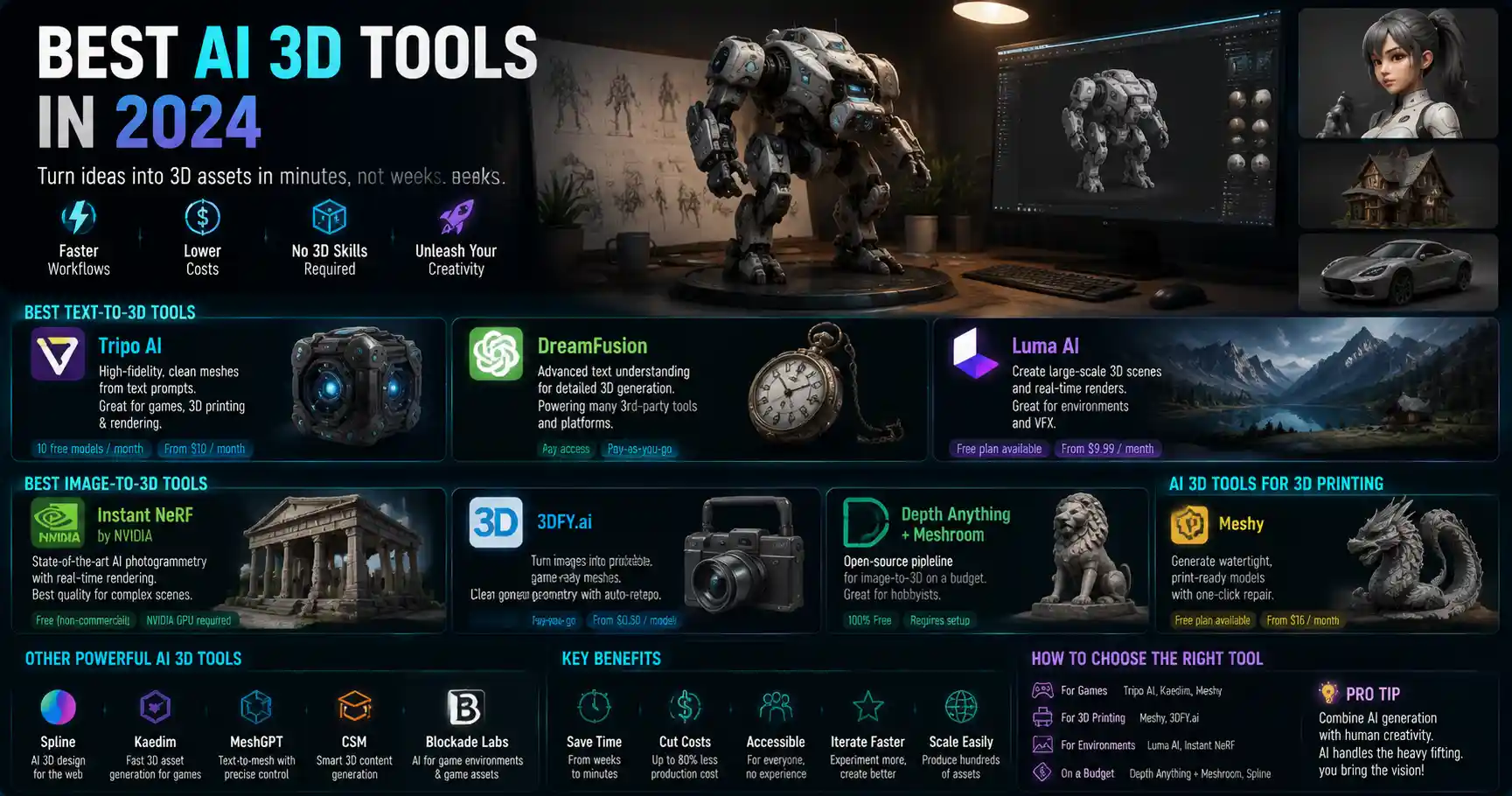
Just a decade ago, creating detailed 3D models required years of training, expensive software licenses, and weeks of manual work for even simple designs. Today, artificial intelligence has flipped that script: AI 3D tools can turn a text prompt, a 2D sketch, or a single photograph into a production-ready 3D asset in minutes. Whether you’re a game developer, product designer, 3D printing hobbyist, or visual effects artist, the right AI tool can cut down your workflow from days to hours and open up creative possibilities you might never have explored on your own. In this guide, we break down the best AI 3D tools available in 2024, organized by use case, to help you pick the right option for your project.
Best AI 3D Text-to-3D Tools for Rapid Prototyping
Text-to-3D is the most accessible category of AI 3D tools, letting anyone generate a complete 3D model from a plain language description. No drawing skills or 3D modeling experience required: just type what you want, adjust a few settings, and watch the AI build a mesh for you. These tools are ideal for rapid prototyping, concept art, and getting early feedback on ideas before investing hours into manual refinement.
Tripo AI
Tripo AI has quickly become the gold standard for text-to-3D generation, thanks to its ability to produce high-fidelity, topologically clean meshes that are ready for 3D printing, game engines, or rendering right out of the box. Unlike many early text-to-3D tools that produced blurry, messy geometry, Tripo’s model outputs consistent, detailed shapes with accurate proportions, even for complex objects like mechanical parts or organic creatures. It supports textures up to 4K resolution and exports in all common formats, including GLB, OBJ, and STL. For most users, the free tier lets you generate up to 10 models per month, which is more than enough for hobbyists testing the waters, while paid pro plans start at $10 per month for unlimited generation and commercial use.
DreamFusion by OpenAI
As the original text-to-3D model that kicked off the AI 3D revolution, DreamFusion laid the groundwork for every tool on this list. While OpenAI doesn’t offer a public standalone version of DreamFusion, it powers many third-party tools integrated into popular platforms like Blender and Unity. What makes DreamFusion stand out is its ability to interpret nuanced text prompts, drawing on OpenAI’s large language model backbone to understand complex descriptions like “a vintage pocket watch with a cracked glass face and a brass chain” instead of just generic object categories. It’s a great option if you already work in a platform that integrates DreamFusion’s API, and its output is consistently reliable for concept work.
Luma AI
Luma AI started as a photogrammetry tool but has expanded into one of the most capable all-in-one AI 3D platforms on the market, with a powerful text-to-3D feature that excels at creating large, environment-scale models. Unlike many text-to-3D tools that only work well for small objects, Luma AI can generate entire 3D scenes, from a mountain landscape to a city street, that you can navigate and render in real time. It also supports neural radiance fields (NeRF) for cinematic rendering, making it a favorite among VFX artists and game level designers. The mobile app lets you generate models on the go, and the web platform supports collaborative editing for teams.
“AI 3D generation isn’t replacing 3D artists—it’s giving them a supercharger for the early stages of ideation. What used to take a week of blocking out basic shapes now takes five minutes, so artists can spend more time refining creative vision instead of doing manual mesh work.”
Best AI 3D Tools for Image-to-3D Conversion
Image-to-3D tools take one or more 2D photographs, sketches, or drawings and reconstruct them into a full 3D model. This is incredibly useful for 3D scanning real-world objects without a dedicated laser scanner, turning concept art into 3D assets, or recreating physical items for 3D printing or digital archiving. Unlike traditional photogrammetry, which requires dozens of photos from every angle, modern AI image-to-3D tools can produce usable 3D models from just a single input image.
Instant NeRF by NVIDIA
NVIDIA’s Instant NeRF is the industry standard for AI-powered photogrammetry and image-to-3D conversion, especially for users with NVIDIA graphics cards. NeRF, short for neural radiance field, works by training a neural network to predict color and density for every point in 3D space, resulting in incredibly realistic, cinematic models with accurate lighting and texture that render in real time. Instant NeRF cuts down the training time from hours to minutes, making it accessible for daily use. It’s free for non-commercial use, and integrates seamlessly with popular 3D tools like Unity and Unreal Engine. If you have a mid-to-high-end NVIDIA GPU, Instant NeRF is hard to beat for quality.
3DFY.ai
3DFY.ai is a dedicated image-to-3D tool that stands out for its ability to produce clean, watertight meshes ideal for 3D printing. Most AI image-to-3D tools produce NeRF outputs that are great for rendering but not ideal for manufacturing or 3D printing, which require solid, manifold geometry. 3DFY.ai solves that by generating traditional polygon meshes directly from your input image, with automatic retopology to keep the poly count low enough for game engines. It also lets you refine the model directly in the browser, adjusting geometry and textures without needing to export to a separate tool. Pricing is pay-as-you-go, starting at $0.50 per model, which makes it a great option for users who only need to convert images occasionally.
Meta DPT Depth Anything + Meshroom
For hobbyists on a budget, the open-source combination of Depth Anything and Meshroom offers a powerful free image-to-3D workflow. Depth Anything, developed by Meta, is an AI depth estimation model that can generate an accurate depth map from a single 2D image in seconds. You can then import that depth map into Meshroom, the free open-source photogrammetry software, which uses that depth data to reconstruct a full 3D mesh. The whole workflow is completely free, even for commercial use, and works on any modern computer, no high-end GPU required. The output quality isn’t as high as premium tools like 3DFY.ai or Instant NeRF, but for simple projects like turning a drawing into a 3D print or creating a low-poly asset for a indie game, it’s more than sufficient.
Best AI Plugins for Existing 3D Workflows
Most professional 3D artists already work with established tools like Blender, Maya, or ZBrush. Rather than switching to an entirely new AI platform, many developers have built AI plugins that integrate directly into these existing workflows, adding AI capabilities without forcing you to learn a new tool from scratch. These plugins are designed to augment your existing skills, not replace them, automating tedious tasks like retopology, UV unwrapping, and texture generation.
Top AI Plugins for Blender
Blender is the most popular free open-source 3D creation suite, and it has a thriving ecosystem of AI plugins that add cutting-edge AI functionality. Here are the best options available right now:
- Dream Textures: This free open-source plugin brings Stable Diffusion-powered texture generation directly into Blender, letting you generate PBR (physically based rendering) textures from text prompts or extend existing textures seamlessly. It’s completely free, works offline if you have a GPU, and integrates with Blender’s shading editor so you can adjust generated textures without leaving the software.
- RetopoFlow AI: Manual retopology—cleaning up messy high-poly meshes to create low-poly versions for game engines—is one of the most tedious parts of 3D modeling. RetopoFlow AI automates the process, taking a high-poly scan or AI-generated mesh and creating a clean, optimized low-poly version with accurate edge flow in minutes. It’s a huge time saver for game and product designers, and the pro version costs a one-time fee of $49, which is far cheaper than many other retopology tools.
- Blender AI Text to 3D: This plugin integrates Tripo AI and DreamFusion APIs directly into Blender, letting you generate full 3D models from text prompts without leaving your project. You can generate a base model, then refine it manually right in Blender, cutting out the step of exporting and importing files between platforms.
Adobe Substance 3D AI Tools
Adobe has integrated AI deeply into its Substance 3D suite, which is the industry standard for texture creation and 3D asset management. The standout AI feature is Substance 3D Sampler’s Auto-UV and texture generation, which can take a scan of a real-world material and turn it into a seamless PBR texture in seconds. Adobe’s Firefly AI also lets you generate custom textures from text prompts directly in Substance, with all assets generated being cleared for commercial use (a huge benefit over open-source models trained on unlicensed content). If you already pay for an Adobe Creative Cloud subscription, these AI features are included at no extra cost, making it a no-brainer for professional artists already in the Adobe ecosystem.
ZBrush AI Deformation
Pixologic, the developer of ZBrush—the leading digital sculpting tool for characters and organic models—recently added built-in AI deformation tools that let you adjust your sculpt with simple text prompts. For example, if you’ve sculpted a character’s head and want to make the jawline more pronounced or the nose shorter, you can just describe the change you want, and the AI will adjust the geometry while preserving all the fine details you’ve sculpted manually. It doesn’t replace manual sculpting, but it speeds up iterative changes dramatically, letting you explore multiple variations of a design in minutes instead of hours.
Best AI 3D Tools for Game Development and Real-Time Assets
Game developers have unique requirements for 3D assets: they need to be optimized for real-time rendering, have clean topology, low poly counts, and compatible PBR textures. The best AI 3D tools for game development are built specifically to meet these requirements, letting you generate ready-to-use assets that you can drop straight into Unity or Unreal Engine.
Quixel Megascans + AI Bridge
Quixel Megascans is already the go-to library for free high-quality 3D assets for game development, and their new AI tools let you create custom assets that match the Megascans quality standard from text or image inputs. The Quixel AI Bridge integrates directly into Unreal Engine and Unity, letting you generate custom assets without leaving your game project. The AI can adjust existing assets to match your specifications: for example, if you need a pine tree log that’s twice as long as the one in the Megascans library, the AI can resize and retopologize it automatically while preserving all the original texture detail. All assets generated through Quixel AI are cleared for commercial use in any game project, which eliminates the copyright concerns that come with many consumer AI 3D tools.
Instant Meshes
Instant Meshes is a free open-source AI-powered automatic retopology tool that’s specifically designed for creating game-ready assets. If you’ve generated a high-poly mesh with a text-to-3D tool or 3D scanned a real object, Instant Meshes can reduce the poly count from millions to just a few thousand while preserving all the key shape details. It’s extremely fast, processing even large meshes in seconds, and exports clean OBJ files that are ready to drop into Unity or Unreal. The software is completely free for commercial use, and even has a drag-and-drop interface that requires no technical expertise to use.
Polycam
Polycam is a mobile and web-based AI 3D tool that’s perfect for game developers who need to quickly scan real-world objects to use as references or assets in their games. The app uses your phone’s camera to capture a object, then uses AI to reconstruct a full 3D model with accurate textures in minutes. It can output game-ready GLB files with automatic LODs (level of detail) optimized for real-time rendering, so you don’t have to do any extra processing before adding the asset to your game. The free tier lets you capture up to 3 models per month, which is great for testing, and the pro plan is $11.99 per month for unlimited captures and commercial use. It’s especially useful for indie game developers working on a budget who need custom props quickly.
For game developers looking to speed up their level design workflow, AI 3D tools offer a set of game-changing advantages that weren’t available even 3 years ago. Here are three actionable tips for integrating AI into your game development workflow:
- Use AI to generate base blockouts of level geometry first, then refine manually. This lets you test multiple level layouts in a single day instead of over a week, helping you catch design flaws early in development.
- Always check the poly count and watertightness of AI-generated assets before importing them into your game engine. Even the best AI tools occasionally produce messy geometry that can cause performance issues, so a 2-minute check saves hours of debugging later.
- Leverage AI texture generation to create variations of existing assets. For example, you can generate 10 different variations of a wall texture from one base, making your game world feel more varied without creating every texture from scratch.
Best AI 3D Tools for 3D Printing and Product Design
3D printing and product design require models that are 100% watertight, dimensionally accurate, and ready for manufacturing. General-purpose AI 3D tools often fall short here, but there are several AI tools built specifically to meet the strict requirements of 3D printing and product design.
AI Generative Design by Autodesk Fusion 360
Autodesk Fusion 360 is the leading CAD tool for product design and 3D printing, and its built-in generative AI design feature is a game-changer for engineering and product development. Unlike text-to-3D tools that generate any shape, Autodesk’s generative design takes your design constraints—how much weight the part needs to support, what materials you’re using, the size of the space it needs to fit into, and your manufacturing method—and generates dozens of optimized, engineering-valid designs that meet all your requirements. It automatically removes excess material to create lightweight, strong parts that are perfect for 3D printing, and all generated models are watertight and dimensionally accurate out of the box. If you already use Fusion 360 for product design, the AI generative design feature is included in the $70 per month pro plan, which is standard for professional product designers.
Printable AI
Printable AI is a dedicated web tool that takes AI-generated 3D models and automatically processes them to make them 3D printable. It fixes common issues like non-watertight geometry, overlapping faces, and messy topology, and even adds automatically generated support structures for complex overhangs. You can upload any AI-generated OBJ or STL file, and the AI will process it in minutes, producing a print-ready file that you can send straight to your 3D printer. It’s especially useful for users who generate models with general-purpose text-to-3D tools that produce non-printable geometry, saving you hours of manual repair work in Meshmixer. Pay-as-you-go pricing starts at $1 per model, with a monthly subscription for heavy users available for $15 per month.
Doodle 3D by Spline
Doodle 3D by Spline is a fun, accessible tool that turns your 2D doodles and sketches into 3D models that are ready for 3D printing. It’s perfect for product designers, educators, and hobbyists who want to turn a quick hand-drawn sketch into a physical object. You just draw your sketch on your phone or tablet, the AI interprets the shape and extrudes it into a 3D model, and you can adjust the dimensions and thickness directly in the app before exporting as an STL. It’s free for non-commercial use, and the $9 per month pro version adds commercial licensing and high-resolution exports.
Conclusion
AI 3D tools have transformed the 3D creation pipeline, making 3D modeling accessible to beginners and speeding up the workflow for professional artists, designers, and developers. Whether you need to generate a quick concept from a text prompt, convert a photograph to a 3D print, or add AI automation to your existing professional workflow, there’s a tool on this list that will meet your needs. For hobbyists just getting started, free and low-cost options like Tripo AI’s free tier, Instant Meshes, and Depth Anything + Meshroom offer incredible value without a big upfront investment. For professionals, tools like Autodesk Fusion 360 generative design, Adobe Substance 3D AI, and Tripo AI Pro deliver the quality, commercial licensing, and integration you need for production work. As AI models continue to improve, we can expect even more capable, accurate 3D generation in the coming years, but the tools available right now are already good enough to revolutionize how you create 3D content. The best way to get started is to pick a tool that matches your use case, experiment with a few generations, and see how AI can cut down your workflow and open up new creative possibilities.