
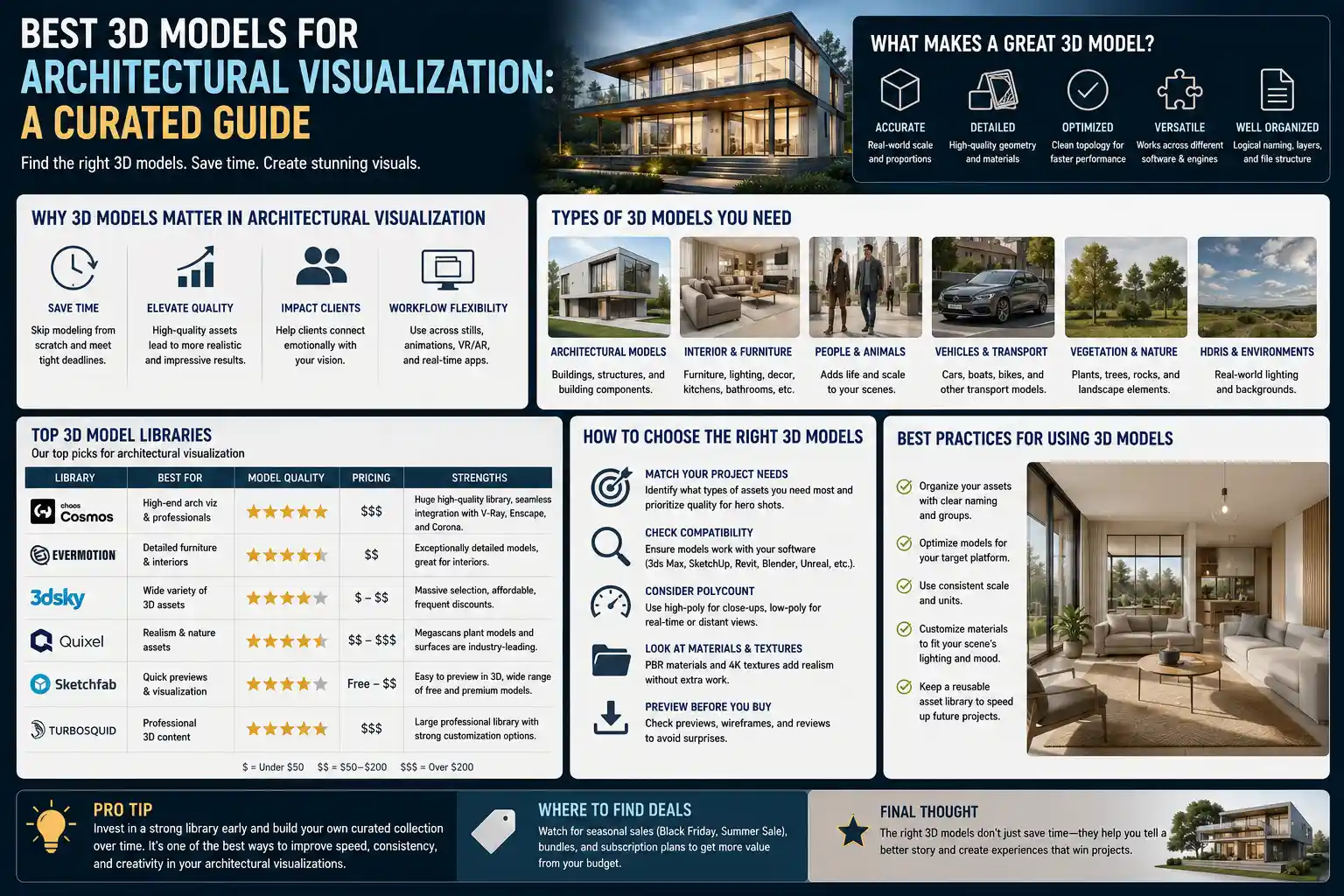
When architects, developers, and marketing teams want to bring a building project to life before the first shovel hits the ground, high-quality 3D models are the unsung heroes of architectural visualization. A great 3D model doesn’t just show what a space will look like—it conveys scale, light, texture, and even the feeling of walking through a finished lobby or living room. Whether you’re creating still renderings for a client presentation, interactive 3D tours for a real estate listing, or animated flythroughs for a marketing campaign, choosing the right 3D models can cut down your workflow by hours and elevate the final result from good to unforgettable. Not all 3D architectural assets are created equal, though. Knowing which types of models deliver the most value, where to source them, and how to use them effectively can make all the difference in meeting deadlines and wowing stakeholders.
Core Categories of 3D Models for Architectural Visualization
Architectural visualization relies on more than just a 3D model of the building itself. Every successful render combines multiple types of assets to create a realistic, immersive scene. Breaking these down by category makes it easier to prioritize which models you need for any given project.
Building Exterior and Structure Models
The foundation of any architectural visualization project is the architectural massing model, which outlines the overall shape, height, and structure of the building. For new construction projects, architects will usually create a custom massing model based on CAD drawings or BIM (Building Information Modeling) data, but pre-made facade models, window assemblies, and roofing systems can speed up the detailing process. For context, pre-made models of surrounding buildings, landscape features, and street elements help ground the project in its actual location, giving viewers a clear sense of how the new build will fit into the neighborhood. For example, if you’re visualizing a new mixed-use development in downtown Chicago, adding accurate 3D models of existing adjacent buildings and the city’s iconic grid street pattern makes the final render far more convincing than a floating building on a blank background.
Interior Architecture and Finishes Models
For interior visualizations, the focus shifts to detailed architectural elements like wall partitions, cabinetry, doors, trim, and flooring. Many modern 3D artists use parametric models for finishes like cabinetry, which can be resized and reconfigured to match any floor plan without having to rebuild the model from scratch. Pre-made models of popular fixtures—like bathroom vanities, kitchen countertops, and built-in shelving—allow artists to quickly match the design intent laid out by the architect or interior designer. This category also includes modular models for structural elements like stairs, columns, and elevator shafts, which can be adapted to fit almost any project layout.
Furniture, Decor, and Contextual Assets
Furnishings and decorative assets are what turn a empty shell of a building into a lived-in, relatable space. This is the category where quality matters most: generic, low-poly furniture models can make even the most well-designed building look cheap and unprofessional. High-quality 3D furniture models from well-known brands (or accurate representations of popular design styles) add authenticity to residential and commercial visualizations alike. Contextual assets include everything from cars parked in the driveway to potted plants, area rugs, wall art, and even people. These small details add scale and life to a scene, helping viewers imagine themselves using the space.
Site and Landscape Models
Even the most beautiful building falls flat without a well-rendered site. Landscape 3D models include everything from terrain meshes to trees, shrubs, walkways, retaining walls, and outdoor furniture. Modern 3D tree models, in particular, have come a long way: high-quality assets with accurate leaf textures and realistic lightingtransparency don’t slow down render times the way they did a decade ago, making it easy to add dense, natural-looking landscaping to any project. For urban projects, site assets can also include street furniture like lampposts, benches, bike racks, and signage to add context and realism.
Key Characteristics of High-Quality Architectural 3D Models
Not all free or paid 3D models are suitable for professional architectural visualization. Knowing what to look for before you download an asset can save you hours of frustration reworking models that don’t meet your needs. Below are the most important characteristics to prioritize:
- Polygon count optimization: A good 3D model for arch viz balances detail and performance. Overly high-poly models will slow down your viewport and increase render times unnecessarily, while too-low-poly models will look blocky and unrealistic in close-up renders. Leading asset marketplaces tag models by polygon count and LOD (level of detail) options, so you can swap in lower-poly versions for background assets and keep high-poly models for focal points.
- UV-mapped and PBR-textured: Physically Based Rendering (PBR) textures are non-negotiable for modern architectural visualization. PBR textures accurately replicate how real materials interact with light, so a wooden countertop will look like real wood whether it’s lit by natural sunlight or warm indoor LED lighting. High-quality models come with pre-unwrapped UV maps and all required texture maps (albedo, roughness, normal, displacement) so you don’t have to spend time creating textures from scratch.
- Correct scale and real-world measurements: Nothing breaks the realism of a render faster than a sofa that’s too big for a living room or a door that’s half the height it should be. Professional 3D models are built to real-world scale, so you can drop them directly into your scene without resizing and guesswork. For branded assets, many models are created to match the exact dimensions of the physical product, which is especially useful when architects are specifying actual furniture or fixtures in their designs.
- Compatible file formats: Different 3D software packages use different native file types, and the best assets come in multiple formats compatible with 3ds Max, Blender, SketchUp, Cinema 4D, Revit, and Unreal Engine. Look for models available in universal formats like FBX or OBJ that can be imported into any workflow, rather than assets that only work in one specific program.
- Editable components: For architectural work, you often need to modify a model to fit your specific design. A good kitchen cabinet model, for example, will let you change the number of drawers, swap out the countertop material, or adjust the length without having to remodel the entire object. Non-editable, merged meshes are far less useful for professional work, even if they look good at first glance.
One common mistake new 3D artists make is downloading free models from unvetted sources that come with hidden issues: flipped normals, missing texture files, or corrupted geometry that causes render errors. Taking the time to source models from trusted providers eliminates these problems, keeping your project on schedule.
Top Sources for Professional-Grade 3D Arch Viz Models
There are dozens of marketplaces and libraries offering 3D models for architectural visualization, ranging from free community-driven platforms to premium subscription services with professionally curated assets. The best source for you depends on your project budget, quality requirements, and software workflow.
Premium Subscription Services
For professional 3D visualization studios that work on multiple projects a month, a premium subscription service is almost always worth the investment. These services curate their assets, test them for compatibility, and update their libraries regularly with new models. Leading options include:
- Turbosquid: One of the oldest and largest 3D model marketplaces, with both pay-per-model and subscription options. It has an extensive collection of architectural assets, from furniture to landscaping, and all models are checked by staff for quality. Many branded furniture manufacturers offer official 3D models through Turbosquid, so you can get accurate representations of actual products.
- Sketchfab: Popular with artists who work in real-time visualization for VR and interactive tours, Sketchfab has a huge library of PBR-textured models available for download. Its subscription tier, Sketchfab Plus, offers royalty-free use for commercial projects and access to millions of high-quality assets.
- 3D Warehouse: Made specifically for SketchUp users, 3D Warehouse is the go-to source for quick, easy-to-import architectural models. While many of the assets are user-uploaded, leading manufacturers like IKEA, Kohler, and Herman Miller upload official models of their products here for free.
- Chaos Cosmos: Integrated directly into Chaos V-Ray and Enscape, two of the most popular rendering tools for architectural visualization, Cosmos offers one-click imports of high-quality, optimized 3D models that are already configured to work with your renderer. It’s included with most V-Ray licenses, making it a convenient option for artists already working in the Chaos ecosystem.
Free and Open-Source Libraries
For students, hobbyists, or small studios working with tight budgets, there are several high-quality free sources for architectural 3D models. BlenderKit, integrated directly into Blender, offers thousands of free PBR models and textures, with a low-cost premium tier for commercial use. Poly Haven is a community-driven project that offers 100% free, royalty-free 3D models, HDRIs, and textures that are perfect for arch viz projects. Many landscape architects also rely on SpeedTree’s free library of tree models, which are optimized for render performance and look incredibly realistic.
Manufacturer Official Libraries
If your project specifies actual products from a particular manufacturer, the best place to get a 3D model is directly from the manufacturer. Almost every major furniture, fixture, and building materials brand offers free, accurate 3D models of their products on their website. These models are always built to the exact dimensions of the physical product, so you can be sure the render matches what will actually be installed in the finished building. For example, Herman Miller, Vifa, and Bosch all offer high-quality 3D models of their products that are ready to drop directly into a visualization scene.
“The biggest mistake young architectural visualizers make is cutting corners on asset quality. A great model of the building will still look bad if it’s furnished with blurry, low-poly furniture that doesn’t fit the space. Investing in high-quality assets isn’t just about making the render look good—it’s about building trust with your client, who sees exactly what they’re going to get.”
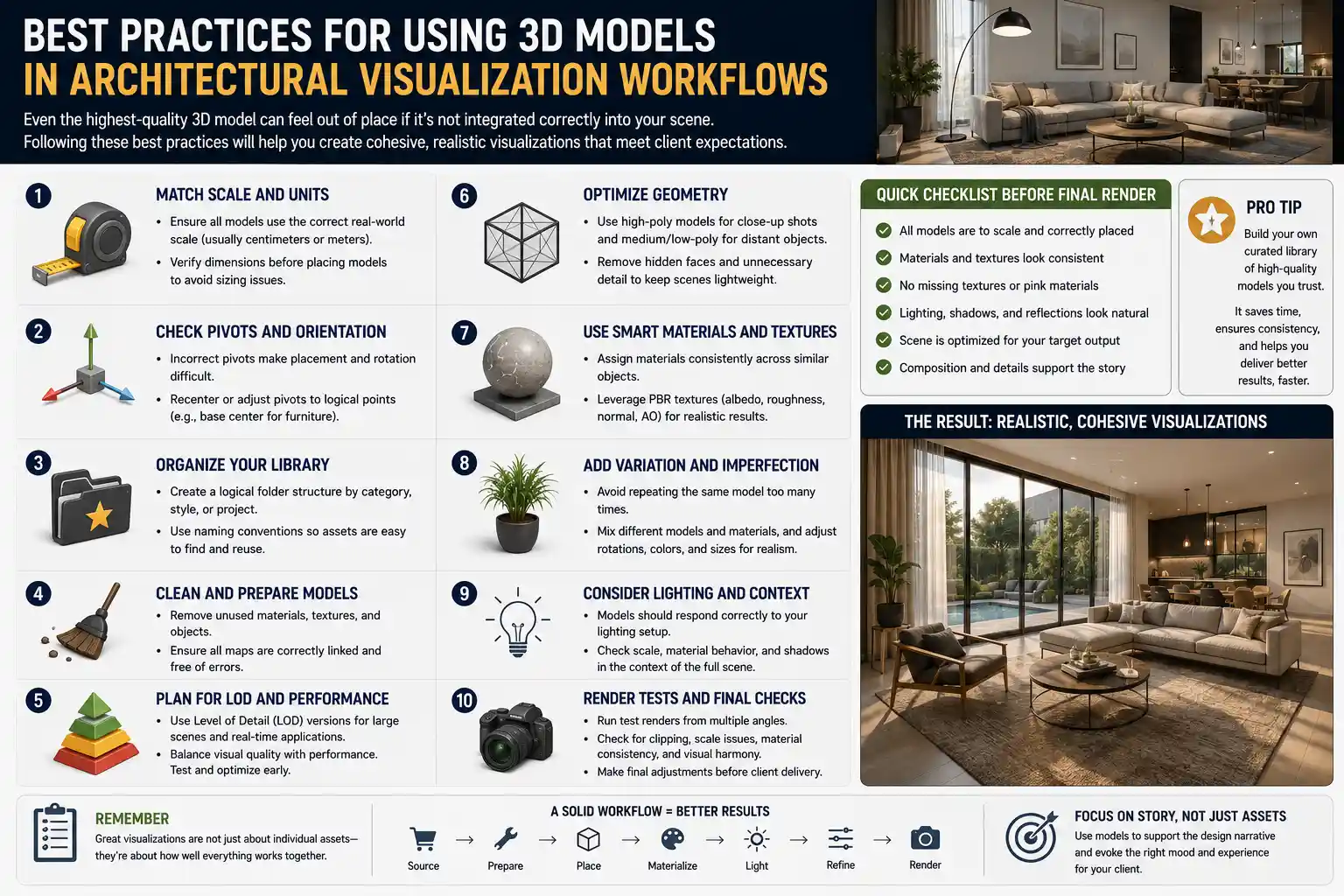
Best Practices for Using 3D Models in Architectural Visualization Workflows
Even the highest-quality 3D model can feel out of place if it’s not integrated correctly into your scene. Following these best practices will help you create cohesive, realistic visualizations that meet client expectations.
Match the Model Style to the Project Goal
Not every architectural visualization needs fully detailed, photorealistic assets. Early-stage concept presentations often work better with simpler, lower-poly models that keep the focus on the overall design, rather than distracting viewers with intricate decor details. For example, a massing study for a city planning approval might only need generic block models for surrounding buildings, while a final marketing render for a luxury residential development needs hyper-detailed, branded furniture and custom finishes. Always adjust the detail level of your assets to match the stage of the project.
Optimize Your Scene for Performance
When you’re working with dozens or even hundreds of 3D assets in a single scene, polygon count can add up quickly, slowing down your viewport and making it hard to make real-time adjustments. Use these strategies to keep your scene running smoothly:
- Use level of detail (LOD) models: Swap lower-poly versions of background assets (like distant trees or buildings across the street) to reduce the overall polygon count without impacting the final render.
- Hide unused assets: Turn off visibility for 3D models that are outside the camera frame or blocked by walls, so your software doesn’t waste processing power rendering them.
- Use instancing for repeated assets: If you have multiple identical chairs in a dining room or the same tree repeated along a driveway, use instancing or proxies to avoid duplicating the model’s geometry in your scene file.
Adjust Materials and Lighting to Match Your Scene
Pre-textured 3D models are a huge time-saver, but they rarely work perfectly right out of the box. Even PBR textures need small adjustments to match the lighting conditions of your scene. For example, a fabric sofa texture that looks perfect in a warmly lit living room might look too dark in a space with floor-to-ceiling natural sunlight. Take an extra 10 minutes per asset to adjust roughness, reflectivity, and brightness to match your scene’s overall lighting scheme. This small step makes a huge difference in how cohesive the final render looks.
Add Variation to Avoid Repetition
It’s easy to fall into the trap of reusing the same 3D model multiple times in a single scene. Repeating the exact same potted plant in every corner or the same dining chair around a table looks unnatural to the human eye. If you need multiple versions of the same type of asset, use slightly different models or make small adjustments (rotate the model, change the texture slightly, adjust the scale by 5-10%) to break up repetition. For landscaping, this is especially important: many modern tree libraries come with multiple variations of the same species, so you can add natural variation to a grove of trees without having to source completely different models.
Check for Licensing Compliance
Before you use a 3D model in a commercial project, always check the license terms. Some free models are only available for non-commercial or personal use, while others require attribution to the original creator. Premium subscription services almost always include a commercial use license, but it’s still worth confirming that you’re allowed to use the asset in marketing materials or client presentations. Using an unlicensed model can lead to copyright claims down the line, which can be costly and time-consuming to resolve.
Popular Types of 3D Models Every Arch Viz Artist Should Have in Their Library
Building a curated library of go-to 3D models speeds up your workflow and ensures consistency across projects. There are a few types of assets that you’ll use in almost every visualization, so it’s worth investing in high-quality versions of these from the start:
Residential furniture collections: A curated set of sofas, coffee tables, dining sets, bedroom furniture, and kitchen fixtures in a range of styles (modern, mid-century, contemporary, traditional) means you’ll always have something that fits the design brief. Prioritize neutral, versatile pieces that work in most spaces, rather than overly niche statement pieces that you’ll only use once.
Landscape assets: A good library of trees, shrubs, grass, and terrain assets is essential for almost any exterior project. Look for assets that are optimized for your renderer, with multiple LOD options to keep render times down. Include a mix of deciduous and evergreen trees, native plants for different regions, and common landscape features like retaining walls, patios, and outdoor seating.
Architectural components: Pre-made window assemblies, door styles, roofing systems, and trim profiles save hours of modeling time when you’re detailing a building exterior or interior. Modular components that can be resized to fit any opening are far more useful than one-off fixed-size models.
Contextual props: Small props add life to a scene, and having a library of go-to props means you don’t have to source new ones for every project. Useful props include books, throw pillows, table lamps, kitchen utensils, bathroom toiletries, cars, bicycles, street signs, and even small decorative items like candles or vases. Even a single well-placed prop can make a space feel lived-in, rather than like a cold, empty showroom.
For artists working in real-time architectural visualization (like interactive 3D tours or VR walkthroughs), it’s especially important to prioritize optimized assets. Real-time engines require lower polygon counts than offline renderers, so look for models specifically optimized for real-time use to avoid lag or performance issues during a client presentation.
Conclusion
High-quality 3D models are the backbone of compelling architectural visualization, turning technical drawings into immersive, persuasive representations of a finished project. By understanding the different categories of assets, knowing what characteristics to look for in a high-quality model, and sourcing assets from trusted providers, you can streamline your workflow and create visualizations that impress clients and stakeholders alike. Remember that the best 3D models don’t draw attention to themselves—they blend seamlessly into your scene, supporting the overall design and helping viewers understand the vision behind the project. Whether you’re a student working on your first architectural render or a lead artist at a busy visualization studio, investing time into building a curated library of high-quality assets will pay off in every project you complete.