
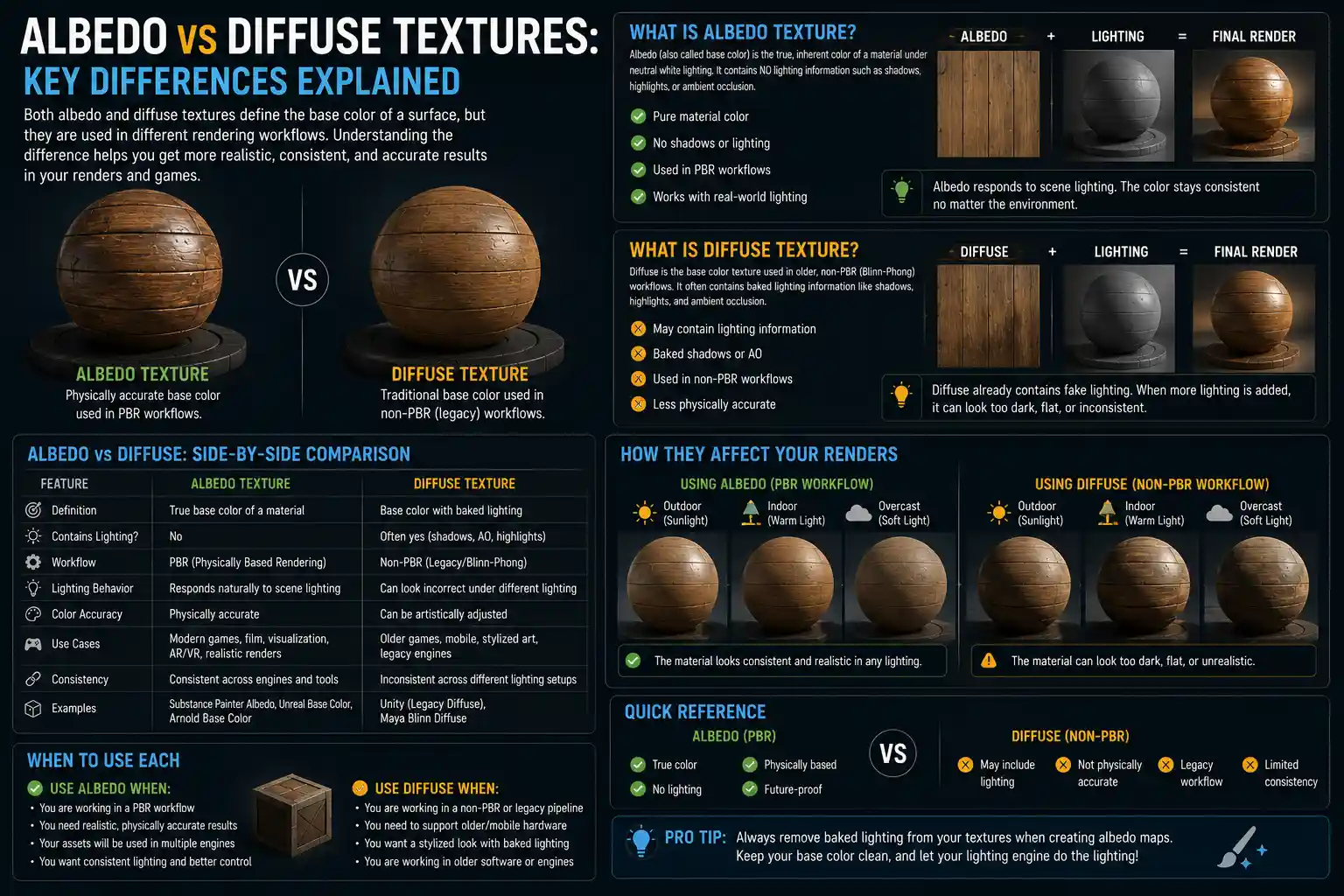
If you’ve ever dabbled in 3D modeling, game development, or digital art, you’ve likely encountered the terms albedo texture and diffuse texture tossed around interchangeably. For beginners and even some seasoned artists, the line between these two common texture maps can feel blurry: both describe base color, right? While it’s true that both albedo and diffuse textures contribute to a surface’s base color in a rendered scene, modern rendering pipelines have drawn clear distinctions between the two that can make or break the final look of your work. Understanding these differences isn’t just a matter of technical jargon—it directly impacts how light interacts with your models, how consistent your renders look across different engines, and how much control you have over your final output. Let’s break down what each texture is, how they differ, and when to use each in your next project.
What Is a Diffuse Texture?
Diffuse texture is one of the oldest texture maps in computer graphics, rooted in the early days of fixed-function rendering pipelines that defined 90s games and early 3D visualization. To understand what a diffuse texture is, you first need to understand the diffuse lighting model that it was built for. In simple terms, diffuse lighting describes how light scatters evenly across a rough surface: when sunlight hits a cotton t-shirt or a clay pot, most of the light bounces off in all directions rather than reflecting a sharp image like a mirror. The diffuse texture was designed to store the base color of that surface, plus any pre-baked lighting information that the fixed-function pipeline couldn’t calculate in real time.
Key characteristics of traditional diffuse textures
Early 3D hardware didn’t have the processing power to calculate dynamic shadows, ambient occlusion, or indirect light for every object in a scene. Artists had to bake all of that information directly into the diffuse texture itself. That means a typical traditional diffuse texture doesn’t just hold the raw color of a brick wall—it includes the darker shade of the cracks where light doesn’t reach, the soft shadow cast by a window ledge above, and even the subtle highlight from the sun hitting the top edge of the wall. This pre-baked information made diffuse textures incredibly efficient for older hardware, as they only needed to be sampled and displayed without complex calculations.
Another key characteristic of diffuse textures is that they often include baked ambient light. For example, a diffuse texture of a character’s face might have darker shading under the chin and around the eyes, baked in once during creation rather than recalculated dynamically every time the light source moves. This saved processing power but came with a big tradeoff: if you moved the light source in the scene, the pre-baked shading would look wrong. A shadow that made sense when the light was on the right side of the character would still be there even after the light moved to the left, creating a disjointed, unrealistic result.
Modern pipelines still use diffuse textures in some contexts, but the definition has shifted slightly. Today, a diffuse texture might also refer to a base color map that includes subtle variation from natural ambient occlusion or surface dirt, but it still differs fundamentally from an albedo texture in what information it stores.
What Is an Albedo Texture?
Albedo textures rose to prominence with the shift to modern programmable rendering pipelines, including PBR (physically based rendering) which is now the standard for games, film, and 3D visualization. To understand albedo, you first need to understand what albedo means in physics: it’s the measure of how much light a surface reflects without any added shading or lighting information. A pure white surface has an albedo of 1 (it reflects 100% of incoming light), while a pure black surface has an albedo of 0 (it absorbs almost all incoming light).
In computer graphics, an albedo texture stores only the raw, base color of a surface, with no pre-baked lighting, shadows, or ambient occlusion. Every pixel in an albedo map represents how much red, green, and blue light the surface reflects at that point, before any dynamic lighting is applied in the render. That means if you have a brick wall albedo texture, all the bricks will be their consistent base red or gray color, and the cracks between them will be the same base dark gray as the mortar—no added shadow darkening, because the renderer will calculate that shadow dynamically based on where the light is in the scene.
Core principles of albedo textures in PBR
Physically based rendering relies on separating different surface properties into different texture maps: albedo for base color, roughness for how sharp or blurry reflections are, metallic for whether a surface acts like a metal or dielectric, and normal for surface detail. By keeping albedo free of pre-baked lighting, PBR allows the renderer to calculate dynamic lighting that reacts correctly to any change in the scene. If you move a light, rotate your model, or change the time of day in your game level, the renderer automatically updates the shadows and highlights, and the albedo stays consistent.
“Albedo is not diffuse. Diffuse implies scattering, which includes both direct diffuse and indirect diffuse. Albedo is simply the percentage of light reflected at a point, with no lighting included. It’s the base layer that all other lighting effects build on.”
Another key principle of albedo textures in PBR is that they follow consistent reflectance values that align with real-world materials. For example, a clean cotton fabric has an albedo value between 0.3 and 0.6, while fresh snow has an albedo of around 0.8, and asphalt has an albedo of around 0.1. Artists use these consistent values to make sure their materials look realistic across different rendering engines, which is why PBR albedo textures created for Blender will look almost identical when imported into Unity or Unreal Engine.
Key Differences Between Albedo and Diffuse Textures
Now that we’ve defined each texture type, let’s break down the core differences that impact how you use them in your work. These differences stem from the eras and rendering pipelines they were designed for, but they’re still relevant today, even as many artists use the terms interchangeably.
1. Stored Information: Raw Color vs Pre-Baked Lighting
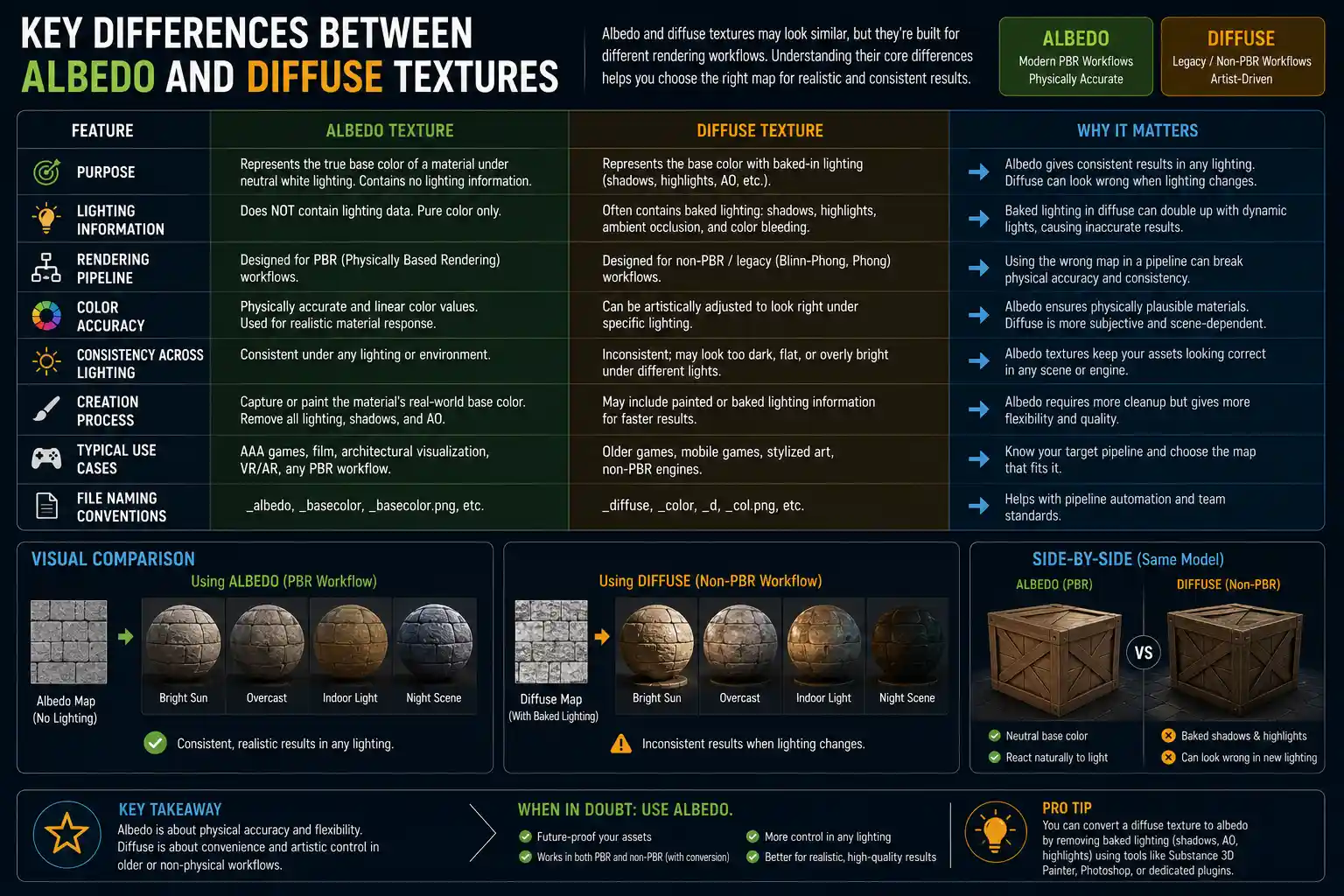
The most fundamental difference between albedo and diffuse textures is what information they store. Albedo textures only store raw base color, with no pre-calculated lighting, shadows, ambient occlusion, or highlights. Any change in lighting is handled by the renderer after the albedo is sampled. Diffuse textures, by contrast, almost always include at least some pre-baked lighting and shading. This was a necessity for older pipelines that couldn’t calculate dynamic lighting, but even many modern diffuse textures still include baked ambient occlusion or dirt to add depth without extra processing.
To illustrate this difference, imagine you’re creating a texture for a wooden crate with slats and gaps between them. On an albedo texture, the inside surface of the gap will be the same base brown color as the rest of the wood. The renderer will automatically darken that gap based on how much light reaches it, creating a natural shadow. On a traditional diffuse texture, the gap will already be darkened by the artist to simulate the shadow, because the renderer couldn’t calculate that shadow in real time. If the light moves, the pre-baked shadow stays, which can look unnatural.
2. Lighting Interaction: Dynamic vs Static
Because albedo textures don’t include pre-baked lighting, they work seamlessly with dynamic lighting. The renderer calculates all shadows, highlights, ambient occlusion, and indirect light in real time, so the surface looks correct no matter how the scene changes. This is why albedo is the standard for modern games with dynamic time of day, moving light sources, and interactive objects.
Diffuse textures with pre-baked lighting, on the other hand, are designed for static scenes or static objects where the light doesn’t change. If you’re creating a 3D architectural render of a building where the camera and light are fixed, a diffuse texture with pre-baked shading can look great and render faster than a dynamic albedo-based setup. But if you need to change anything about the lighting, you have to re-bake the information into the diffuse texture, which is time-consuming.
3. Workflow and Pipeline Compatibility
Albedo is the default base color map for all modern PBR pipelines, including those used in Unity, Unreal Engine, Blender, Substance Painter, and most professional film and game production tools. Because PBR separates surface properties into individual maps, albedo fits perfectly into this modular workflow. Diffuse textures are the default for older fixed-function pipelines, like those used in legacy 3D games, old CAD software, and some simple real-time visualization tools.
It’s worth noting that some software still labels the base color input “diffuse” even when it expects an albedo texture. This is one of the biggest sources of confusion for new artists: if you import a traditional diffuse texture with pre-baked shading into a PBR pipeline that expects a clean albedo, you’ll end up with double darkening—your pre-baked shadows will be darkened again by the renderer’s dynamic lighting calculation, resulting in a muddy, too-dark surface.
4. Common Use Cases
To make the difference even clearer, here’s a list of common use cases for each texture type:
- Albedo textures are used for: Modern game assets with dynamic lighting, PBR 3D models for marketplaces like Sketchfab or TurboSquid, animated characters, interactive architectural visualization, VFX for film and television, and any project where lighting might change after the texture is created.
- Diffuse textures are used for: Legacy game modding, static renders with fixed lighting, simple low-poly mobile games where performance is a top priority, 3D models for 3D printing (where only base color is needed), and simple arch-viz still images where pre-baked lighting cuts down on render time.
5. Value Range and Consistency
Albedo textures follow strict value ranges based on real-world physics, which makes them consistent across different rendering engines. For example, even the brightest non-emissive surface (like fresh snow) will rarely have an albedo value higher than 0.8 in linear color space, because no real surface reflects 100% of incoming light. Diffuse textures don’t follow these rules, because artists adjust values to get the right look after pre-baking shading. A diffuse texture might have pure white values of 1.0 for a highlight, and much darker values for baked shadows that don’t align with the raw base color of the surface.
Common Mistakes and How to Avoid Them
Even experienced artists mix up albedo and diffuse textures, especially when working across different software that uses different labeling conventions. Here are the most common mistakes we see, and practical tips to avoid them in your own work.
Using a diffuse texture with baked shading in a PBR pipeline
This is the most common mistake by far, and it leads to one of two bad outcomes: either the texture is too dark because the renderer adds dynamic shadows on top of your pre-baked shadows, or you have to crank up the brightness to compensate, which washes out the base color and makes materials look unrealistic. If you’re working in a PBR pipeline, always make sure your base texture is a true albedo with no pre-baked shading. If you only have a diffuse texture available, you can clean it up in Photoshop or GIMP by removing the baked shadows and adjusting the base colors to match real-world albedo values.
Adding ambient occlusion to albedo textures unnecessarily
Many artists add ambient occlusion (AO) to their albedo textures as a habit, even when working in PBR. While adding a small amount of AO to crevices can add subtle detail that dynamic AO misses, adding too much AO to albedo leads to the same double-darkening problem as baked diffuse shadows. The renderer will calculate AO dynamically on top of your baked AO, making crevices unnaturally dark. The best practice for PBR is to add AO as a separate layer in the material or a lightmap, not bake it into the albedo itself.
Confusing albedo with base color in software labeling
As we mentioned earlier, many software packages still use the term “diffuse” for the base color input, even when they expect an albedo texture. For example, Unity’s standard shader has a “Albedo” input that clearly expects a PBR albedo, but Blender’s older Blender Render engine used “Diffuse” as the base color input, and even modern Cycles still labels the base color input “Color” or sometimes “Diffuse”. Always check what type of texture the pipeline expects, not just what the input is called. If it’s a PBR pipeline, it expects an albedo, no matter what the input is labeled.
Getting albedo value ranges wrong
New PBR artists often make albedo textures too bright or too dark because they don’t follow real-world albedo value ranges. Here’s a quick reference guide for common materials to keep your albedos consistent:
- Black asphalt: 0.05 – 0.15 (very low reflectance)
- Charcoal: 0.02 – 0.10
- Red brick: 0.15 – 0.30
- Green grass: 0.20 – 0.40
- Cotton fabric: 0.30 – 0.60
- Concrete: 0.20 – 0.40
- Dry sand: 0.35 – 0.50
- Fresh snow: 0.60 – 0.80 (the maximum for non-emissive surfaces)
Keeping your values within these ranges will make your materials look much more realistic right out of the gate, and they’ll render consistently across different engines. The only exception is emissive materials like light bulbs or neon signs, which can have values above 1.0 because they produce their own light.
Forgetting to convert to linear color space
Both albedo and diffuse textures need to be correctly color managed, but this is especially critical for albedo in PBR. Albedo values are based on linear light measurements, so if you import a sRGB gamma-corrected albedo into a linear rendering pipeline, your colors will be too bright and your values will be incorrect. Always make sure your albedo texture is marked as sRGB when importing into a linear pipeline like Unity or Unreal, so the engine can correctly convert it to linear space for calculations.
Practical Guide: When to Use Which Texture
To wrap up the practical application, let’s walk through common scenarios and which texture type you should choose.
You’re making a 3D model for a modern game or interactive experience
If you’re working on a game for PC, console, or modern mobile devices, you should almost always use an albedo texture. Modern games rely on dynamic lighting to create immersive experiences, and albedo fits perfectly into the standard PBR workflow used by Unity and Unreal. The only exception is if you’re working on a very low-end mobile game where you need to cut down on processing power, and you’re using static lighting for all your level geometry. In that case, a diffuse texture with baked lighting can improve performance without hurting the visual quality.
You’re creating a static render or still image for architecture or product design
If you’re creating a single still image with a fixed camera and fixed lighting, you can use either, but a diffuse texture with pre-baked lighting will often render faster. If you’re using a modern PBR renderer, you’ll still use an albedo texture, but you can bake the lighting into the render output after calculation. If you’re working with older software or need to get a quick render out, a diffuse texture works fine.
You’re modding a legacy game or working on a retro game project
Legacy games from the 90s and early 2000s used fixed-function pipelines that rely on diffuse textures with pre-baked lighting. If you’re creating assets for one of these games, you need to use diffuse textures, because the engine doesn’t support dynamic lighting calculations that work with albedo. The same goes for intentional retro game projects that use old fixed-function pipelines for aesthetic reasons.
You’re selling or sharing 3D assets online
If you’re creating 3D assets for sale on marketplaces like TurboSquid, Sketchfab, or the Unity Asset Store, you should always include a PBR albedo texture. Almost all buyers expect PBR-compatible assets that work with modern pipelines, and a clean albedo is non-negotiable for that. You can also include a pre-baked diffuse for users who need it, but albedo should be the default.
Conclusion
At the end of the day, the key difference between albedo and diffuse texture boils down to what information they store: albedo holds only raw base color, ready for dynamic lighting calculations, while diffuse includes pre-baked lighting and shading for static or legacy workflows. The confusion between the two comes from decades of overlapping terminology, as the industry shifted from fixed-function rendering to modern physically based rendering, and many software packages still use the old “diffuse” label even when they expect a clean albedo.
Understanding this distinction isn’t just about getting the terminology right—it’s about avoiding common mistakes like double darkening, inconsistent materials, and unrealistic lighting that can turn a great 3D model into a muddy, unconvincing render. For most modern artists working in games, film, or interactive 3D, albedo is the right choice for base color maps, fitting perfectly into the modular PBR workflow that produces consistent, realistic results across every platform. Diffuse still has its place in legacy work, static renders, and performance-critical projects, but knowing when to use each will make your work more professional and save you hours of troubleshooting bad lighting down the line.