
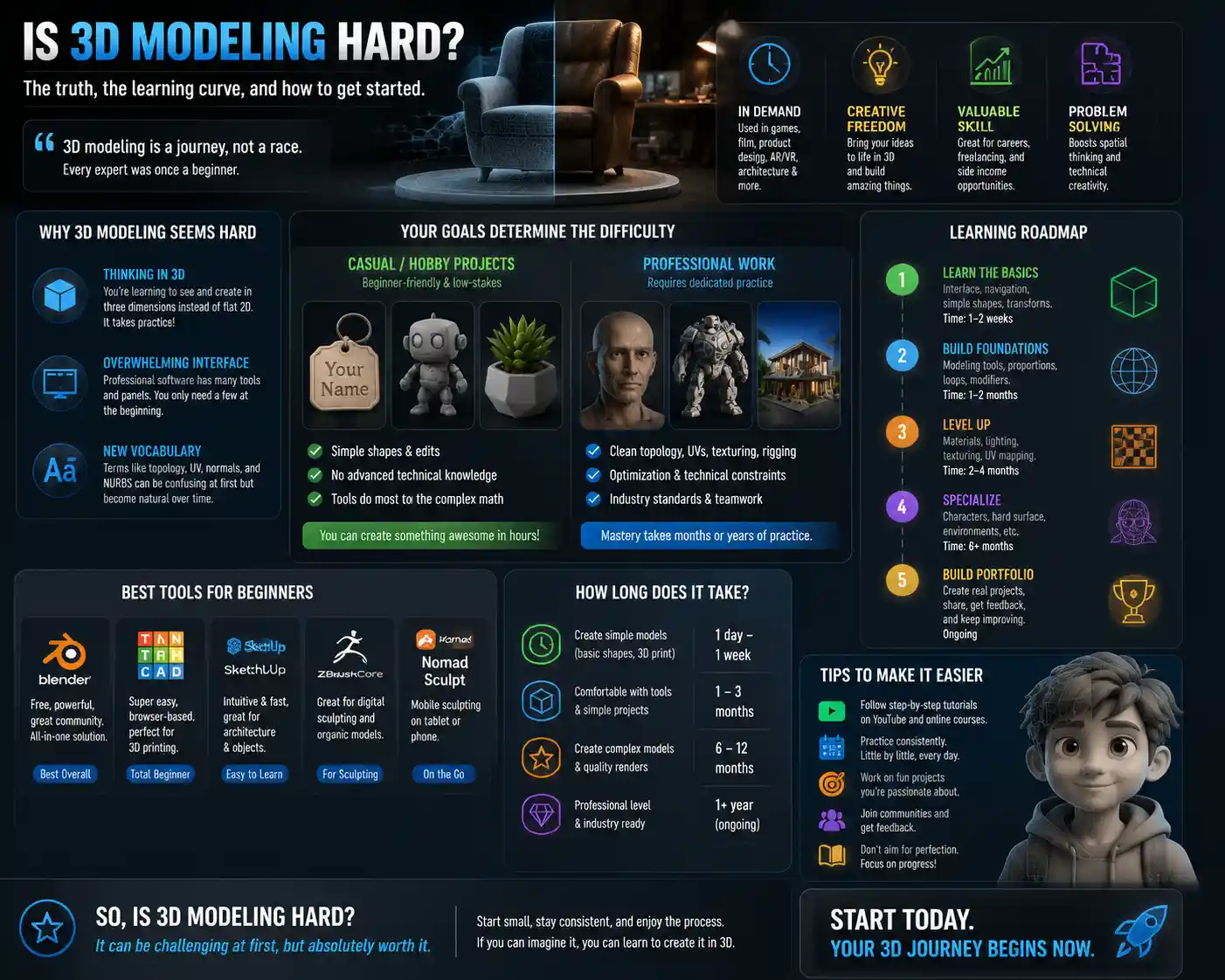
If you’ve ever scrolled through a behind-the-scenes reel of your favorite animated movie, admired a 3D-printed custom figurine, or wondered how video game designers create sprawling open worlds, you’ve probably wondered the same thing millions of aspiring creators ask: is 3D modeling hard? It’s easy to assume the skill is reserved for seasoned technical artists with years of coding training or industrial design degrees. While 3D modeling is a complex skill that takes time to master, the difficulty depends on several factors: what you want to create, what tools you use, and how you approach learning. For many beginners, the initial learning curve feels intimidating, but modern tools and accessible learning resources have broken down many of the barriers that once kept 3D modeling out of reach for casual creators and hobbyists.
What Makes 3D Modeling Seem Hard (For Beginners)
Newcomers often find 3D modeling intimidating before they even open their first software, and for good reason. The core challenge of 3D modeling is shifting from thinking in two dimensions to working in three, which rewires how you visualize shapes and space. Unlike 2D drawing, where you work on a flat canvas, 3D modeling requires you to constantly rotate, pan, and zoom your view to adjust every edge, vertex, and face of your object. A mistake you miss on one side can ruin the entire model when you render it, which adds a layer of attention to detail that many new artists don’t expect.
The overwhelming interface of professional software
One of the biggest first impressions that turns beginners away is the default interface of professional 3D tools like Blender, Maya, or ZBrush. A standard workspace includes multiple viewports, toolbars, modifier menus, property panels, and keyboard shortcut prompts that can look like the cockpit of an airplane to someone who’s never worked with 3D before. Even basic actions like moving an object or adjusting a vertex can feel confusing when there are 50 different tools visible on your screen at once.
Many new creators quit in the first hour because they can’t figure out how to do something as simple as extrude a shape, convinced they don’t have the technical aptitude for 3D work. What they don’t realize is that professional tools are built for full-time artists working on large projects, and most users only ever use a small fraction of the available tools on a daily basis. You don’t need to memorize every menu to create a simple 3D model for 3D printing, a game asset, or a personal art project.
Learning a new technical vocabulary
3D modeling comes with its own language that can feel like learning a foreign language at first. Terms like mesh topology, non-uniform rational basis spline (NURBS), beveling, retopology, and UV unwrapping don’t mean anything to most people outside the industry, and misunderstanding a core term can derail an entire project. For example, if you don’t know that a "ngon" is a polygon with more than four sides, you might end up with a model that breaks when you try to 3D print it or import it into a game engine.
This vocabulary barrier is a big part of why 3D modeling feels harder than it actually is for many beginners. Once you learn the basic terms, they become second nature, and the learning curve flattens out considerably. The problem is that most introductory tutorials throw all of these terms at you at once, rather than introducing them gradually as you need them, which can leave new creators feeling overwhelmed.
How Your Goals Change the Difficulty of 3D Modeling
There’s no universal answer to how hard 3D modeling is, because difficulty depends entirely on what you want to achieve. A 3D artist creating a feature-length animated film needs a much higher skill level than someone who wants to design a custom keychain for 3D printing. Your end goal dictates how much time you need to invest, what skills you need to learn, and how hard the process will feel along the way.
Casual hobbyist projects: beginner-friendly and low-stakes
If you’re a hobbyist who wants to create simple models for 3D printing, custom miniatures, or social media content, 3D modeling is far easier than it used to be. Modern beginner-friendly tools like Tinkercad, SketchUp, and even Canva’s basic 3D design tools let you create simple models by dragging and dropping pre-made shapes, no advanced technical knowledge required. You can learn to make a basic functional model in an afternoon, with most of the complex math handled automatically by the software.
For example, creating a custom nameplate for your desk or a toy for your child only requires you to combine basic shapes like cubes, cylinders, and spheres. You don’t need to learn about topology, UV mapping, or texturing to get a printable model that works perfectly. Many casual hobbyists get started with these simple projects and build up their skills gradually, only learning more advanced techniques when they need them for a new project.
Professional work for games, film, or design: requires dedicated practice
It’s no surprise that professional 3D modeling work is much harder, because it demands a high level of precision, creativity, and technical knowledge. A 3D character modeler working on a AAA video game needs to understand how to create clean topology that deforms correctly when the character moves, how to sculpt fine details like skin pores and hair strands, how to unwrap UVs for texturing, and how to optimize the model to run smoothly on consoles and PCs. A product designer creating 3D models for manufacturing needs to understand tolerances, material properties, and engineering constraints that add another layer of complexity to the work.
Professional 3D modeling isn’t just about shaping objects, either. Most roles require you to collaborate with other teams, work within strict technical specifications, and adapt to new tools and workflows on a regular basis. It typically takes 1-2 years of consistent practice to build the skills needed for an entry-level 3D modeling job, and many professional artists spend decades refining their craft.
Freelance and personal creative projects: a middle ground
Many creators fall somewhere in the middle: they don’t need a full set of professional skills, but they want to create more complex work than basic hobbyist models allow. This might include creating custom assets for indie games, selling 3D models on Etsy, creating digital art for NFTs or social media, or designing custom furniture for your home. For these projects, the difficulty is moderate: you’ll need to learn core 3D modeling skills beyond basic shape manipulation, but you don’t need to master every advanced technique that professional artists use.
Most creators can reach this level in 3-6 months of consistent practice, working on projects that interest them. The biggest challenge at this stage is often breaking bad habits you might have picked up as a beginner, like ignoring topology or creating models with too many polygons that are slow to render. But even these skills can be learned gradually through targeted practice.
The Most Common 3D Modeling Learning Challenges (And How To Overcome Them)
Every new 3D modeler faces the same common challenges when they’re getting started. The good news is that most of these obstacles are easy to overcome once you know what to expect, and there are proven strategies to make the learning process smoother. Below are the three most common difficulties beginners face, with actionable tips to work through them:
1. Learning to think in 3D space
The single biggest mental shift for beginners is moving from 2D to 3D thinking. When you draw a cube on paper, you’re drawing a flat representation of a 3D object. When you model a cube in 3D software, you’re creating an actual object that exists in three dimensions that you can rotate, cut, and reshape from any angle. This shift takes time for your brain to adjust to, and it’s normal to feel disoriented when you start moving objects around in a viewport.
The best way to overcome this challenge is to practice with simple, everyday objects first. Start by modeling things you interact with daily: a coffee mug, a chair, a smartphone, a book. Keep a reference photo of the object next to you, and try to match its dimensions and shape as closely as possible. This exercise trains your brain to see 3D shapes and translate what you see in the real world into a 3D model. You can also use physical 3D puzzles or clay modeling to build your spatial reasoning skills before you even touch software.
2. Avoiding information overload
Information overload is one of the most common reasons beginners quit 3D modeling. When you start, you’ll find thousands of tutorials covering every possible tool, technique, and workflow, and it’s easy to feel like you need to learn everything at once. You might spend weeks watching tutorials without actually creating anything on your own, which leaves you feeling frustrated and like you’re not making progress.
The beautiful thing about learning 3D modeling in 2024 is that you only need to learn what you need for your current project. You don’t have to master everything before you start creating.
To avoid information overload, follow this simple rule: learn by doing, not by watching. Instead of binging 20 beginner tutorials, pick one small project you want to complete (like a custom keychain) and only learn the skills you need to finish that project. When you’re done, pick a slightly harder project and learn the new skills you need for that. This project-based learning approach keeps you motivated, because you get a finished result at the end of every learning cycle, and you only add new skills when you’re ready for them.
3. Mastering keyboard shortcuts and workflow
Many new beginners struggle with the workflow of 3D modeling, especially when it comes to remembering keyboard shortcuts. It can feel slow and clunky to click through five different menus just to move an object, which makes the whole process feel harder than it needs to be. The good news is that workflow becomes automatic with practice, and you only need to memorize a handful of core shortcuts to work efficiently.
To make this easier, start by memorizing just these 5 core shortcuts for most 3D tools: move, rotate, scale, undo, and save. Once those become second nature, add one new shortcut every week as you need it. You don’t need to memorize 50 shortcuts in your first week. Most professional artists only use a dozen or so shortcuts on a daily basis, and they still click through menus for rare tools they don’t use often.
How Your Choice of Tool Affects Difficulty
The 3D modeling software you choose has a huge impact on how hard the learning process is. A decade ago, professional 3D tools cost thousands of dollars in licensing fees, putting them out of reach for most beginners. Today, there are tools for every skill level and budget, from free beginner-friendly options to high-end professional suites. Choosing the right tool for your goals can cut your learning time in half.
Beginner-friendly tools for new creators
If you’re just getting started and want to make simple models, there are several tools designed specifically to reduce the learning curve:
- Tinkercad: A free browser-based tool from Autodesk that uses basic shape building to create 3D printable models. It’s almost impossible to make a mistake that breaks your model, and you can learn the entire interface in under an hour. Perfect for 3D printing beginners and kids learning 3D design.
- SketchUp Free: A free version of SketchUp, which is designed for architectural modeling and product design. It’s intuitive for beginners who want to create furniture, buildings, or other larger-scale objects, with a gentle learning curve compared to professional tools.
- Nomad Sculpt: A low-cost mobile and tablet sculpting tool that lets you sculpt 3D models with a stylus, similar to working with clay. It’s much more intuitive than desktop sculpting tools for beginners who prefer a tactile, hands-on approach.
These tools hide most of the complex technical details from you, so you can focus on creating rather than troubleshooting. The tradeoff is that they don’t have all the advanced features professional artists need, but for beginners and hobbyists, that’s a good thing.
Professional tools for intermediate and advanced creators
When you’re ready to move on to more complex projects, professional tools offer far more flexibility and features, but they come with a steeper initial learning curve. The most popular options are:
- Blender: A completely free, open-source professional 3D suite that includes modeling, sculpting, rendering, animation, and even video editing. It’s the most popular choice for independent creators and beginners looking to move to a professional tool, thanks to its zero cost and massive community of tutorial creators. The interface can feel overwhelming at first, but there are more free learning resources for Blender than any other 3D tool.
- Autodesk Maya: The industry standard for film and game animation, with a monthly subscription cost of around $200. It’s extremely powerful, but overkill for most hobbyists and casual creators.
- ZBrush: The go-to tool for high-resolution digital sculpting, used for character models and fine detail work. It has a very unique interface and workflow that takes time to get used to, but it’s unmatched for organic sculpting.
Many beginners worry that they need to start with a professional tool to learn correctly, but that’s not true. Starting with a simple beginner tool lets you build your confidence and spatial reasoning skills before you tackle the complexity of professional software. If you eventually want to work professionally, you can make the switch once you’ve mastered the basics.
Modern tools that reduce 3D modeling difficulty
One of the biggest changes in 3D modeling over the last few years is the rise of AI-powered tools that automate many of the most time-consuming and difficult parts of the process. AI tools can generate a 3D model from a 2D image or a text prompt in seconds, which gives beginners a starting point to edit and refine rather than building a model from scratch. Tools like Luma AI, 3DFY.ai, and Blender’s built-in AI generative tools can cut down the time it takes to create a model from hours to minutes, and they make it possible for beginners to create complex models they wouldn’t be able to build from scratch.
AI doesn’t replace the need for basic 3D modeling skills, because you still need to edit, refine, and prepare the model for your end use (like 3D printing or game import). But it removes a lot of the initial barrier to entry, letting beginners create impressive results much faster than they could 5 years ago.
Practical Tips to Make Learning 3D Modeling Easier
Whether you’re a hobbyist looking to make simple 3D prints or an aspiring professional working toward your first job, these actionable tips will make your learning journey smoother and less frustrating:
- Start with small, achievable projects. Don’t try to model a full game character in your first week. Start with a mug, then a chair, then a simple character head. Small finished projects build confidence and give you a sense of progress, which keeps you motivated when you hit a challenging part of the learning curve.
- Follow project-based tutorials for your specific use case. If you want to learn 3D modeling for 3D printing, follow tutorials that focus on preparing models for print, not on creating animated characters for film. Learning skills that you don’t need for your current goals is a waste of time and leads to information overload.
- Join a community of other 3D modelers. Sites like Reddit’s r/3Dmodeling, Blender Artists, and Discord groups for 3D creators let you ask questions when you get stuck, get feedback on your work, and see how other people solve common problems. Having a supportive community makes a huge difference when you’re a beginner, because most questions you have have already been answered by someone who was once in your position.
- Don’t worry about perfection at first. Your first 10 models will be bad, and that’s okay. Every 3D artist, no matter how experienced, started with bad models. The only way to get better is to make mistakes and learn from them. Focus on finishing projects, not making them perfect, and you’ll improve much faster.
- Practice consistently, even for 15 minutes a day. Consistent short practice sessions are much more effective than occasional 4-hour marathons. 15 minutes of daily practice trains your brain to get used to 3D thinking and workflow, and you’ll build your skills gradually without feeling overwhelmed.
One common mistake beginners make is comparing their early work to the finished work of professional artists with 10+ years of experience. It’s important to remember that every professional was once a beginner, and the impressive work you see online is the result of years of practice and refinement. Your progress will be personal to you, and it doesn’t need to match anyone else’s.
Conclusion
So, is 3D modeling hard? The answer is that it’s challenging, but not as hard as it looks from the outside, especially if you start small and choose the right tools for your goals. If you’re a hobbyist who wants to create simple 3D printable models, you can learn the basics in an afternoon with beginner-friendly tools like Tinkercad. If you want to master professional-level 3D modeling for games, film, or product design, it will take months of consistent practice, but it’s completely achievable if you break the learning process into small, manageable steps.
The biggest barrier to learning 3D modeling today isn’t technical skill—it’s the intimidation that comes from seeing complex professional work and overwhelming software interfaces. Modern tools, free learning resources, and AI assistance have broken down most of the barriers that once kept 3D modeling out of reach for casual creators. If you’re curious about trying 3D modeling, the best thing you can do is pick a simple project, open a free beginner tool, and get started. You might be surprised how quickly you can go from a blank viewport to a finished 3D model you can be proud of.