
Walk into any modern architecture studio, and you’ll notice one thing that sets today’s practice apart from the work of 30 years ago: rows of designers working on detailed, rotating digital models instead of poring over hand-drawn blueprints stacked on drafting tables. 3D modeling has transformed architecture from a profession rooted in 2D drawing to one that leverages digital technology to visualize, test, and build structures before a single shovel hits the ground. But what exactly is 3D modeling in architecture, and how has it reshaped the way buildings are designed and constructed?
The Core Definition and Purpose of Architectural 3D Modeling
At its simplest, 3D modeling in architecture is the process of creating a digital three-dimensional representation of a building or structure. Unlike 2D drawings that show separate plans, elevations, and sections on flat paper, a 3D model is a complete, scale-accurate digital object that can be viewed from any angle, modified in real time, and used for everything from client presentations to construction documentation.
The core purpose of 3D modeling goes far beyond just making pretty pictures. Early 3D tools emerged in the 1980s and 1990s as a way to help architects communicate their vision to clients who often struggled to interpret 2D technical drawings. A client who can’t tell the difference between a section line and an elevation mark can easily walk through a digital 3D model and understand exactly how the space will look and feel. Today, that core purpose has expanded to support every stage of a project, from initial concept sketches to post-construction facility management.
Key Differences From 2D Architectural Drawing
To understand the value of 3D modeling, it helps to compare it to the traditional 2D drawing process that dominated architecture for centuries. 2D drawings are flat, separate representations of a building: one sheet shows the floor plan, another shows the front elevation, another shows a cross-section. To understand the full design, you have to mentally assemble all these separate pieces, a skill that takes years of training to develop.
3D modeling, by contrast, creates a single digital database that contains all the information needed to generate any 2D drawing automatically. If you change the size of a window in the 3D model, that change updates automatically in every linked 2D elevation, section, and plan. This eliminates the human error that comes from manually updating dozens of separate drawings, saving time and reducing costly mistakes on construction sites.
Another key difference is the ability to simulate real-world conditions. A 3D model can be tested for things like natural light exposure, structural load, energy efficiency, and even how people will move through the space – all before construction begins. That kind of testing is impossible with 2D drawings alone.
Common Types of 3D Modeling Used in Architecture
Not all 3D architectural models are the same. Different stages of a project require different types of models, each with its own purpose and level of detail. Understanding the differences helps architects choose the right tool for the job and deliver the right output to clients, contractors, and other stakeholders.
1. Conceptual Massing Models
At the very start of a project, architects create conceptual massing models to explore basic design ideas. These are simple, low-detail 3D models that focus on the overall size, shape, and relationship of a building to its site. A massing model for a new residential development, for example, might just show the overall volume of each building, how they sit on the land, and how they cast shadows on surrounding properties. It doesn’t include details like door locations or wall textures – the goal is to test big-picture ideas quickly and discard options that don’t work.
2. Visualization Models
Visualization models (also called render models) are built specifically to create photorealistic images and animations for client presentations, marketing, and public outreach. These models prioritize visual detail: accurate materials, realistic lighting, furniture, landscaping, and even people to help stakeholders imagine what the finished building will look like. A visualization model for a new skyscraper might include detailed glass textures, tree lighting for the plaza at its base, and even cars on the surrounding streets to create a compelling marketing image.
Unlike working construction models, visualization models often don’t include detailed technical information – their main job is to communicate the aesthetic and emotional feel of a design.
3. BIM (Building Information Modeling)
Today, BIM is the most common type of 3D modeling used for commercial and large-scale residential projects. Unlike basic 3D surface models, BIM is an intelligent 3D modeling process that embeds data into every component of the model. A wall in a BIM model isn’t just a geometric shape – it includes information about what material it’s made of, how much it costs, its thermal resistance, its fire rating, when it needs to be maintained, and who manufactured it.
“BIM isn’t just 3D modeling. It’s a data-rich digital twin of the building that lives with the structure from design through construction to 50 years of operation. A 3D model shows you what the building looks like; BIM tells you everything you need to know about how it’s built and how to care for it.”
BIM models can be shared across the entire project team: architects, structural engineers, MEP (mechanical, electrical, plumbing) designers, contractors, and facility managers all work from the same central model. If a structural engineer changes the size of a steel beam, that update appears automatically for everyone else on the team, reducing coordination errors.
4. Site and Topography Models
Site 3D models focus on the land and surroundings of a proposed building, rather than the building itself. They use survey data and LiDAR scans to create an accurate 3D representation of the existing terrain, trees, existing structures, and infrastructure. This helps architects understand how their design fits into the natural landscape and plan for things like drainage, slope stabilization, and access roads.
Core Benefits of 3D Modeling for Architectural Projects
The shift from 2D drawing to 3D modeling has brought measurable benefits to every stakeholder in an architectural project, from the design team to the client to the end user. These benefits go far beyond just convenience – they often lead to better buildings, lower costs, and faster project timelines.
Improved Communication and Faster Client Approval
One of the biggest pain points in traditional architectural practice was getting client approval for a design when most clients couldn’t read 2D drawings. An architect might spend weeks drawing a detailed set of plans, only for the client to say “I don’t understand what this looks like – can you change it?” 3D modeling eliminates this disconnect.
Clients can walk through a 3D model in virtual reality, rotate it to see it from any angle, and even experience what it would be like to stand in the living room of a new home or the lobby of an office building. This leads to faster feedback, fewer change orders later in the project, and higher client satisfaction. For public projects like new schools or city halls, 3D models also make it easier to get community buy-in, since members of the public don’t need any special training to understand the design.
Reduced Errors and Lower Construction Costs
Errors in construction documentation cost the global construction industry billions of dollars every year. Many of these errors come from mismatched 2D drawings: a window dimension that’s different on the floor plan vs. the elevation, or a structural beam that conflicts with a plumbing pipe that was added later. 3D modeling, especially BIM, eliminates most of these errors by creating a single source of truth for the entire project.
Before construction even begins, the project team can run a clash detection scan that automatically identifies conflicts between different systems. For example, a scan might show that a duct running through the ceiling is in the same space as a structural steel beam. The team can fix that conflict in the 3D model before construction starts, avoiding the cost of rework in the field, which can add tens or even hundreds of thousands of dollars to a project budget.
Better Performance and Sustainability Testing
Sustainability is a core priority for most modern architectural projects, and 3D modeling makes it much easier to design high-performance buildings. Architects can run a range of simulations directly on the 3D model to test how the design performs:
- Daylight simulation to see how much natural light enters the building throughout the year, reducing the need for artificial lighting
- Energy efficiency modeling to calculate heating and cooling loads, and test how different materials and window placements impact energy use
- Structural simulation to test how the building will hold up against wind, earthquakes, and heavy snow loads
- Water runoff modeling to design drainage systems that reduce flood risk and comply with local environmental regulations
All of these simulations help architects refine the design to be more sustainable, comfortable, and safe before construction begins. For example, a 3D daylight simulation might show that moving a window 2 feet to the left would cut lighting energy use by 15% – a change that would be almost impossible to discover with 2D drawings alone.
Streamlined Construction and Prefabrication
Modern construction increasingly relies on prefabrication, where building components like wall panels, bathroom pods, and steel beams are manufactured off-site in a factory and then assembled on-site. Prefabrication reduces construction time and waste, but it requires extremely accurate dimensional information – and that’s exactly what 3D modeling provides.
Manufacturers can take 3D model data directly from the architect and use it to program CNC cutting machines and other automated manufacturing equipment. This eliminates the need to manually redraw the design for manufacturing, reducing errors and speeding up the process. For large projects like modular apartment buildings, this can cut overall construction time by months.
Common Tools and Workflows in Architectural 3D Modeling
The tools architects use for 3D modeling have evolved dramatically over the past 20 years, with options available for every project size and budget. Most studios use a combination of tools to handle different tasks, from early concept design to final construction documentation.
Leading 3D Modeling and BIM Software
For large commercial projects and BIM work, Autodesk Revit is the industry standard in most parts of the world. Revit is built specifically for architectural BIM, with tools for intelligent modeling, automatic drawing generation, and collaboration across teams. Other popular BIM tools include ArchiCAD, which is widely used by smaller practices in Europe and North America, and Bentley OpenBuildings, which is common for infrastructure projects like bridges and roads.
For early conceptual design and massing, many architects use more flexible tools like SketchUp, which is known for its easy learning curve and large library of pre-made 3D components. SketchUp is especially popular with small residential practices and for quick concept exploration. For more organic, free-form design (think the curved shapes of the Guggenheim Bilbao or the Beijing National Stadium), tools like Rhino 3D and Grasshopper are the industry standard, allowing architects to create complex parametric shapes that would be impossible to model by hand.
For visualization and rendering, tools like 3ds Max, V-Ray, Enscape, and Lumion are widely used. Enscape and Lumion are particularly popular because they allow real-time rendering, so architects can see changes to the model in photorealistic detail instantly, instead of waiting hours for a render to finish.
Typical 3D Modeling Workflow for a New Project
While every studio has its own process, most architectural 3D modeling projects follow a similar step-by-step workflow:
- Site data collection: The team starts by importing survey data, LiDAR scans, and existing site maps to create a 3D base model of the site.
- Conceptual massing: Architects explore multiple design options with simple low-detail massing models, testing things like building height, orientation, and relationship to the site.
- Design development: Once a concept is approved, the team adds more detail to the 3D model, refining room layouts, material choices, and structural systems.
- Coordination and clash detection: All the different consultants (structural, MEP, civil) add their systems to the central BIM model, and the team runs clash detection to resolve conflicts.
- Performance simulation: The team runs energy, daylight, and structural simulations to refine the design for performance and sustainability.
- Documentation and construction: The team generates all the required 2D construction drawings, schedules, and quantity takeoffs directly from the 3D model, and shares the model with the contractor for construction.
- Handover to facility management: After construction is complete, the updated as-built 3D model is handed over to the building owner to use for future renovations, maintenance, and space planning.
Emerging Technologies: VR, AR, and Digital Twins
The latest innovation in architectural 3D modeling is the integration of virtual reality (VR) and augmented reality (AR). VR allows clients and designers to fully immerse themselves in the 3D model, walking through rooms, opening doors, and experiencing the scale of the space firsthand. AR overlays the 3D model onto the actual physical site, so stakeholders can see what the finished building will look like in its real location by holding up a tablet or phone.
Another emerging trend is the digital twin, which is a living 3D model of a finished building that is updated with real-time data from sensors installed in the building. The digital twin can track things like energy use, indoor air quality, and equipment performance, allowing the building owner to optimize operations and reduce maintenance costs over the building’s lifespan. This extends the value of the original 3D model far beyond construction, turning it into a tool that adds value for decades.
Common Misconceptions About 3D Modeling in Architecture
As 3D modeling has become ubiquitous, a few common misconceptions have emerged that can confuse clients and even new architecture students. It’s worth addressing these to clear up what 3D modeling can and can’t do.
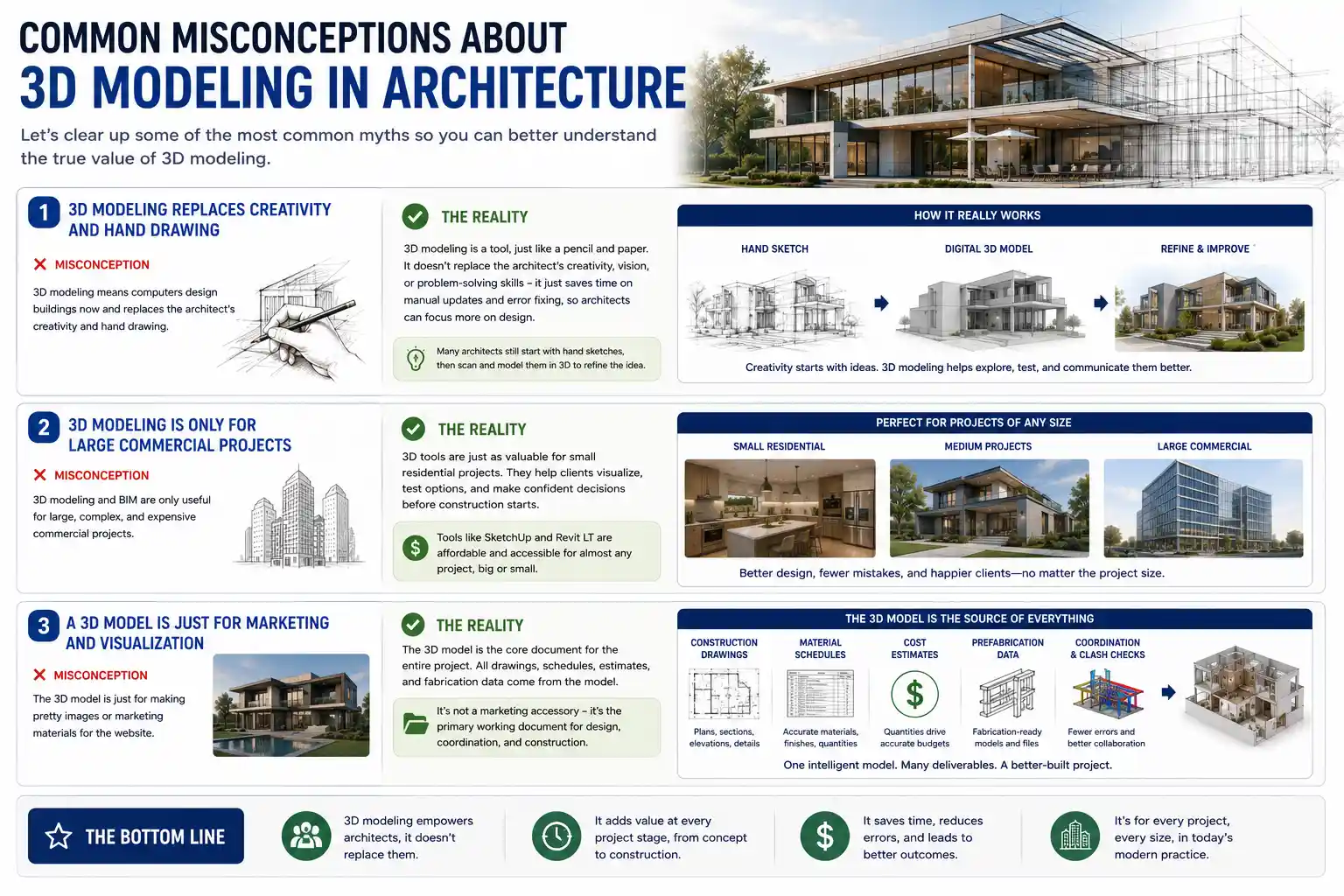
Misconception 1: 3D modeling replaces creativity and hand drawing
Many people assume that 3D modeling means computers design buildings now, but that’s not true. 3D modeling is a tool, just like a pencil and paper. It doesn’t replace the architect’s creativity, vision, or problem-solving skills – it just frees up time that used to be spent manually updating drawings and fixing errors, so architects can focus more on design. Many architects still start projects with hand sketches, then scan those sketches and turn them into 3D models to refine the idea.
Misconception 2: 3D modeling is only for large commercial projects
It’s true that large projects get the most attention when it comes to BIM and 3D modeling, but 3D tools are just as valuable for small residential projects. A custom home builder can use a 3D model to help the client visualize exactly what their new kitchen will look like, test different cabinet layouts, and confirm the size of windows before construction starts. Tools like SketchUp and Revit LT are affordable even for small practices, making 3D modeling accessible to almost any project.
Misconception 3: A 3D model is just for marketing and visualization
Some clients see the 3D model as a nice extra, just something to make pretty pictures for the website. In reality, the 3D model is the core document for the entire project. All construction drawings, material schedules, cost estimates, and prefabrication data come from the 3D model. It’s not a marketing accessory – it’s the primary working document for the project.
Conclusion
3D modeling has transformed architecture from a profession rooted in 2D hand drawing to a data-driven, collaborative process that creates better, more sustainable buildings for everyone. At its core, it’s more than just a digital representation of a building – it’s a single source of truth that supports every stage of a project, from early concept design to decades of post-construction operation.
For clients, it eliminates the confusion of interpreting 2D drawings and ensures that what you see is what you get. For architects and contractors, it reduces errors, cuts costs, and speeds up project timelines. For end users, it leads to buildings that are more comfortable, more energy efficient, and better designed for how people actually use them.
As technology like VR, AR, and digital twins continues to evolve, the role of 3D modeling in architecture will only grow. What started as a tool to make better visualizations has become the foundation of modern architectural practice, changing how we design, build, and care for the built environment around us.