
When you scroll through a modern video game, customize a 3D-printed phone case, or tour a new building design before construction even breaks ground, you’re interacting with a 3D model. What started as a niche tool for engineers and animation studios has become a foundational part of digital culture, powering everything from Hollywood blockbusters to medical imaging to social media filters. But what exactly is a 3D model, beyond the vague idea that it’s “something that looks three-dimensional on a screen”? At its core, a 3D model is far more than a pretty image—it’s a mathematical representation of an object that can be manipulated, tested, and produced in the real world. This guide breaks down everything you need to know about what 3D models are, how they work, and how they shape the world around us today.
Core Definition and Basic Principles of 3D Modeling
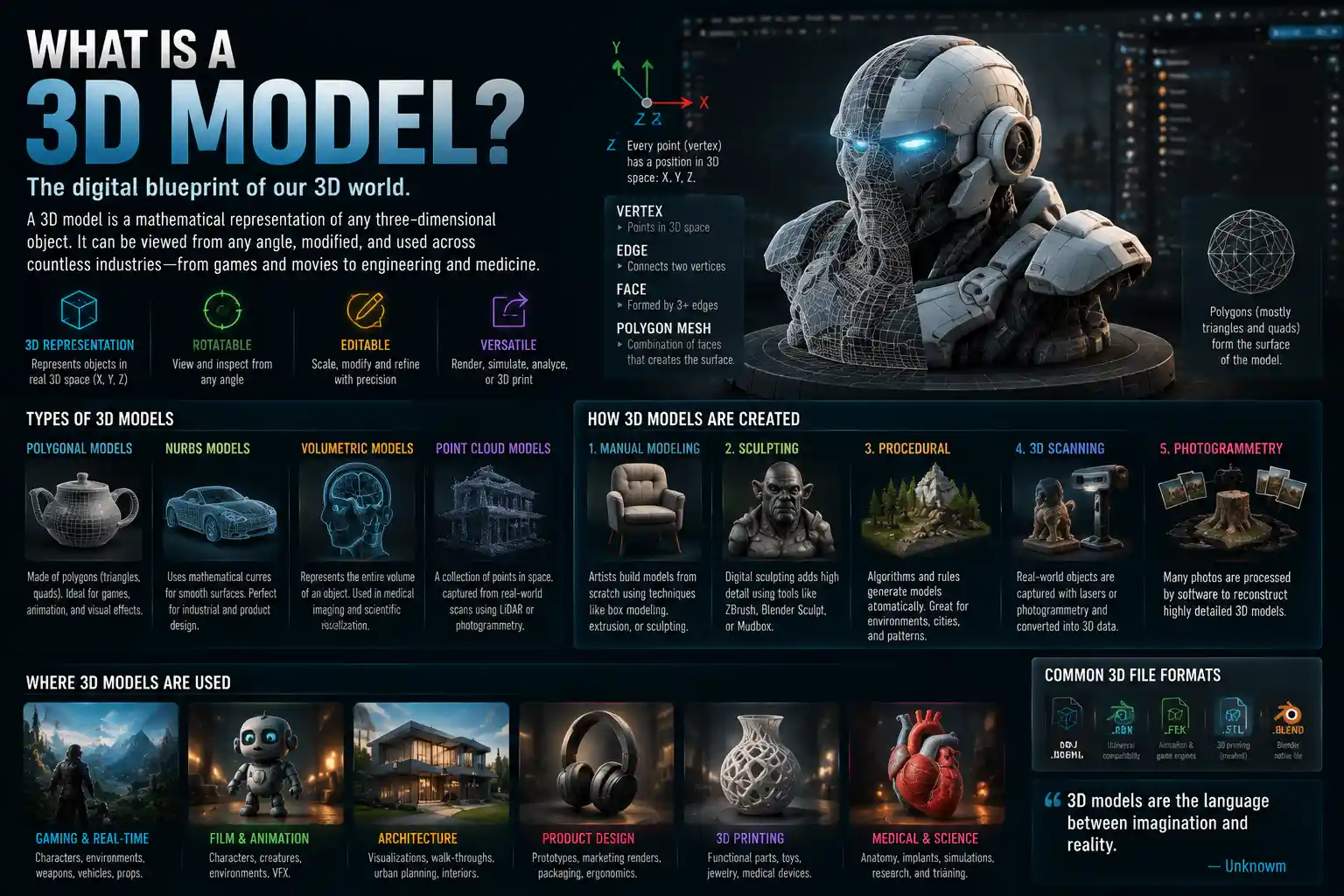
Put simply, a 3D model is a mathematical representation of any three-dimensional object, whether it’s a tiny tooth, a skyscraper, or a fictional alien creature. Unlike a 2D image, which only records height and width, a 3D model stores data about the object’s depth, allowing it to be rotated, viewed from any angle, scaled up or down, and modified in real time. 3D models can represent physical objects that exist in the real world, entirely imaginary creations, or abstract shapes designed for functional purposes.
Every 3D model exists within a 3D coordinate system, the mathematical framework that defines where every point on the model sits. The three axes are: X (horizontal width), Y (vertical height), and Z (depth). Every vertex, or point, on the model is assigned coordinates along these three axes, which is what allows the software to render the object as three-dimensional.
Polygonal Modeling: The Most Common Type
The vast majority of 3D models you interact with today are polygonal models, which build the shape of an object out of small, flat shapes called polygons. Most polygons are triangles, though some workflows use four-sided quads or more complex n-gons. These polygons are connected at their edges to form a mesh, which is the surface of the 3D model.
The number of polygons in a mesh determines its polygon count, a metric that impacts both the model’s detail and its performance. A high-poly model with millions of polygons can capture fine details like the texture of tree bark or the creases in a character’s face, but it requires more processing power to display. A low-poly model with fewer polygons is lighter and faster to load, making it ideal for real-time applications like video games or AR filters, where performance is critical.
Other Common 3D Model Types
While polygonal modeling is the most widespread, other types of 3D models serve specialized purposes:
- NURBS (Non-Uniform Rational B-Splines): NURBS models use mathematical curves to create smooth, organic surfaces instead of flat polygons. They’re the standard in industrial and automotive design, where precision and smooth curves are non-negotiable. Unlike polygonal meshes, NURBS surfaces remain smooth no matter how much you scale them, making them perfect for engineering work.
- Volumetric models: Volumetric models store data across the entire three-dimensional space of an object, not just its surface. This makes them ideal for medical imaging (like CT scans and MRIs) and geological modeling, where professionals need to analyze the internal structure of an object, not just its outer shape.
- Point cloud models: Created by scanning real-world objects with LiDAR or 3D scanners, point cloud models are made up of thousands or millions of individual points that map the surface of the original object. They’re often used as a starting point to create a polygonal 3D model of an existing building or product.
How 3D Models Are Created
3D modeling is a skilled craft, and there are multiple workflows to create a 3D model depending on its end use. Some are built entirely from scratch by 3D artists, while others are scanned from existing physical objects. Each method has its own advantages and use cases.
Manual 3D Modeling Workflows
When an artist creates a 3D model from scratch, they typically use one of these common techniques:
- Box modeling: One of the most accessible beginner techniques, box modeling starts with a simple primitive shape—like a cube, sphere, or cylinder—that the artist gradually pushes, pulls, and subdivides into the desired shape. It’s a flexible, intuitive method that works for everything from character modeling to product design.
- Extrusion modeling: Extrusion starts with a 2D outline or profile of an object, which the artist then “extrudes” along the Z-axis to add depth. This is the go-to method for creating objects with consistent cross-sections, like pipes, walls, or furniture legs.
- Sculpting: Digital sculpting works just like traditional clay sculpting, but in a 3D software environment. Artists push, pull, pinch, and smooth a digital mesh to create highly detailed organic shapes, like character faces, monsters, or detailed product textures. Modern sculpting tools like ZBrush can handle hundreds of millions of polygons, allowing for incredible levels of detail.
- Procedural modeling: Procedural modeling uses algorithms and rules to generate 3D models automatically, instead of building them by hand. This is perfect for creating repeating patterns, like terrain, brick walls, or crowds of people, and it allows artists to quickly generate endless variations of a base model.
3D Scanning: Capturing Real-World Objects
For projects that require an exact digital copy of an existing physical object, 3D scanning is the fastest and most accurate method. A 3D scanner uses lasers, structured light, or photogrammetry to capture thousands of data points about the shape and surface of the original object, which are then stitched together into a 3D model.
Photogrammetry, a popular 3D scanning method that doesn’t require specialized laser equipment, works by taking dozens or hundreds of photos of an object from every angle. Software then analyzes the photos to identify common features and reconstruct the 3D shape of the object. This method is often used to create 3D models of historical artifacts, outdoor landscapes, and even entire buildings.
3D scanning has revolutionized industries from healthcare to cultural preservation. For example, museums use 3D scanning to create exact digital replicas of fragile artifacts that can be shared online around the world, without risking damage to the original piece. In dentistry, dentists use 3D scans of a patient’s teeth to create custom crowns and aligners that fit perfectly on the first try.
What 3D Modelers Add After Creating the Mesh
A raw 3D mesh is just a wireframe of an object—most of the time, it needs additional work before it’s ready to use. The most common post-processing steps include:
- Texturing: Applying 2D image files called textures to the surface of the mesh to add color, roughness, reflectivity, and small details like scratches or wood grain. Modern PBR (physically based rendering) textures mimic how real materials interact with light, making models look incredibly realistic.
- Rigging: For animated characters or moving objects, rigging adds a digital “skeleton” to the mesh that allows animators to pose and move the model without having to reshape it manually.
- UV mapping: A process that unwraps the 3D mesh into a 2D plane, so textures can be applied correctly without stretching or distortion.
Common Use Cases for 3D Models Across Industries
It’s hard to overstate how ubiquitous 3D models have become in modern life. Nearly every industry relies on them for one purpose or another, and new use cases emerge as 3D technology becomes cheaper and more accessible. Below are some of the most common applications.
Entertainment and Media
The entertainment industry was one of the first to adopt 3D modeling at scale, and it remains one of the largest users. Every modern animated film from studios like Pixar and DreamWorks is built entirely from 3D models of characters, sets, and props. Even live-action films rely heavily on 3D models for visual effects: 3D models are used to create everything from superhero characters like Thanos to digital environments that are too dangerous or expensive to build physically.
Video games are another massive consumer of 3D models. Every character, weapon, building, and piece of terrain in a modern console or PC game is a 3D model, optimized to run in real time as the player moves through the game world. Even indie mobile games rely on libraries of pre-made 3D models to speed up development.
More recently, 3D models have become core to social media and the creator economy. AR filters on Instagram and TikTok use 3D models to overlay digital objects (like a pair of sunglasses or a dancing cat) onto the real world through your phone camera. 3D models are also the foundation of non-fungible tokens (NFTs) for digital art and virtual worlds like the Metaverse and Decentraland, where users buy and sell digital land and avatars made of 3D models.
Architecture, Engineering, and Construction (AEC)
Before 3D modeling, architects had to rely on 2D blueprints and physical scale models to show clients what a finished building would look like. Today, nearly all architectural design is done with 3D models, which allow architects to explore different designs, create realistic renderings for clients, and even walk through the building virtually before construction starts.
Building Information Modeling (BIM), the standard workflow for modern construction projects, uses 3D models to embed every detail of a building into one digital file—from the type of concrete used in the foundation to the location of electrical outlets. This allows architects, engineers, and contractors to collaborate more effectively, catch design errors before construction, and reduce material waste.
In civil engineering, 3D models are used to design everything from bridges to highways to water treatment plants. Engineers can test how a 3D model of a bridge holds up under extreme wind or traffic loads, making the final design safer and more cost-effective.
Manufacturing and Product Design
Product designers use 3D models to prototype and test new products before they go into mass production. Instead of carving dozens of physical prototypes by hand, designers can create a 3D model, iterate on it digitally in hours, and even 3D print a physical prototype to test fit and function. This speeds up development time and reduces costs dramatically.
3D models are also the foundation of additive manufacturing (the technical term for 3D printing). To print a physical object, you need a 3D model to tell the printer what shape to create. This has revolutionized custom manufacturing, from custom prosthetics to personalized medical implants to one-off parts for vintage cars.
In mass manufacturing, 3D models are used to program CNC machines and robotic assembly lines, which cut and shape parts directly from the digital model with extreme precision.
Healthcare and Life Sciences
3D modeling has transformed healthcare in recent years. Surgeons use 3D models created from a patient’s CT or MRI scans to practice complex procedures before operating on the patient. For example, a surgeon can print a 3D model of a patient’s heart with a congenital defect to plan the exact incision path, reducing the risk of complications during surgery.
Custom medical devices like prosthetics, hearing aids, and orthopedic implants are all designed from 3D models scanned to fit the exact shape of a patient’s body. This makes them far more comfortable and effective than one-size-fits-all alternatives.
Scientists also use 3D models to study molecular structures, helping to develop new drugs and treatments for diseases. For example, researchers used 3D models of the COVID-19 virus spike protein to develop mRNA vaccines in record time.
“What 3D modeling does is it allows us to think and create in three dimensions, just like we do in the real world. It removes the barrier between our imagination and the ability to see, test, and share what we’re thinking.”
Key Terms and Common Misconceptions About 3D Models
3D modeling has its own vocabulary, and many people mix up related terms that have distinct meanings. Let’s clear up the most common misconceptions and define key terms that you’re likely to encounter.
3D Modeling vs. 3D Rendering
One of the most common mix-ups is between 3D modeling and 3D rendering. 3D modeling is the process of creating the 3D mesh itself—the digital shape of the object. 3D rendering is the process of taking that 3D model and generating a final 2D image or video from it, by adding lighting, materials, and camera angles. Think of it this way: modeling is building the chair, and rendering is taking a photo of the chair to show someone what it looks like. You can’t have a render without a 3D model, but you can create a 3D model without ever rendering it (for example, a 3D model that’s only used for 3D printing).
3D Model vs. 3D Asset
A 3D asset is a 3D model that’s prepared for use in a specific project or pipeline. A raw 3D model of a tree might just be a mesh, but a 3D asset of a tree for a video game includes the mesh, textures, rigging (if it needs to sway in the wind), and any other data the game engine needs to load it quickly. In most cases, all 3D assets are 3D models, but not all 3D models are prepared to be used as assets in a larger project.
Common Misconceptions
Let’s bust three of the most persistent myths about 3D models:
- Myth: All 3D models are meant to be realistic. In reality, 3D models come in every style, from hyper-realistic to stylized low-poly art. Many game developers intentionally use low-poly, stylized 3D models to create a specific aesthetic, and abstract 3D models are widely used in graphic design and advertising.
- Myth: 3D models are only for digital use. As 3D printing becomes more common, millions of 3D models are created every year specifically to be turned into physical objects. From custom jewelry to construction parts, 3D models are the digital blueprint for physical objects.
- Myth: You need a super powerful computer to work with 3D models. While high-poly models for feature films do require expensive hardware, simple 3D models can be created and edited on a regular laptop, and free cloud-based 3D modeling tools make the craft accessible to anyone with an internet connection.
Another common misconception is that 3D modeling is a new technology. While consumer 3D printing and real-time 3D graphics are relatively new, the first 3D models date back to the 1960s, when computer scientist Ivan Sutherland created the first interactive 3D computer graphics program at MIT. 3D modeling started to be widely used in industrial design and film in the 1970s and 1980s, and the rise of personal computers in the 1990s made it accessible to more creators.
Future Trends in 3D Modeling
3D modeling is evolving faster than ever, driven by advances in artificial intelligence and real-time graphics. Several key trends are shaping the future of the industry, making 3D modeling faster, more accessible, and more capable than ever before.
AI-Powered 3D Modeling
Artificial intelligence is already transforming how 3D models are created. New AI tools can generate a 3D model from a text prompt or a single 2D photo in minutes, a process that used to take a skilled artist hours or days. For example, tools like Luma AI and 3DFY.ai allow users to type “a wooden kitchen table with four legs” and get a usable 3D model in seconds. This is democratizing 3D modeling, allowing people with no formal training to create custom 3D models for prototyping, games, or 3D printing.
AI is also helping automate tedious parts of the 3D modeling workflow, like retopologizing high-poly meshes, creating UV maps, and texturing models. This frees up 3D artists to focus on creative work instead of repetitive technical tasks.
Real-Time 3D and Interactive 3D Models
Advances in graphics processing units (GPUs) have made it possible to display complex high-poly 3D models in real time on everything from high-end gaming consoles to mobile phones. This is leading to a rise in interactive 3D models for marketing, e-commerce, and education. For example, many furniture retailers now let customers place a 3D model of a couch in their living room using AR on their phone, to see how it fits and looks before buying. E-commerce brands have found that interactive 3D models increase customer confidence and reduce return rates, since customers can see the product from every angle before purchasing.
Generative Design for Engineering and Manufacturing
Generative design is an AI-powered workflow where engineers input design requirements (like how much weight a part needs to hold, what materials it can use, and what its maximum cost is) and the AI generates hundreds of possible 3D model designs that meet those requirements. This allows engineers to create parts that are lighter, stronger, and cheaper than anything they could have designed manually. Generative design is already widely used in aerospace and automotive design, where reducing weight while maintaining strength is a top priority.
As these trends continue, 3D models are only going to become more embedded in everyday life. What started as a specialized tool for engineers and animators is becoming a general-purpose technology that anyone can use, opening up new creative and commercial possibilities across every industry.
Conclusion
A 3D model is far more than just a digital trick to make images look three-dimensional. It’s a flexible, powerful representation of objects that bridges the gap between digital and physical worlds, allowing us to create, test, and share three-dimensional shapes faster and more accurately than ever before. From the 3D models that power your favorite video games to the custom 3D-printed implants that save lives, 3D models shape nearly every part of modern life.
As AI makes 3D modeling more accessible and real-time graphics become more powerful, we’re only going to see more innovative uses for 3D models in the coming years. Whether you’re a creator looking to get started in 3D modeling, a business owner exploring how 3D models can improve your marketing, or just someone curious about the technology behind the digital content you use every day, understanding what 3D models are and how they work is key to understanding the modern digital world. What once required years of training and expensive equipment is now available to anyone with an idea, opening the door to a new era of creativity and innovation built on 3D modeling.