
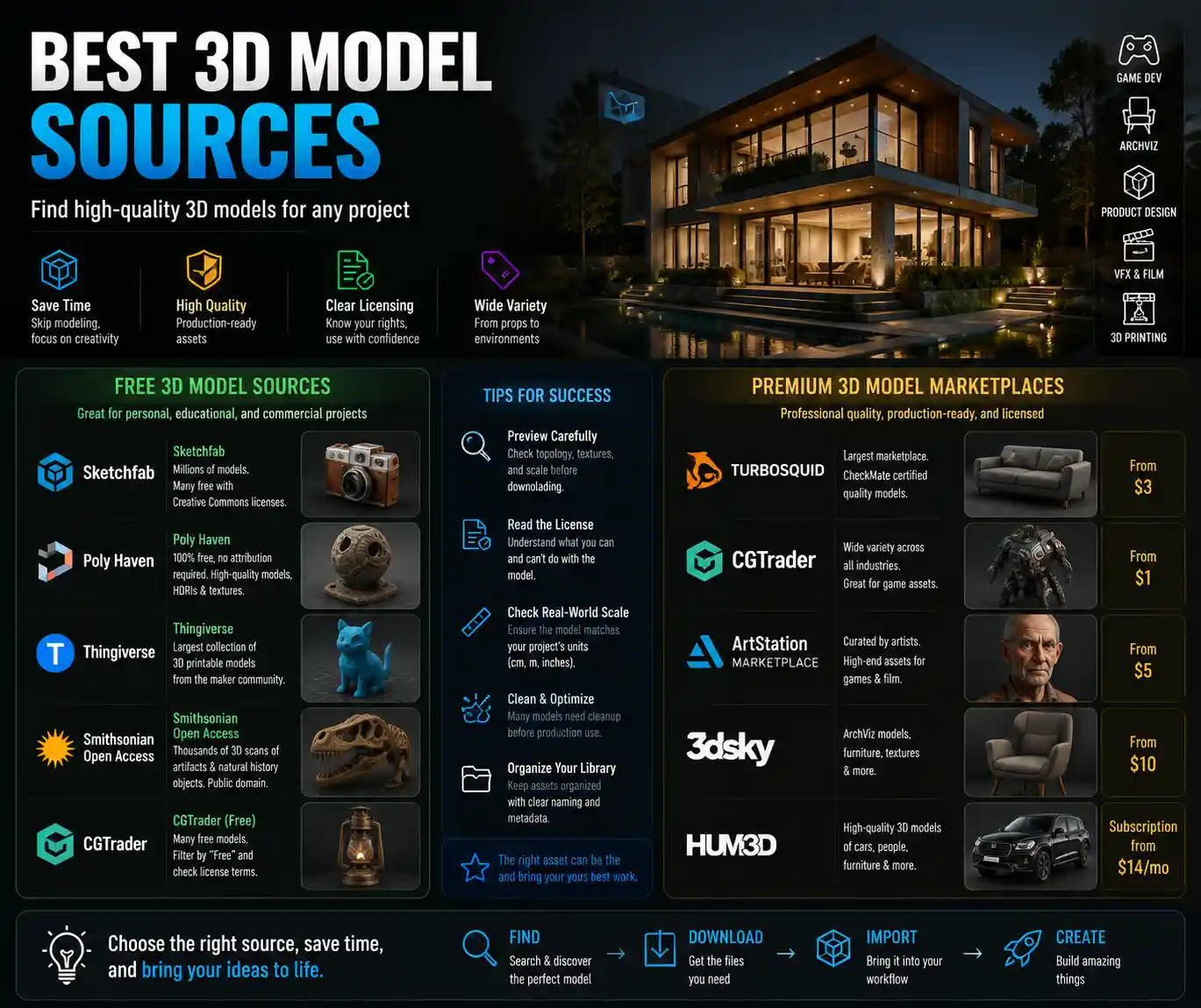
Whether you’re an indie game developer building an open-world environment, a product designer prototyping a new consumer gadget, a 3D artist working on a VFX shot for a short film, or an architecture student visualizing a campus redevelopment, high-quality 3D models cut down work weeks of manual modeling and elevate the final quality of your project. But with thousands of marketplaces, free repositories, and custom studios claiming to offer top-tier assets, sorting through the noise to find models that match your polycount requirements, licensing needs, and aesthetic standards can feel like searching for a needle in a digital haystack. This guide breaks down the best 3D model sources available today, organized by use case, quality, and licensing, to help you find exactly what you need without wasting time or money.
Free High-Quality 3D Model Repositories for Non-Commercial and Commercial Use
Contrary to popular belief, you don’t need a big budget to access professional-grade 3D assets. A growing number of non-profit initiatives, industry platforms, and artist communities offer free high-quality models with permissive licenses that allow use in everything from student projects to commercial products. The key is knowing which sources curate their collections to avoid low-poly, poorly unwrapped, or incorrectly scaled assets that cause headaches down the line.
Public Domain and Artist-Shared Community Collections
Platforms built around open sharing have some of the most unique free 3D assets available, from scanned real-world objects to fan art and educational resources. One of the most trusted names in this space is Sketchfab, which hosts more than 2 million free Creative Commons-licensed models. What sets Sketchfab apart is its built-in 3D viewer that lets you inspect polycount, check UV mapping, and test texture resolution before downloading. Many independent artists upload their work to Sketchfab to build their portfolio, meaning you can find everything from high-detail environmental props to fully rigged character models for free, as long as you credit the creator for commercial use (some artists waive attribution requirements for a small fee). Another standout is Poly Haven, a non-profit project run by 3D artist Greg Zaal that offers 100% free, commercially usable 3D models, HDRIs, and textures. All assets on Poly Haven are cleared for commercial use with no attribution required, and the collection is focused on production-ready assets for architectural visualization and game design—think high-detail furniture, plants, and building materials.
For architecture and design professionals, CADmodels and the Revit City free library offer thousands of manufacturer-created BIM (Building Information Modeling) models that are accurate to real-world dimensions, perfect for integrating actual furniture, appliances, and building components into design plans. For 3D printing enthusiasts and makers, Thingiverse remains the largest free repository of 3D printable models, though quality varies widely—stick to models with hundreds of downloads and positive comments to avoid failed prints.
Government and Institutional Open-Source Collections
Many museums, research institutions, and government agencies release high-quality 3D scans of historical artifacts, natural specimens, and cultural heritage objects for free public use. These models are often far more accurate than handmade assets, making them ideal for educational content, documentaries, or historical games. The Smithsonian Open Access program, for example, has released more than 3,000 high-resolution 3D scans of everything from dinosaur skeletons to ancient Egyptian masks into the public domain, with no restrictions on use. Similarly, the British Museum 3D Collection offers hundreds of free scans of iconic artifacts for non-commercial and limited commercial use. For scientific and natural history projects, the Digital Morphology Library provides 3D scans of animal and plant specimens that are used in research and educational media worldwide.
While free sources are incredibly valuable, they do come with caveats. Always check the license before using a model in a commercial project: some Creative Commons licenses require attribution, others prohibit commercial use entirely, and few free models come with the type of commercial indemnification that paid sources offer. It’s also common to find topology errors, overlapping UVs, or missing texture maps in free assets, so budget time to clean up models before integrating them into your project.
Premium Paid Marketplaces for Production-Ready 3D Assets
For commercial projects where reliability, quality, and clear licensing are non-negotiable, premium 3D model marketplaces are the best investment. Unlike free repositories, most paid platforms curate their collections, require artists to meet specific technical standards, and offer clear commercial licenses that protect you from copyright claims. Prices range from a few dollars for individual props to hundreds of dollars for fully rigged characters or entire environment packs, but the time saved on fixing bad assets is almost always worth the cost.
General-Purpose Premium Marketplaces
TurboSquid is the largest and most well-known premium 3D marketplace, with a collection of more than 1 million models across every category you can imagine: from product models for marketing renderings to game assets, architectural assets, and VFX props. What makes TurboSquid stand out is its CheckMate certification program, which guarantees that certified models meet specific technical standards: they’re properly scaled, have clean topology, include all advertised texture maps, and are free of modeling errors. For professional work, CheckMate models eliminate almost all the guesswork that comes with downloading 3D assets from unknown sources. TurboSquid also offers flexible licensing, with options for single-use commercial projects and unlimited use enterprise licenses.
Another leading general marketplace is CGTrader, which combines a curated library of pre-made assets with a custom 3D modeling service that lets you commission a unique model if you can’t find what you’re looking for. CGTrader’s quality standards are high, and many independent studios and artists use the platform to sell their work, so you can often find more niche assets than you would on larger marketplaces. For game developers and AR/VR creators, Unity Asset Store and Unreal Engine Marketplace are unparalleled. All assets on these platforms are optimized for their respective engines, with pre-built materials, blueprints, or scripts that let you drop them directly into your project without extra conversion work. Both marketplaces have extensive free sections, and their premium collections include everything from fully rigged character packs to entire landscape environments.
Niche Premium Platforms for Specific Use Cases
Depending on your project, a niche 3D asset source may offer better quality and more relevant assets than a general marketplace. Here are some of the best niche sources for common use cases:
- Architectural Visualization: 3DExport and ArchDaily’s BIM objects library offer thousands of manufacturer-accurate furniture, fixtures, and building components that are optimized for high-end renderings. Evermotion is another long-standing favorite for ArchViz, with curated packs of high-detail furniture, vegetation, and people models.
- Game Development: Kitbash3D sells modular building and environment packs that are designed for fast level creation, with consistent polycounts and texture resolutions that work seamlessly together. Their collections span everything from sci-fi cities to medieval towns, making them a go-to for indie game teams working on tight deadlines.
- Product Design and Manufacturing: GrabCAD (owned by Stratasys) offers more than 4 million free and premium CAD models for mechanical engineering and product design, with files available in STEP, IGES, and other standard manufacturing formats. Premium CAD models on GrabCAD are often created by manufacturers, so they’re dimensionally accurate for prototyping and production.
- VFX and Animation: ProductionCrate offers affordable subscriptions that give you access to thousands of high-quality 3D models, motion graphics, and footage, with clear commercial licensing. For character models, Reallusion’s Character Creator marketplace has thousands of fully rigged, game-ready characters that work with most major animation pipelines.
One thing to watch for when buying from premium marketplaces is license scope. Most marketplaces offer two main license types: a standard license for single projects with limited distribution, and an extended license for projects that will be distributed to more than 5,000 users or used in merchandise. Always double-check that the license covers your intended use—for example, some licenses prohibit using assets in NFTs or AI training datasets, so if you’re working in those areas, make sure you get the right permissions.
Scanner-Generated 3D Models: Sources for Photorealistic, Real-World Assets
For projects that require unmatched realism—whether that’s a historical documentary, a product visualization, or a hyper-realistic game environment—3D scanned models are far more accurate than handmade models. Scanned models capture every subtle texture, imperfection, and detail of the original real-world object, creating a level of realism that’s almost impossible to achieve through manual modeling. Today, there are several reliable sources for high-quality scanned 3D assets, ranging from free repositories to premium specialized platforms.
The biggest advantage of scanned 3D models isn’t just realism—it’s efficiency. Instead of spending weeks modeling and texturing a single brick wall or piece of driftwood, you can drop a scanned asset into your scene and get a photorealistic result in hours.
Free Scanned Asset Collections
As mentioned earlier, Poly Haven has a growing collection of free scanned 3D assets, including rocks, plants, and building materials, all cleared for commercial use. Another standout free source is Scan My World, a community project that collects 3D scans of landmarks, buildings, and historical sites from around the world, most of which are free to download for non-commercial use. For small-scale props and natural assets, 3D Scan Store offers a small collection of free high-resolution scans to test their quality before you buy.
Premium Scanned Asset Platforms
For professional production, Quixel Megascans (now part of Epic Games) is the industry standard for scanned 3D assets. Megascans has a library of more than 10,000 high-resolution scanned assets, including everything from rocks and vegetation to building materials and surface decals, all with 8K texture maps and clean topology that’s optimized for real-time use. The best part? If you’re using Unreal Engine, Megascans assets are completely free to use in Unreal projects, even for commercial use. For other engines, you can get access to the entire library through an affordable subscription.
Another leading provider of scanned assets is 3D Scan Store, which specializes in high-resolution 3D scans of human beings, animals, and common objects. Their full-body 3D scans are perfectly rigged and ready for animation, making them a popular choice for VFX studios and game developers that need realistic human models. For architecture and construction, DroneBase offers custom 3D scanned models of existing buildings and landscapes, created from aerial drone imagery, which is perfect for renovation projects or site planning.
While scanned models offer unmatched realism, they do come with one major downside: file size. A single high-resolution scanned asset can have hundreds of megabytes of texture data, so you’ll need to make sure you optimize them for your use case—downscaling textures for real-time game use, for example, or retopologizing high-poly scans to reduce polycount. Most reputable scanned asset sources provide multiple LODs (Level of Detail) already, which makes optimization much easier.
Custom 3D Model Sources: When Pre-Made Isn’t Enough
Sometimes, you need a 3D model that’s completely unique to your project—whether that’s a custom character for a game, a prototype of a new product, or a 3D model of a specific building that doesn’t exist anywhere online. In these cases, working with a custom 3D artist or studio is the best way to get exactly what you need, and it’s often more affordable than most people think.
Freelance Platforms for Custom 3D Modeling
If you have a small to medium-sized project, freelance platforms let you connect with thousands of experienced 3D artists around the world, with rates to fit almost any budget. Upwork and Fiverr are the largest general freelance platforms, and both have extensive categories for 3D modeling. When hiring on these platforms, always ask to see a portfolio of past work that matches your project type—an artist that specializes in 3D printable jewelry may not be the best fit for a game-ready character, for example. It’s also a good idea to ask for a small test model to confirm quality before committing to a large project.
For more specialized work, CGTrader and Toptal are better options. CGTrader has a built-in custom modeling service that lets you post your project and get bids from pre-vetted 3D artists, with escrow payment protection that ensures you only pay when you get a model that meets your requirements. Toptal vets all its 3D artists and designers for technical skill and communication, making it a good option for larger projects that require a high level of expertise.
Specialized Custom 3D Studios
For large commercial projects—such as a full game’s asset pack, a product line of 3D models, or VFX assets for a feature film—a specialized 3D asset studio will give you more consistent quality and project management than working with individual freelancers. Many studios specialize in specific niches: for example, some focus exclusively on game assets, others on architectural BIM modeling, and others on product modeling for e-commerce. When hiring a studio, ask for client references and a breakdown of what’s included in the price—do they include UV mapping, texture baking, and optimization for your specific pipeline, or do those cost extra?
If you need a 3D model of an existing physical object, you can also work with a local 3D scanning service to scan the object for you. This is a common option for product designers who have a physical prototype and need a digital model for manufacturing, or for cultural institutions that need to digitize their collections. Most 3D printing services also offer 3D scanning, so you can get a scanned model and a 3D printed prototype in one stop.
When commissioning a custom 3D model, it’s critical to get the contract right. Make sure the contract explicitly states that you will own full copyright of the final model, and that the artist grants you unlimited commercial use rights. This avoids disputes down the line if you decide to expand your project or reuse the model in other products.
Key Criteria to Evaluate 3D Model Quality Before You Download
Regardless of where you get your 3D model from, there are a few key criteria you should check to confirm it’s high-quality before you integrate it into your project. Skipping this step can lead to hours of frustrating troubleshooting later, from rendering errors to texture stretching or collision issues in games.
- Check topology and polycount: High-quality models have clean topology, with no non-manifold geometry, overlapping faces, or unnecessary extra vertices. For real-time use, the polycount should match your project’s requirements: a mobile game will need much lower polycount than a high-end cinematic rendering. Always check the wireframe preview if one is available—messy, chaotic wireframes usually mean messy topology.
- Verify UV mapping and texture quality: Good UVs have minimal stretching, and all texture files are included (albedo, normal, roughness, metallic, AO, etc.). Check the resolution of the texture maps: a 1K texture may be fine for a background prop, but a foreground character will need at least 4K for a high-quality result.
- Confirm scale and units: One of the most common issues with 3D assets is incorrect scaling. A kitchen chair that’s 10 meters tall is useless if you’re importing it into an architectural rendering, so check that the model’s dimensions match real-world units before you download. Most reputable sources list dimensions clearly in the model description.
- Check file formats: Make sure the model is available in a file format that works with your pipeline. Common formats include FBX, OBJ, GLB for real-time use, and STEP for CAD. If you’re using a specific engine or software, confirm that the file is compatible before you buy.
- Review licensing terms: Even if the model is high-quality, it’s not worth using if the license doesn’t cover your intended use. Always confirm if you can use it commercially, if attribution is required, and if there are any restrictions on modifying or redistributing the model.
Most premium sources and many free sources offer a preview option that lets you inspect the model in a 3D viewer before downloading. Always take advantage of this— it only takes a minute to rotate the model, zoom in on details, and check for obvious issues that would require extra work to fix.
Conclusion
Finding high-quality 3D models doesn’t have to be a frustrating process. Whether you’re working on a tight student budget and need free assets from community repositories, a professional game developer looking for production-ready scanned assets from a premium platform, or a product designer needing a custom model built from scratch, there’s a source that fits your needs. The key is to prioritize quality and clear licensing over low cost: a $10 well-made model that’s ready to drop into your project will always save you more time and money than a free model that requires hours of cleanup. By using the criteria and sources outlined in this guide, you can build a library of high-quality 3D assets that elevate your work and keep your project on schedule.