
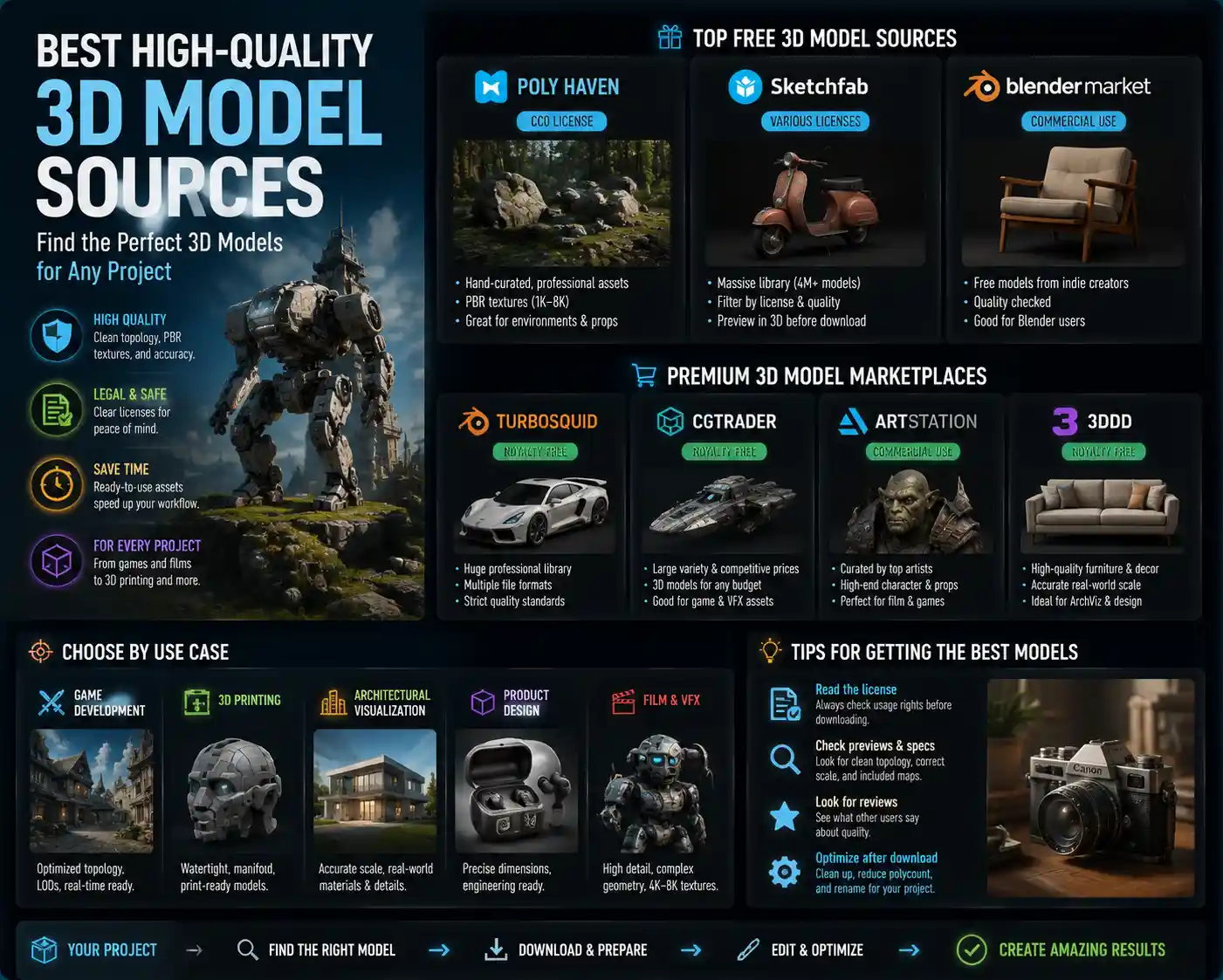
Whether you’re a game developer building an open world, a product designer prototyping a new consumer gadget, an architect visualizing a residential development, or a 3D printing enthusiast bringing a custom creation to life, the quality of your final project starts with the 3D model you use. A low-poly model with distorted geometry, mismatched textures, or missing components can derail timelines, force hours of rework, and result in a lackluster end product that fails to meet client or audience expectations. Today, there are more sources for 3D models than ever before, but not all are created equal. Knowing where to find high-quality, legally usable models that fit your specific project needs can save you time, money, and stress. This guide breaks down the best high-quality 3D model sources, organized by use case, licensing, and quality, to help you find exactly what you need for your next project.
What Defines a High-Quality 3D Model?
Before diving into specific sources, it’s important to understand what separates a truly high-quality 3D model from a mediocre one. Not all projects require the same level of detail, but there are universal standards that apply across industries.
Core Quality Standards
A high-quality 3D model starts with clean geometry. This means no non-manifold edges, overlapping faces, reversed normals, or unnecessary vertices that bloat the file size and cause issues when 3D printing, rendering, or importing into game engines. For photorealistic projects, accurate topology matters too: edge loops follow the form of the object, making it easy to edit or animate if needed.
Next comes properly mapped, high-resolution textures. Low-quality models often come with blurry 512x512px textures that look pixelated up close, while high-quality sources provide 4K or even 8K PBR (physically based rendering) textures that accurately reflect how light interacts with different materials, from brushed metal to woven fabric. Most professional sources also include all required map types: albedo, roughness, metallic, normal, ambient occlusion, and displacement, depending on the model’s use case.
Finally, legal clarity is a critical part of quality. A free model that looks great but comes with an unclear license can leave you open to copyright claims, lawsuits, or forced takedowns if you use it in a commercial project. Reliable sources clearly state usage rights, attribution requirements, and restrictions on modification or resale, so you always know where you stand.
Quality by Project Type
The definition of quality changes based on how you plan to use the model. For example:
- Game development: Polycount is optimized for real-time rendering, with LODs (level of detail) included to keep performance smooth even in large open worlds.
- 3D printing: Models are watertight, have proper wall thickness, and no errors that would cause a print to fail mid-job.
- Architectural visualization: Models are scaled correctly to real-world dimensions and match the exact specifications of real building products, from windows to furniture.
- VFX and film: Models have enough geometry detail and texture resolution for 4K or even 8K close-up shots.
Best Free High-Quality 3D Model Sources
Free 3D models get a bad reputation for low quality, but there are several reputable platforms that host thousands of professional-grade models available for free download, even for commercial use, in many cases. These sources are ideal for independent creators, students, and small teams working with limited budgets.
Poly Haven
Formerly known as HDRI Haven, Poly Haven has expanded into one of the best sources for free, high-quality 3D assets, including models, textures, and HDRIs. All assets on the site are released under the Creative Commons Zero (CC0) license, which means you can use, modify, and redistribute them for any purpose, personal or commercial, with no attribution required (though it’s always appreciated). Every model comes with fully cleaned topology and 1K to 8K PBR textures, and the curation team manually tests every asset before it’s added to the library. The collection is smaller than some commercial platforms (around 1,000 models as of 2024), but every single asset is professional quality. It’s particularly strong for environmental assets like rocks, plants, furniture, and architectural details perfect for game environments or architectural visualization.
Sketchfab
Sketchfab is one of the largest 3D model platforms on the web, with over 4 million free models available to download. The quality varies widely, from student projects to professional assets from major studios, but the platform’s filtering tools make it easy to narrow results to only free, commercially licensed models with PBR textures. The “Downloadable” filter lets you sort by license type, including CC0, Creative Commons Attribution, and other commercial-friendly options. Sketchfab also has a great feature that lets you view and test models directly in your browser before downloading, so you can check texture quality and geometry before committing. Many professional artists and companies release their work for free on Sketchfab to build their portfolios, so you can often find high-quality models of everything from electronics to vehicles to characters. The biggest downside is that you have to do your own due diligence on quality and licensing, but for a free source, it’s unmatched in variety.
Blender Market Free Section
Blender Market is best known as a commercial marketplace for Blender add-ons and assets, but it also has a large section of free 3D models from independent creators. All assets on the platform are vetted for basic quality, so you’re much less likely to run into broken geometry or missing textures than on uncurated free platforms. Most free models are available for commercial use, though you should always check the specific license listed on the product page. It’s particularly strong for Blender-specific assets with properly set up materials and modifiers that work seamlessly in Blender, saving you time on post-download edits.
Other Notable Free Sources
- CGTrader Free Section: Curated free models from a large community of 3D artists, with clear licensing filters for commercial use.
- Thingiverse: The go-to source for free 3D printable models, with millions of designs tested by the 3D printing community. All models are free, though licensing varies by creator.
- MyMiniFactory: Another popular 3D printing platform with a large free section, and all free models are guaranteed to be print-ready.
- Google Poly: A library of free, low-poly 3D models ideal for AR/VR projects and quick prototypes.
Top Paid Commercial High-Quality 3D Model Sources
For professional projects where you need guaranteed quality, legal protection, and specific features, paid sources are almost always worth the investment. Prices range from a few dollars for individual models to monthly subscriptions for unlimited access, so there are options for every budget and project scale.
TurboSquid
TurboSquid is one of the oldest and most respected paid 3D model marketplaces, with a library of over 1 million professional models. It’s the go-to choice for many studios because of its strict quality checks for premium models, clear licensing, and wide variety of asset types. All models on TurboSquid have clear usage rights, with a standard license that allows use in most commercial projects, and an extended license for products that will be distributed to more than 500,000 copies. The platform’s CheckMate certification program guarantees that models meet specific quality standards, including clean geometry, correct scale, and working textures, so you know exactly what you’re getting before you buy. TurboSquid also offers a subscription service, TurboSquid 100, which gives you 100 free downloads a month for a flat monthly fee, making it affordable for teams that need a steady stream of assets. It’s particularly strong for product models, industrial designs, furniture, and characters.
"When you’re working on a commercial project for a client, the last thing you can afford is to spend 10 hours fixing a broken free model that looked good in the preview. Paying a small fee for a certified, ready-to-use model from TurboSquid pays for itself in saved time alone."
CGTrader
CGTrader is another large curated marketplace that connects buyers with 3D artists, with both pre-made models and a custom 3D modeling service if you can’t find what you need. Like TurboSquid, it has strict quality guidelines for most listings, and all licenses are clearly stated, with options for commercial and extended use. One of the biggest advantages of CGTrader is its pricing: many independent artists sell their work for lower prices than you’ll find on larger platforms, and the site regularly runs sales that discount popular assets. It’s also a great option if you need a custom model modified to your specifications; you can often message the creator directly to request changes for a small additional fee. CGTrader’s library is particularly strong for game assets, characters, and architectural models.
Unity Asset Store / Unreal Engine Marketplace
If you’re developing a game or interactive experience in Unity or Unreal Engine, the native marketplaces for each engine are some of the best places to find high-quality, engine-ready 3D models. All assets are tested to work with the current version of the engine, with pre-setup materials, shaders, animations, and LODs that work right out of the box, no extra editing required. Both marketplaces have large sections of free assets, as well as paid assets ranging from individual props to full environment packs. Pricing varies from a few dollars for small prop packs to $100+ for full character packs with animations, but the convenience of engine-ready assets makes the cost worth it for most developers. The licensing is also very clear: for most assets, you can use them in any commercial project built on the engine, with no additional fees as long as your project is distributed through standard channels.
ArchDaily / 3D Warehouse
For architects and interior designers, 3D Warehouse from SketchUp is one of the largest sources of free and paid 3D models of real building products from major manufacturers. Brands like Ikea, Herman Miller, and Duravit publish official 3D models of their products on 3D Warehouse, so you can add accurate, to-scale models to your architectural visualization with no guesswork. For higher-quality, render-ready architectural assets, sites like ArchDaily’s 3D model library and BIMobject offer official BIM (Building Information Modeling) and 3D models that are perfectly scaled and detailed for construction documents and high-end visualization. Most of these models are free for architects to use, as they’re intended to help designers specify the manufacturer’s products in their projects.
Specialized High-Quality 3D Model Sources for Niche Use Cases
General marketplaces are great for most projects, but for niche use cases, specialized sources often offer higher quality assets tailored to your specific needs. Whether you’re 3D printing, building AR experiences, or creating VFX for film, these sources have you covered.
3D Printing Niche Sources
3D printing requires models that are specifically designed for additive manufacturing, with watertight geometry, proper wall thickness, and no errors that would cause a print to fail. While general models can be converted for 3D printing, it’s much easier to use models designed specifically for the process. The two leading sources for high-quality printable models are:
- CGTrader 3D Printing Section: Offers thousands of pre-tested 3D printable models from professional designers, with clear previews and pricing starting at around $5.
- Patreon: Many popular 3D printing creators release monthly packs of high-quality models (like cosplay props, miniatures for tabletop games, and home decor) to their Patreon supporters for a small monthly subscription. This is one of the best sources for unique, high-quality miniatures for D&D and other tabletop games, with new models added every month.
For example, popular creators like Loot Studios and Print Your Monsters release monthly packs of 3D printable fantasy miniatures that are professionally sculpted and tested for printing, with quality that matches or exceeds commercially produced miniatures at a fraction of the cost.
AR/VR and Real-Time Niche Sources
Augmented and virtual reality projects require optimized, low-poly models that don’t drain performance on mobile headsets or phones. For these use cases, Sketchfab is still a great option, with a filter for “optimized for AR/VR” that sorts models by polycount and file size. Another specialized source is Adobe Stock 3D, which has a large library of optimized 3D models that work seamlessly with Adobe’s Creative Cloud tools, including Dimension and Substance 3D, making it easy to integrate them into marketing materials or AR experiences for social media. Adobe Stock’s 3D models are all cleared for commercial use, and you can license them as part of your existing Adobe Creative Cloud subscription, so no extra fees are needed if you already have an active subscription.
Scan-Based Real-World Models
For projects that need hyper-accurate models of real-world objects, 3D scan-based models are the gold standard. These models are created by scanning physical objects with 3D scanners, resulting in unmatched detail and accuracy. One of the best sources for high-quality scanned 3D models is 3D Scan Store, which sells pre-scanned 3D models of human bodies, faces, clothing, and everyday objects. All models come with high-resolution topology and textures, and they’re perfect for character design, VFX, and medical visualization. Another great source is Meshcapade, which offers a huge library of scanned 3D human models with different body types, ages, ethnicities, and clothing options, all optimized for animation and real-time use.
How to Evaluate and Choose the Right 3D Model Source for Your Project
With so many options available, how do you pick the right source for your specific project? There are a few key factors to consider before you start downloading or buying models.
Check Licensing First
Licensing is non-negotiable, especially for commercial projects. Always confirm that the model’s license allows your intended use: if you’re creating a commercial product that will be sold to customers, you need a license that permits commercial use, and if you’re embedding the model in a software or game that will be distributed to thousands of users, you may need an extended license. CC0 models are the most flexible, as they require no attribution and allow any use, but always check the fine print: some free models require attribution for commercial use, which is easy to accommodate but needs to be planned for.
Match Quality to Your Project Scope
You don’t need an 8K 10-million-poly scanned model for a quick student prototype, just like you can’t use a 512px low-poly model for a 4K product commercial. Think about your end use: if the model is going to be in the background of a scene, a lower-cost or free model with moderate detail will work fine. If it’s the focal point of your render, animation, or print, investing in a higher-quality certified model is worth the extra cost.
Prioritize Ready-to-Use Assets When Possible
One of the biggest hidden costs of free low-quality models is the time you’ll spend fixing them. If you’re on a tight deadline, a $20 certified ready-to-use model from a paid marketplace will almost always save you money in the long run compared to spending 10+ hours fixing a broken free model. For niche use cases like 3D printing or game development, always choose models that are designed for your specific use case to avoid hours of rework.
Verify File Compatibility
Before you buy or download a model, check what file formats are included. Most sources provide common formats like FBX, OBJ, and STL, which work with every major 3D software, but some sources offer software-native formats (like .blend or .skp) that only work in specific programs. If you’re working in Blender, a native .blend file with pre-setup materials will save you time, but if you’re working in Maya, make sure the model is available in a universal format you can import.
Conclusion
Finding high-quality 3D models doesn’t have to be a frustrating process of sifting through hundreds of low-quality broken assets. Whether you’re working on a budget and need free CC0 assets from Poly Haven or Sketchfab, or you’re a professional studio looking for certified commercial models from TurboSquid or CGTrader, there’s a source that fits your needs. For niche projects, specialized sources like 3D Scan Store for scanned models or Thingiverse for 3D printing offer tailored assets that meet the specific requirements of your work. The key is to prioritize clear licensing, quality matched to your project scope, and compatibility with your workflow to avoid unnecessary rework and legal issues. By starting with the sources outlined in this guide, you can spend less time searching for models and more time creating a great final project.