
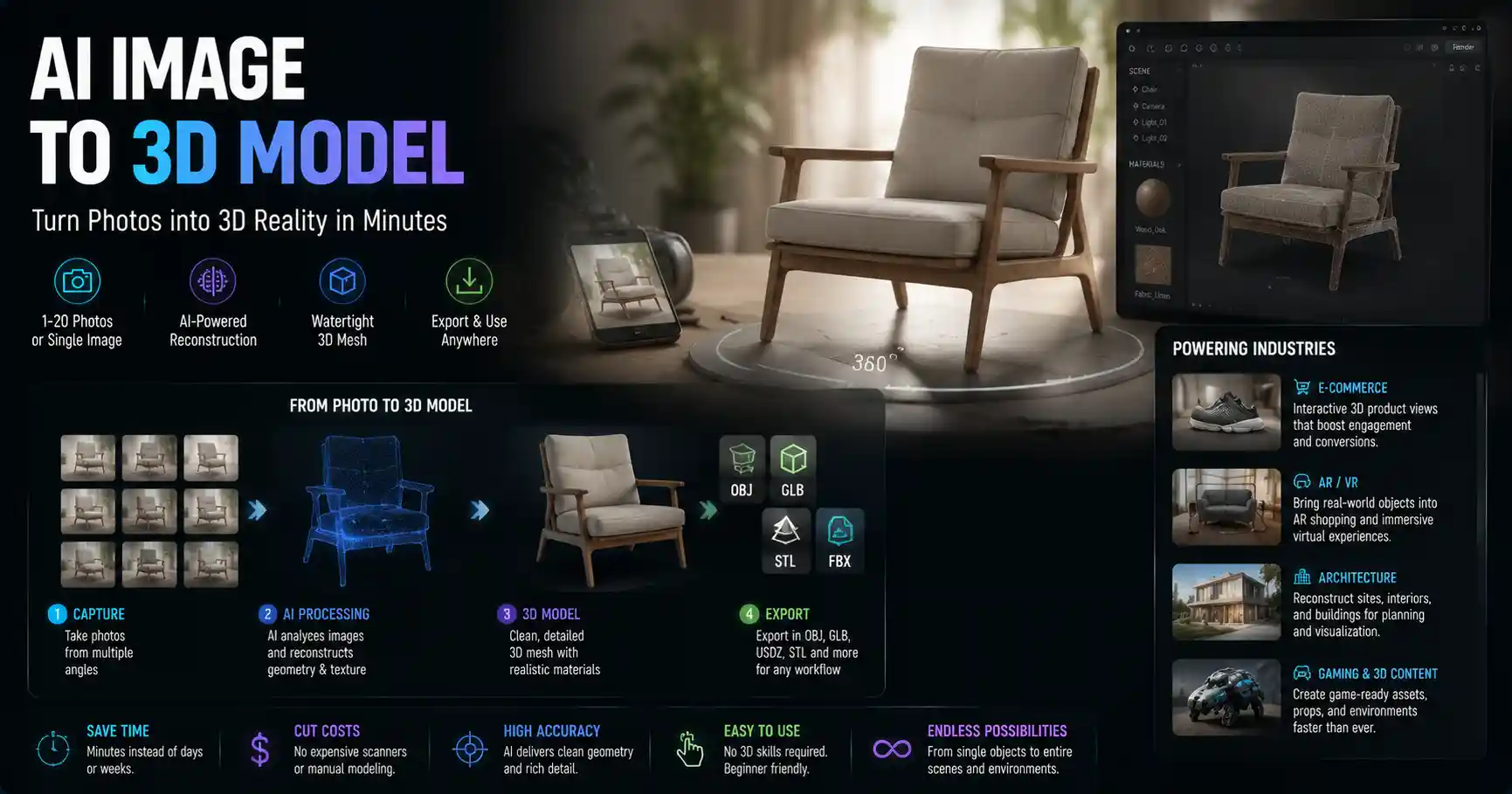
Not long ago, turning a simple 2D photograph into a fully realized 3D model required weeks of manual modeling, expensive specialized software, and years of technical training. Today, AI-powered image to 3D model tools are reshaping entire industries, from product design and gaming to architecture and augmented reality, putting the power of 3D creation into the hands of anyone with a smartphone or camera. What once felt like a futuristic technology is now accessible to hobbyists, small business owners, and professional designers alike, unlocking new levels of creativity and efficiency that were unthinkable just five years ago.
How AI Image to 3D Model Conversion Works
To understand why AI-powered image to 3D tools are such a game-changer, it helps to break down the technology that powers them. Traditional 3D modeling from images relied on manual photogrammetry, a process that required dozens of overlapping photos from every angle, hours of processing time on powerful computers, and extensive manual cleanup to fix errors and holes in the final model. AI has streamlined this process dramatically, often producing usable 3D models from as few as one or five photos in minutes.
Core AI Approaches to 3D Reconstruction
Most modern image to 3D AI tools rely on one of two primary machine learning architectures, each with its own strengths and use cases. The first is neural radiance fields (NeRF), a technology introduced in 2020 that revolutionized 3D reconstruction from 2D images. NeRF trains a neural network to predict the color and density of every point in 3D space, allowing it to generate photorealistic novel views of an object or scene from any camera angle. Unlike traditional photogrammetry, which produces a discrete mesh of connected points, NeRF creates a continuous volumetric representation that captures fine details and soft textures with incredible accuracy.
The second common approach is depth estimation + mesh reconstruction, which is more commonly used for single-image 3D conversion. These AI models are trained on millions of paired 2D images and 3D models to predict the depth of every pixel in a photo, then extrapolate that depth information into a full 3D mesh. While single-image conversion is less accurate than multi-image NeRF-based methods, it offers unmatched convenience for users who only have one photo of an object to work with.
Newer approaches, including 3D diffusion models, are pushing the boundaries even further. These generative AI models can fill in missing information about an object’s back or sides when only a single front-facing photo is available, leveraging what they’ve learned from millions of existing 3D models to make plausible guesses about unseen geometry. This makes them particularly useful for creative projects where perfect accuracy isn’t the primary goal.
Key Input Requirements for Quality Results
No matter what AI tool you use, the quality of your final 3D model depends heavily on the quality of your input images. Most tools fall into one of two categories based on input requirements:
- Single-image tools: Require only one photo, but produce less accurate results, especially for complex objects with lots of texture or overlapping geometry. They work best for objects with clear, distinct shapes and uniform lighting.
- Multi-image tools: Require 3–20 photos taken from different angles around the object. Most produce dramatically better results than single-image tools, as the AI has more information to work with to reconstruct accurate geometry.
To get the best results from any AI image to 3D tool, follow a few basic rules: avoid blurry or overexposed photos, capture the entire object in every frame, use soft, even lighting to reduce harsh shadows, and leave at least 30% overlap between consecutive photos for multi-image captures. For best results, shoot against a plain, untextured background to help the AI isolate the object from its surroundings.
Common Use Cases Across Industries
AI image to 3D conversion has moved far beyond experimental research, and is now a standard tool in workflows across dozens of sectors. From small independent creators to large multinational corporations, organizations are using these tools to cut costs, speed up development, and create new experiences that weren’t possible before.
E-Commerce and Product Marketing
One of the fastest-growing use cases for image to 3D AI is e-commerce. Brands can now turn existing product photos into interactive 3D models that customers can rotate and zoom in their web browser, leading to higher engagement and lower return rates. A 2023 study by Shopify found that product pages with interactive 3D models had a 27% higher conversion rate than those with only 2D photos, as customers can get a much better sense of an object’s size, shape, and texture before buying.
For small businesses that don’t have the budget for professional 3D modeling or 3D scanning, AI tools make it possible to create 3D product models for a fraction of the cost and time. Instead of waiting days for a freelancer to create a model from scratch, you can generate a usable 3D model from your existing product photos in an hour or less.
Augmented Reality (AR) and Virtual Reality (VR)
AR shopping apps, virtual try-on experiences, and VR environments all rely on large libraries of 3D content, and AI image to 3D tools are the fastest way to generate that content. Furniture brands use these tools to let customers see how a new sofa will look in their living room via AR, while fashion brands use them to create 3D models of clothing for virtual try-on. For VR game developers and metaverse creators, AI conversion makes it easy to turn photos of real-world objects into 3D assets for virtual environments, cutting down the time spent creating assets from weeks to days.
Architecture, Construction, and Real Estate
In architecture and construction, professionals use AI image to 3D tools to quickly create 3D models of existing buildings and sites from smartphone photos. This is particularly useful for renovation projects, where architects need an accurate model of the existing structure before drawing up new plans. Instead of hiring a team to manually measure and model the building, they can walk around the site taking photos, then generate a complete 3D model in a few hours.
For real estate, 3D models generated from property photos can be used to create immersive virtual tours that let potential buyers walk through a property remotely, with much lower production costs than traditional 3D laser scanning.
Game Development and VFX
Indie game developers and VFX artists use AI image to 3D tools to quickly prototype assets and create background objects. Instead of modeling every rock, tree, or household object from scratch, artists can take a photo of the real object and generate a 3D model ready to drop into a game or scene. While high-profile main characters still require detailed manual modeling, AI tools handle the bulk of smaller, less critical assets, freeing up artists to focus on creative work.
Heritage Preservation and Education
Museums and cultural institutions are using AI image to 3D tools to preserve historic artifacts and sites that are at risk of damage or decay. By taking hundreds of photos of a statue or artifact, institutions can create a detailed 3D model that can be studied by researchers around the world and displayed in virtual museums. For education, 3D models generated from photos let students interact with historic artifacts from their own devices, even if the original is too fragile to handle or display.
"AI-powered 3D reconstruction from photos is democratizing 3D content creation in the same way that word processors democratized writing and digital cameras democratized photography. For the first time in history, anyone with a phone can create a 3D model of something they see in the world, and that’s going to unlock creative uses we haven’t even imagined yet."
— Dr. Richard Newcombe, co-inventor of NeRF and professor of computer science at the University of Washington
Top AI Image to 3D Tools Compared
Today’s market for image to 3D AI tools ranges from free browser-based apps for beginners to professional-grade platforms for large teams. We’ve broken down the most popular options by use case to help you choose the right tool for your project.
Free and Beginner-Friendly Tools
For hobbyists, students, or anyone testing out image to 3D conversion for the first time, these free tools offer a great starting point:
- Luma AI (free tier available): Luma AI popularized consumer-grade NeRF reconstruction, and its mobile app lets you capture a video of an object with your phone’s camera and generate a high-quality 3D model in minutes. The free tier supports public models and basic exports, while paid plans add private projects and higher-resolution exports. It’s particularly good for capturing large objects and outdoor scenes.
- 3DFY.ai (free trial available): 3DFY.ai offers both single-image and text-to-3D generation, with a simple web interface that requires no technical expertise. Its single-image tool can generate a clean 3D mesh from one product photo, making it a popular choice for e-commerce beginners.
- Meshroom (100% free, open-source): Meshroom is a traditional photogrammetry tool that has integrated AI for faster processing and better cleanup. It’s completely free to download and use, and works with any number of input photos. The downside is that it requires a fairly powerful computer to run, and has a steeper learning curve than cloud-based tools.
- Instant NeRF (100% free, open-source): Developed by NVIDIA, Instant NeRF is a fast, open-source NeRF implementation for users with some technical expertise. It runs on NVIDIA GPUs and can generate high-quality volumetric models from dozens of input photos in minutes.
Professional-Grade Tools for Businesses
For professional users and teams that need high accuracy, reliable support, and integration with existing workflows, these tools are the industry standard:
- Polycam: Polycam offers a range of AI-powered 3D capture tools, from mobile capture to LiDAR integration. It supports both NeRF and mesh export, and offers enterprise plans for teams that need bulk processing of product models. It’s widely used for e-commerce and real estate, and exports models in all standard 3D formats compatible with AR, game engines, and CAD software.
- RealityCapture: Developed by Epic Games, RealityCapture is a professional photogrammetry tool that uses AI to speed up processing and improve model quality. It’s widely used in VFX, game development, and architecture, and can process hundreds of photos into a high-resolution 3D model with incredible accuracy. It’s more expensive than consumer tools, but offers unmatched quality for professional projects.
- Adobe Substance 3D Sampler: Adobe has integrated AI image to 3D conversion into its Substance 3D suite, making it easy for designers already using Adobe tools to turn photos into 3D assets and textures. It’s particularly good for creating PBR (physically based rendering) textures for 3D models, which are essential for realistic rendering in games and product design.
- Calibry 3D: Calibry is an AI-powered photogrammetry platform designed specifically for industrial and architectural use cases. It automates much of the manual cleanup that traditional photogrammetry requires, and can generate accurate models of large construction sites from hundreds of drone photos.
Factors to Consider When Choosing a Tool
When comparing tools, think about your specific priorities:
- Input: Do you only have one photo, or can you take multiple photos from different angles?
- Accuracy: Do you need a model that matches the real object’s dimensions exactly, or is a plausible approximation enough for your project?
- Export format: Do you need a standard mesh file for 3D printing, a volumetric NeRF for VR, or a glTF file for web-based AR?
- Cost: Are you a hobbyist looking for a free option, or a business that can invest in a professional subscription?
Current Limitations and Common Challenges
While AI image to 3D tools have improved dramatically in recent years, they’re not perfect. It’s important to understand their current limitations to avoid disappointment and plan your projects accordingly.
Accuracy and Geometry Errors
The biggest limitation of current technology is accuracy, especially for single-image conversion. When an AI only has one photo of an object, it has to guess what the back and sides look like, and those guesses aren’t always correct. Even multi-image tools can struggle with complex geometry, transparent or reflective objects, and textureless surfaces like plain white walls. Small, fine details like text on a product label or intricate carvings on an artifact can be lost in the conversion process, especially if the input photos are low resolution.
For example, if you’re creating a 3D model of a glass vase, most AI tools will struggle to correctly model the transparency and refraction of the glass, leading to a model that looks solid and opaque in rendering. Reflective surfaces like chrome or polished metal can also confuse the AI’s depth estimation, leading to warped or lumpy geometry.
License and Intellectual Property Concerns
As with all generative AI tools, image to 3D AI raises unresolved intellectual property questions. Most tools train their models on millions of 3D models scraped from public sources, including many that are copyrighted. This has led to ongoing legal debates about whether the output of these tools infringes on existing copyrights, and who owns the final model generated by AI.
For commercial users, it’s important to read the terms of service of any tool you use carefully. Most major platforms grant commercial usage rights for output generated by users who own the input photos, but some restrict usage for certain types of projects. If you’re creating 3D models for commercial sale, make sure you understand the license terms before you start.
Post-Processing Requirements
Even the best AI-generated 3D model almost always requires some manual post-processing to be ready for use. Common issues that need fixing include small holes in the mesh, extra geometry from background objects, and incorrect texture mapping. For professional use cases like 3D printing or game development, you’ll almost always need to clean up the model in software like Blender, MeshLab, or ZBrush before you can use it. How much post-processing you need depends on the complexity of the object and the quality of your input photos, but you should plan to spend at least some time refining the output from any AI tool.
Hardware and Processing Constraints
High-resolution 3D reconstruction requires significant computing power. While most consumer tools move processing to the cloud, so you don’t need a powerful computer to use them, large models with millions of polygons can still take hours to process, and export quality is often limited on cheaper plans. Open-source tools that run locally require a powerful GPU with lots of VRAM to process large datasets, which can be a barrier for hobbyists with older computers.
Practical Tips for Getting High-Quality Results
Whether you’re a hobbyist working on your first 3D model or a professional designer integrating AI into your workflow, these practical tips will help you get the best possible output from any image to 3D AI tool.
Capture Better Input Photos
Your final model can only be as good as your input photos, so it’s worth taking the time to capture them correctly. For multi-image capture:
- Move slowly around the object in a circular path, taking a photo every 10–15 degrees. For small objects, you can spin the object on a turntable and take photos from a fixed position.
- Keep the object in focus and the camera steady. Use a tripod if you have one, or prop your phone up to avoid camera shake.
- Avoid harsh direct sunlight or strong artificial lights that create dark shadows or overexposed highlights. Soft, diffused lighting on an overcast day or near a window works best.
- Capture extra photos of complex details and indentations. If an object has a handle or a hollow interior, take extra photos from angles that show those details clearly.
- Remove any extra objects from the frame and use a plain background that contrasts with the object. A plain white sheet works well for most small objects.
For single-image conversion, use a high-resolution photo with good lighting, and crop the image to remove most of the background to help the AI identify the object you want to model.
Optimize Your Model for Your Use Case
Different use cases require different types of 3D models, so adjust your export settings accordingly. If you’re creating a model for web-based AR, you’ll need to reduce the polygon count to keep the file size small enough to load quickly on mobile devices. If you’re 3D printing the model, you’ll need to make sure the mesh is watertight (no holes or non-manifold geometry) and that the dimensions are accurate. Most AI tools let you adjust polygon count and export format, so choose the settings that match what you plan to do with the model.
Know When to Use Manual Cleanup
Don’t expect the AI to produce a perfect model ready for use right away. For professional projects, set aside time to clean up the model in a 3D editing tool. Simple fixes like removing extra background geometry, filling small holes, and smoothing out warped areas usually take less than 30 minutes, and can dramatically improve the final result. For users new to 3D editing, free tools like Blender and MeshLab have lots of beginner-friendly tutorials to help you learn the basics of model cleanup.
Start Small and Iterate
If you’re new to AI image to 3D conversion, start with a simple, solid object like a mug or a book to practice your capture technique before moving on to more complex objects. Once you get comfortable with the process, you can try more challenging subjects like furniture or outdoor scenes. If your first model doesn’t turn out well, adjust your capture technique (usually adding more overlapping photos or improving lighting) and try again.
Conclusion
AI-powered image to 3D model conversion is one of the most exciting developments in 3D content creation of the last decade. It has democratized access to 3D modeling, turning a process that once required specialized expertise and thousands of dollars in equipment into something anyone with a smartphone can do. From small e-commerce brands creating interactive product models to heritage institutions preserving at-risk artifacts, these tools are already having a meaningful impact across industries.
While current technology still has limitations, especially around accuracy for complex objects and intellectual property clarity, the pace of innovation is rapid. Every year, new models and tools are released that produce better results faster and at lower cost. In the next few years, we can expect AI image to 3D tools to become even more capable, with better accuracy, easier workflows, and deeper integration into the design and creative tools that professionals already use.
For anyone interested in 3D creation, there’s never been a better time to experiment. Whether you’re a hobbyist looking to 3D print a model of your favorite object, a small business owner looking to boost e-commerce conversions, or a professional designer looking to speed up your workflow, AI image to 3D tools offer a fast, affordable way to turn 2D photos into usable 3D assets. With a little practice and the right tool, you can create high-quality 3D models in hours that would have taken weeks just a few years ago.