
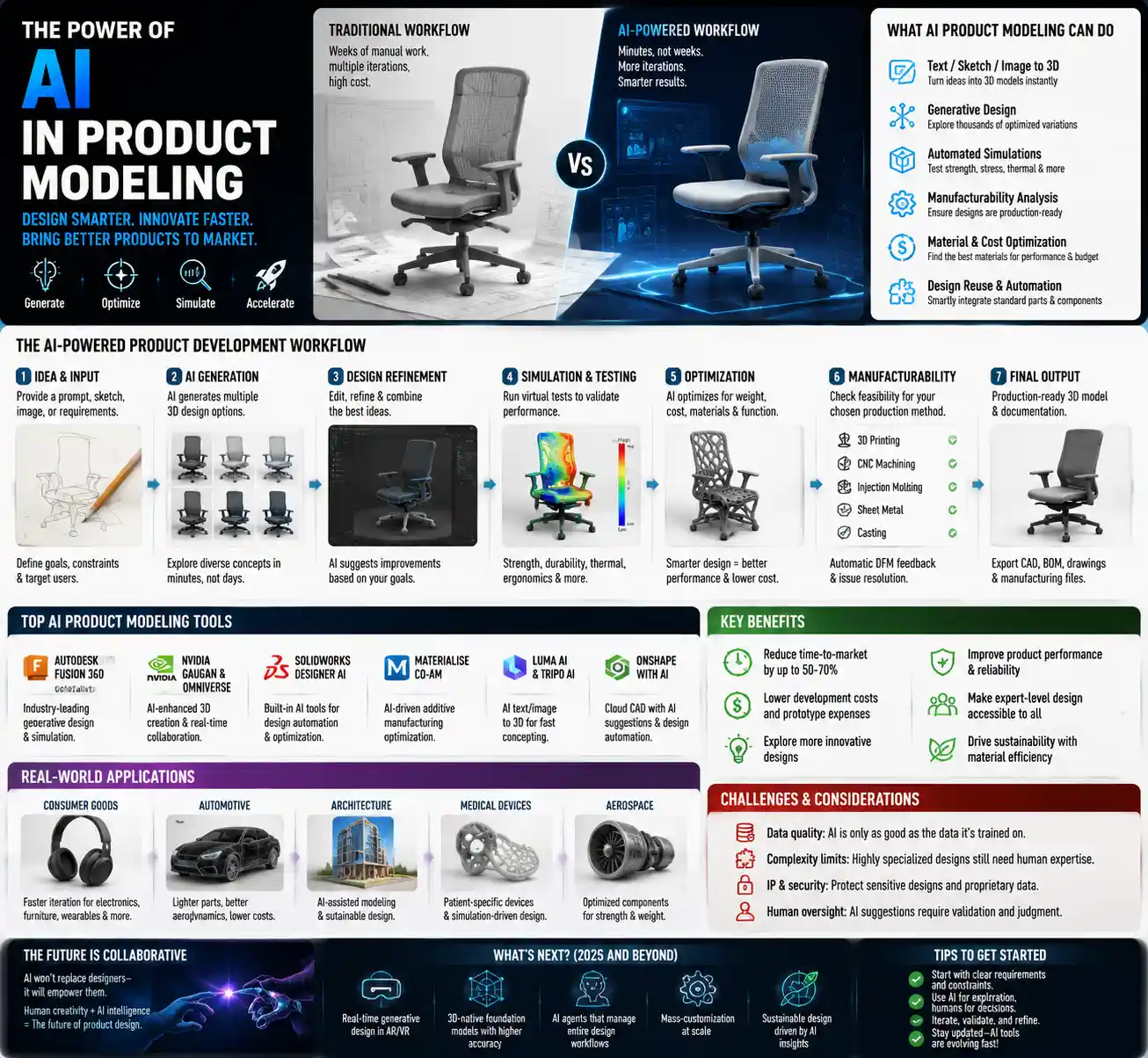
Imagine you’re a startup product designer working on a new ergonomic office chair. A decade ago, creating 10 iterations of the design, running material stress tests, and simulating how the chair would hold up after five years of daily use would have taken weeks of work with expensive CAD software and a team of engineers. Today, you can upload a rough sketch, input your material and user requirements, and get a fully functional 3D product model with performance simulations in less than an hour—all thanks to AI product modeling tools. These AI-powered platforms are transforming how products are designed, tested, and brought to market, cutting costs, reducing lead times, and opening up innovative design possibilities that were out of reach for small teams and large enterprises alike.
What Are AI Product Modeling Tools?
At their core, AI product modeling tools are software platforms that use artificial intelligence and machine learning to automate and enhance the creation of digital representations of physical products. Unlike traditional computer-aided design (CAD) software that requires manual input from skilled designers for every line, dimension, and feature, AI tools can generate complete models from text prompts, rough sketches, or reference images, and automatically optimize designs for performance, cost, and manufacturing requirements.
It’s important to distinguish AI product modeling from generic AI image generation. While tools like MidJourney or DALL-E create 2D visual images for marketing or concept art, AI product modeling produces technically accurate, manufacturing-ready 3D models that include all the data needed for prototyping, testing, and production. These models include precise dimensions, material properties, tolerance specifications, and assembly instructions that can be fed directly into CNC machines, 3D printers, or mass production lines.
Key Capabilities of Modern AI Product Modeling Tools
- Generative design: Automatically create hundreds of design variations based on user-defined constraints (weight, strength, cost, material availability) that human designers would never think to explore
- Concept to CAD conversion: Turn 2D sketches, hand-drawn notes, or text descriptions into editable 3D CAD models in minutes
- Automated performance simulation: Run virtual tests for stress, durability, aerodynamics, thermal regulation, and other key product metrics without building physical prototypes
- Manufacturability analysis: Flag design issues that would make production difficult or expensive, such as hard-to-mold geometries or incompatible material choices, and suggest automatic fixes
- Design reuse: Pull from millions of existing component models to automatically integrate standard parts (screws, hinges, circuit boards) into new designs, reducing redundant work
Today’s AI product modeling tools serve a wide range of industries, from consumer electronics and furniture to automotive and medical device manufacturing. What once required a team of specialized CAD designers and simulation engineers can now be done by a single designer with a basic understanding of product requirements, democratizing access to professional-grade product development capabilities.
How AI Is Transforming the Product Development Workflow
Traditional product development follows a linear, iterative process: concept sketching, manual CAD modeling, physical prototyping, testing, design revision, and repeat. This process is slow, expensive, and often leaves teams settling for “good enough” designs because they don’t have the time or budget to explore more innovative options. AI product modeling tools upend this workflow by compressing timelines and removing barriers to experimentation.
Early-Stage Concept Exploration
In the concept phase, designers often spend weeks turning rough ideas into presentable 3D models. AI tools cut this process down to hours. For example, a footwear designer working on a new line of running shoes can input text prompts like “lightweight carbon plate trail running shoe for women’s size 8, 10mm heel drop, waterproof upper” and get 20 distinct 3D models to review in less than a day. They can tweak the prompt to adjust the toe box shape or midsole cushioning and generate new iterations immediately, rather than waiting for a CAD designer to manually update the model.
This speed allows teams to explore more concepts than ever before. A 2023 report from McKinsey found that product teams using AI generative modeling explore 2-3 times more design concepts than teams using traditional tools, leading to more innovative final products that better meet user needs.
Automated Design Optimization
One of the most impactful uses of AI in product modeling is generative design optimization, where the AI explores thousands of possible design configurations to meet specific performance goals. For example, aerospace company Airbus uses AI product modeling to design lightweight bracket components for aircraft. By inputting constraints (the bracket must support 10 tons of force, fit in a 20cm x 30cm space, and be compatible with titanium 3D printing), the AI generated a design that was 45% lighter than the previous manually designed bracket, reducing fuel consumption over the life of the aircraft and cutting material costs during production.
This capability isn’t just for large aerospace companies. A small batch custom furniture brand can use AI to optimize the frame of a dining chair to minimize wood usage while still meeting weight capacity requirements, reducing material costs and environmental impact without sacrificing durability.
Reduced Prototype Testing and Iteration
Physical prototyping is one of the most expensive and time-consuming parts of product development. A single prototype of a consumer electronics device can cost thousands of dollars and take weeks to build, and most products require 5-10 prototype iterations before reaching production. AI product modeling tools integrate virtual simulation that can test most performance characteristics digitally, drastically reducing the number of physical prototypes needed.
For example, a medical device company developing a new wearable insulin pump used AI modeling to simulate how the device would hold up to daily drops, temperature changes, and sweat exposure. The AI identified design weak points in the initial model and automatically adjusted the casing thickness and material choice before any physical prototype was built. The team ended up building just 2 physical prototypes instead of the 8 they originally planned, cutting 3 months off the development timeline and reducing prototyping costs by 75%.
Top AI Product Modeling Tools for Different Use Cases
The market for AI product modeling tools has exploded over the past three years, with options ranging from free beginner-friendly platforms to enterprise-grade solutions for large manufacturing teams. Below is a breakdown of the most popular tools, organized by common use cases:
For Beginners and Small Business: User-Friendly, Low-Cost Options
- Sketch2CAD by Spline: This browser-based tool converts hand-drawn 2D sketches into editable 3D CAD models. It integrates with popular tools like SketchUp and AutoCAD, and offers a free tier for users creating models under 10MB. It’s ideal for small product designers and makers who want to turn hand-drawn ideas into production-ready files quickly.
- Shapemaker: Shapemaker uses text-to-3D AI to generate product models from natural language prompts. It includes built-in analysis for common 3D printing constraints, so it automatically flags parts that are too thin or require supports. Pricing starts at $20 per month, making it accessible for small businesses and hobbyists.
- Autodesk Tinkercad AI: Built on the popular entry-level CAD platform, Tinkercad AI adds generative design capabilities for new users. It’s free for education and non-commercial use, making it a great starting point for designers learning to use AI in product development.
For Mid-Sized Design Teams: Mid-Range, Collaborative Tools
- SolidWorks x AI: Dassault Systèmes, the company behind the industry-standard SolidWorks CAD platform, has integrated native AI generative design and automated modeling into recent versions of the software. It seamlessly integrates with existing SolidWorks workflows, so teams don’t have to learn an entirely new platform to start using AI capabilities. Pricing starts at $1,500 per year per user.
- Figma for 3D Product Modeling: Originally built for UI/UX design, Figma has added AI-powered 3D product modeling features for consumer product designers working on everything from apparel to home goods. Its real-time collaboration features make it easy for cross-functional teams (design, marketing, manufacturing) to review and edit models together, which is a big advantage over traditional standalone CAD tools.
- LumiAI: LumiAI is a specialized AI product modeling tool for the apparel and footwear industry. It automatically generates 3D fit models from size charts and design sketches, and simulates how fabric will drape on different body types, reducing the need for multiple fit samples. It’s used by brands like Patagonia and Allbirds to cut sample costs and lead times.
For Enterprise Manufacturing: High-Capability, Industry-Specific Solutions
Large companies in aerospace, automotive, and medical device manufacturing require AI tools that can handle complex, highly regulated product development. Leading options in this space include Autodesk Generative Design, which integrates with the company’s full Fusion 360 and Inventor platforms, and Siemens NX AI, which offers advanced simulation and optimization for large-scale industrial products. PTC Creo Generative Design is another popular option, with built-in compliance tools for regulated industries like medical devices and aerospace.
“AI isn’t replacing product designers—it’s giving them superpowers. The best designs come from human creativity, but AI takes care of the repetitive work and opens up the design space to explore ideas that would have been impossible to develop manually.”
Key Benefits and Common Challenges of Adopting AI Product Modeling
While the benefits of AI product modeling are clear, adoption isn’t without its challenges. Understanding both sides helps teams make informed decisions about integrating these tools into their workflow.
Core Benefits for Product Teams
The most immediate benefit is reduced time to market. A 2024 study by the International Data Corporation (IDC) found that teams using AI product modeling cut product development timelines by an average of 36%, allowing companies to bring new products to market months faster than competitors. In fast-moving industries like consumer electronics and fashion, this speed can be the difference between capturing a market trend and missing it entirely.
Second, AI product modeling reduces development costs. By cutting down on manual design work, reducing the number of physical prototypes, and optimizing designs for material usage, companies can cut overall product development costs by 20-50% according to McKinsey. For small businesses with limited budgets, this cost reduction can make it possible to develop new products that would have been financially out of reach.
Third, AI enables more sustainable product design. Because AI can optimize designs for minimal material usage and maximum energy efficiency (for example, optimizing the shape of an electric vehicle battery housing for light weight), it helps companies reduce the environmental impact of their products. A 2023 study of lightweight automotive components designed with AI found that the average component reduced vehicle weight by 22%, leading to a 5% reduction in lifetime carbon emissions for the vehicle.
Finally, AI lowers the barrier to entry for new designers. Traditional CAD software requires months of training to master, and many small product teams can’t afford to hire full-time specialized CAD designers. AI product modeling tools let designers with basic product knowledge create production-ready models without years of CAD training, democratizing product development.
Common Challenges Teams Face
One of the most common challenges is technical accuracy for complex products. While AI works well for most consumer products and simple industrial components, highly complex products like aircraft engines or medical implants require extremely tight tolerances and specific material properties that some lower-cost AI tools don’t always get right on the first try. Teams still need skilled engineers to review AI-generated models and verify their accuracy before production, especially in regulated industries.
Another challenge is intellectual property uncertainty. Many AI product modeling tools are trained on millions of existing product models scraped from public sources, which raises questions about who owns the rights to an AI-generated design. If an AI creates a design that is too similar to an existing patented product, the end user can be held liable for infringement. Some tool providers offer IP indemnification, but that’s mostly limited to higher-priced enterprise plans, leaving small businesses exposed.
Workflow integration is also a common pain point. Many established companies have invested decades of work into traditional CAD workflows and file management systems. Integrating a new AI tool with existing systems can require significant time and IT investment, and some older team members may be resistant to learning new tools. Companies that take a gradual, training-focused approach to adoption tend to have far better outcomes than those that try to replace all existing tools overnight.
Finally, there is a learning curve even for user-friendly AI tools. While AI reduces the need for manual CAD drawing skills, designers still need to learn how to write effective prompts, input the right constraints, and review AI-generated models for errors. Teams that invest in upskilling see far better results than those that assume AI will do all the work automatically.
Best Practices for Getting Started With AI Product Modeling
For teams considering adopting AI product modeling, following these practical best practices will help you avoid common pitfalls and maximize ROI:
- Start small with a low-risk project: Don’t try to replace your entire existing CAD workflow with AI overnight. Pick a simple, non-critical product or component to test the tool, so you can learn how it works and how it fits into your workflow before using it for your flagship product. For example, a furniture company might start by using AI to design a new table leg, rather than an entire dining set, for their first project.
- Choose a tool that integrates with your existing software: If your team already uses SolidWorks or AutoCAD, choosing an AI tool that integrates natively with that software will drastically reduce friction and training time. Avoid switching to an entirely new platform just for AI capabilities if you can add AI to your existing workflow.
- Keep human review in the process: AI is a tool to augment, not replace, skilled designers and engineers. Always have a qualified team member review AI-generated models for technical accuracy, manufacturability, and design intent. AI can miss subtle requirements that a human designer will catch, especially for products that require a specific user experience or aesthetic.
- Clarify IP rights before you start: Before using any AI product modeling tool, review the terms of service to understand who owns the rights to designs you create with the tool. For commercial use, prioritize tools that explicitly grant you full ownership of your designs and offer some level of IP infringement indemnification, especially if you are selling products publicly.
- Invest in upskilling your team: Even the best AI tool won’t deliver good results if your team doesn’t know how to use it effectively. Allocate time and budget for training, whether that’s official training from the tool provider or internal knowledge sharing between team members. Focus on teaching designers how to define clear constraints, evaluate AI output, and refine iterations, rather than just how to use the software interface.
For example, outdoor apparel brand Cotopaxi adopted AI product modeling for apparel design in 2022 by starting small: they tested the tool on a new line of hiking socks, using it to optimize the 3D fit model and reduce the number of fit samples. After a successful pilot that cut sample costs by 40%, they rolled the tool out to their entire apparel design team with a 2-day training workshop, and now use it for all new product development. This gradual approach helped them avoid disruption and get buy-in from the entire team.
Conclusion
AI product modeling tools are more than just a new productivity hack for product designers—they’re reshaping the entire product development landscape, from early-stage concept exploration to mass production. By automating repetitive work, opening up new design possibilities, and cutting time and cost out of the development process, these tools make it possible for small startups to compete with large established brands, and for large companies to innovate faster than ever before.
Of course, AI isn’t a silver bullet. Teams still need human creativity, technical expertise, and careful review to create high-quality, safe, and manufacturable products, and adoption comes with challenges around IP, workflow integration, and accuracy. But for teams that approach adoption strategically—starting small, investing in training, and using AI to augment rather than replace human skill—the benefits far outweigh the risks.
As AI technology continues to improve and more tools enter the market, AI product modeling will become as standard in product development as word processing is for writing. The companies that embrace this transformation today will be the ones leading the next generation of innovative, sustainable, and affordable products for consumers around the world.