
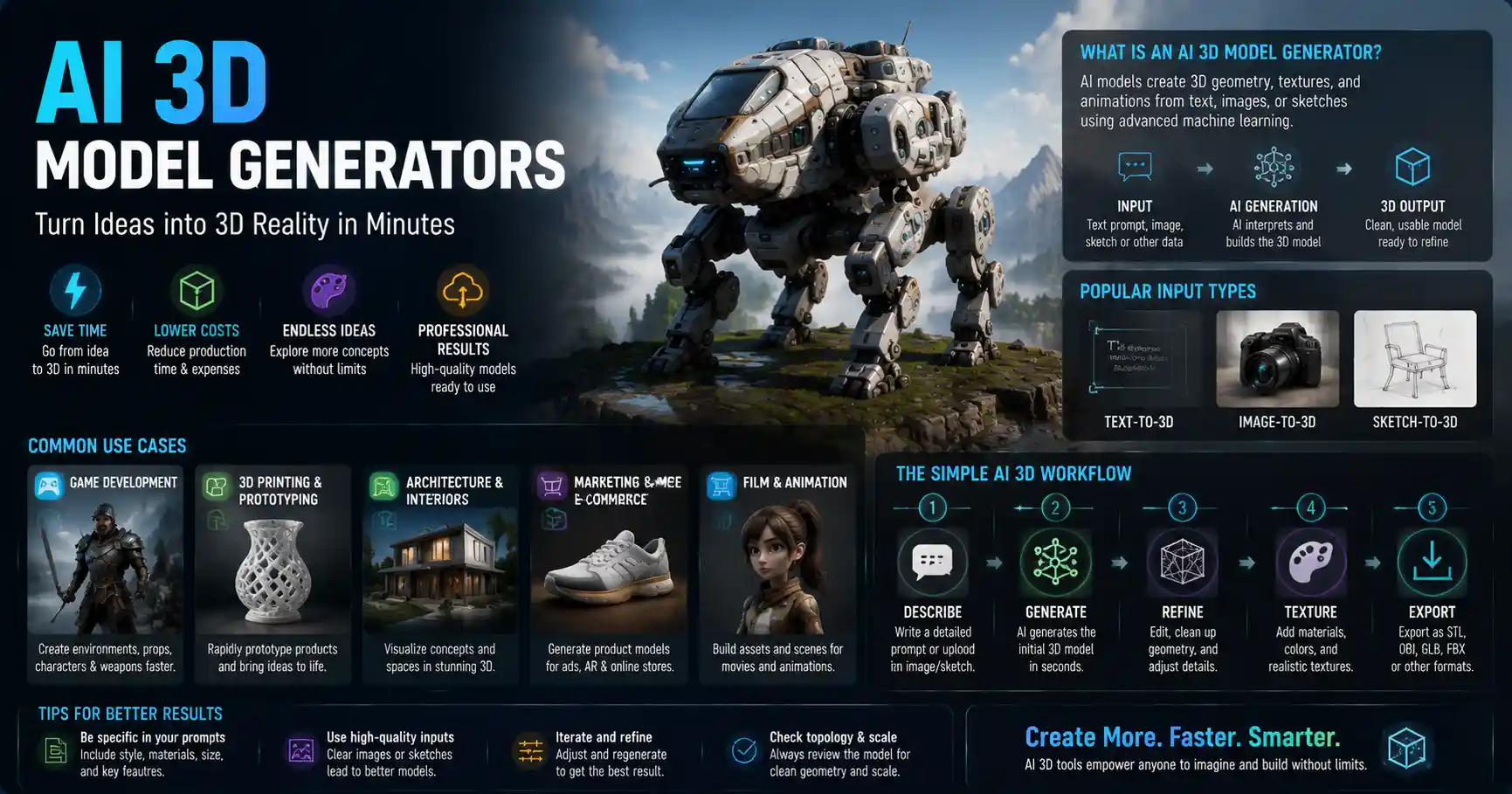
Not long ago, creating a 3D model required years of training, expensive software, and hundreds of hours of manual work to perfect every vertex, texture, and topology. Today, AI 3D model generators have flipped that script on its head, letting designers, game developers, hobbyists, and small business owners turn a simple text prompt or a 2D photo into a usable 3D asset in minutes. Whether you’re building a virtual world for a video game, prototyping a product for 3D printing, or creating assets for a marketing campaign, these tools are democratizing 3D content creation in a way that was unthinkable just five years ago. This guide breaks down how AI 3D generators work, what to look for when choosing a tool, how to get the best results, and what the future holds for this fast-growing technology.
What Is an AI 3D Model Generator, and How Does It Work?
At its core, an AI 3D model generator is a tool that uses trained machine learning models to automatically create 3D geometry, textures, and even rigged animations from simple inputs. The most common inputs are text prompts (similar to how DALL-E or MidJourney work for 2D images) and 2D reference images, but some advanced tools also support generating 3D models from sketches, depth maps, or even point cloud data captured by cameras.
Unlike traditional 3D modeling software like Blender or Maya, which require users to manually build and edit every part of a model, AI generators handle the heavy lifting of geometry creation, reducing a process that once took days to minutes. That doesn’t mean they replace human artists entirely—most of the time, generated models still need small tweaks to fit specific project needs—but they eliminate the most time-consuming entry barrier for new creators.
The Technology Behind AI 3D Generation
Modern AI 3D generators rely on two key technological advances that have made high-quality generation possible over the last three years: diffusion models and large pre-trained datasets. Early attempts at AI 3D generation produced low-resolution, distorted models that were only good for rough concepting. Today’s tools leverage neural radiance fields (NeRF) and score distillation sampling to create detailed, topologically sound models that can be edited, exported, and used in production workflows.
To put this in simpler terms: most AI 3D generators are trained on massive datasets of millions of existing 3D models paired with text descriptions and 2D images. The machine learning model learns to identify patterns between a text prompt like “a weathered oak wooden dining chair with curved legs” and the 3D structure that defines that object. When you input a new prompt, the model starts with random noise and gradually refines it to match the patterns it learned during training, resulting in a complete 3D model.
Some tools work a little differently depending on their input type:
- Text-to-3D: Generates a full 3D model from a natural language prompt, no reference image required. This is the most common type for beginners and concepting work.
- Image-to-3D: Reconstructs a 3D model from one or more 2D photos, making it popular for product designers and creators who want to turn a physical object into a digital asset.
- Sketch-to-3D: Turns a hand-drawn 2D sketch into a 3D mesh, ideal for industrial designers and concept artists who prefer working by hand.
Common Use Cases for AI 3D Model Generators
AI 3D generators aren’t just for professional game developers or 3D artists. Their flexibility and low cost have made them useful for a wide range of industries and personal projects. Here are some of the most common applications today:
Video Game and Metaverse Asset Creation
Independent game developers and small studios are among the biggest early adopters of AI 3D generation. Building an open-world game requires hundreds if not thousands of unique assets—from trees and rocks to furniture, weapons, and non-player character (NPC) gear. Instead of creating every asset from scratch or licensing generic models from marketplaces, developers can generate custom assets that match their game’s art style in minutes, then tweak them to fit their needs. This cuts down development time and costs dramatically, letting small teams compete with larger studios that have bigger art budgets.
For metaverse and virtual reality (VR) creators, AI 3D generators make it easy to populate virtual spaces with custom content. Whether you’re building a virtual storefront for a retail brand or a social space for a community, you can generate unique furniture, decor, and environmental assets to match your brand identity without hiring a full 3D art team.
Product Prototyping and 3D Printing
Product designers and inventors use AI 3D generators to quickly turn ideas into tangible prototypes. If you have an idea for a new custom phone case, a kitchen tool, or a piece of jewelry, you can describe it in text, generate a 3D model, and 3D print a prototype the same day. This is far faster than the traditional prototyping workflow, which often involves multiple back-and-forth meetings with a 3D modeler before you even get a first version to test.
For small businesses that sell custom 3D printed products, AI generation lets them offer personalized items at scale without extra work. A customer can request a custom engraved figurine of their pet, for example, and the designer can generate a base model from a photo in minutes before adding the custom details.
Architecture and Interior Design Visualization
Architects and interior designers use AI 3D generators to create quick concept models for client presentations. Instead of spending weeks building a detailed 3D model of a new building or a room renovation, you can generate a rough but realistic model from a text description or a floor plan sketch, then use it to show clients the overall layout and design direction. This speeds up the approval process and lets designers explore more creative options before committing to a final design.
Marketing and E-Commerce Content
E-commerce brands are increasingly using 3D models to create interactive product experiences, letting customers rotate and zoom in on products before buying. Creating these models traditionally required a professional photo studio and 3D scanning equipment, which is expensive for small brands. AI 3D generators can create a realistic 3D model of a product from just a few smartphone photos, cutting the cost of creating 3D product listings by 70% or more for many brands.
How to Choose the Right AI 3D Model Generator for Your Needs
There are dozens of AI 3D generators on the market today, ranging from free browser-based tools for beginners to enterprise-level platforms for professional studios. No single tool is best for every use case, so it’s important to consider your specific needs before committing to a subscription or paid plan. Here are the key factors to compare, along with popular options for different use cases.
Key Factors to Compare
- Output quality and compatibility: The most important thing to check is whether the tool exports models in a file format that works with your existing workflow. Most tools support common formats like OBJ, GLB, and STL, which work with 3D printers, Blender, Unity, Unreal Engine, and other popular tools. If you need high-poly models for 3D printing or photorealistic rendering, look for a tool that generates models with at least 1024px resolution geometry and high-quality PBR textures. For real-time use in games or VR, you’ll want a tool that can automatically retopologize models to keep polygon counts low.
- Input options: If you already have a sketch or a photo of what you want to create, choose a tool that supports image-to-3D or sketch-to-3D generation. If you’re starting from a blank page, a text-to-3D tool will be more useful.
- Licensing rights: This is a critical detail that many new users overlook. Most consumer AI tools grant you commercial use rights for models you generate, but some have restrictions—for example, limiting commercial use to paid plans, or requiring attribution to the tool developer. Always read the terms of service before using an AI-generated model in a commercial product. Enterprise tools usually offer full commercial usage rights with no restrictions, which is why many professional teams prefer them.
- Editing capabilities: Few AI-generated models are perfect on the first try. Look for a tool that lets you edit the model directly in the platform—for example, adjusting the size of parts, changing textures, or refining the geometry with follow-up prompts. Some tools also let you remesh and retopologize the model automatically to fix distortions, which saves you time when you export it to another tool for final editing.
- Cost: Free tools are great for beginners testing the technology, but they usually have limits on resolution, number of exports, and commercial use. Paid plans typically range from $10 to $50 per month for individual users, while enterprise plans for studios can cost hundreds of dollars per month.
Popular AI 3D Model Generators by Category
To help you narrow down your options, here’s a quick breakdown of the most popular tools for different needs:
- Best for beginners (free/budget): Luma AI, Meshy, and 3DFY.AI all offer free tiers that let you generate basic models from text or images, with easy browser-based interfaces that don’t require any 3D experience.
- Best for 3D printing: Cura AI and Instant NeRF are popular for generating watertight STL files that are ready to print, with tools to automatically fix common geometry errors that cause 3D printing failures.
- Best for professional game developers: Unity’s Muse 3D and Unreal Engine’s MetaHuman Creator are designed to integrate directly with popular game development workflows, letting you generate rigged, game-ready assets that can be imported straight into your project.
- Best for image-to-3D for e-commerce: Polycam and Capture One 3D use AI to turn multiple smartphone photos into high-quality 3D product models, with automatic UV unwrapping and texturing built in.
AI 3D generation doesn’t replace 3D artists—it just lets them skip the tedious parts of the job and spend more time on the creative work that actually moves the needle. A good 3D artist can take a solid AI-generated base model and turn it into a production-ready asset in a fraction of the time it takes to build from scratch.
This quote from Sarah Chen, a lead 3D art director at a mid-sized independent game studio, sums up the most common misconception about AI 3D tools: they’re not here to replace human creativity, they’re here to amplify it. Even the most advanced AI generators can’t read your mind and deliver exactly what you need for your project on the first try. Human input is still required to refine the model, fix distortions, and ensure it fits the specific technical and creative requirements of your project.
Tips for Getting High-Quality Results from AI 3D Model Generators
Just like with AI 2D image generators, the quality of your AI 3D model depends largely on the quality of your input and your process. A good prompt and a few simple post-generation tweaks can turn a messy, distorted model into a production-ready asset. Here are practical, actionable tips to get better results every time.
Write Detailed, Specific Prompts
Prompt engineering for 3D is similar to prompt engineering for 2D images, but with a few extra key details you should always include. A vague prompt like “a coffee mug” will give you a generic, low-quality mug. A good prompt includes:
- The object type and core function (e.g., “12oz ceramic coffee mug with a handle on the left side”)
- The style or aesthetic (e.g., “scandinavian minimalist design, matte sage green finish”)
- Key details and any specific features (e.g., “slightly tapered base, no patterns, thick rim”)
- The level of detail you need (e.g., “photorealistic, high resolution”)
This level of specificity gives the AI model clear guidance, so it doesn’t add extra features you don’t want or miss key structural details that make the model functional.
Iterate and Refine Your Generation
Rarely will you get a perfect model on the first try. Most tools let you generate multiple variations of the same prompt, so generate 3-5 variations first, then pick the one that’s closest to what you want. Many modern tools also let you use inpainting for 3D, which means you can select a specific part of the model and re-generate just that part with a new prompt. For example, if you generated a chair with wobbly legs, you can just re-generate the legs instead of starting over from scratch.
Clean Up Your Model Post-Generation
Even the best AI-generated models often have small issues like non-manifold geometry, extra vertices, or distorted textures that need to be fixed before use. If you’re using the model for 3D printing, use a free tool like MeshLab to automatically repair common geometry errors. For game assets, you’ll want to retopologize the model to reduce the polygon count so it runs smoothly in real time. If you’re new to 3D editing, many modern AI generators have built-in automatic cleaning and retopology tools that do this for you with one click—take advantage of them.
Use Reference Images for Better Accuracy
If you have a specific object you want to recreate, don’t rely on text alone. Uploading a 2D reference image gives the AI a clear guide for the shape, proportions, and texture of the object, resulting in a much more accurate 3D model. For example, if you want to create a 3D model of your grandfather’s old pocket watch, a single clear photo of the front of the watch will help the AI get the shape and details right far better than a text description alone.
Check for Common AI Generation Errors
AI 3D models are prone to a few common errors that you should always check for before using the model:
- Distorted or disconnected geometry: Parts of the model may be floating or not connected properly, which causes issues for 3D printing and rendering.
- Inverted normals: This causes parts of the model to appear transparent or black when rendered, and is an easy fix in most 3D editing tools.
- Extra or missing features: The AI might add an extra leg to a chair or forget the handle on a mug, so always double-check the model against your original requirements.
Catching these errors early saves you time later when you’re working on the final project.
Challenges and Limitations of Current AI 3D Generation
While AI 3D generation has improved dramatically in the last three years, it’s still a young technology with some key limitations that you should be aware of before integrating it into your workflow. Understanding these limitations helps you set realistic expectations and avoid costly mistakes.
One of the biggest limitations today is topological accuracy for complex organic models. While AI tools can generate great basic shapes for objects like chairs or mugs, they still struggle with complex organic objects like human faces, animals, or detailed mechanical parts with many moving components. The geometry can often be messy or distorted when you zoom in, requiring significant manual editing to fix. For production projects that require precise topology, AI generators are still best used as a base model that a human artist cleans up, rather than a final product.
Another key challenge is copyright and ownership uncertainty. Just like with 2D AI art, there are ongoing legal debates about who owns AI-generated models, especially when the AI was trained on copyrighted 3D models from other artists. While most tool providers offer terms of service that grant you commercial use rights, there’s still a risk of copyright infringement claims if the model generated is too similar to an existing copyrighted work. For professional projects, many studios add significant manual edits to AI-generated models to reduce this risk, or use tools that are trained on licensed or public domain datasets only.
Current tools also struggle with scale and precision for industrial or architectural projects. If you need a 3D model of a building with exact measurements for construction, an AI generator can’t give you that level of precision yet. It can create a great concept model for presentations, but you’ll still need a human architect to create the final, dimensionally accurate model for construction.
Finally, there’s still a big gap in quality between the free consumer tools and the expensive enterprise tools. Free tools are great for concepting, but they often produce low-resolution models with messy geometry that aren’t suitable for production use. Professional tools deliver much better quality, but they come with a higher price tag that puts them out of reach for many hobbyists and small businesses.
Conclusion
AI 3D model generators have already changed the 3D content creation industry for good, opening up access to 3D modeling for people who never had the time, money, or training to learn traditional 3D software. For professionals, they cut down development time and reduce costs by handling the most tedious parts of the 3D creation process, letting artists focus on creative refinement and custom work. For hobbyists and small business owners, they make it possible to turn ideas into 3D printable assets, game models, or e-commerce content without a huge investment in software or training.
As the technology improves, we can expect even more impressive capabilities: higher resolution models, better topological accuracy, and more seamless integration with existing design and development workflows. But even today, AI 3D generators are a powerful tool that can add value to almost any 3D project. By choosing the right tool for your needs, learning to write good prompts, and doing a small amount of post-generation cleanup, you can get high-quality results that fit your project requirements, whether you’re a beginner testing out 3D printing for the first time or a professional game developer building your next open-world release.