
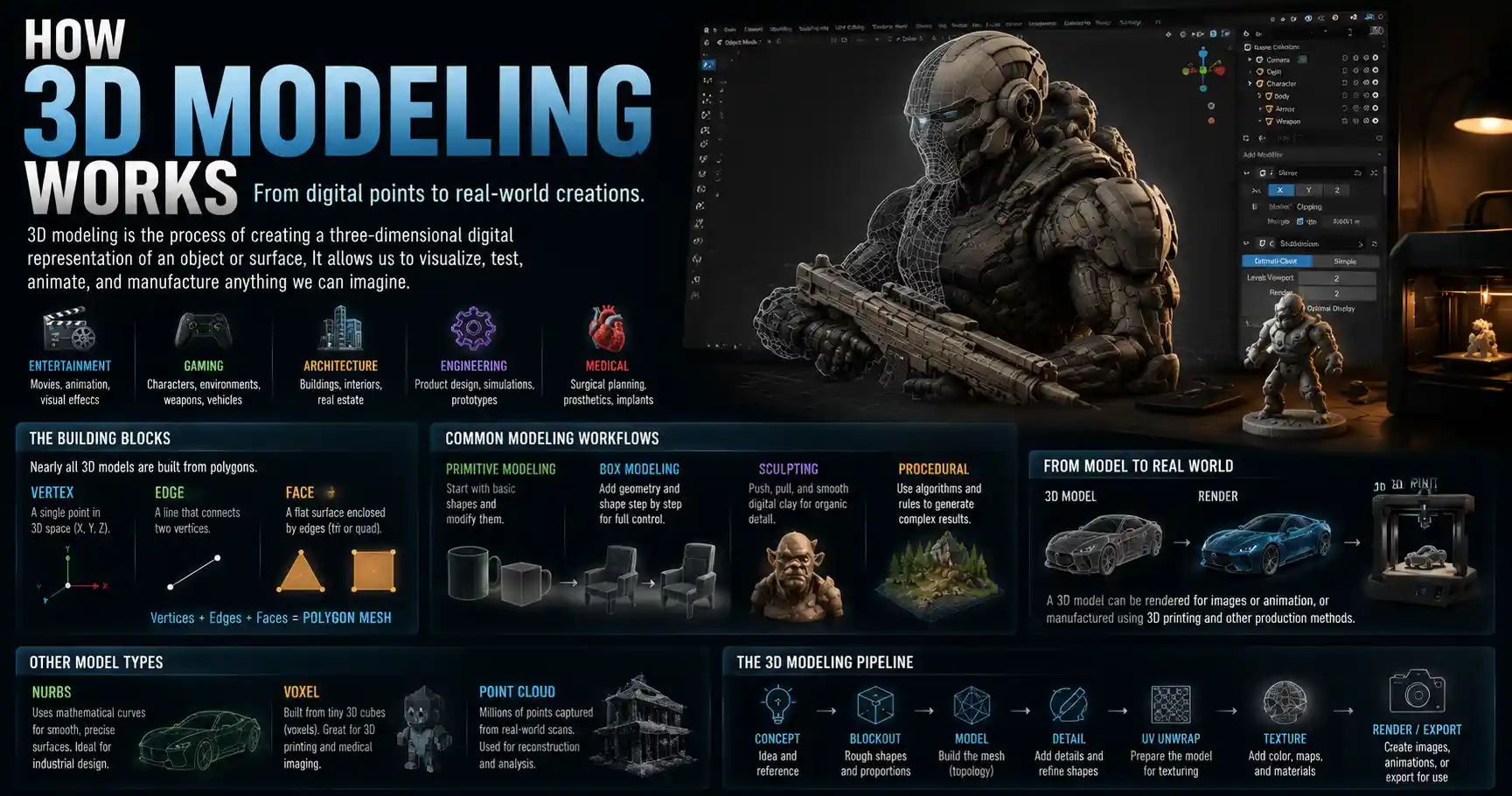
From the CGI monsters in blockbuster movies to the custom-printed chess piece on your desk, 3D modeling shapes nearly every part of modern life. It powers the video games we play, helps engineers test new airplane designs before they ever take flight, and even lets doctors plan complex surgeries before making a single incision. But how does a flat screen of 0s and 1s turn into a detailed three-dimensional object that can be measured, animated, or manufactured? 3D modeling is far more accessible than it used to be, but the math and logic behind it still feel like magic to most people. Let’s break down exactly how 3D modeling works, from the core building blocks all models share to the modern tools that are democratizing this transformative technology.
Core Fundamentals: What Is a 3D Model, Anyway?
At its most basic, a 3D model is a digital representation of any object or surface that exists in three dimensions. Unlike a 2D image, which only records height and width, a 3D model stores data about depth, volume, spatial relationships, and even how the object will interact with light. This extra data is what makes 3D models useful for everything from 3D printing to virtual reality: you can rotate them, zoom into them, slice them apart, and modify them in ways you can never do with a flat photograph.
All 3D models are built from a common set of core building blocks, regardless of the software used to create them. It helps to understand these building blocks before diving into how models are actually made.
Vertices, Edges, and Faces: The Backbone of Every Model
Nearly all 3D models are polygon-based, meaning they’re constructed from simple flat shapes called polygons that fit together to form a larger surface. The three core components of any polygon mesh are:
- Vertices: Single points in 3D space, defined by three coordinates (X for horizontal position, Y for vertical, Z for depth). Think of vertices as the corners of a 3D shape: a cube has 8 vertices total.
- Edges: The straight lines that connect two vertices, forming the sides of a polygon. A cube has 12 edges total.
- Faces: The flat surfaces enclosed by edges. The most common faces are triangles (tris) and four-sided quads, because these simple shapes are easy for computers to process quickly. A standard cube has 6 faces, one for each side.
The entire collection of vertices, edges, and faces is called a polygon mesh. When you see a smooth curved surface like a character’s face in a video game, that’s actually thousands or millions of tiny flat polygons packed so close together that the surface looks continuous to the naked eye. The number of polygons in a model is called its poly count, and higher poly counts mean more detail but also more processing power to display or edit the model.
Alternative: Non-Polygon Modeling Methods
While polygon meshes are the most common type of 3D model, they’re not the only option. NURBS (Non-Uniform Rational B-Splines) are another popular format, common in industrial and automotive design. Instead of building shapes from individual polygons, NURBS use mathematical equations to define smooth curved surfaces. This makes them far more precise for engineering applications, where exact dimensions are critical, because the curve stays perfectly smooth no matter how much you zoom in. Another less common method is voxel-based modeling, which builds 3D shapes from tiny 3D cubes called voxels, similar to how 2D images are built from pixels. Voxel modeling is popular for 3D printing and medical imaging, where you need to represent solid volume rather than just a surface.
Common 3D Modeling Workflows and Techniques
There is no single “right” way to create a 3D model. Artists and designers choose different techniques based on what the model will be used for, whether that’s a video game character, a building blueprint, or a 3D printed toy. Let’s break down the most common approaches and how they work.
Primitive Modeling: Starting From Basic Shapes
Primitive modeling is the most beginner-friendly technique, and it’s the foundation for most complex 3D work. It starts with primitive shapes: simple pre-made 3D objects like cubes, spheres, cylinders, cones, and planes. From there, artists modify these basic shapes by pushing, pulling, scaling, and cutting them into more complex forms.
For example, if you wanted to model a simple coffee mug, you’d start with a cylinder primitive, scale it taller to match the height of your mug, then push in the center of the top face to create the hollow interior. Then you’d add a second cylinder primitive, curve it into a C-shape, and attach it to the side to make the handle. This technique is great for building hard-surface objects like furniture, tools, or architectural models, where shapes are mostly angular or regular.
Box Modeling: The Most Popular Polygon Modeling Workflow
Box modeling is a step up from primitive modeling, and it’s the go-to technique for characters, organic shapes, and complex objects. The process follows a predictable step-by-step pattern:
- Start with a simple primitive (usually a cube) that matches the general volume of your final object. For a human character, this might be a single cube scaled to match the overall height and width of the body.
- Gradually add more geometry (called subdividing) to create more vertices and faces you can modify. Subdividing splits existing faces into smaller ones, giving you more control over fine details.
- Push and pull individual vertices to shape the mesh into the basic outline of your object. For a character, you’d pull out vertices to form arms, legs, a head, and a torso.
- Add more subdivisions as needed to shape smaller details like fingers, facial features, or muscle definition.
The biggest advantage of box modeling is that it lets you start with a big-picture shape and gradually add detail, which feels very natural for most artists. Most professional 3D artists use box modeling for character creation and organic modeling, because it gives you a lot of creative control over the final shape.
Other Popular Modeling Techniques
Beyond primitive and box modeling, there are several specialized techniques used for specific use cases:
- Extrusion modeling: This technique starts with a 2D shape (called a profile), then pulls it along a path or straight line to create a 3D object. It’s perfect for things like pipes, moldings, or furniture legs, because you just draw the cross-section and extend it to the length you need.
- Sculpting: Digital sculpting works just like traditional clay sculpting. Artists use a digital brush to push, pull, smooth, carve, and add clay to a 3D mesh, just like you would with real clay. It’s ideal for creating highly detailed organic shapes like faces, creatures, or sculptures. Modern sculpting tools like ZBrush let artists work with hundreds of millions of polygons to create incredible details like skin pores or fabric texture.
- Photogrammetry: This is a process that creates 3D models automatically from a series of 2D photographs of a real object. Software analyzes multiple photos taken from different angles, identifies matching features across each image, and uses that data to reconstruct a 3D mesh. Photogrammetry is used to create accurate models of historic buildings, real-world objects for video games, and even full 3D scans of people. It’s become much more accessible in recent years, with smartphone apps that can create a 3D model from just a few dozen photos taken on your phone.
- Procedural modeling: Procedural modeling uses algorithms and rules to generate 3D models automatically, instead of shaping every vertex by hand. It’s commonly used to generate large environments like cities, forests, or mountains, because you can create thousands of unique trees or buildings with just a few settings instead of modeling each one individually.
“3D modeling is just digital sculpture. The biggest difference is that you never run out of clay, and you can undo a bad cut with one click. But the core idea—starting with a block of material and shaping it into what you imagine—hasn’t changed in thousands of years.”
From Mesh to Finished Model: The Post-Modeling Process
Creating the base shape of the model is only the first step. A raw polygon mesh is just a collection of vertices and faces—it doesn’t have color, texture, or any of the properties that make it look like a real object. To turn a raw mesh into a finished usable model, artists go through several additional steps.
Retopology
When you create a model via digital sculpting or photogrammetry, you often end up with an extremely high poly count—sometimes tens or hundreds of millions of polygons. That’s great for detail, but it’s too heavy to use in video games, animation, or 3D printing, where the computer has to move or render the model in real time. Retopology is the process of creating a new, lower-poly mesh that fits over the high-poly original. The goal is to keep the overall shape of the high-detail model while reducing the number of polygons as much as possible, making it efficient to work with. For a video game character, a finished retopologized model might have between 5,000 and 50,000 polygons, depending on how close the camera gets to it.
UV Unwrapping
To add color and texture to a 3D mesh, you need a way to map 2D texture images onto the 3D surface. This process is called UV unwrapping. Think of it like taking a 3D shape and cutting it flat so you can wrap a 2D piece of fabric (the texture) around it. Every vertex on the 3D mesh is assigned a coordinate on a 2D grid called a UV map, which tells the software where each part of the texture should go. Good UV unwrapping ensures that textures stretch or warp as little as possible, so your model looks consistent across its entire surface.
Texturing and Shading
Texturing is the process of adding color, detail, and surface properties to your model. A single model uses multiple different texture maps to define different aspects of its surface:
- Albedo/diffuse maps: Define the base color of each part of the model. For a wooden chair, this would be the brown color of the wood with any grain or knots.
- Normal/bump maps: Add small surface details like scratches, wrinkles, or texture without adding extra polygons to the mesh. They fake the way light hits small bumps to create the illusion of detail.
- Roughness/metallic maps: Define how shiny or rough the surface is. A metal teapot would have a high metallic value and low roughness, while a cotton t-shirt would have low metallic and high roughness.
- Opacity/transparency maps: Define which parts of the model are transparent or semi-transparent, for things like glass, water, or fabric lace.
Shading goes hand-in-hand with texturing: a shader is a small program that tells the computer how to calculate the way light interacts with your model’s surface based on all the texture maps. A good shader can make a model look like glass, metal, skin, or fabric, even if the underlying mesh is the same shape.
Rendering
Once your model is fully textured and shaded, the final step to create a 2D image or animation is rendering. Rendering is the process where the computer calculates all the light interactions, shadows, textures, and camera positions to turn your 3D scene into a finished 2D image or video. The time it takes to render depends on the complexity of the scene, the quality of the settings, and the power of your computer. A single frame from a Pixar movie can take hours to render, while a real-time render in a video game happens in a fraction of a second, with lower quality settings to keep the frame rate high.
Common Use Cases for 3D Modeling
3D modeling is no longer just for Hollywood studios and big engineering firms. The rise of free software, 3D printing, and accessible computing has put 3D modeling into the hands of millions of creators. Let’s look at some of the most common ways 3D models are used today.
Entertainment and Media
It’s almost impossible to watch a modern movie, TV show, or play a modern video game without interacting with 3D models. In film and animation, 3D models are used to create everything from background objects to full CGI characters. Avatar: The Way of Water used hundreds of detailed 3D models to create the alien world of Pandora, with individual models for every plant, creature, and character. In video games, every object you see, from the player character to the walls of a level, is a 3D model rendered in real time as you play. 3D modeling is also the foundation of virtual reality (VR) and augmented reality (AR) experiences, which require 3D environments that users can move through and interact with.
Product Design and Manufacturing
Nearly every physical product you buy today was first designed as a 3D model. Companies use 3D modeling to prototype products digitally before they ever start manufacturing, which saves time and money compared to building multiple physical prototypes. Car manufacturers use 3D models to test aerodynamics, crash safety, and ergonomics, while consumer goods companies use them to design everything from smartphones to furniture. 3D modeling is also required for computer-aided manufacturing (CAM), where the 3D model data is sent directly to a 3D printer or CNC machine to create the final physical product. This is what makes custom manufacturing on demand possible today.
Architecture and Construction
Architects use 3D modeling to design buildings and show clients what a finished project will look like before construction starts. Modern architectural 3D models can include everything from furniture and landscaping to lighting and material textures, so clients can walk through a virtual version of the building before breaking ground. The rise of building information modeling (BIM) has turned 3D modeling into a core tool for the entire construction process: BIM models include not just the shape of the building, but also data about materials, costs, construction timelines, and maintenance schedules, so all stakeholders can work from the same 3D model throughout the life of the building.
Healthcare and Science
3D modeling has revolutionized modern medicine in recent years. Doctors use 3D models created from MRI and CT scans to create patient-specific models of organs, bones, and tumors. These models let surgeons plan complex procedures, practice incisions, and even create custom implants before operating, which reduces risk and improves outcomes. Scientists use 3D models to study everything from molecular structures to climate change: they can create 3D models of new drug compounds to test how they interact with virus cells, or 3D models of glaciers to study how they’re changing over time.
Choosing the Right 3D Modeling Software for Your Needs
Today, there are dozens of 3D modeling software options available, ranging from free open-source tools to professional packages that cost thousands of dollars. The right tool for you depends entirely on what you want to make. Let’s break down the most popular options by use case.
Beginner and Hobbyist Tools
If you’re just starting out, you don’t need to spend a fortune on professional software. There are several high-quality free or low-cost options that are great for learning:
- Blender: Blender is a free, open-source full-featured 3D creation suite that includes modeling, sculpting, animation, rendering, and even video editing. It’s become the go-to tool for independent artists, hobbyists, and even many professional studios, thanks to its huge community and constant updates. It’s capable of everything from 3D printing to character animation, and it’s completely free to download and use, even for commercial work.
- Tinkercad: Tinkercad is a free browser-based tool from Autodesk designed for absolute beginners. It’s very simple to learn, perfect for kids or people who want to create basic models for 3D printing without learning complex software.
- SketchUp Free: SketchUp Free is another browser-based option that’s particularly popular for architectural modeling and interior design. It’s intuitive to use, and great for creating 3D models of buildings or furniture.
Professional Industry Tools
For professional work, different industries tend to use different specialized tools:
- ZBrush: ZBrush is the industry standard for digital sculpting, used by almost every major game and film studio for high-detail character and creature models. It’s incredibly powerful for organic sculpting, but it has a steep learning curve.
- Autodesk Maya and 3ds Max: Maya is the industry standard for 3D animation and character work in film and games, while 3ds Max is more commonly used for architectural modeling and hard-surface work. Both are full-featured professional tools, but they require a paid subscription.
- Autodesk AutoCAD and SolidWorks: AutoCAD and SolidWorks are the standard tools for industrial design, engineering, and manufacturing. They’re built for precise NURBS modeling, so engineers can create parts with exact dimensions that are ready for manufacturing.
- Rhino 3D: Rhino is a popular NURBS modeling tool used by industrial designers, architects, and jewelry designers. It’s more affordable than SolidWorks, and very flexible for free-form design work.
One of the biggest trends in recent years is the rise of cloud-based 3D modeling tools that let you collaborate on models in real time from any device, no expensive hardware required. Tools like SketchUp and Autodesk Fusion 360 offer cloud-based workflows that make it easy for teams spread across the world to work on the same 3D project together.
Conclusion
At its core, 3D modeling is just a way to turn an idea in your head into a digital three-dimensional object that you can share, test, animate, or turn into a physical thing. What started as a specialized tool for engineers and Hollywood has become an accessible creative medium, with free tools and millions of tutorials available to anyone who wants to learn. Whether you’re a hobbyist printing a custom toy on your desktop 3D printer, a designer prototyping a new product, or an animator creating the next blockbuster character, the fundamental logic of 3D modeling stays the same: it’s all about building up shapes from simple building blocks, then adding detail and texture to bring your idea to life. As computing power gets cheaper and 3D capture tools like photogrammetry get more accessible, 3D modeling will only become more ubiquitous, shaping everything from the products we buy to the entertainment we consume.