
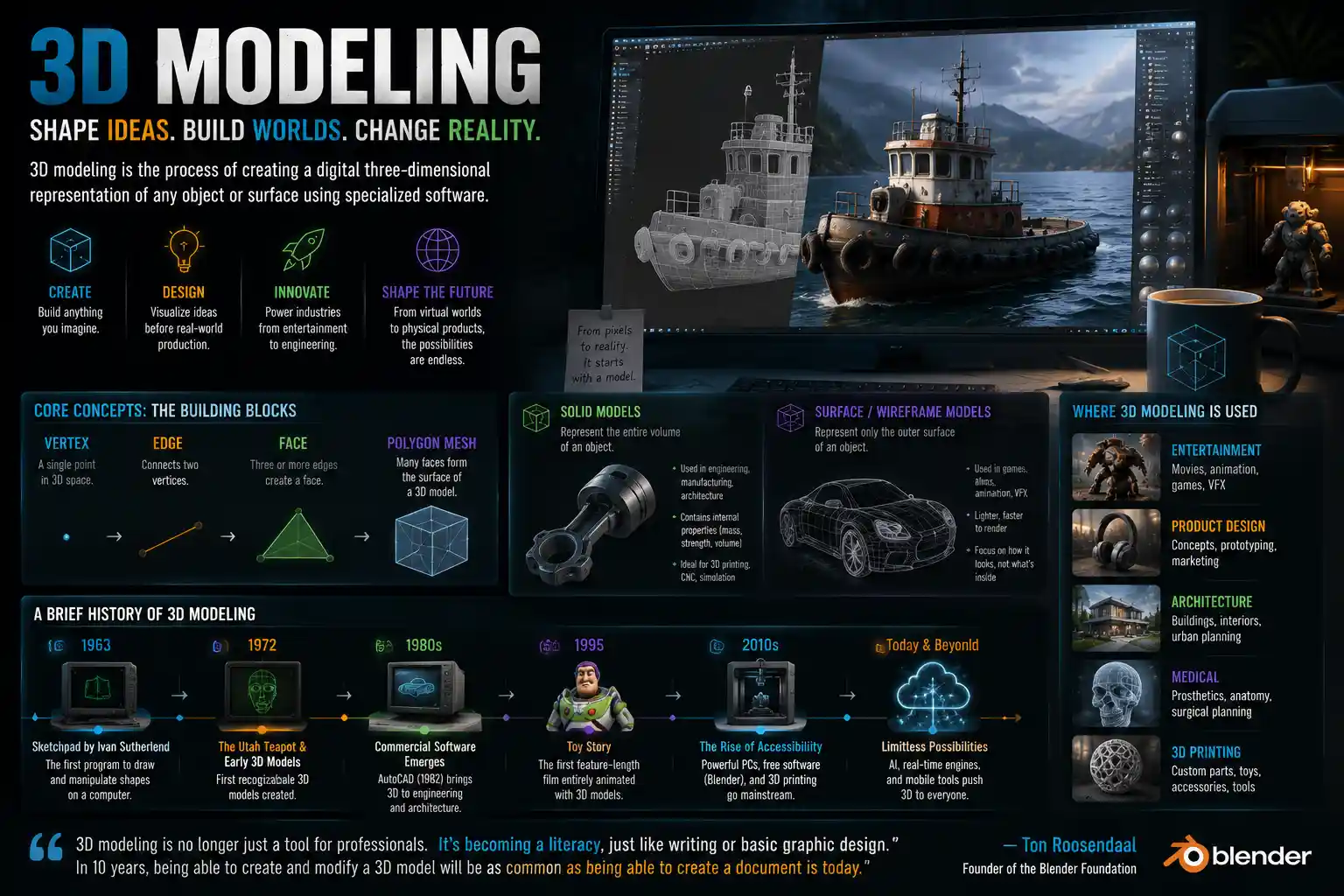
When you watch a Hollywood blockbuster, order a custom-printed 3D figurine of your dog, or test a new car design in a virtual wind tunnel, you’re interacting with the end product of 3D modeling. What started as a niche tool for computer graphics researchers in the 1960s has grown into a foundational technology that touches nearly every industry, from entertainment to healthcare to architecture. At its core, 3D modeling is the process of creating a mathematical representation of any three-dimensional surface or object, but its applications and methods have evolved far beyond that simple definition to shape how we design, create, and interact with the world around us.
Core Concepts: What 3D Modeling Actually Is
To understand 3D modeling, it helps to start with the basics. Unlike 2D art, which only uses height and width (X and Y axes), 3D modeling adds a third dimension (Z axis) that captures depth. This allows creators to build objects that can be rotated, viewed from any angle, scaled, and manipulated just like a physical object in the real world.
Every 3D model is built from a core set of fundamental components. The simplest building block is a vertex, a single point in 3D space. When two vertices connect, they form an edge, and three or more edges connected together create a face, which is the flat surface that makes up the outer shell of an object. Groups of faces form polygons, and most modern 3D models are made of thousands or even millions of polygons stitched together to create smooth, complex shapes.
It’s important to distinguish 3D modeling from two closely related terms that are often confused with it: 3D rendering and 3D printing. 3D modeling is the process of creating the 3D object itself, while 3D rendering is the step that comes after: generating a 2D image or animation from the completed 3D model by adding lighting, textures, and shadows. 3D printing, meanwhile, is the process of turning a digital 3D model into a physical object using additive manufacturing. A 3D model is required for both rendering and 3D printing, but they are distinct steps in the production workflow.
Two Primary Types of 3D Models
All 3D models fall into one of two broad categories, each with its own uses and advantages: solid models and surface/wireframe models.
Solid 3D models represent the entire volume of an object, not just its outer surface. Think of a 3D model of a brick: a solid model would capture the fact that it is solid all the way through, with defined internal properties. These models are most commonly used in engineering, manufacturing, and architectural design because they allow creators to test things like weight, strength, density, and how the object will interact with other physical components. Solid modeling is critical for 3D printing and CNC machining, where the exact internal and external dimensions of an object determine whether it will function correctly.
Surface or wireframe models, by contrast, only represent the outer surface of an object, not its internal volume. These models are made of a mesh of connected polygons that form the shape of the object, with no information about what’s inside. This type of modeling is the standard for entertainment, game design, and visual effects, where the only thing that matters is how the object looks from the outside. Most 3D characters in movies and video games are surface models, as they only need to look convincing when rendered, not pass engineering stress tests.
A Brief History of 3D Modeling
3D modeling as we know it today emerged from early computer graphics research in the mid-20th century, but its evolution has been driven by steady advances in computing power that have made complex, high-resolution models accessible to casual creators, not just large institutions.
The first recognized 3D modeling software was developed in 1963 by Ivan Sutherland, an American computer scientist, who created Sketchpad, the first program that allowed users to draw and manipulate shapes on a computer display. Sketchpad was a revolutionary proof of concept, but it was limited to 2D shapes; researchers at universities and aerospace companies spent the next two decades developing the first mathematical frameworks for representing 3D objects digitally. In 1972, one of the first recognizable 3D models – a rotating face created by students at the University of Utah – demonstrated that 3D modeling could produce lifelike, recognizable shapes.
The 1980s saw the first commercial 3D modeling software hit the market, opening the door for widespread adoption across industries. AutoDesk released AutoCAD in 1982, which brought computer-aided design (CAD) to engineering and architecture firms, replacing hand-drawn blueprints with digital 3D models. By the end of the decade, 3D modeling had made its way to Hollywood: the 1982 film Tron used primitive 3D models for its iconic light cycle sequences, and 1995’s Toy Story became the first feature-length film entirely animated with 3D models.
The 2000s and 2010s brought exponential growth in accessibility. As personal computers became more powerful, free and low-cost 3D modeling software like Blender, Tinkercad, and SketchUp emerged, putting the tool in the hands of independent creators, students, and hobbyists. The rise of 3D printing in the 2010s further accelerated demand for 3D models, as millions of people began designing their own physical objects at home. Today, even smartphone apps can generate 3D models by scanning physical objects with a phone’s camera, bringing 3D modeling to a global audience of billions.
3D modeling is no longer just a tool for professionals. It’s becoming a literacy, just like writing or basic graphic design. In 10 years, being able to create and modify a 3D model will be as common as being able to create a document is today.
Common 3D Modeling Techniques and Workflows
There is no single “right” way to create a 3D model. Creators use a range of different techniques depending on the intended use of the model, the software they’re working with, and their own personal style. Below are the most common methods used today.
Polygon Modeling (Box Modeling)
Polygon modeling, also known as box modeling, is the most widely used technique for organic and hard-surface modeling in entertainment and game design. The process starts with a simple primitive shape – usually a cube, sphere, or plane – that the creator gradually sculpts and refines by adding edges, moving vertices, and subdividing polygons to add more detail. For example, a 3D artist might start with a single cube to build the base of a character’s head, then cut in edges to define the jawline, nose, and cheekbones before adding finer detail for eyes and mouth.
Box modeling is popular because it’s intuitive and flexible, allowing artists to start with a vague idea and refine the shape as they go. It’s also relatively easy to learn for beginners, as most introductory 3D courses start with box modeling to teach the basics of working in 3D space.
3D Scanning and Photogrammetry
3D scanning is a technique that creates a digital 3D model by capturing data from a physical object. Specialized 3D scanners use lasers or structured light to measure the shape of an object, capturing thousands of data points that are stitched together to form a 3D model. Photogrammetry, a related technique that has become much more accessible in recent years, uses multiple 2D photographs of an object taken from different angles to generate a 3D model through software processing.
One of the biggest advantages of 3D scanning and photogrammetry is that they can create incredibly accurate, detailed 3D models of existing real-world objects in a fraction of the time it would take to model them by hand. For example, a video game developer can use photogrammetry to scan a real rock formation and turn it into a 3D model for a game environment, capturing every crack and texture perfectly. In cultural heritage, archaeologists use 3D scanning to create digital replicas of ancient artifacts and historical sites, preserving them for future research even if the original object is damaged or destroyed.
Sculpting
Digital sculpting is a technique that mimics the process of sculpting with clay in the physical world. Instead of moving individual vertices one by one, artists use specialized brushes to push, pull, smooth, and carve the 3D mesh, adding fine details like skin wrinkles, hair strands, or texture to stone and wood. Digital sculpting is the standard for creating highly detailed organic models like characters, creatures, and fine art sculptures.
Modern sculpting software like ZBrush can handle models with billions of polygons, allowing artists to create incredibly detailed work that looks indistinguishable from real life when rendered. Many 3D character artists start with a rough block-out using box modeling, then move to digital sculpting to add fine details before retopologizing (cleaning up) the mesh for use in games or animation.
Procedural Modeling
Procedural modeling is an automated technique that creates 3D models using algorithms and rules, instead of shaping the model by hand. Creators define parameters (like the height of a mountain, the number of branches on a tree, or the size of bricks in a wall) and the software generates the model automatically based on those rules. Procedural modeling is especially useful for creating large, repetitive environments like cityscapes, forests, or mountain ranges, where modeling every building or tree by hand would be incredibly time-consuming.
Key Industry Applications of 3D Modeling
Today, 3D modeling is used in nearly every industry that involves design, visualization, or manufacturing. It has replaced traditional hand-drawn design processes in many fields, cutting costs, reducing errors, and allowing creators to test and iterate on designs before they go into production. Below are some of the most common and impactful uses.
Entertainment, Games, and Visual Effects
The entertainment industry is one of the largest users of 3D modeling, and it’s where most people encounter 3D models on a daily basis. Every 3D animated film, every modern video game, and nearly every big-budget live-action film uses 3D models to create characters, environments, and special effects. For example, the character Thanos in the Marvel Cinematic Universe is a fully 3D modeled character, with every wrinkle and facial expression captured and rendered to look like a real, living being. In video games, every weapon, character, building, and piece of terrain is a 3D model that is rendered in real time as the player moves through the game world.
Architecture, Engineering, and Construction (AEC)
3D modeling has revolutionized how buildings and infrastructure are designed and built. Today, most architects use 3D modeling to create detailed digital models of buildings before construction begins, replacing 2D blueprints with building information modeling (BIM), which includes not just the 3D shape of the building, but also data about materials, cost, and construction schedules. 3D models allow architects and clients to walk through a virtual version of the building before it’s built, identifying design flaws and making changes early in the process that would be far more expensive to fix after construction starts.
In civil engineering, 3D models are used to design everything from bridges to dams to highway systems, allowing engineers to test how structures will hold up to extreme weather, earthquakes, and heavy traffic before construction begins. This reduces the risk of structural failure and cuts down on costly delays during construction.
Manufacturing and Product Design
Before any mass-produced product hits the market – from a new smartphone to a chair to a car – it starts as a 3D model. Product designers use 3D modeling to iterate on designs, test ergonomics, and check for manufacturing issues before moving to production. For example, car manufacturers use 3D models to test aerodynamics in virtual wind tunnels, reducing the need for expensive physical prototypes and cutting down the time it takes to develop a new car model from years to months.
3D modeling is also the foundation of additive manufacturing (3D printing). Every 3D printed object requires a 3D model as input, and the rise of desktop 3D printing has created a huge global community of independent designers who create and share 3D models of everything from custom phone cases to replacement parts for household appliances.
Healthcare and Life Sciences
3D modeling has led to major breakthroughs in healthcare in recent years. Surgeons use 3D models created from patient CT and MRI scans to plan complex surgeries, like separating conjoined twins or replacing a damaged jawbone. By creating a physical 3D print of the patient’s anatomy from the digital 3D model, surgeons can practice the procedure before operating, reducing risk and improving outcomes. Medical device companies also use 3D modeling to create custom prosthetics and implants that are perfectly tailored to an individual patient’s body, replacing one-size-fits-all devices that are less comfortable and less effective.
In education, 3D models of human anatomy allow medical students to study and interact with the human body in ways that traditional cadavers can’t, zooming in on individual organs and rotating them to see structures from any angle.
Getting Started with 3D Modeling: Practical Tips for Beginners
If you’re interested in learning 3D modeling, it’s never been easier or more affordable to get started. You don’t need a fancy $10,000 computer or an expensive software license to begin creating your own models. Below is a practical guide to getting started as a beginner.
Choose the Right Software for Your Goals
The first step is to pick a software that matches what you want to create and your budget. There are options for every use case and skill level:
- For beginners/hobbyists (3D printing, simple projects): Tinkercad (free, browser-based) and SketchUp Free (free for personal use) are perfect starting points. Both have intuitive interfaces that don’t require months of training to learn, and they’re great for creating simple models for 3D printing or home design projects.
- For general purpose modeling, animation, and art: Blender is completely free and open source, and it has every feature you’ll ever need for modeling, sculpting, animation, and rendering. It’s used by professional studios and independent creators alike, and there are thousands of free tutorials available online to help you learn.
- For CAD, engineering, and product design: FreeCAD is a free open-source option for solid modeling that’s great for beginners, while Fusion 360 offers a free license for hobbyists and students and is widely used in professional product design.
- For professional digital sculpting: ZBrush is the industry standard, but it has a steep learning curve and a relatively high price tag. SculptGL is a great free alternative for beginners to practice with.
Learn the Fundamentals First
It’s easy to get overwhelmed when you open 3D modeling software for the first time, with dozens of tools and menus you’ve never seen before. Focus on learning the fundamentals first before you try to create a complex character or building:
- Start by learning how to navigate 3D space: panning, zooming, and rotating the viewport. This is the most basic skill, but you’ll use it on every project, so it’s important to get comfortable with it early.
- Practice working with primitive shapes (cubes, spheres, cylinders) to create simple objects like a mug, a chair, or a house. This will teach you how to move, scale, and rotate objects, and how to combine shapes to build more complex forms.
- Learn about edge loops, subdivision surface modeling, and retopology if you plan to do organic modeling for games or animation. These are core concepts that will help you create clean, deformable meshes that work well for animation.
- Follow step-by-step tutorials for your first few projects. There are thousands of free high-quality tutorials on YouTube and sites like Udemy that will walk you through the process of creating a specific model, helping you learn by doing.
Build Your Skills Gradually
Don’t try to create a full 3D character for a video game in your first week. Start with small, simple projects, and gradually work your way up to more complex ones. Join online communities like the Blender Artists forum, Reddit’s r/3Dmodeling, or local 3D printing clubs to get feedback on your work and learn from more experienced creators.
Conclusion
3D modeling is far more than just a tool for creating digital art or animated movies. It’s a foundational technology that has transformed how we design, build, and understand the world around us. From the custom hip replacement that lets a patient walk again to the 3D animated character that brings a story to life to the sustainable new building designed to withstand climate change, 3D modeling touches millions of lives every day in ways most people never notice.
As computing power continues to increase and artificial intelligence begins to automate more parts of the 3D modeling process, it’s becoming more accessible than ever. What was once a tool limited to large studios and engineering firms is now available to anyone with a laptop and an internet connection. Whether you’re a hobbyist looking to design your first 3D printed object, a student interested in a career in design or games, or just someone curious about how the digital content you interact with every day is made, 3D modeling offers a creative and technical outlet with endless possibilities.