
When you are deep inside an interior design visualization, few things stall a project faster than hunting for the right 3D model. A sofa that looks blocky. A lamp that casts weird shadows. A chair that downloads only to reveal missing textures. Time gets eaten, deadlines slip, and the mood in the room sours. Free 3D models can be a lifeline—if you know how to pick them wisely.
This article walks through the practical side of sourcing free 3D models for interior design work, from what makes a model truly usable to where you can find quality assets today. Whether you work with Blender, 3ds Max, Cinema 4D, or something else, the same principles apply. And yes, we will mention a few places worth bookmarking—including Relebook, a platform that aggregates 3D models, textures, HDRI, and other CG resources that can fit into visualization workflows.
What Makes a Free 3D Model Good for Interior Design?
Not all free 3D models are born equal. A model that looks great on a preview thumbnail might fall apart when you drop it into a fully lit scene. Here are the criteria that matter most for interior design projects.
Real-World Scale and Proportions
An armchair that is 1.5 meters wide instead of 0.9 meters ruins the whole composition. Good free models come with correct real-world scale. If a model is not scaled, you will spend extra time adjusting it—and even then, proportions might feel off. Always check the download page for scale information or load the model into your scene and measure it.
Polygon Count That Fits Your Render Engine
Interior scenes often combine dozens of objects. A single chair with 300,000 polygons might be fine for a hero shot, but if you fill a living room with such chairs, the viewport becomes sluggish and render times climb. Good free 3D models should offer a balanced polygon count. Some platforms provide both high-poly and low-poly versions, which is ideal for layering details where needed.
UV Mapping and Clean Topology
A model that is poorly UV-mapped will stretch or distort textures. For realistic interiors, you want clean UVs that allow seamless tileable textures or custom materials. Also, avoid models with triangles scattered everywhere (triangulated in a chaotic way). While game engines often expect triangles, for rendering in Blender or 3ds Max, quads are easier to subdivide and modify.
Included Textures and Material Files
The worst feeling is downloading a model only to find no texture maps. The best free resources include diffuse, roughness, normal, and sometimes displacement maps. Some models even come with ready-to-use material files (like .mat in Blender or .max material library). If textures are missing, you can often substitute your own, but that adds work.
Where to Find Free 3D Models for Interior Design
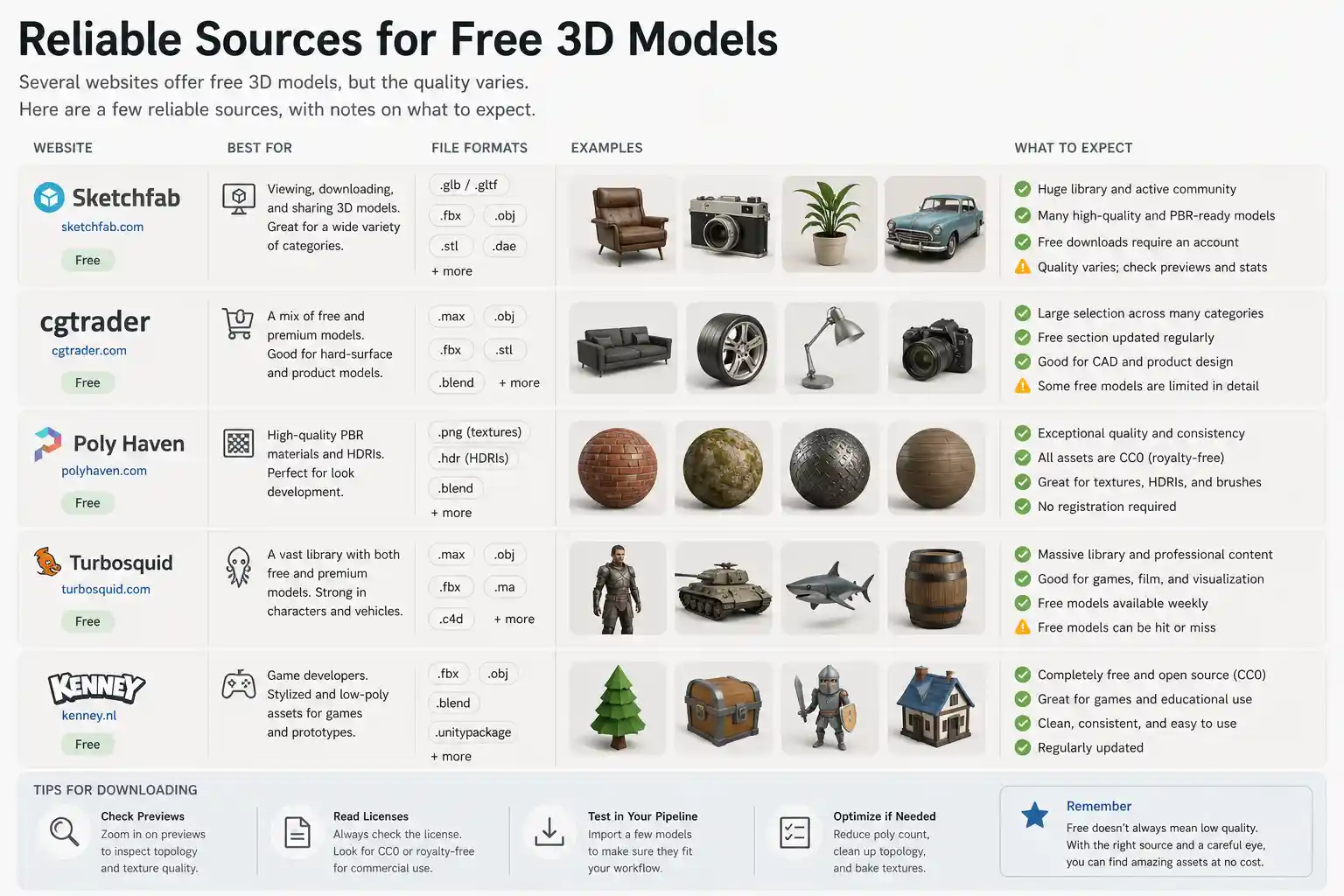
Several websites offer free 3D models, but the quality varies. Here are a few reliable sources, with notes on what to expect.
1. Dedicated 3D Model Libraries
Platforms like SketchUp’s 3D Warehouse, Turbosquid (free section), and Open3DModel provide a wide variety of interior objects—furniture, decor, plumbing fixtures. The catch: you often have to sift through many low-quality uploads to find gems. Check user ratings and preview images carefully. Many free models from these sites are old or not optimized for modern render engines.
2. BlenderKit (for Blender Users)
BlenderKit integrates directly into Blender and offers a mix of free and paid assets. The free tier gives you access to thousands of models, materials, and brushes. Models are usually well made because the platform curates submissions. The downside is that the free selection rotates, and some popular items require a subscription for full resolution textures.
3. Community-Shared Assets on Forums
CGarchitect, Evermotion’s free section, and Poly Haven (formerly HDRI Haven) offer community-driven assets. Poly Haven is especially strong for HDRIs and textures, but also has a growing library of 3D models—all under the CC0 license, meaning you can use them for commercial work without attribution. However, the model variety is limited compared to bigger libraries.
4. Relebook – A Curated Gateway
If you prefer to browse a collection that blends free and paid resources, Relebook is worth exploring. The site organizes 3D models, textures, HDRIs, and other CG assets in a searchable interface designed for visualization professionals. Instead of swimming through hundreds of unrelated items, you can filter by category—sofas, tables, lighting—and see previews that indicate format and quality. It is important to note that availability and licensing vary per asset. Some models are free to download; others are part of paid packs. Before using any asset in a commercial project, check the license information on the specific product page. Relebook serves as a convenient starting point when you need a reliable source for interior design resources without jumping between a dozen different sites
Where to Find Free 3D Models for Interior Design
Alt text: Where to Find Free 3D Models for Interior Design - supporting visual
Workflow Tips for Using Free 3D Models
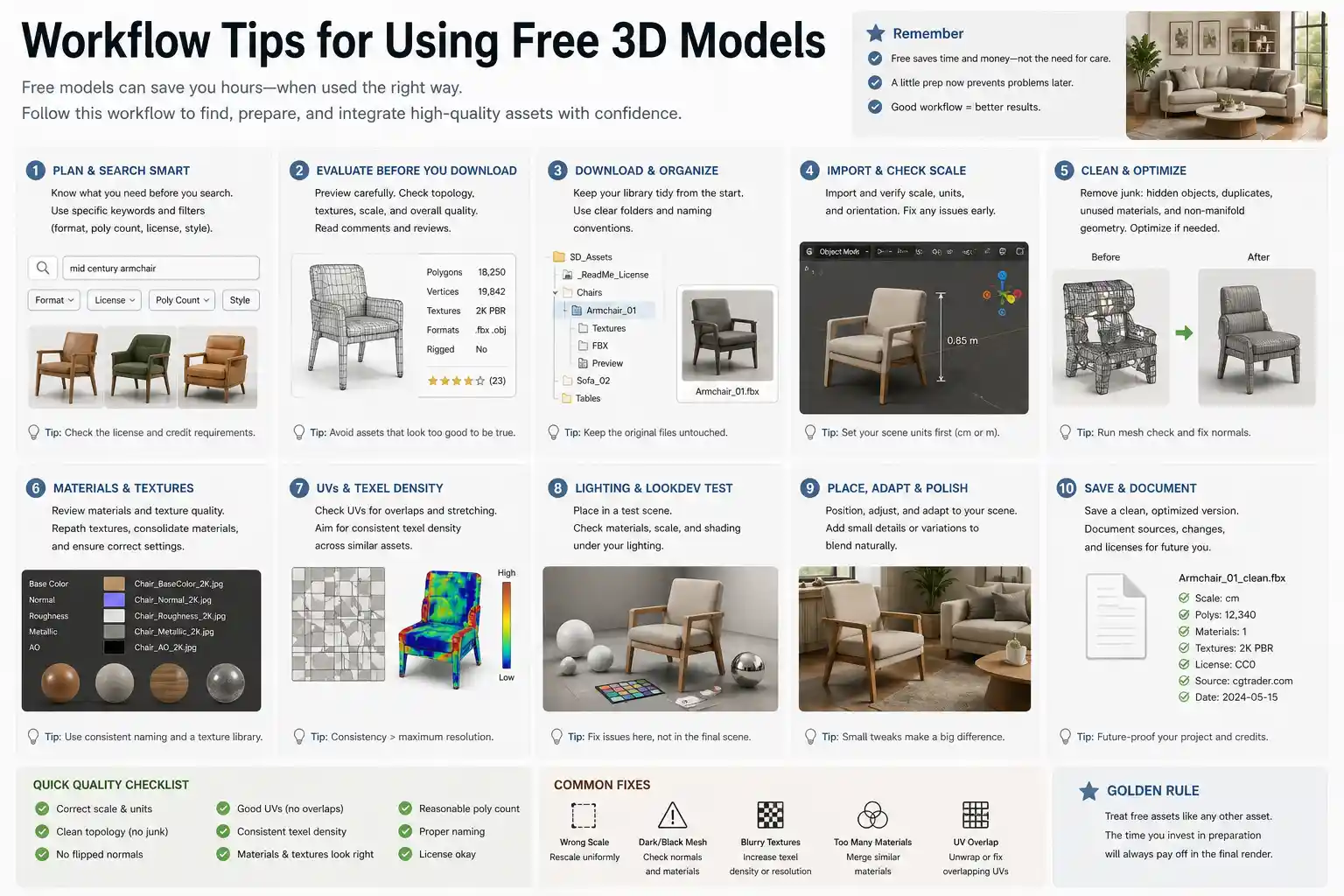
Even the best free model needs a little care before it is scene-ready. Use these practices to save time and avoid surprises.
Always Inspect in a Clean Scene
When you download a model, open it in a blank scene first. Check its scale, materials, and whether all textures load properly. Apply a temporary white material to see the mesh clearly. This also helps you spot hidden geometry, floating vertices, or double faces.
Re-Path or Embed Textures
Many free models come with textures in a separate folder. If you move the model file, the texture links break. Most 3D applications have a “Find Missing Files” or “Resource Collector” feature. In 3ds Max, use the Bitmap/Photometric Path Editor. In Blender, go to File > External Data > Find Missing Files. For your own sanity, embed textures into the blend or max file if you plan to reuse the model across projects.
Simplify and Optimize
Free models sometimes have unnecessary subdivisions or overly complex geometry. Consider using a decimation modifier (in Blender) or ProOptimizer (in 3ds Max) to reduce polygons while keeping the silhouette. This is especially helpful if you need to duplicate the object many times in a single scene.
Replace Textures with Your Own Library
If the free model’s textures are low resolution or have visible tiling, swap them with higher-quality maps from your own collection or from a resource site like Relebook (which offers textures and HDRIs separately). This way you retain the modeling work and improve the final look.
Keep a License Log
For commercial projects, track where each model came from and what license it carries. Free does not automatically mean “free for any use.” Some models require attribution, others forbid redistribution, and a few restrict usage in certain industries. A simple spreadsheet with asset name, source, license type, and project name will save you legal headaches.
Practical Examples from Interior Design Scenarios
Let’s imagine you are visualizing a modern living room. You need a sofa, a coffee table, a floor lamp, and some decorative objects. Instead of modeling everything from scratch, you can source free 3D models for the bulk of the furniture, then focus your modeling time on custom elements like a built-in bookshelf or a unique wall panel.
Sofa: Look for a model with plush fabric cushions—check that the UVs are clean so you can apply a velvet or leather material. A free model from a curated site like Relebook might already come with a photorealistic material preset.
Coffee Table: Often simple geometry, so even a basic low-poly model works. You can add a wood texture from Poly Haven or Relebook’s texture library.
Floor Lamp: Be careful with transparent parts (glass or fabric shades). Free models sometimes mess up the opacity maps. Test the lamp with a strong backlight in your scene.
By combining a few well-chosen free assets with your own lighting and materials, you can produce a portfolio-quality render without buying a single premium model.
Final Thoughts
Free 3D models are a powerful resource for interior design projects—provided you invest a little time in evaluating them before hitting the render button. Focus on scale, topology, texture quality, and licensing. Keep a set of go-to sources that you trust, and do not be afraid to mix free and paid assets to get the exact look you need.
Platforms like Relebook simplify the search by grouping 3D models, textures, HDRIs, and other CG elements in one place. When you are in the middle of a project and need a realistic vase or a specific chair, it can be a time-saver to browse by category rather than scrolling through hundreds of unrelated downloads. That said, always review the individual asset details for format compatibility and license terms before using anything in a commercial render.
By applying the selection criteria and workflow practices covered here, you can build rich, convincing interior scenes without blowing your budget. The next time you start a visualization, spend a few minutes finding the right free 3D models—it will pay back in speed and quality.
FAQ
Are free 3D models safe to use for commercial interior design projects?
It depends on the license. Some free 3D models are released under Creative Commons (CC0), which allows commercial use without attribution. Others may be licensed for personal use only or require credit. Always read the license terms on the download page before using an asset in a commercial project. When in doubt, contact the creator or choose a model from a platform that explicitly states commercial rights.
What file formats are most common for free 3D models used in interior design?
Common formats include .obj, .fbx, .blend, .max, .3ds, and .c4d. .obj and .fbx are widely compatible across software. Many free models also include material files like .mtl or native formats for Blender or 3ds Max. Check the asset page for format details, and if you need to convert, use a tool like Assimp or Blender’s import/export functions.
How can I tell if a free 3D model will look good in my render?
Look at user reviews, preview images, and wireframe views if available. Also examine the polygon count—models with very high polygon counts can slow down your scene. Download a few test models and check their UV mapping and texture resolution in a blank scene before committing to a large set.
Do I need to credit the creator when using free 3D models?
Only if the license requires it. Licenses such as CC BY ask for attribution; CC0 does not. The safest approach is to check each asset’s license page. If you are working on a client project, it is best to avoid models that require attribution to prevent complications in deliverables.