
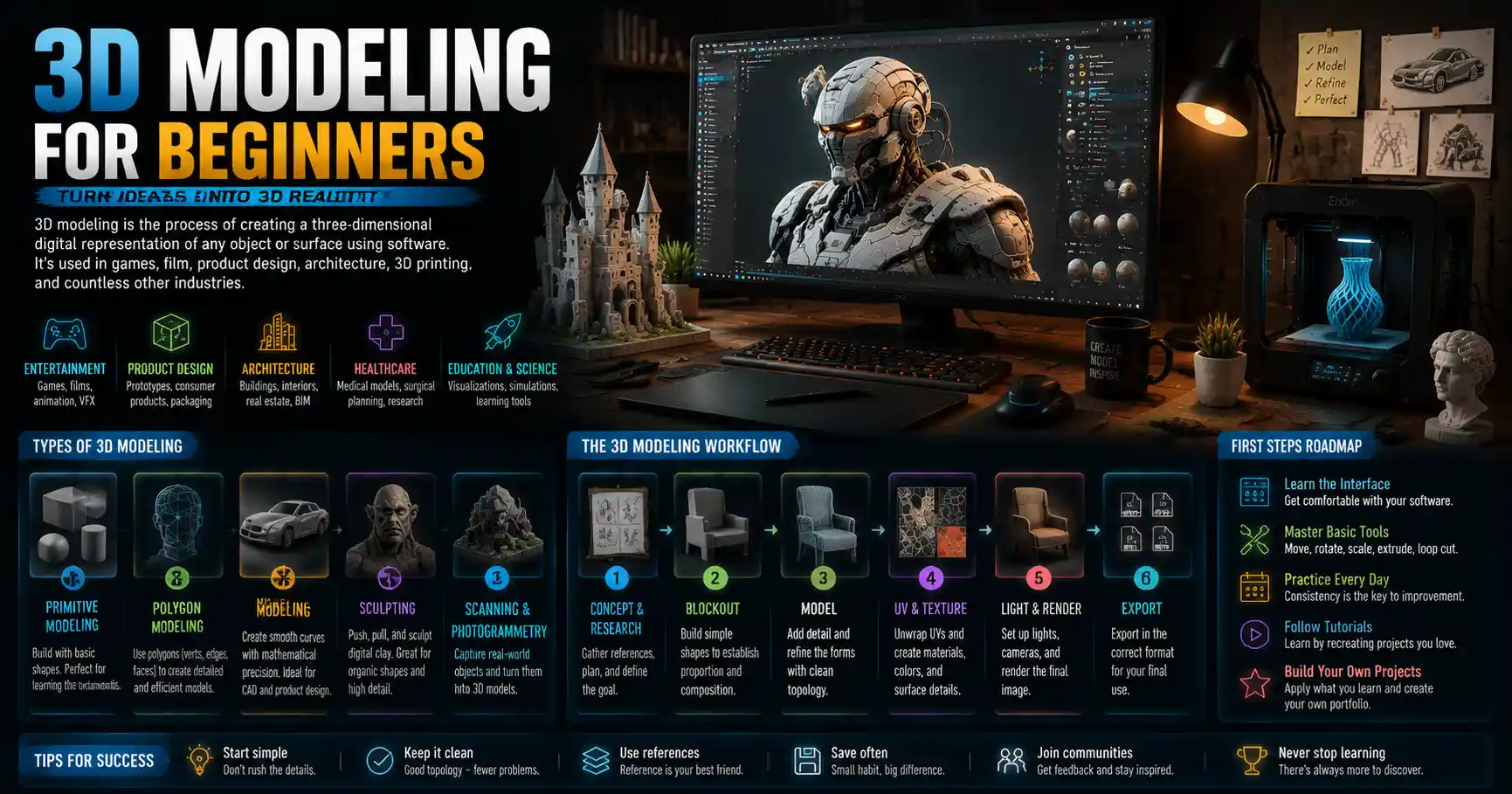
When you scroll through a movie trailer, order a custom-printed 3D phone case, or explore a virtual house tour online, you’re interacting with the end product of 3D modeling. What once was a niche tool reserved for Hollywood animators and automotive engineers is now accessible to anyone with a laptop and an idea. Whether you want to design a prototype for a small business, create assets for a video game, or just pick up a new creative hobby, 3D modeling offers a flexible, rewarding way to turn abstract concepts into tangible digital objects. For beginners, the world of 3D can feel overwhelming at first—with dozens of software options, confusing jargon, and endless techniques to learn—but breaking the process down into core fundamentals makes it far more approachable.
What Is 3D Modeling, And What Do People Use It For?
At its core, 3D modeling is the process of creating a mathematical representation of any three-dimensional surface or object using specialized software. Unlike 2D art, which is defined only by height and width, a 3D model exists on three axes: X (horizontal), Y (vertical), and Z (depth). This depth allows you to rotate your model, view it from any angle, change its lighting, and even 3D print it as a physical object.
3D modeling is used across nearly every industry today, and its applications continue to grow as technology becomes more affordable. For beginners, it helps to understand the most common use cases to see where your interests might align.
Entertainment and Media
Every modern blockbuster video game, animated film, and superhero movie relies on 3D modeling to create characters, environments, and props. Even live-action films use 3D models to design CGI sets, create digital stunt doubles, and build creatures that don’t exist in the real world. Independent game developers and animators also use 3D modeling to create small indie games and short films that can be published directly to platforms like Steam or YouTube, opening the door for solo creators to build entire projects from home.
Product Design and Manufacturing
Before any physical product goes into mass production, it’s almost always designed as a 3D model first. Product designers use 3D modeling to test the shape, fit, and functionality of everything from furniture to smartphones to athletic shoes. The rise of desktop 3D printing has also made it possible for hobbyists and small business owners to design custom products at home—from jewelry to replacement parts for household appliances—without investing in expensive factory equipment.
Architecture and Real Estate
Architects use 3D modeling to create detailed renderings of buildings and interior spaces before construction ever begins. These models help clients visualize how a finished home or commercial building will look, test different layout options, and identify design flaws early in the process. In real estate, 3D models of vacant properties let potential buyers take virtual interactive tours from anywhere in the world, a trend that exploded in popularity during the COVID-19 pandemic and remains a standard marketing tool today.
Healthcare and Science
Even medical professionals rely on 3D modeling to improve patient care. Surgeons use 3D models created from patient CT scans to practice complex procedures before operating, reducing risk and improving outcomes. Scientists also use 3D models to study everything from molecular structures to the impact of climate change on coastal erosion, turning complex data into visualizations that are easier to analyze and share.
Core Types of 3D Modeling Every Beginner Should Know
Not all 3D modeling is the same. Different techniques are used for different projects, and understanding the basics of each will help you choose the right approach when you start your first model. You don’t need to master all of these as a beginner—start with the one that aligns with your end goal, and expand your skills over time.
Primitive Modeling
Primitive modeling is the most basic starting point for most beginners. It relies on primitives—simple predefined shapes like cubes, spheres, cylinders, and planes—that you combine and modify to create more complex objects. For example, if you wanted to model a basic chair, you might start with four cylinders for the legs and a flat cube for the seat, then adjust their size and position to fit together. This method is great for learning the fundamentals of 3D space, and it’s the foundation for almost every other modeling technique.
Polygon Modeling
Polygon modeling (often called poly modeling) is the most common technique used for video games, character design, and animation. Polygons are small flat shapes—usually triangles or quads—that fit together to create the surface of your 3D model. The more polygons you use, the more detailed and smooth your model will be, but more polygons also mean larger file sizes and slower performance. For game assets, artists usually aim for a balance between detail and efficiency, while high-resolution models for film can use millions of polygons to achieve ultra-realistic results.
“The best 3D model isn’t the one with the most polygons—it’s the one that accomplishes its goal with the least amount of extra work. Beginners often get obsessed with adding detail too early, but clean, simple geometry will save you hours of frustration down the line.”
NURBS Modeling
Short for Non-Uniform Rational B-Splines, NURBS modeling is a technique that uses mathematical curves to create smooth, precise surfaces. Unlike polygon modeling, which creates rough, faceted surfaces that have to be smoothed, NURBS surfaces are perfectly smooth by default. This makes NURBS the go-to choice for industrial design, automotive engineering, and product design where precision is critical. Most professional CAD (computer-aided design) software used by engineers relies on NURBS modeling.
Scanned 3D Modeling
3D scanning is a process that uses lasers, cameras, or depth sensors to create a 3D model directly from a physical object. Instead of building the model from scratch, you just scan the existing object, and the software automatically generates a digital 3D version. This technique is popular for creating custom models of people, historical artifacts, or complex organic shapes that would be time-consuming to model by hand. As 3D scanning technology has gotten cheaper, even hobbyists can now buy handheld 3D scanners for a few hundred dollars to use at home.
Procedural Modeling
Procedural modeling uses algorithms and rules to generate 3D objects automatically, rather than shaping them by hand. For example, you can use procedural modeling to generate an entire forest of trees, a rocky mountain range, or a complex building facade by adjusting a few parameters, instead of modeling every tree or rock individually. This technique is incredibly efficient for creating large, complex environments for games or films, and many beginner-friendly 3D tools now include built-in procedural features that make it easy to experiment.
Choosing The Right 3D Modeling Software For Beginners
One of the biggest questions new beginners have is which software to start with. There are dozens of options available, ranging from free open-source tools to professional packages that cost thousands of dollars. The best choice for you depends on your budget, your end goal, and how much time you want to invest in learning. Below is a breakdown of the most popular beginner-friendly options:
- Blender (Free, Open-Source): Blender is the gold standard for beginner 3D modelers, and for good reason. It’s completely free to download and use, no subscriptions, no license fees, and it includes almost every feature you’d find in a professional paid tool: modeling, animation, rendering, video editing, and even game development. The community around Blender is massive, so you can find thousands of free tutorials for every skill level on YouTube and beyond. The interface can feel intimidating at first, but once you learn the basics, it’s powerful enough to take you from simple beginner projects to professional work. It’s a great fit for hobbyists, game artists, and animators on a budget.
- SketchUp (Free Tier Available): SketchUp is designed specifically for beginners who want to create architectural models, furniture, and simple 3D prints. Its interface is far simpler than Blender or other professional tools, so you can create your first basic model in less than an hour. The free web version is perfect for hobbyists, and the paid Pro version adds advanced features for professional architects and designers. If your main goal is to model houses, interior designs, or simple physical objects for 3D printing, SketchUp is one of the easiest starting points.
- Tinkercad (Free, Browser-Based): Tinkercad is a browser-based 3D modeling tool built by Autodesk specifically for beginners and students. It uses a simple block-based approach that’s perfect for kids, teachers, or anyone who wants to create simple 3D printable models without learning complex software. It’s completely free, and you don’t need to download anything to use it. If you’re completely new to 3D and just want to experiment with designing small objects for 3D printing, Tinkercad is the best place to start.
- Autodesk Fusion 360 (Free For Hobbyists/Students): Fusion 360 is a professional CAD tool that’s free for qualifying hobbyists, students, and startup businesses. It combines 3D modeling, computer-aided manufacturing, and simulation in one tool, making it perfect for product designers and people who want to create models for 3D printing or CNC machining. It uses parametric modeling, which means you can easily change the size and shape of your model later by editing its original dimensions, a huge advantage for product design. If your goal is to design functional physical objects, Fusion 360 is an excellent choice.
- ZBrush (Paid, Free Trial Available): ZBrush is the industry standard for high-resolution character modeling and sculpting, and it uses a digital sculpting approach that mimics working with clay. It’s more specialized than general modeling tools, but it’s incredibly powerful for creating organic, detailed models like characters, creatures, and sculptures. It has a steep learning curve, but many beginners who want to focus on character art start with a free trial to learn the basics. There’s also a free alternative called SculptGL that’s great for beginners who want to experiment with digital sculpting without paying for ZBrush.
As a general rule, beginners don’t need to pay for software when they’re just starting out. Start with a free tool like Blender, Tinkercad, or Fusion 360 (if you qualify for the free hobbyist license) to learn the fundamentals, and upgrade to a paid tool later if you outgrow its features. Switching between 3D tools is much easier once you understand the core concepts of 3D modeling, so don’t worry about getting locked into your first choice.
10 Practical Tips For Beginners Learning 3D Modeling
Learning 3D modeling is a process that takes time and practice, but you can avoid many common beginner mistakes by following a few core principles. These tips are designed to help you build a strong foundation and stay motivated as you learn:
- Start with simple projects first. Don’t try to model a full hyper-realistic character for your first project. Start with small, simple objects like a mug, a chair, or a house to learn the basics of navigation, shaping, and editing. Small wins build confidence and help you master core skills before you tackle more complex work.
- Master navigation first. The most important skill to learn first is how to move around the 3D viewport: pan, zoom, and rotate your camera. Spend 10-15 minutes just practicing moving around before you start modeling. If you have to stop and think about how to rotate your view every 10 seconds, you’ll slow down your progress and get frustrated.
- Learn core terminology. 3D modeling has its own set of jargon, and learning the basics will make it much easier to follow tutorials. Key terms to learn early include vertices, edges, faces, polygons, mesh, and topology. You don’t need to memorize every term at once, just look up any term you don’t recognize when you see it in a tutorial.
- Focus on clean topology early. Topology refers to the way the polygons in your model are arranged. Good topology means your polygons are evenly spaced and arranged in a way that makes it easy to edit your model later, especially if you want to animate it. Avoid adding extra polygons that don’t add any detail—this is called “polygon spaghetti” and it makes your model hard to work with. Learning good topology habits early will save you hours of rework later.
- Follow along with structured tutorials. There are thousands of free 3D modeling tutorials on YouTube, but stick to structured, beginner-focused series rather than jumping between random short videos. Blender’s official YouTube channel has an excellent beginner starter series, and sites like Udemy and Coursera offer affordable structured courses for every skill level.
- Use reference images. Even professional 3D artists never model from memory alone. Find photos or drawings of the object you’re modeling from multiple angles, and import them into your 3D software as a reference. This will help you get the proportions and details right, and it will teach you to observe real-world objects more closely.
- Save versions of your work. It’s easy to make a mistake that breaks your model, especially when you’re new. Get in the habit of saving incremental versions of your project (for example, chair_v1, chair_v2, chair_v3) so you can always go back to an earlier version if something goes wrong. Most software has an autosave feature, but it’s still good practice to save manual versions when you hit a major milestone.
- Join a community. Learning 3D modeling doesn’t have to be a solo activity. Join beginner-focused communities like Reddit’s r/blender, the Blender Artists forum, or Facebook groups for 3D modeling beginners to share your work, ask questions, and get feedback. Seeing other beginners’ progress will help you stay motivated, and more experienced artists are usually happy to help new learners fix common mistakes.
- Don’t get distracted by add-ons or advanced tools early. Blender and other popular tools have thousands of free add-ons that promise to speed up your workflow, but as a beginner, you should focus on learning the core tools first before you add extra plugins. Mastering the default poly modeling tools will give you a much stronger foundation than relying on add-ons to do the work for you.
- Practice consistently. 3D modeling is a skill, and like any skill, it improves with regular practice. You don’t need to spend 4 hours a day modeling—even 30 minutes a day 3 times a week will help you progress much faster than cramming 8 hours once a month. Small, consistent practice builds muscle memory and helps concepts stick over time.
One of the most common reasons beginners give up on 3D modeling is that they expect to create a perfect, professional-quality model in their first week. Remember that even professional 3D artists have been practicing for years, and every beginner makes messy, imperfect models when they start. That’s part of the learning process, not a sign that you’re not cut out for it.
Common Beginner Mistakes To Avoid
Even when you follow the tips above, it’s easy to fall into common traps that slow down your progress. Being aware of these mistakes will help you spot them early and correct course quickly.
Adding Too Much Detail Too Early
Many beginners get excited about adding fine details like textures, scratches, or logos to their model before they get the basic shape and proportions right. Details don’t matter if the overall shape of your object is wrong. Always finish the basic shape of your model before you add any fine details or textures. This is called blocking out your model, and it’s a core workflow habit used by professional artists.
Ignoring Scale And Units
If you’re creating a model for 3D printing or manufacturing, getting the scale right is critical. It’s easy to accidentally model a mug that’s 10 feet tall instead of 10 centimeters when you’re just starting out. Get in the habit of setting your units (inches or millimeters, depending on your project) when you start a new file, and check the size of your object before you export it for printing.
Overcomplicating Your Workflow
There are often dozens of ways to achieve the same result in 3D modeling, and beginners often think they need to use the most complex method to get a good result. In reality, the simplest method that gets you the result you want is almost always the best. If you can create the shape you want by combining two primitives, you don’t need to use a complex sculpting technique to get the same result.
Comparing Your Beginner Work To Professional Work
It’s easy to scroll through Instagram or ArtStation and see incredible professional 3D art and feel discouraged when your first models don’t look the same. Remember that those professional artists have years or even decades of experience, and they work on teams with other artists to create large projects. Your first model doesn’t need to be perfect—it just needs to teach you something new.
Conclusion
3D modeling is an incredibly versatile skill that opens up creative and professional opportunities, regardless of whether you want to build a new career as a 3D artist or just pick up a fun new hobby. The key to success as a beginner is to start small, focus on mastering core fundamentals before you tackle complex projects, and be patient with yourself as you learn. With dozens of free, beginner-friendly tools available and a huge global community of artists willing to help new learners, there’s never been a better time to start learning.
Whether you want to design a custom gift to 3D print for a friend, create your own indie video game, or visualize an addition to your home, 3D modeling gives you the power to turn any idea into a digital (or physical) object. Start with a simple project, pick a free tool that fits your goal, and practice consistently—you’ll be surprised how quickly you can go from a complete beginner to creating models you’re proud of.